
vue封装tab切换
vue封装tab切换
预览:
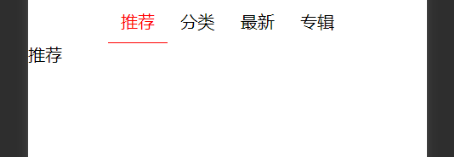
第一种
通过父传子标题,子传父事件
子组件
<template>

	<div class='app'>

		<div class="tabs_header">

			<div :class="['tabs_header_items',currentIndex==i?'active':'']" @click="itemsClick(i)" v-for="(v,i) in tabs_list"

			 :key="v">{{v}}</div>

		</div>

	</div>

</template>

<script>

	export default {

		data() {

			return {

				currentIndex: 0

			};

		},

		props: ['tabs_list'],

		methods: {

			itemsClick(i) {

				this.currentIndex = i

				this.$emit('tabshundle', i)

			}

		},

	};

</script>

<style scoped='scoped'>

	.tabs_header {

		display: flex;

		justify-content: center;

		align-items: center;

		text-align: center;

	}

	.tabs_header_items {

		flex: 1;

		padding: 10px;

		cursor: pointer;

		border-bottom: 1px solid transparent;

	}

	.active {

		color: red;

		border-bottom: 1px solid red;

	}

</style>
父组件
 <template>

 	<div>

 		<tabs :tabs_list="tabs_list.map((v,i)=>v.title)" @tabshundle="tabshundle"></tabs>

 		<template v-if="currIndex==0">

 			<rec></rec>

 		</template>

 		<template v-else-if="currIndex==1">

 			<cate></cate>

 		</template>

 		<template v-else-if="currIndex==2">

 			<New></New>

 		</template>

 		<template v-else-if="currIndex==3">

 			<alb></alb>

 		</template>

 	</div>

 </template>

 <script>

 	import tabs from '../../components/tabs/tabsfb'

 	import alb from './alb.vue'

 	import cate from './cate.vue'

 	import New from './new.vue'

 	import rec from './rec.vue'

 	export default {

 		name: 'app',

 		data() {

 			return {

 				tabs_list: [{

 						title: '推荐'

 					},

 					{

 						title: '分类'

 					},

 					{

 						title: '最新'

 					},

 					{

 						title: '专辑'

 					}

 				],

 				currIndex: 0,

 			};

 		},

		methods: {

			tabshundle(e) {

				this.currIndex = e

			}

		},

 		components: {

 			tabs,alb,cate,New,rec

 		}

 	};

 </script>

 <style scoped='scoped'>

 	/deep/.tabs_header {

 		width: 60%;

 		margin: 0 auto;

 	}

 </style>
vue封装tab切换的更多相关文章
- vue 实现tab切换动态加载不同的组件
vue 实现tab切换动态加载不同的组件 使用vue中的is特性来加载不同的组件.具体看如下代码:这个功能对于vue比较复杂的页面可以使用上,可以把一个页面的功能拆分出来,使代码更简单.使用方式具体看 ...
- vue实现tab切换功能
最近用vue做一个页面的tab功能,经过一查找资料,没用路由,也没用动态组件,完美实现了tab切换功能,效果如下 下面是代码实现,这是模板 <article id="example&q ...
- VUE 实现tab切换页面效果
一 163邮箱登录tab切换 <!DOCTYPE html> <html lang="en"> <head> <meta charset= ...
- vue实现tab切换
需要弄类似tab切换的功能就是一个点击切换上一页下一页的页面 找到这个获得灵感 <!DOCTYPE html> <html lang="en"> <h ...
- vue -vantUI tab切换时 list组件不触发load事件解决办法
最近由于公司项目需要,用vue写了几个简单的页面.用到了vantUI List 列表 瀑布流滚动加载,用于控制长列表的展示 当列表即将滚动到底部时,会触发事件并加载更多列表项. (页面加载完成后默认会 ...
- Vue如何tab切换高亮最简易方法
以往我们实现tab切换高亮通常是循环遍历先把所有的字体颜色改变为默认样式,再点亮当前点击的选项,而我们在vue框架中实现tab切换高亮显示并不需要如此,只需要将当前点击选项的index传入给一个变量, ...
- 封装tab切换事件
HTML <!DOCTYPE html> <html> <head> <meta charset="UTF-8"> <titl ...
- vue实现tab切换功能精简版
<template> <div> <p class="tabs" v-for="(list,index) in lists" :c ...
- vue之tab切换
<style> .active{ color: red; } div a{ display: block; } </style> <script src="ht ...
随机推荐
- git将本地仓库中的文件上传到远程仓库
现在我们开始创建本地git仓库(版本库又叫仓库) (本地仓库:$ git init之后的目录): 1.任意地方新建文件夹aaa,右击git bash here, 2.弹出一个对话框, 3. 首先配置你 ...
- jpa基础知识掌握-分页-sql
https://blog.csdn.net/liuchuanhong1/article/details/52042477
- c语言的变量,常量及作用域等
1.const定义常量 在C语言中,const可以用来定义的一个常量,在变量名前加上const即可. int const a: 定义了一个a的整数常量,且a的值不能被修改.如果要修改a的值,有以下两种 ...
- JavaScript函数报错SyntaxError: expected expression, got ';'
故事背景:编写Javaweb项目,在火狐浏览器下运行时firebug报错SyntaxError: expected expression, got ';'或者SyntaxError: expected ...
- WebStrom配置TypeScript开发环境
安装NodeJS node.js下载地址:https://nodejs.org/en/download/ 安装TypeScript npm install typescripot -g 新建tscon ...
- vue3.x版本新建项目相关知识和注意事项
前言你前提应该懂下面基础知识:下载node.js 下好后自带npm 命令 终端查看命令 npm -v 即可看到安装版本安装淘宝镜像:npm install -g cnpm --registry=htt ...
- shell-变量的数值运算符-计算双括号(())的使用
1. 变量的数值计算 变量的数值计算常见的如下几个命令: (()).let.expr.bc.$[] 1) (())用法:(此法很常用,且效率高) 执行简单的整数运算,只需将特定的算术表达式用 &qu ...
- 炉石传说酒馆战棋一键拔线(windows)
小编的业余游戏之一<炉石传说>,这里分享的是现在很火的游戏拔线(跳过约20秒的战斗动画),用夜吹的话说,注意,不是"日你大坝",是"整活",哈哈.小 ...
- centos 6.4 配置本地yum源(iso镜像)
1.先挂载 iso镜像 eg: mount -o loop /home/帐号/downloads/CentOS.iso /mnt/iso 2.用管理员帐号备份CentOS-Base.repo e ...
- day58 Pyhton 框架Django 01
内容回顾 python基础 网路编程 并发编程 数据库 前端 osi7层 tcp/ip 5层模型 应用层 表示层 ...