
PJzhang:鸟哥的linux私房菜-shell脚本-上
猫宁~~~
建议全程在centos7中进行,我在kali linux中有些命令无法执行。
1~家目录下创建bin文件,test.sh文件在bin目录
下面的shell代码打印Hello World!
#!/bin/bash

PATH=/bin:/sbin:/usr/bin:/usr/sbin:/usr/local/bin:/usr/local/sbin:~/bin

export PATH

echo -e "Hello China! \a \n"

exit 0
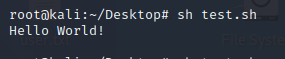
2~输入名称,变量前空格一定要严格空出来哦
#!/bin/bash

PATH=/bin:/sbin:/usr/bin:/usr/sbin:/usr/local/bin:/usr/local/sbin:~/bin

export PATH

read -p "Please input your first name:" firstname

read -p "Please input your last name:" lastname

echo -e "\nYour full name is:${firstname} ${lastname}"
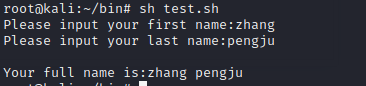
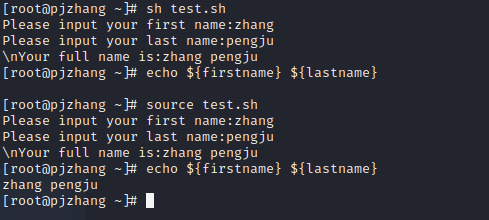
sh test.sh
echo ${firstname} ${lastname},空
source test.sh
echo ${firstname} ${lastname},不空
3~批量创建文件,自定义名称之后添加时间,设置大量变量
不定义文件名前缀,默认是filename,直接回车即可
#!/bin/bash

PATH=/bin:/sbin:/usr/bin:/usr/sbin:/usr/local/bin:/usr/local/sbin:~/bin

export PATH

echo -e "I will use 'touch' command to create 3 files."

read -p "Please input your filename:" fileuser

filename=${fileuser:-"filename"}

date1=$(date --date="2 days ago" +%Y%m%d)

date2=$(date --date="1 days ago" +%Y%m%d)

date3=$(date +%Y%m%d)

file1=${filename}${date1}

file2=${filename}${date2}

file3=${filename}${date3}

touch "${file1}"

touch "${file2}"

touch "${file3}"

4~两个数相乘运算
#!/bin/bash

PATH=/bin:/sbin:/usr/bin:/usr/sbin:/usr/local/bin:/usr/local/sbin:~/bin

export PATH

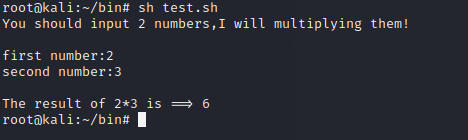
echo -e "You should input 2 numbers,I will multiplying them! \n"

read -p "first number:" firstnu

read -p "second number:" secnu

total=$((${firstnu}*${secnu}))

echo "\nThe result of ${firstnu}*${secnu} is ==> ${total}"
echo $((120*120)) 乘积,整数计算
echo $((13%3)) 取余
echo "1.2*1.2" | bc 小数计算,添加bc,bc在centos7上可以用,但是在kali linux上不可以
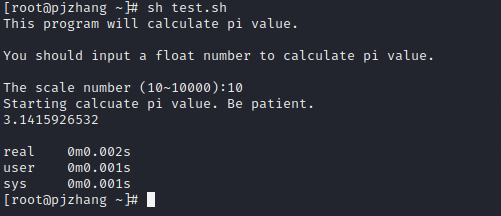
5~计算π的值,4*a(1)是bc提供的计算π的函数
#!/bin/bash

PATH=/bin:/sbin:/usr/bin:/usr/sbin:/usr/local/bin:/usr/local/sbin:~/bin

export PATH

echo -e "This program will calculate pi value. \n"

echo -e "You should input a float number to calculate pi value. \n"

read -p "The scale number (10~10000):" checking

num=${checking:-"10"}

echo "Starting calcuate pi value. Be patient."

time echo "scale=${num}; 4*a(1)" | bc -lq
6~test判断
目录是否存在
在/root下创建test目录
test -e /test && echo "exist" || echo "Not exist"
打印exist
test -e /root/test && echo "exist" || echo "Not exist"
打印Not exist
-e 文件或目录
-f 针对文件存在与否
-d 针对目录存在与否
文件权限相关
test -s /root/test.html && echo "exist" || echo "Not exist"
-r 可读
-w 可写
-x 可执行
-s 文件是否为空
文件比较
test1.html更新,打印exist
test test1.html -nt test.html && echo "exist" || echo "Not exist"
-nt 更新
-ot 更旧
-ef 是否为同一个文件
整数间判定
test 1 -eq 1 && echo "exist" || echo "Not exist" 打印exist
-eq 相等
-ne 不等
-gt 前者大于后者
-lt 前者小于后者
-ge 前者大于等于后者
-le 前者小于等于后者
字符串判定
test -z 111 && echo "exist" || echo "Not exist" 打印Not exist
-z 字符串为空显示exist,其他显示Not exist
-n 字符串为空显示Not exist,其他显示exist
test 111 == 111 && echo "exist" || echo "Not exist"
111 == 111 相等,打印exist,不相等,打印Not exist
111 != 111 相等,打印Not exist,不相等,打印exsit
多重条件判定
-rw-r--r--. 1 root root 5556 Oct 11 20:49 test.html
test -r test.html -a -x test.html && echo "exist" || echo "Not exist" 打印Not exist
test ! -x test.html && echo "exist" || echo "Not exist" 没有执行权限,打印exist
-a and关系
-o or关系
! 相反
#!/bin/bash

PATH=/bin:/sbin:/usr/bin:/usr/sbin:/usr/local/bin:/usr/local/sbin:~/bin

export PATH

echo -e "Please input a filename,I wiil check the filename's type and permission. \n\n"

read -p "Input a filename:" filename

test -z ${filename} && echo "You must input a filename." && exit 0

test ! -e ${filename} && echo "The filename '${filename}' DO NOT exist" && exit 0

test -f ${filename} && filetype="regulare file"

test -d ${filename} && filetype="directory"

test -r ${filename} && perm="readable"

test -w ${filename} && perm="${perm} writable"

test -x ${filename} && perm="${perm} executable"

echo "The filename:${filename} is a ${filetype}"

echo "And the permissions for you are:${perm}"
文件名为空显示
You must input a filename.
目录
Input a filename:test
The filename:test is a directory
And the permissions for you are:readable writable executable
文件不存在
Input a filename:120
The filename '120' DO NOT exist
文件存在
Input a filename:test.html
The filename:test.html is a regulare file
And the permissions for you are:readable writable
7~判断符号
[ "abcd" == "abcd" ] ; echo $? 打印0
[ "abcd" == "abc" ] ; echo $? 打印1
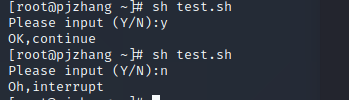
#!/bin/bash

PATH=/bin:/sbin:/usr/bin:/usr/sbin:/usr/local/bin:/usr/local/sbin:~/bin

export PATH

read -p "Please input (Y/N):" yn

[ "${yn}" == "Y" -o "${yn}" == "y" ] && echo "OK,continue" && exit 0

[ "${yn}" == "N" -o "${yn}" == "n" ] && echo "Oh,interrupt" && exit 0

echo "I don't know what your choice is" && exit 0
8~默认变量
[root@pjzhang ~]# file /etc/init.d/network
/etc/init.d/network: Bourne-Again shell script, ASCII text executable
文件是可执行脚本
/etc/init.d/network stop,start,status
$0 脚本文件名
$# 后接参数个数
$@ 参数全部内容,加双引号
${1} 第一个参数
#!/bin/bash

PATH=/bin:/sbin:/usr/bin:/usr/sbin:/usr/local/bin:/usr/local/sbin:~/bin

export PATH

echo "The script name is    ==>${0}"

echo "Total parameter number is    ==>$#"

[ "$#" -lt 2 ] && echo "The number of parameter is less than 2. Stop here." && exit 0

echo "Your whole parameter is    ==>'$@'"

echo "The 1st parameter    ==>${1}"

echo "The 2st parameter    ==>${2}"

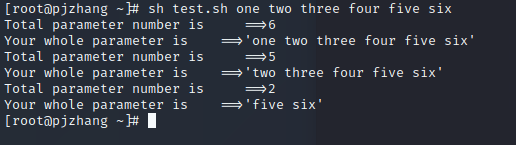
第一次偏移掉1个,第二次在第一次基础上偏移掉3个,从前向后
#!/bin/bash

PATH=/bin:/sbin:/usr/bin:/usr/sbin:/usr/local/bin:/usr/local/sbin:~/bin

export PATH

echo "Total parameter number is     ==>$#"

echo "Your whole parameter is    ==>'$@'"

shift

echo "Total parameter number is     ==>$#"

echo "Your whole parameter is    ==>'$@'"

shift 3

echo "Total parameter number is     ==>$#"

echo "Your whole parameter is    ==>'$@'"
over~~~
PJzhang:鸟哥的linux私房菜-shell脚本-上的更多相关文章
- 鸟哥的 Linux 私房菜Shell Scripts篇(一)
参考: http://linux.vbird.org/linux_basic/0340bashshell-scripts.php#script_be http://www.runoob.com/lin ...
- 鸟哥的 Linux 私房菜Shell Scripts篇(四)
12.4 条件判断式 只要讲到『程式』的话,那么条件判断式,亦即是『 if then 』这种判别式肯定一定要学习的!因为很多时候,我们都必须要依据某些资料来判断程式该如何进行.举例来说,我们在上头的a ...
- 鸟哥的 Linux 私房菜Shell Scripts篇(三)
参考: http://linux.vbird.org/linux_basic/0340bashshell-scripts.php#script_be http://www.runoob.com/lin ...
- 鸟哥的 Linux 私房菜Shell Scripts篇(二)
参考: http://linux.vbird.org/linux_basic/0340bashshell-scripts.php#script_be http://www.runoob.com/lin ...
- 《鸟哥的linux私房菜》 - linux命令温故而知新
在公司的某角落里,看到了<鸟哥的linux私房菜>,顿时想看看是什么鬼. 其他时候还要自己去买才有,现在正好,比图书馆方便.看完了,写点啥! 编辑器很重要,一个vim就主要是我的使用方向: ...
- 鸟哥的Linux私房菜笔记第四章
前言 对着<鸟哥的Linux私房菜-基础版>做了简化笔记.不想让自己知其然而不知其所然.所以写个博客让自己好好巩固一下,当然不可能把书中的内容全部写下来.在这里就简化一点把命令写下来. 让 ...
- 《鸟哥的Linux私房菜》Chapter11 20180726~20180806
目录 1.认识Bash这个shell 1.1.硬件.核心与shell 1.2.系统的合法shell和/etc/shells功能 1.3.Bash shell的功能 1.3.1.命令修编功能 1.3.2 ...
- 【鸟哥的Linux私房菜】笔记1
Linux是什么 从操作系统与cpu架构关系到linux Richard Mathew Stallman GPL 关于GNU计划 Linux的发展 Linux的核心版本 Linux的特色 Linux ...
- linux学习书籍推荐《鸟哥的Linux私房菜》下载
下载地址:点我 <鸟哥的Linux私房菜:基础学习篇>是具有知名度的Linux入门书<鸟哥的Linux私房菜基础学习篇>的最新版,全面而详细地介绍了Linux操作系统.< ...
随机推荐
- 开源基于lua gc管理c++对象的cocos2dx lua绑定方案
cocos2dx目前lua对应的c++对象的生命周期管理,是基于c++析构函数的,也就是生命周期可能存在不一致,比如c++对象已经释放,而lua对象还存在,如果这时候再使用,会有宕机的风险,为此我开发 ...
- tp5下的文件上传与下载类
class FieldInterfun extends Controller { /** * [upload 上传文件] * @param [type] $file [description] * @ ...
- java初探(1)之登录再探
https://www.cnblogs.com/lovejune/p/java_login_1.html 上一章内容搭建起了登录应用场景的环境,模拟实现了登录操作,页面与后端数据的交互过程,使用的是异 ...
- php中的加密解密模块-mcrypt
<?php /* 打开加密算法和模式 */ $td = mcrypt_module_open('rijndael-256', '', 'ofb', ''); /* 创建初始向量,并且检测密钥长度 ...
- nginx 启动报错“var/run/nginx/nginx.pid" no such file or directory
nginx 启动报错“var/run/nginx/nginx.pid" no such file or directory 今天刚搭建的nginx服务器启动时,报错“var/run/ngin ...
- MySQL通过POIN数据类型查询指定范围内数据
情况一: 数据库:只有point类型的location字段 实体类:有经纬度字段(double).originLoction字段(存放string类型的数据库location字段:POINT(123. ...
- 预处器的对比——Sass、LESS和Stylus
http://www.w3cplus.com/css/sass-vs-less-vs-stylus-a-preprocessor-shootout.html
- 吴恩达《深度学习》-第五门课 序列模型(Sequence Models)-第三周 序列模型和注意力机制(Sequence models & Attention mechanism)-课程笔记
第三周 序列模型和注意力机制(Sequence models & Attention mechanism) 3.1 序列结构的各种序列(Various sequence to sequence ...
- .NET 5.0 RC1 发布,离正式版发布仅剩两个版本
原文:http://dwz.win/Qf8 作者:Richard 翻译:精致码农-王亮 说明:1. 本译文并不是完全逐句翻译的,存在部分语句我实在不知道如何翻译或组织就根据个人理解用自己的话表述了.2 ...
- P1295 [TJOI2011]书架 线段树优化dp,单调栈
P1295 [TJOI2011]书架 本题思路比较好想(对我来说不是),但代码细节很多,奈何洛谷的题解只有思路,然后就是 没有丝毫解释的代码,让人看起来很头疼(~~ 尤其是像我这样的蒟蒻~~),所以便 ...