
bean中属性名和json不一致解决方案(请求和响应)
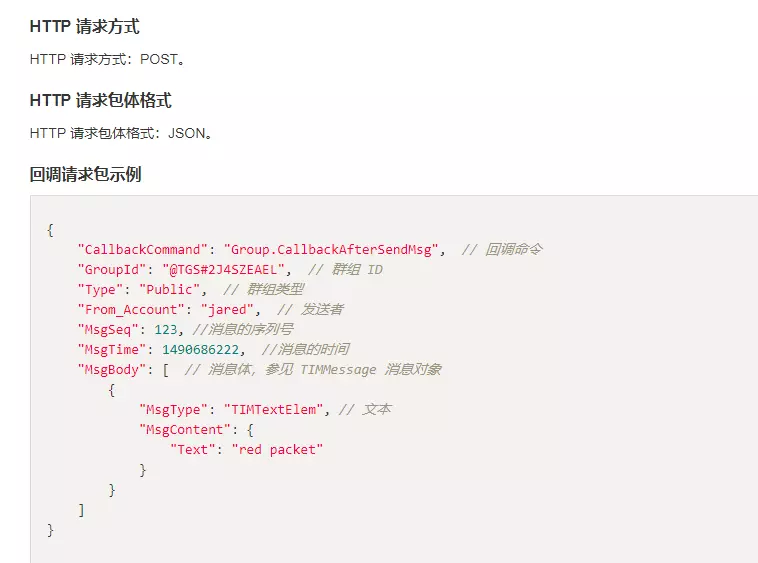

此时@RequestBody、@ResponseBody需要与@JsonProperty结合使用,才能做到请求正常解析,响应按要求格式返回。

注意@JsonProperty注解的位置需要加在getter方法上。

如果直接加在属性上,响应会这样返回:

{

    "actionStatus": "OK",

    "errorInfo": "success",

    "errorCode": 0,

    "ActionStatus": "OK",

    "ErrorInfo": "success",

    "ErrorCode": 0

}

正常实现的示例代码如下:

@RequestMapping(value = "/tecentim/v1/callback", method = RequestMethod.POST)

    @ResponseBody

    public CallbackRsp imcallback(

            @RequestParam String SdkAppid,

            @RequestParam String CallbackCommand,

            @RequestParam String contenttype,

            @RequestParam String ClientIP,

            @RequestParam String OptPlatform,

            @RequestBody CallbackCommand command) {

        CallbackRsp result = new CallbackRsp();

        result.setActionStatus("OK");

        result.setErrorInfo("success");

        result.setErrorCode(0);

        try {

            System.out.println("SdkAppid:"+SdkAppid);

            System.out.println("CallbackCommand:"+CallbackCommand);

            System.out.println("contenttype:"+contenttype);

            System.out.println("ClientIP:"+ClientIP);

            System.out.println("OptPlatform:"+OptPlatform);

            System.out.println(command);

        } catch (DingDongFMException de) {

            logger.error("imcallback failed", de);

        } catch (Exception e) {

            logger.error("imcallback failed", e);

        }

        return result;

    }

import java.util.Arrays;

import com.fasterxml.jackson.annotation.JsonProperty;

public class CallbackCommand {

    private String CallbackCommand; //回调命令

    private String GroupId; //产生群消息的群组 ID

    private String Type; //产生群消息的 群组类型,例如 Private,Public 和 ChatRoom

    private String From_Account; //消息发送者 ID

    private Integer MsgTime; //消息发送的时间戳,对应后台 Server 时间

    private Integer MsgSeq; //消息序列号,唯一标示一条消息

    private MsgBody[] MsgBody;//消息体,具体参见 消息格式描述

    @JsonProperty(value = "CallbackCommand")

    public String getCallbackCommand() {

        return CallbackCommand;

    }

    public void setCallbackCommand(String callbackCommand) {

        CallbackCommand = callbackCommand;

    }

    @JsonProperty(value = "GroupId")

    public String getGroupId() {

        return GroupId;

    }

    public void setGroupId(String groupId) {

        GroupId = groupId;

    }

    @JsonProperty(value = "Type")

    public String getType() {

        return Type;

    }

    public void setType(String type) {

        Type = type;

    }

    @JsonProperty(value = "From_Account")

    public String getFrom_Account() {

        return From_Account;

    }

    public void setFrom_Account(String from_Account) {

        From_Account = from_Account;

    }

    @JsonProperty(value = "MsgTime")

    public Integer getMsgTime() {

        return MsgTime;

    }

    public void setMsgTime(Integer msgTime) {

        MsgTime = msgTime;

    }

    @JsonProperty(value = "MsgSeq")

    public Integer getMsgSeq() {

        return MsgSeq;

    }

    public void setMsgSeq(Integer msgSeq) {

        MsgSeq = msgSeq;

    }

    @JsonProperty(value = "MsgBody")

    public MsgBody[] getMsgBody() {

        return MsgBody;

    }

    public void setMsgBody(MsgBody[] msgBody) {

        MsgBody = msgBody;

    }

    @Override

    public String toString() {

        return "CallbackCommand [CallbackCommand=" + CallbackCommand + ", GroupId=" + GroupId + ", Type=" + Type

                + ", From_Account=" + From_Account + ", MsgTime=" + MsgTime + ", MsgSeq=" + MsgSeq + ", MsgBody="

                + Arrays.toString(MsgBody) + "]";

    }

}

import com.fasterxml.jackson.annotation.JsonProperty;

public class CallbackRsp {

    private String ActionStatus;

    private String ErrorInfo;

    private Integer ErrorCode;

    @JsonProperty(value = "ActionStatus")

    public String getActionStatus() {

        return ActionStatus;

    }

    public void setActionStatus(String actionStatus) {

        ActionStatus = actionStatus;

    }

    @JsonProperty(value = "ErrorInfo")

    public String getErrorInfo() {

        return ErrorInfo;

    }

    public void setErrorInfo(String errorInfo) {

        ErrorInfo = errorInfo;

    }

    @JsonProperty(value = "ErrorCode")

    public Integer getErrorCode() {

        return ErrorCode;

    }

    public void setErrorCode(Integer errorCode) {

        ErrorCode = errorCode;

    }

    @Override

    public String toString() {

        return "CallbackRsp [ActionStatus=" + ActionStatus + ", ErrorInfo=" + ErrorInfo + ", ErrorCode=" + ErrorCode

                + "]";

    }

}
bean中属性名和json不一致解决方案(请求和响应)的更多相关文章
- java中的getProperty()方法。获取系统中属性名为key的属性对应的值
总结:getProperty方法:获取系统中属性名为key的属性对应的值,系统中常见的属性名以及属性如下: 现在用getProperty()的方法,获取系统信息代码: package com.aaa; ...
- MyBatis(5)——解决属性名与列名不一致的问题
解决属性名与列名不一致的问题 问题描述: 当实体类的属性与数据库的列名不对应时取不到该列数据 说明:MyBatis会根据查询的列名设值(列名的setter方法),然后以此列名为做查询等操作,在此过程中 ...
- resultMap结果集映射解决属性名和字段不一致问题
解决属性名和字段名不一致的问题 1.出现的问题 数据库中的字段 新建一个项目,拷贝之前的,测试实体类与数据库字段不一致的情况 public class User { private int id; ...
- java jackson 忽略不存在的属性字段 和 按照属性名转json
@JsonAutoDetect(fieldVisibility = Visibility.ANY, getterVisibility = Visibility.NONE, isGetterVisibi ...
- Visual Studio 下C#编译器在解析属性名时如果增加一个get_[您的另一个已经包含在类中属性名]的属性会报错,微软大哥这是什么鬼?
假设在在我们的vs环境新建一个类 copy以下代码,表面看好像一切都没有问题. using System; using System.Collections.Generic; using System ...
- Dubbo中服务消费者和服务提供者之间的请求和响应过程
服务提供者初始化完成之后,对外暴露Exporter.服务消费者初始化完成之后,得到的是Proxy代理,方法调用的时候就是调用代理. 服务消费者经过初始化之后,得到的是一个动态代理类,InvokerIn ...
- Django & JavaScript 用Ajax实现JSON数据的请求和响应
[描述] 1.Server端定义了两个字段:Article.title 和 Article.content 2.客户端用JavaScript Ajax异步加载请求服务器的JSON数据 效果是点击按钮从 ...
- es6中的对象的可计算的属性名
先简单的啰嗦一下对象的属性: var obj = { a:2 } 要访问obj中a的位置,方法:1. obj.a //2 2..obj ["a"] ...
- Mybatis系列(二):优化MyBatis配置文件中的配置和解决字段名与实体类属性名不相同的冲突
原文链接:http://www.cnblogs.com/xdp-gacl/p/4264301.html http://www.cnblogs.com/xdp-gacl/p/4264425.ht ...
随机推荐
- SQL优化思路与解决方案
1.面对问题SQL的思考 这条查询SQL的语句到底有没有问题? 存在什么问题? 什么情况下存在问题? 怎么去优化? 2.SQL优化思路 where查询字段是否建立索引? 是否有建立索引但是查询时候没有 ...
- Bootstrap Blazor 组件介绍 Table (一)自动生成列功能介绍
Bootstrap Blazor 是一套企业级 UI 组件库,适配移动端支持各种主流浏览器,已经在多个交付项目中使用.通过本套组件可以大大缩短开发周期,节约开发成本.目前已经开发.封装了 70 多个组 ...
- VM15 Ubuntu18.04下固定IP
输入su 进入root用户 为下面修改文件内容提供权限 1.查看自己网卡名称:输入命令: ifconfig -a 或者 ip link 或者 ip addr 所以我的网卡名称是:ens33 2. 然后 ...
- Integer中的奇妙位运算
Integer中的奇妙位运算 参考资料 https://segmentfault.com/a/1190000015763941 highestOneBit(int i) 函数的作用是获得传入参数的最高 ...
- SpringBoot打包成Docker镜像
1. 本文环境 Maven:3.6.3(Maven配置参考) SpringBoot version:2.3.4.RELEASE Docker version: 19.03.11(Docker搭建参考) ...
- Python中使用eval执行下面函数的结果怎么是字符串'10020'?
定义了函数: def add(a,b): s='a+b' c=compile(s,'','eval') gArea,lArea = {},{} gArea['a']=str(a10) gArea['b ...
- 半夜删你代码队 Day1冲刺
一.团队信息 1.团队项目:Midnight聊天室 2.团队名称:半夜删你代码队 3.队员信息: 职务 项目经理 主开发团队 测试人员 姓名 陈惠霖 周楚池 侯晓龙 余金龙 胡兆禧 林涛 二.Alph ...
- 题解 CF1428F Fruit Sequences
\(\texttt{Bullshit}\) 蒟蒻 \(\texttt{7 min}\) 切 \(\texttt{F}\), 挽回了本一定掉分的局面/cy 分竟然还没有别人 5 题高 (本题解为目前 c ...
- Codeforces Edu Round 54 A-E
A. Minimizing the String 很明显,贪心之比较从前往后第一个不一样的字符,所以可以从前往后考虑每一位,如果把它删除,他这一位就变成\(str[i + 1]\),所以只要\(str ...
- 函数动态参数 *args **kwargs
def f1(*args,**kwargs): print(args,type(args)) print(kwargs,type(kwargs))li = [11,22,33]dic = {'k1': ...