
JavaDailyReports10_18
学习内容:HTML基本知识
1、通常标记具有默认属性,当一个标记中只有标记名时,使用默认属性。
2、HTML标记有两种:单标记和双标记,单标记的语法格式: <标记名称/>
3、不同的属性之间用空格间隔,属性值可以使用引号括起来,也可以不使用,HTML标记不区分大小写。
4、颜色
①颜色名称: <body text =“red”>
②16进制颜色代码:#RRGGBB “红绿蓝”。
③10进制RGB码:语法格式:RGB(RRR,GGG,BBB) “红绿蓝”。
5、标题标记
<hn align = "对齐方式"> 标题文本 </hn>
6、字体标记
默认中文网页黑色、宋体、三号字。
<font face="字体名称" size = "字号" color ="字体颜色" > ********文字内容********** </font>
字号取值范围 1-7
7、段落标记
<p> 单标记 与上文产生一个空行
双标记 与上下文产生一个空行
同样可以设置段落格式(对齐方式)
换行标记
<br> 不能设置属性 单标记 一次换行使用 一次 <br/>
连续使用两次 换行相当于一个段落标记
 1 <%@ page language="java" import="java.util.*" pageEncoding="UTF-8"%>

 2 <%

 3 String path = request.getContextPath();

 4 String basePath = request.getScheme()+"://"+request.getServerName()+":"+request.getServerPort()+path+"/";

 5 %>

 6

 7 <!DOCTYPE HTML PUBLIC "-//W3C//DTD HTML 4.01 Transitional//EN">

 8 <html>

 9   <head>

10     <base href="<%=basePath%>">

11

12     <title>字体标记的使用</title>

13     <meta http-equiv="pragma" content="no-cache">

14     <meta http-equiv="cache-control" content="no-cache">

15     <meta http-equiv="expires" content="0">

16     <meta http-equiv="keywords" content="keyword1,keyword2,keyword3">

17

18     <meta http-equiv="description" content="This is my page">

19     <!--

20     <link rel="stylesheet" type="text/css" href="styles.css">

21     -->

22

23   </head>

24

25   <body>

26

27     <font size= 4 color ="red"  face="楷体">《登鹳雀楼》<p/> 白日依山尽 <br> 黄河入海流 <br>

28     欲穷千里目,<br/> 更上一层楼。  </font>

29

30   </body>

31 </html>

8、预格式化标记
让浏览器自动排版的时候保留本来的格式。
<pre> 标记 </pre>
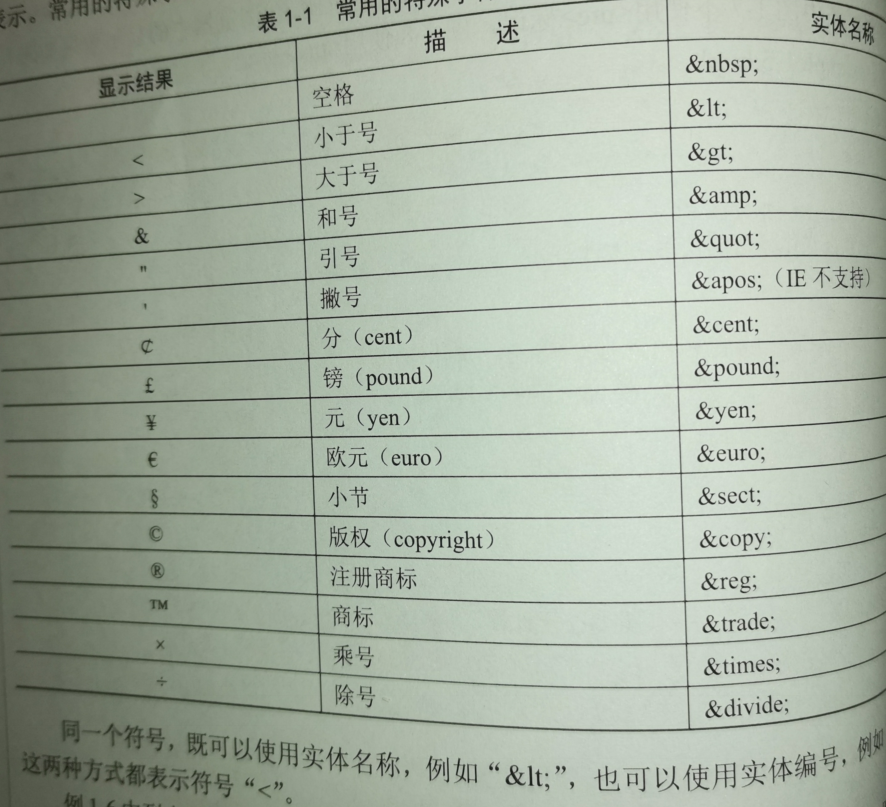
9、转义字符
三部分构成:①第一部分是“&”符号。
②第二部分实体名字或者“#”+实体名字编号。
③分号,表示转义字符结束。
10、文字修饰标记
<b>
<i>
<u>
<s> 删除线
<sup> 上标
<sub> 下标
11、列表标记
①无序列表
使用项目符号
<ul type ="列表的标记符">
<li> 项目一 </li>
<li>项目二</li>
...
</ul>
type 属性的取值定义: disc 实心圆(默认值) circle 空心圆 square 实心方块。
②有序列表
<ol type = "列表标记符" start ="起始值">
<li> ... </li>
<li> ... </li>
.....
</ol>
type属性取值范围 : 1,a,A,i,I
i:小写罗马
I:大写罗马
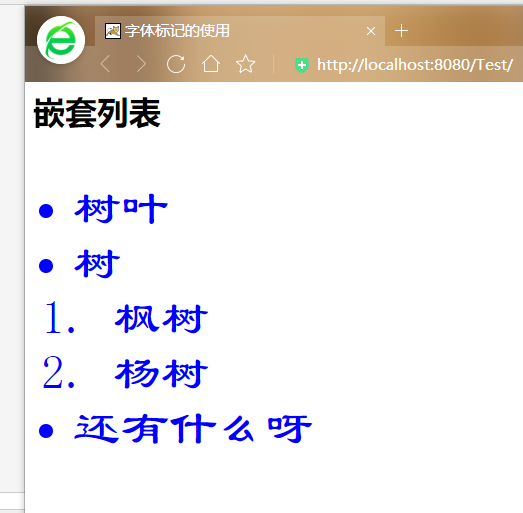
10、嵌套列表
 1 <%@ page language="java" import="java.util.*" pageEncoding="UTF-8"%>

 2 <%

 3 String path = request.getContextPath();

 4 String basePath = request.getScheme()+"://"+request.getServerName()+":"+request.getServerPort()+path+"/";

 5 %>

 6

 7 <!DOCTYPE HTML PUBLIC "-//W3C//DTD HTML 4.01 Transitional//EN">

 8 <html>

 9   <head>

10     <base href="<%=basePath%>">

11

12     <title>字体标记的使用</title>

13     <meta http-equiv="pragma" content="no-cache">

14     <meta http-equiv="cache-control" content="no-cache">

15     <meta http-equiv="expires" content="0">

16     <meta http-equiv="keywords" content="keyword1,keyword2,keyword3">

17

18     <meta http-equiv="description" content="This is my page">

19     <!--

20     <link rel="stylesheet" type="text/css" href="styles.css">

21     -->

22

23   </head>

24

25   <body>

26

27    <h1>嵌套列表</h1>

28    <font size=7 color ="blue" face="隶书">

29

30

31

32

33        <ul type = "square ">

34                <li> 树叶</li>

35                <li> 树

36                             <ol>

37                         <li>枫树</li>

38                         <li>杨树</li>

39                          </ol>

40

41                 </li>

42                 <li>还有什么呀</li>

43            </ul>

44            </font>

45   </body>

46 </html>
11、分割线标记
标记名称:<hr> 单独使用
<hr align = "center" color = "blue" width="%59">
属性: align 对齐方式 “center”
noshade 设置水平线是纯色没有阴影
size 设置水平线的高度 单位像素
width 宽度
color 颜色
JavaDailyReports10_18的更多相关文章
随机推荐
- Python正则表达式\W+和\W*匹配过程的深入分析
在学习re.split函数的处理过程中,发现执行如下语句及返回与老猿预想的不一致: >>> re.split('\W*','Hello,world') ['', 'H', 'e', ...
- PyQt(Python+Qt)学习随笔:QTreeView树形视图的indentation属性
老猿Python博文目录 专栏:使用PyQt开发图形界面Python应用 老猿Python博客地址 QTreeView树形视图的indentation属性用于控制视图中每级数据项之间的缩进,对于顶级项 ...
- selenium 淘宝商品分页
通过这行代码确定每页的下一页,因为从淘宝的第4页 xpath就匹配不出下一页的位置#这是面向对象写法,不用的把self. 去掉即可next_button = self.driver.find_elem ...
- Panda Global 要点聚焦,区块链在数字医疗的落地应
据Panda Global,随着区块链技术影响力的不断扩大,其应用性已涉及更加广泛的领域,不断更新着人们的认知.在区块链技术未介入之前,关于医疗行业和数字经济结合早已不是什么新鲜话题,相关研究不少 但 ...
- 【ZJOI2019】线段树(线段树 & dp)
Link UOJ LOJ Luogu Solution 很玄妙的一道题,考察了对线段树较本质的理解 然而我并不会这个所谓最可做的题 首先,虽然题目很复杂,好像每个点的标记变化都很玄学,但是我们可以深入 ...
- 如何将 Dapper 换成 SqlSuagr ORM
为什么要写这篇文章 因数我看到很多人虽然用着SqlSugar,但是同时也用着Dapper,因为SqlSugar兼容了Dapper所有API,所以既然你用了SqlSugar那么就没有必要在同一个项目中使 ...
- centos 7 配置 mysql 5.7 主从复制
centos 7 配置 mysql 5.7 主从复制 主库:192.168.12.3 从库:192.168.12.2 1. 主库从库所在服务器关闭防火墙Systemctl stop firewalld ...
- Samba:error nt_status_host_unreachable
安装Samba之后: smbclient -L server0.example.com 出现报错:error nt_status_host_unreachable 解决方法:server端把S ...
- Java基础语法吐血整理
前言 自己的Java理论知识方面一直都不是很好,决定从0开始好好总结下,把想到的和以前不确定的(查阅资料确定)的知识整理一下,加油!!坚持!!! Java概述 Java三大体系 1.JavaSE 标准 ...
- Spring Boot 2.4 对多环境配置的支持更改
在目前最新的Spring Boot 2.4版本中,对配置的加载机制做了较大的调整.相关的问题最近也被问的比较多,所以今天就花点时间,给大家讲讲Spring Boot 2.4的多环境配置较之前版本有哪些 ...