
Flutter - 自定义Dialog弹窗
------------恢复内容开始------------
Flutter - 自定义Dialog弹窗
应用场景:app系统版本升级弹窗,系统退出登录弹窗,首页广告弹窗,消息中心弹窗,删除文件弹窗等等各种应用场景中,我们开发中都会遇到此情形。
废话不多话,先看效果图如下:(以上场景中代码逻辑都差不多,源代码自行修改即可!!!)------这里仅展示退出登录场景
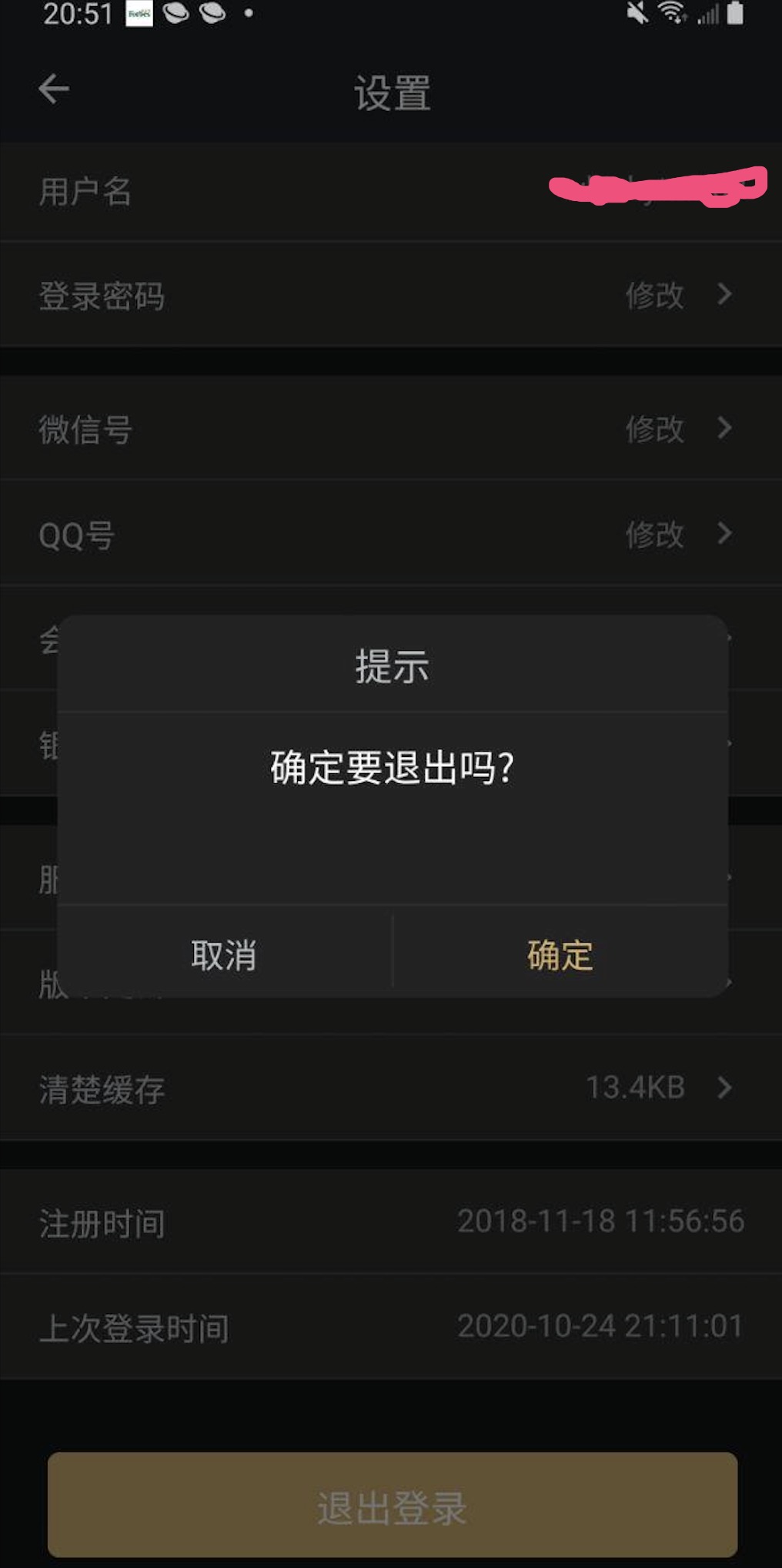
逻辑其实很简单,重写Dialog类即可。
逻辑代码如下:
import 'package:flutter/material.dart';

class DialogWidget extends Dialog {

    final String title; //标题

    final String content; //内容

    final String cancelText; //是否需要"取消"按钮

    final String confirmText; //是否需要"确定"按钮

    final Function cancelFun; //取消回调

    final Function confirmFun; //确定回调

    DialogWidget({

        Key key,

        @required this.title,

        @required this.content,

        this.cancelText,

        this.confirmText,

        @required this.cancelFun,

        this.confirmFun

    }) : super(key: key);

    @override

    Widget build(BuildContext context) {

        return Padding(

            padding: EdgeInsets.all(15),

            child: Material(

                type: MaterialType.transparency,

                child: Column(

                    mainAxisAlignment: MainAxisAlignment.center,

                    children: <Widget>[

                        Container(

                            decoration: ShapeDecoration(

                                color: Color(0xfff2f2f2),

                                shape: RoundedRectangleBorder(

                                    borderRadius: BorderRadius.all(

                                        Radius.circular(10),

                                    ),

                                ),

                            ),

                            margin: EdgeInsets.all(15),

                            child: Column(

                                children: <Widget>[

                                    Padding(

                                        padding: EdgeInsets.all(10),

                                        child: Center(

                                            child:  Text(title, style: TextStyle(color: Color(0xff666666))),

                                        ),

                                    ),

                                    Container(

                                        color: Color(0xffffffff),

                                        height: 1.0,

                                    ),

                                    Container(

                                        constraints: BoxConstraints(minHeight: 100),

                                        child: Padding(

                                            padding: const EdgeInsets.all(12.0),

                                            child: IntrinsicHeight(

                                                child:  Text(title, style: TextStyle(color: Color(0xff666666))),

                                            ),

                                        ),

                                    ),

                                    Container(

                                        color: Color(0xffeeeeee),

                                        height: 1.0,

                                    ),

                                    this._buildBottomButtonGroup()

                                ],

                            ),

                        )

                    ],

                ),

            ),

        );

    }

    Widget _buildBottomButtonGroup() {

        var widgets = <Widget>[];

        if (cancelText != null && cancelText.isNotEmpty) widgets.add(_buildBottomCancelButton());

        if (confirmText != null && confirmText.isNotEmpty && confirmText != null && confirmText.isNotEmpty) widgets.add(_buildBottomOnline());

        if (confirmText != null && confirmText.isNotEmpty) widgets.add(_buildBottomPositiveButton());

        return Flex(

            direction: Axis.horizontal,

            children: widgets,

        );

    }

    Widget _buildBottomOnline() {

        return Container(

            color: Color(0xffeeeeee),

            height: 38,

            width: 1,

        );

    }

    Widget _buildBottomCancelButton() {

        return Flexible(

            fit: FlexFit.tight,

            child: FlatButton(

                onPressed: this.cancelFun,

                child:  Text(title, style: TextStyle(color: Color(0xff666666))),

            ),

        );

    }

    Widget _buildBottomPositiveButton() {

        return Flexible(

            fit: FlexFit.tight,

            child: FlatButton(

                onPressed: this.confirmFun,

                child:  Text(title, style: TextStyle(color: Color(0xff666666))),

            ),

        );

    }

}
代码中实际的效果可能与上面附图可能不一样, 但是逻辑是一样的。(如背景颜色字体等等,自行配置)
下面该如何使用调用呢?
点击"退出登录"按钮:
FlatButton(

  child: Text("退出登录"),

  onPressed: logOut, //退出登录方法

)
方法:
// 退出登录

    void logOut(){

        showDialog(

            context: context,

            barrierDismissible: false,

            builder: (BuildContext context){

                return DialogWidget(

                    title: '提示',

                    content: '确定要退出吗?',

                    cancelText: '取消',

                    confirmText: '确定',

                    cancelFun: (){

                        Navigator.pop(context);

                    },

                    confirmFun: (){

                        Navigator.pop(context);

                        Navigator.pop(context);

                        Provider.of<UserModel>(context).clearUserInfo();

                    },

                );

            }

        );

    }
到这里基本结束了,希望大家学以致用,举一反三!!!
------------恢复内容结束------------
Flutter - 自定义Dialog弹窗的更多相关文章
- 30 Flutter自定义Dialog
MyDialog.dart import 'dart:async'; import 'package:flutter/material.dart'; class MyDialog extends Di ...
- Flutter学习笔记(41)--自定义Dialog实现版本更新弹窗
如需转载,请注明出处:Flutter学习笔记(41)--自定义Dialog实现版本更新弹窗 功能点: 1.更新弹窗UI 2.强更与非强更且别控制 3.屏蔽物理返回键(因为强更的时候点击返回键,弹窗会消 ...
- 自定义Dialog布局的弹窗功能的简单实现
package com.loaderman.dialogdemo; import android.os.Bundle; import android.support.v7.app.AlertDialo ...
- AlertDialog 、SimpleDialog、 showModalBottomSheet、showToast 自定义 Dialog
// AlertDialog .SimpleDialog.showModalBottomSheet.showToast // 使用showToast安装插件 https://pub.dev/packa ...
- Android自定义Dialog
Android开发过程中,常常会遇到一些需求场景——在界面上弹出一个弹框,对用户进行提醒并让用户进行某些选择性的操作, 如退出登录时的弹窗,让用户选择“退出”还是“取消”等操作. Android系统提 ...
- 非自定义和自定义Dialog的介绍!!!
一.非自定义Dialog的几种形式介绍 转自:http://www.kwstu.com/ArticleView/kwstu_20139682354515 前言 对话框对于应用也是必不可少的一个组件,在 ...
- Android—自定义Dialog
在 Android 日常的开发中,Dialog 使用是比较广泛的.无论是提示一个提示语,还是确认信息,还是有一定交互的(弹出验证码,输入账号密码登录等等)对话框. 而我们去看一下原生的对话框,虽然随着 ...
- Android自定义Dialog(美化界面)
前言:在做项目的时候,发现dialog界面太丑陋,从csdn上下载了一份自定义dialog的源码,在他的基础上对界面进行美化...有需要的朋友可以直接拿走 效果图如下: 主要代码: /** * 自定义 ...
- 通用的Dialog自定义dialog
图样:
随机推荐
- JAVA之代理2CGLib
对于CGLib的代理目前还是知道如何使用,以及理论上它的原理,到源码上的理解还没到位 https://www.jianshu.com/p/9a61af393e41?from=timeline& ...
- 想要搭建个论坛?Guide哥调研了100来个 Java 开源论坛系统,发现这 5 个最好用!
大家好!我是 Guide 哥,Java 后端开发.一个会一点前端,喜欢烹饪的自由少年. 最近有点小忙.但是,由于前几天答应了一位读者自己会推荐一些开源的论坛系统,所以,昨晚就简单地熬了个夜,对比了很多 ...
- Java Web学习(九)网络协议详解
一.基本概念 概念:协议是网络中计算机或设备之间进行通信的一系列规则的集合. 协议栈/族:在网络中为了完成通信而使用到的多层上的各种协议按照层次顺序的组合. 作用:建立对等层之间的虚拟通信.实现层次之 ...
- Shiro框架--将Shrio的session改成HTTPSession数据
重写 FormAuthenticationFilter类 的 onLoginSuccess()方法即可 import javax.servlet.ServletRequest; import java ...
- pwnable.kr-blackjack-witeup
这是个人对程序逻辑的分析总结. 真的很巧很神奇,理解完程序的逻辑,不知道怎么破解.看了一眼题解,忽然懂了,好神奇哦. 题目说,要获得1000000才能获得flag.经过多次试玩和在分析程序的逻辑,知道 ...
- CUP的MESI协议
MESI协议中的状态 CPU中每个缓存行(caceh line)使用4种状态进行标记(使用额外的两位(bit)表示): M: 被修改(Modified) 该缓存行只被缓存在该CPU的缓存中,并且是被修 ...
- Android Handler MessageQueue Looper 消息机制原理
提到Android里的消息机制,便会提到Message.Handler.Looper.MessageQueue这四个类,我先简单介绍以下这4个类 之间的爱恨情仇. Message 消息的封装类,里边存 ...
- QT博客:QT学习之路
http://www.qter.org/thread-629-1-1.html
- java高级项目 jdbc与数据库连接数据库
//图书管类 public class Book { private Integer id; private String b_name; private double b_price; privat ...
- Docker开启远程连接,本地IDEA使用docker插件连接(不认证的版本和认证的版本都有)
前言 在学校学习的时候,要部署一个Java程序,一般是打成war包,放到服务器上的tomcat的webapp里面去: 后来SpringBoot出现内置了tomcat,就直接打成jar包,丢到服务器任何 ...