
Flutter - 自定义Dialog弹窗
------------恢复内容开始------------
Flutter - 自定义Dialog弹窗
应用场景:app系统版本升级弹窗,系统退出登录弹窗,首页广告弹窗,消息中心弹窗,删除文件弹窗等等各种应用场景中,我们开发中都会遇到此情形。
废话不多话,先看效果图如下:(以上场景中代码逻辑都差不多,源代码自行修改即可!!!)------这里仅展示退出登录场景
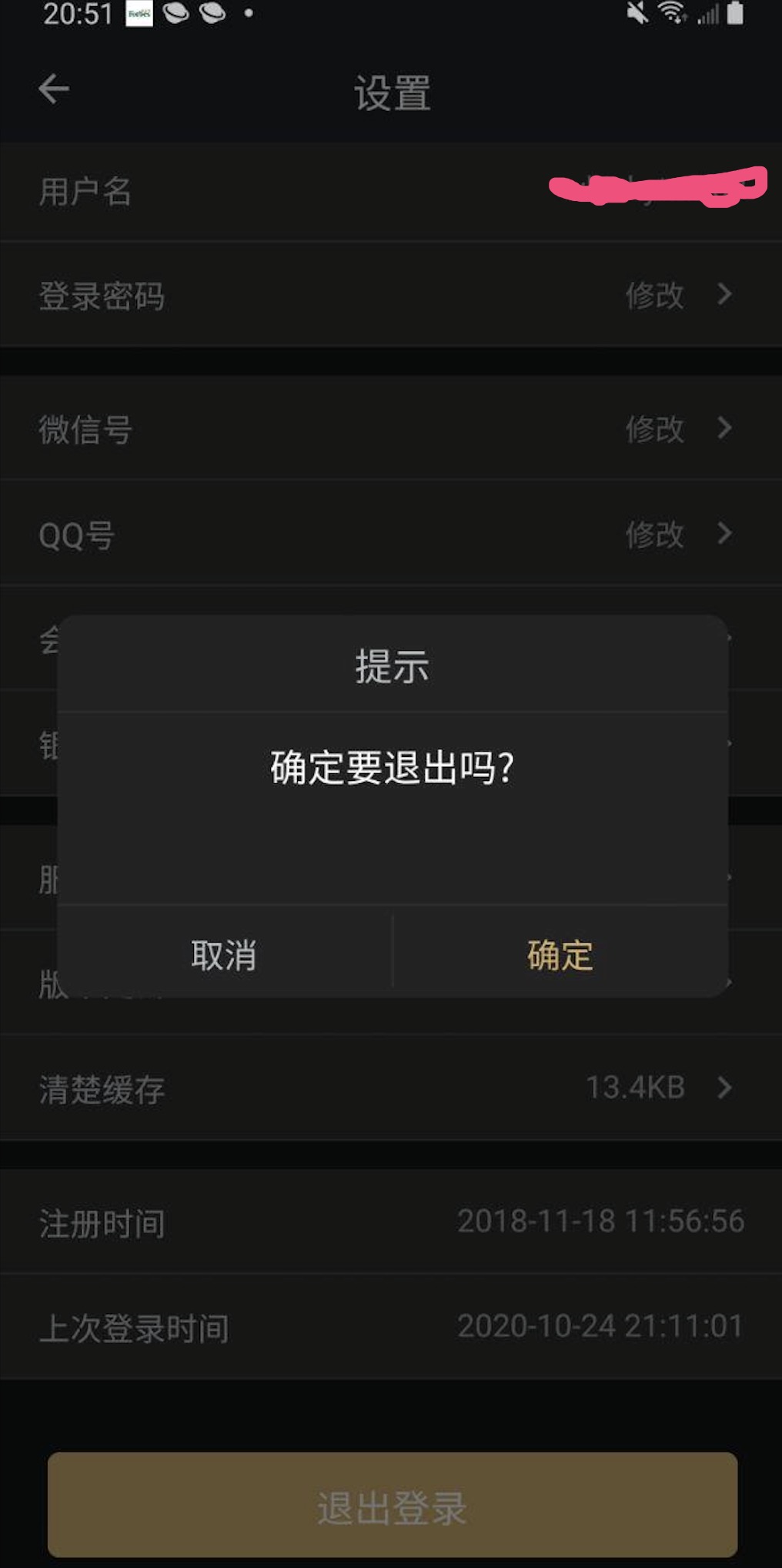
逻辑其实很简单,重写Dialog类即可。
逻辑代码如下:
import 'package:flutter/material.dart';

class DialogWidget extends Dialog {

    final String title; //标题

    final String content; //内容

    final String cancelText; //是否需要"取消"按钮

    final String confirmText; //是否需要"确定"按钮

    final Function cancelFun; //取消回调

    final Function confirmFun; //确定回调

    DialogWidget({

        Key key,

        @required this.title,

        @required this.content,

        this.cancelText,

        this.confirmText,

        @required this.cancelFun,

        this.confirmFun

    }) : super(key: key);

    @override

    Widget build(BuildContext context) {

        return Padding(

            padding: EdgeInsets.all(15),

            child: Material(

                type: MaterialType.transparency,

                child: Column(

                    mainAxisAlignment: MainAxisAlignment.center,

                    children: <Widget>[

                        Container(

                            decoration: ShapeDecoration(

                                color: Color(0xfff2f2f2),

                                shape: RoundedRectangleBorder(

                                    borderRadius: BorderRadius.all(

                                        Radius.circular(10),

                                    ),

                                ),

                            ),

                            margin: EdgeInsets.all(15),

                            child: Column(

                                children: <Widget>[

                                    Padding(

                                        padding: EdgeInsets.all(10),

                                        child: Center(

                                            child:  Text(title, style: TextStyle(color: Color(0xff666666))),

                                        ),

                                    ),

                                    Container(

                                        color: Color(0xffffffff),

                                        height: 1.0,

                                    ),

                                    Container(

                                        constraints: BoxConstraints(minHeight: 100),

                                        child: Padding(

                                            padding: const EdgeInsets.all(12.0),

                                            child: IntrinsicHeight(

                                                child:  Text(title, style: TextStyle(color: Color(0xff666666))),

                                            ),

                                        ),

                                    ),

                                    Container(

                                        color: Color(0xffeeeeee),

                                        height: 1.0,

                                    ),

                                    this._buildBottomButtonGroup()

                                ],

                            ),

                        )

                    ],

                ),

            ),

        );

    }

    Widget _buildBottomButtonGroup() {

        var widgets = <Widget>[];

        if (cancelText != null && cancelText.isNotEmpty) widgets.add(_buildBottomCancelButton());

        if (confirmText != null && confirmText.isNotEmpty && confirmText != null && confirmText.isNotEmpty) widgets.add(_buildBottomOnline());

        if (confirmText != null && confirmText.isNotEmpty) widgets.add(_buildBottomPositiveButton());

        return Flex(

            direction: Axis.horizontal,

            children: widgets,

        );

    }

    Widget _buildBottomOnline() {

        return Container(

            color: Color(0xffeeeeee),

            height: 38,

            width: 1,

        );

    }

    Widget _buildBottomCancelButton() {

        return Flexible(

            fit: FlexFit.tight,

            child: FlatButton(

                onPressed: this.cancelFun,

                child:  Text(title, style: TextStyle(color: Color(0xff666666))),

            ),

        );

    }

    Widget _buildBottomPositiveButton() {

        return Flexible(

            fit: FlexFit.tight,

            child: FlatButton(

                onPressed: this.confirmFun,

                child:  Text(title, style: TextStyle(color: Color(0xff666666))),

            ),

        );

    }

}
代码中实际的效果可能与上面附图可能不一样, 但是逻辑是一样的。(如背景颜色字体等等,自行配置)
下面该如何使用调用呢?
点击"退出登录"按钮:
FlatButton(

  child: Text("退出登录"),

  onPressed: logOut, //退出登录方法

)
方法:
// 退出登录

    void logOut(){

        showDialog(

            context: context,

            barrierDismissible: false,

            builder: (BuildContext context){

                return DialogWidget(

                    title: '提示',

                    content: '确定要退出吗?',

                    cancelText: '取消',

                    confirmText: '确定',

                    cancelFun: (){

                        Navigator.pop(context);

                    },

                    confirmFun: (){

                        Navigator.pop(context);

                        Navigator.pop(context);

                        Provider.of<UserModel>(context).clearUserInfo();

                    },

                );

            }

        );

    }
到这里基本结束了,希望大家学以致用,举一反三!!!
------------恢复内容结束------------
Flutter - 自定义Dialog弹窗的更多相关文章
- 30 Flutter自定义Dialog
MyDialog.dart import 'dart:async'; import 'package:flutter/material.dart'; class MyDialog extends Di ...
- Flutter学习笔记(41)--自定义Dialog实现版本更新弹窗
如需转载,请注明出处:Flutter学习笔记(41)--自定义Dialog实现版本更新弹窗 功能点: 1.更新弹窗UI 2.强更与非强更且别控制 3.屏蔽物理返回键(因为强更的时候点击返回键,弹窗会消 ...
- 自定义Dialog布局的弹窗功能的简单实现
package com.loaderman.dialogdemo; import android.os.Bundle; import android.support.v7.app.AlertDialo ...
- AlertDialog 、SimpleDialog、 showModalBottomSheet、showToast 自定义 Dialog
// AlertDialog .SimpleDialog.showModalBottomSheet.showToast // 使用showToast安装插件 https://pub.dev/packa ...
- Android自定义Dialog
Android开发过程中,常常会遇到一些需求场景——在界面上弹出一个弹框,对用户进行提醒并让用户进行某些选择性的操作, 如退出登录时的弹窗,让用户选择“退出”还是“取消”等操作. Android系统提 ...
- 非自定义和自定义Dialog的介绍!!!
一.非自定义Dialog的几种形式介绍 转自:http://www.kwstu.com/ArticleView/kwstu_20139682354515 前言 对话框对于应用也是必不可少的一个组件,在 ...
- Android—自定义Dialog
在 Android 日常的开发中,Dialog 使用是比较广泛的.无论是提示一个提示语,还是确认信息,还是有一定交互的(弹出验证码,输入账号密码登录等等)对话框. 而我们去看一下原生的对话框,虽然随着 ...
- Android自定义Dialog(美化界面)
前言:在做项目的时候,发现dialog界面太丑陋,从csdn上下载了一份自定义dialog的源码,在他的基础上对界面进行美化...有需要的朋友可以直接拿走 效果图如下: 主要代码: /** * 自定义 ...
- 通用的Dialog自定义dialog
图样:
随机推荐
- RXJAVA之Subject
RxJava中常见的Subject有4种,分别是 AsyncSubject. BehaviorSubject.PublishSubject. ReplaySubject. AsyncSubject 使 ...
- windows服务器中创建账号及管理相关的net命令
本文测试环境:windows server 2012 R2 Datacenter 实例要求: 1.创建账号,加入到远程桌面组,能实现远程桌面登录 2.指定Full name .及Description ...
- IDEA环境配置里的一些error
1. idea添加edit configuration 没有tomcat图标 File->Setting->Build,Execution,Deployment-->Applicat ...
- JAVA基础之代码简洁之道
引言 普通的工程师堆砌代码,优秀的工程师优雅代码,卓越的工程师简化代码.如何写出优雅整洁易懂的代码是一门学问,也是软件工程实践里重要的一环.--来自网络 背景 软件质量,不但依赖于架构及项目管理,更与 ...
- react-router 路由切换动画
路由切换动画 因为项目的需求,需要在路由切换的时候,加入一些比较 zb 的视觉效果,所以研究了一下.把这些学习的过程记录下来,以便以后回顾.同时也希望这些内容能够帮助一些跟我一样的菜鸟,让他们少走些坑 ...
- Activiti工作流系统环境搭建
一.创建Activiti工程,并导入Activiti包及数据库驱动包 二.用代码方式创建 流程引擎 1 @Test 2 public void createProcessEngineWithCode( ...
- 用JTable 实现日历
效果图: 主要思想:日历最核心的功能就是能显示某年某月对应的日期和星期几.因此只要实现传入具体的年份和月份,得到一组存放了日期的数组a[ ]即可.其中数组的大小设置成42,要考虑的问题是当月的第一天对 ...
- std(标准库)和STL(标准模板库)的关系
C++标准库的内容分为10类: C1.语言支持 C2.输入/输出 C3.诊断 C4.一般工具 C5.字符串 C6.容器 C7.迭代器支持 C8.算法 C9.数值操作 C10.本地化: 下面分类详解: ...
- 基于COCA词频表的文本词汇分布测试工具v0.2
update: 简单整理了一下代码的组织. 处理的单词封装成类,单词的修正,信息的显示都作为其内的方法. 写得还比较糙,工具本身可以封装,还有对于单词的变形基本没什么处理,以后有时间再改. 项目托管到 ...
- matlab中strcmpi比较字符串(不区分大小写)
来源:https://ww2.mathworks.cn/help/matlab/ref/strcmpi.html?searchHighlight=strcmpi&s_tid=doc_srcht ...