
windows本地eclispe运行linux上hadoop的maperduce程序
继续上一篇博文:hadoop集群的搭建
1.将linux节点上的hadoop安装包从linux上下载下来(你也可以从网上直接下载压缩包,解压后放到自己电脑上)
我的地址是:
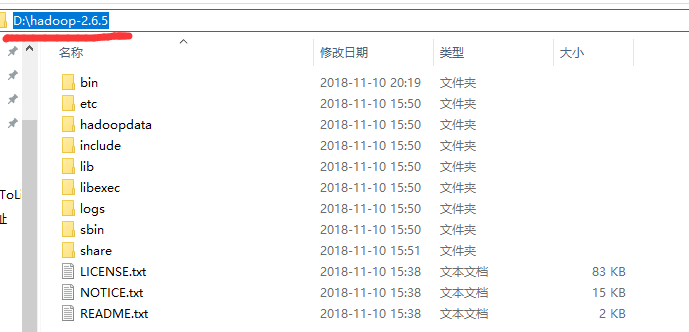
2.配置环境变量:
HADOOP_HOME D:\hadoop-2.6.5
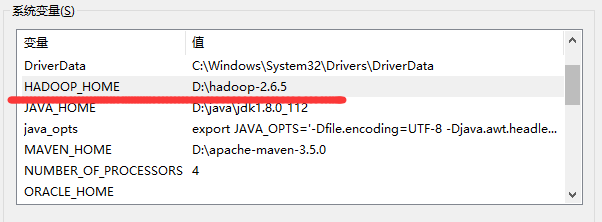
Path中添加:%HADOOP_HOME%\bin
3.下载hadoop-common-bin-master\2.7.1
并且拷贝其中的winutils.exe,libwinutils.lib这两个文件到hadoop安装目录的 bin目录下
拷贝其中hadoop.dll,拷贝到c:\windows\system32;
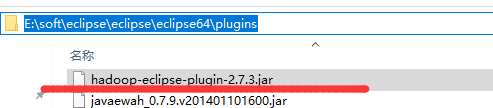
3.下载eclipse的hadoop插件

4.拷贝到eclispe的plugin文件夹中
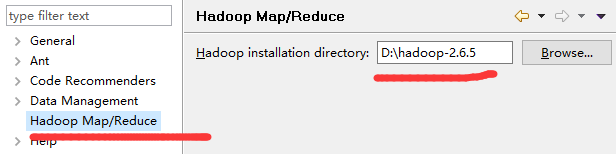
5.eclispe==》window==》Preferences
6.window==》show view==》other
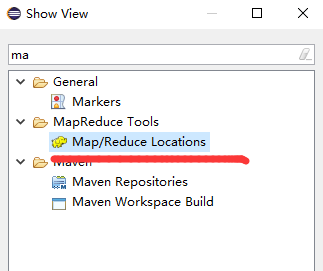
显示面版

7.Map.Reduce Locations 面版中右击
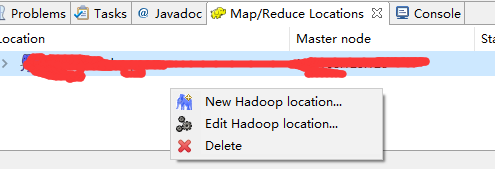
8.选择 第一个New Hadoop location
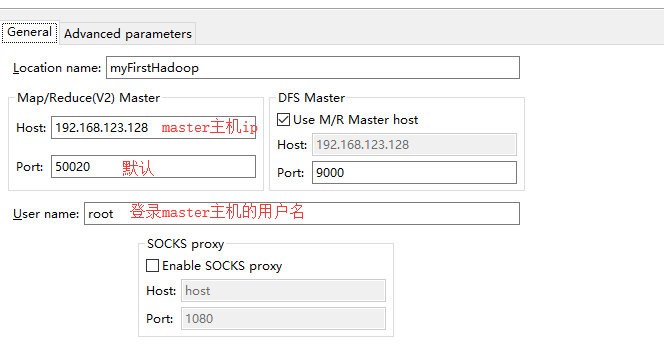
9.面板中多出来一头小象

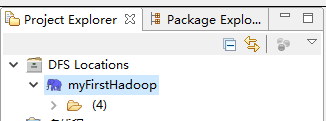
并且左侧的Project Explorer窗口中的DFS Locations看到我们刚才新建的hadoop Location。
10.linux上准备测试文件到
/opt中新建文件 hadoop.txt内容如下:
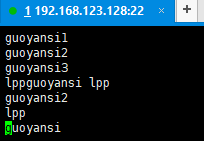
11.上传到hadoop
hadoop fs -put /opt/hadoop.txt /test/input/hadoop.txt
12.刷新eclipes的Hadoop Location 有我们刚才上传的文件

13.创建项目 File==>New==>Other

14.项目名称

15.编写源码:
package com.myFirstHadoop;

import java.io.IOException;

import java.util.StringTokenizer;

import org.apache.hadoop.conf.Configuration;

import org.apache.hadoop.fs.Path;

import org.apache.hadoop.io.IntWritable;

import org.apache.hadoop.io.Text;

import org.apache.hadoop.mapreduce.Job;

import org.apache.hadoop.mapreduce.Mapper;

import org.apache.hadoop.mapreduce.Reducer;

import org.apache.hadoop.mapreduce.lib.input.FileInputFormat;

import org.apache.hadoop.mapreduce.lib.output.FileOutputFormat;

import org.apache.hadoop.util.GenericOptionsParser;

public class WorkCount {

    public static class TokenizerMapper extends Mapper<Object, Text, Text, IntWritable>{

        private final static IntWritable one=new IntWritable(1);

        private Text word=new Text();

        public void map(Object key,Text value,Context context) throws IOException, InterruptedException{

            StringTokenizer itr=new StringTokenizer(value.toString());

            while(itr.hasMoreTokens()){

                word.set(itr.nextToken());

                context.write(word, one);

            }

        }

    }

    public static class IntSumReducer extends Reducer<Text, IntWritable, Text, IntWritable>{

        private IntWritable result=new IntWritable();

        public void reduce(Text key,Iterable<IntWritable> values,Context context) throws IOException, InterruptedException{

            int sum=0;

            for(IntWritable val:values){

                sum+=val.get();

            }

            result.set(sum);

            context.write(key, result);

        }

    }

    public static void main(String[] args) throws IOException, ClassNotFoundException, InterruptedException {

        Configuration conf=new Configuration();

        String[] otherArgs=new GenericOptionsParser(conf,args).getRemainingArgs();

        if(otherArgs.length<2){

            System.err.println("Useage:wordCount <in> [<in> ...] <out>");

            System.exit(2);

        }

        Job job=new Job(conf,"word count");

        job.setJarByClass(WorkCount.class);

        job.setMapperClass(TokenizerMapper.class);

        job.setCombinerClass(IntSumReducer.class);

        job.setReducerClass(IntSumReducer.class);

        job.setOutputKeyClass(Text.class);

        job.setOutputValueClass(IntWritable.class);

        for(int i=0;i<otherArgs.length-1;++i){

            FileInputFormat.addInputPath(job, new Path(otherArgs[i]));

            FileOutputFormat.setOutputPath(job,new Path(otherArgs[otherArgs.length-1]));

            System.exit(job.waitForCompletion(true)?0:1);

        }

    }

}
16.运行前的修改
右击==》run as ==》Run Configurations
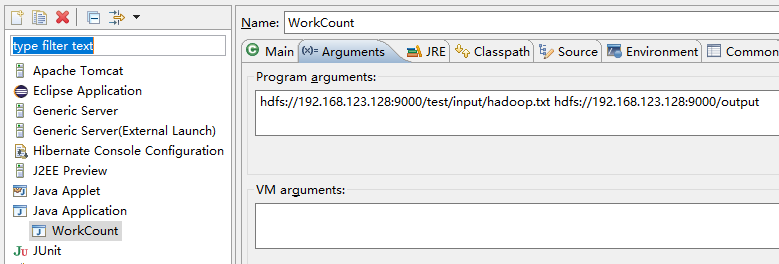
前面一个hdfs是输入文件;后面一个hdfs是输出目录
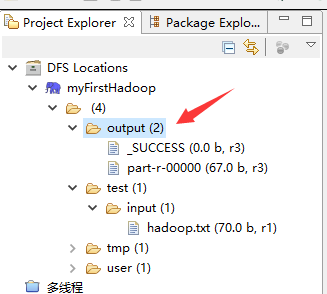
17.回到主界面右击==》Run As==》Run on Hadoop 等运行结束后查看Hadoop目录
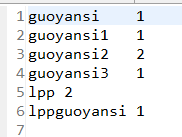
18.查看运行结果:
19.收工。
windows本地eclispe运行linux上hadoop的maperduce程序的更多相关文章
- 使用VS GDB扩充套件在VS上远端侦错Linux上的C/C++程序
在 Linux 上开发 C/C++ 程序,或许你会直接(本机或远端)登入 Linux,打开编辑器写完代码后,就用 gcc/g++ 来编译,遇到要除错(debug)的时候,则会选择使用 gdb 来进行除 ...
- 真香!Windows 可直接运行 Linux 了
点击关注上方"开源Linux", 后台回复"读书",有我为您特别筛选书籍资料~ 之前了解过一些适用于Linux的Windows子系统,最近又听人提起,于是在自己 ...
- windows上面链接使用linux上面的docker daemon
1. 修改linux 上面的 docker的 配置文件. vim /usr/lib/systemd/system/docker.service 注意 这个是centos的路径 发现ubuntu的路径不 ...
- Linux上如何执行java程序
想要在Ubuntu上运行java程序,可以将java程序编译成功后打包,然后在Ubuntu上用命令执行jar文件 具体操作如下: 1.Windows上使用eclipse编译java工程,编译完成后导出 ...
- Cygwin - windows系统下运行linux操作 --代替linux虚拟机安装、双系统的繁琐
我把Cygwin视为Windows用户熟练linxu系统操作的良好途径.它不需要虚拟机.双系统等安装对电脑知识.硬件的要求,只需要基本的软件安装操作即可.以下是安装步骤供小白同胞参考. Cygwin安 ...
- 将windows项目移植到linux上
提要:由于项目使用java开发,移植中没有什么编译问题(移植很快,但小问题多) 1.移植过程中遇到的问题: (1).由于项目中使用了 1024以下的端口号,导致网络通信一直出错 原因:因为Linux要 ...
- dotnet core排序异常,本地测试和linux上结果不一致
根据汉字排序,本地测试结构正常,发到docker之后,发现汉字升序降序和本地相反,检查代码后,没找到任何可能出现问题的点. 然后去翻文档:字符串比较操作 看到了这一句,会区分区域性 然后猜测应该是do ...
- Linux服务器架设篇,Windows中的虚拟机linux上不了外网怎么办?
1.将电脑的网线口直连路由器内网接口(确保该路由器可以直接正常上网,切记不可以使用宽带连接和无线网连接). 2.在实体机电脑可以上网的前提下,在命令框窗口输入 ipconfig 3.记录下电脑以太网的 ...
- 用xmanager6启动Linux上的图形界面程序
1.下载Xmanager6 并自行安装,这里不赘述了 2.打开Xmanager.启动Xstart 3.按提示输入:主机IP,协议,用户名,命令,完成后点击“保存”,接着点击“运行”,运行xmanage ...
随机推荐
- 如何 distinct 只对一个字段有用,同时查出其他字段
转至:http://blog.csdn.net/u013402772/article/details/51262524 在使用MySQL时,有时需要查询出某个字段不重复的记录,虽然mysql提供 有d ...
- Spring Developer Tools 源码分析:二、类路径监控
在 Spring Developer Tools 源码分析一中介绍了 devtools 提供的文件监控实现,在第二部分中,我们将会使用第一部分提供的目录监控功能,实现对开发环境中 classpath ...
- weinre 远程调试 安装 配置
1.第一种方法:安装:npm install -g weinre 2.第一种方法:开启本地监听服务器(修改端口,默认端口是8080):在cmd中运行: weinre --httpPort 8101 - ...
- 组队项目,Main队伍
本小组经过讨论,决定做的项目为----厨娘 分组情况: 1.界面设计:胡骏 2.前段,界面代码实现:梅庆 3.后台.逻辑处理:唐正奎.张军洪.袁成杰 4.数据库的建立与存写:张军洪.蒋利平 厨娘——需 ...
- mongoose的关联查询 :populate
mongoose关联查询从3.2版本开始支持 基本用法如下: var studentSchema = new Schema({ name:String, age:String, school:{ ty ...
- bootstrap--------bootstrap table
bootstrap table 显示行号 <th rowspan="2" data-field="index" data-formatter=" ...
- 使用json改写网站
效果图 json文件 https://raw.githubusercontent.com/sherryloslrs/timetable/master/timetable.json { "Ti ...
- keras 实现人工神经网络
#encoding=utf-8 import numpy as np from keras.models import Sequential from keras.layers import Dens ...
- 复制目录及其子目录下所有文件DOC
echo 开始同步代码 set src_home=F:\work\sign\Bonade-Sign set dest_home=F:\work\testGit\sign5\Bonade-Sign se ...
- grep、head和tail
一.请给出打印test.txt内容时,不包含oldboy字符串的命令 Linux系统中grep命令是一种强大的文本搜索工具,它能使用正则表达式搜索文本,并把匹 配的行打印出来.grep全称是Globa ...