
spring学习总结(一)_Ioc基础(上)
最近经历了许许多多的事情,学习荒废了很久。自己的目标成了摆设。现在要奋起直追了。最近发现了张果的博客。应该是一个教师。看了他写的spring系列的博客,写的不错。于是本文的内容参考自他的博客,当然都是手打书写。由于我感觉他写的博客篇幅过长。我根据我的习惯进行拆分学习。而且他的文章一系列很清楚。也值得我去学习。自己写博客就零零散散。不是很系统。
spring概述
spring可以做很多事情,它为企业级开发提供了丰富的功能。但是这些功能的底层都依赖于它的两个核心特性,控制反转(IOC)和面向切面(AOP)、
本篇文章主要介绍IOC。
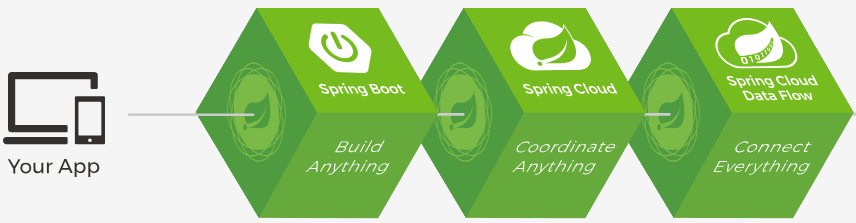
现在 springboot 和spring cloud十分火爆,还是有必要看看两者之间的关系的
Spring Boot 是 Spring 的一套快速配置脚手架,可以基于Spring Boot 快速开发单个微服务,Spring Cloud是一个基于Spring Boot实现的云应用开发工具;Spring Boot专注于快速、方便集成的单个微服务个体,Spring Cloud关注全局的服务治理框架;Spring Boot使用了约束优于配置的理念,很多集成方案已经帮你选择好了,能不配置就不配置,Spring Cloud很大的一部分是基于Spring Boot来实现,Spring Boot可以离开Spring Cloud独立使用开发项目,但是Spring Cloud离不开Spring Boot,属于依赖的关系。
Ioc基础
控制反转IOC是一种设计思想,DI(依赖注入)是实现IOC的一种方法。(下面的这张图画的太好了)
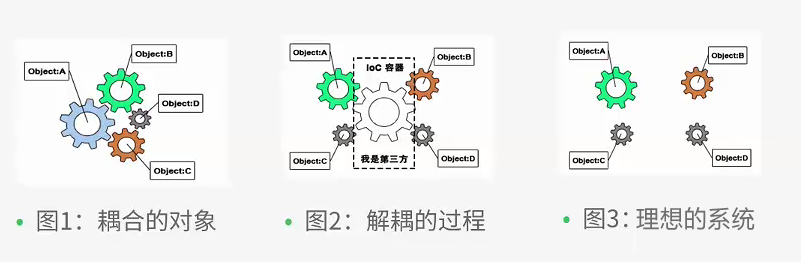
- 没有IOC的程序中我们使用面向对象编程对象的创建于对象间的依赖关系完全硬编码在程序中,对象的创建由程序自己控制。
- 控制反转后将对象的创建转移给第三方。
IOC是spring框架的核心内容,使用多种方式完美的实现了IOC,可以使用xml配置,也可以使用注解,新版本的spring可以零配置实现IOC。
使用XML配置方式实现IOC
- 创建maven项目
- pom文件如下
<?xml version="1.0" encoding="UTF-8"?>

<project xmlns="http://maven.apache.org/POM/4.0.0"

         xmlns:xsi="http://www.w3.org/2001/XMLSchema-instance"

         xsi:schemaLocation="http://maven.apache.org/POM/4.0.0 http://maven.apache.org/xsd/maven-4.0.0.xsd">

    <modelVersion>4.0.0</modelVersion>

    <groupId>com.kevin</groupId>

    <artifactId>spring</artifactId>

    <version>1.0-SNAPSHOT</version>

    <properties>

        <project.build.sourceEncoding>UTF-8</project.build.sourceEncoding>

        <spring.version>4.3.0.RELEASE</spring.version>

    </properties>

    <dependencies>

        <dependency>

            <groupId>junit</groupId>

            <artifactId>junit</artifactId>

            <scope>test</scope>

            <version>4.10</version>

        </dependency>

        <dependency>

            <groupId>org.springframework</groupId>

            <artifactId>spring-context</artifactId>

            <version>${spring.version}</version>

        </dependency>

        <dependency>

            <groupId>org.aspectj</groupId>

            <artifactId>aspectjweaver</artifactId>

            <version>1.8.9</version>

        </dependency>

        <dependency>

            <groupId>cglib</groupId>

            <artifactId>cglib</artifactId>

            <version>3.2.4</version>

        </dependency>

    </dependencies>

</project>
使用无参构造方法创建对象
新建一个Music类
/**

 * 音乐

 *

 * @author: kevin

 * @Date: 2018/12/8

 */

public class Music {

    public Music() {

        System.out.println("播放周杰伦的《七里香》");

    }

}
resources文件夹下新建music.xml
<?xml version="1.0" encoding="UTF-8"?>

<beans xmlns="http://www.springframework.org/schema/beans"

       xmlns:xsi="http://www.w3.org/2001/XMLSchema-instance"

       xsi:schemaLocation="http://www.springframework.org/schema/beans http://www.springframework.org/schema/beans/spring-beans.xsd">

    <bean id="jay" class="com.kevin.spring.demo1.entity.Music"></bean>

</beans>
测试类
package com.kevin.spring.demo1.test;

import com.kevin.spring.demo1.entity.Music;

import org.springframework.context.ApplicationContext;

import org.springframework.context.support.ClassPathXmlApplicationContext;

/**

 * @author: kevin

 * @Date: 2018/12/8

 */

public class Test {

    public static void main(String[] args) {

        ApplicationContext ctx = new ClassPathXmlApplicationContext("music.xml");

        Music jay = ctx.getBean("jay", Music.class);

    }

}
运行结果
信息: Loading XML bean definitions from class path resource [music.xml]

播放周杰伦的《七里香》
使用有参构造方法创建对象
Person
package com.kevin.spring.demo2.entity;

/**

 * 人类

 */

public abstract class Person {

    public String name;

}
Student
package com.kevin.spring.demo2.entity;

/**

 * 学生

 */

public class Student extends Person{

    /**

     * 身高

     */

    public int height;

    /**

     * 有参构造函数

     * @param name

     * @param height

     */

    public Student(String name,int height) {

        this.name = name;

        this.height = height;

    }

    @Override

    public String toString() {

        return "Student{" +

                "height=" + height +

                ", name='" + name + '\'' +

                '}';

    }

}
student.xml
<?xml version="1.0" encoding="UTF-8"?>

<beans xmlns="http://www.springframework.org/schema/beans"

       xmlns:xsi="http://www.w3.org/2001/XMLSchema-instance"

       xsi:schemaLocation="http://www.springframework.org/schema/beans http://www.springframework.org/schema/beans/spring-beans.xsd">

    <bean id="kevin" class="com.kevin.spring.demo2.entity.Student">

        <constructor-arg name="name" value="kevin"></constructor-arg>

        <constructor-arg name="height" value="170"></constructor-arg>

    </bean>

    <!--使用索引指定参数-->

    <bean id="maomao" class="com.kevin.spring.demo2.entity.Student">

        <constructor-arg index="0" value="maomao"></constructor-arg>

        <constructor-arg index="1" value="100"></constructor-arg>

    </bean>

</beans>
测试类
package com.kevin.spring.demo2.test;

import com.kevin.spring.demo2.entity.Person;

import com.kevin.spring.demo2.entity.Student;

import org.springframework.context.ApplicationContext;

import org.springframework.context.support.ClassPathXmlApplicationContext;

public class Test {

    public static void main(String[] args) {

        ApplicationContext ctx = new ClassPathXmlApplicationContext("student.xml");

        Person kevin = ctx.getBean("kevin", Student.class);

        Person maomao = ctx.getBean("maomao", Student.class);

        System.out.println(maomao);

        System.out.println(kevin);

    }

}
输出
信息: Loading XML bean definitions from class path resource [student.xml]

Student{height=100, name='maomao'}

Student{height=170, name='kevin'}
通过属性赋值
Animal
package com.kevin.spring.demo3.entity;

/**

 * 动物

 */

public class Animal {

    /**

     * 动物名称

     */

    private String name;

    public Animal() {

    }

    public Animal(String name) {

        this.name = name;

    }

    public String getName() {

        return name;

    }

    public void setName(String name) {

        this.name = name;

    }

    @Override

    public String toString() {

        return "Animal{" +

                "name='" + name + '\'' +

                '}';

    }

}
animal.xml
<?xml version="1.0" encoding="UTF-8"?>

<beans xmlns="http://www.springframework.org/schema/beans"

       xmlns:xsi="http://www.w3.org/2001/XMLSchema-instance"

       xmlns:p="http://www.springframework.org/schema/p"

       xsi:schemaLocation="http://www.springframework.org/schema/beans http://www.springframework.org/schema/beans/spring-beans.xsd">

    <bean id="dog" class="com.kevin.spring.demo3.entity.Animal">

        <property name="name" value="dog"></property>

    </bean>

    <bean id="cat" class="com.kevin.spring.demo3.entity.Animal" p:name="cat"></bean>

</beans>
测试
package com.kevin.spring.demo3.test;

import com.kevin.spring.demo3.entity.Animal;

import org.springframework.context.ApplicationContext;

import org.springframework.context.support.ClassPathXmlApplicationContext;

/**

 * 测试类

 */

public class Test {

    public static void main(String[] args) {

        ApplicationContext ctx = new ClassPathXmlApplicationContext("animal.xml");

        Animal dog = ctx.getBean("dog",Animal.class);

        Animal cat = ctx.getBean("cat",Animal.class);

        System.out.println(cat);

        System.out.println(dog);

    }

}
输出结果
信息: Loading XML bean definitions from class path resource [animal.xml]

Animal{name='cat'}

Animal{name='dog'}
对象引用
Tyre
package com.kevin.spring.demo4.entity;

/**

 * 轮胎

 * @author: kevin

 * @Date: 2018/12/8

 */

public class Tyre {

    private String name;

    public Tyre(String name) {

        this.name = name;

    }

    public String getName() {

        return name;

    }

    public void setName(String name) {

        this.name = name;

    }

    @Override

    public String toString() {

        return "Tyre{" +

                "name='" + name + '\'' +

                '}';

    }

}
Car
package com.kevin.spring.demo4.entity;

/**

 * 车

 */

public class Car {

    private String name;

    private Tyre tyre;

    public Car(String name, Tyre tyre) {

        this.name = name;

        this.tyre = tyre;

    }

    public String getName() {

        return name;

    }

    public void setName(String name) {

        this.name = name;

    }

    public Tyre getTyre() {

        return tyre;

    }

    public void setTyre(Tyre tyre) {

        this.tyre = tyre;

    }

    @Override

    public String toString() {

        return "Car{" +

                "name='" + name + '\'' +

                ", tyre=" + tyre +

                '}';

    }

}
测试
package com.kevin.spring.demo4.test;

import com.kevin.spring.demo4.entity.Car;

import org.springframework.context.ApplicationContext;

import org.springframework.context.support.ClassPathXmlApplicationContext;

public class Test {

    public static void main(String[] args) {

        ApplicationContext ctx = new ClassPathXmlApplicationContext("car.xml");

        Car bike = ctx.getBean("bike", Car.class);

        System.out.println(bike);

    }

}
输出结果
信息: Loading XML bean definitions from class path resource [car.xml]

Car{name='bike', tyre=Tyre{name='自行车轮胎'}}
对象作用域
在大多数情况下,单例bean是很理想的方案。初始化和垃圾回收对象实例所带来的的成本只留给一些小规模任务,在这些任务中,让对象保持无状态并且在应用中反复重用这些对象可能并不合理。在这种情况下,将class声明为单例的bean会被污染,稍后重用的时候会出现意想不到的问题。 -《spring实战》
Spring定义了多种作用域,可以基于这些作用域创建bean,包括:
| 作用域 | 描述 |
|---|---|
| 单例(Singleton) | 在整个应用中,只创建bean的一个实例 |
| 原型(Prototype) | 每次注入或者通过spring应用上下文获取的时候,都会创建一个新的bean实例 |
| 会话(Session) | 在web应用中,为每个会话创建一个bean实例 |
| 请求(Request) | 在web应用中,为每个请求创建一个bean实例 |
1、spring中默认是单例的,我们通过之前的代码演示下
<?xml version="1.0" encoding="UTF-8"?>

<beans xmlns="http://www.springframework.org/schema/beans"

       xmlns:xsi="http://www.w3.org/2001/XMLSchema-instance"

       xmlns:p="http://www.springframework.org/schema/p"

       xsi:schemaLocation="http://www.springframework.org/schema/beans http://www.springframework.org/schema/beans/spring-beans.xsd">

    <bean id="dog" class="com.kevin.spring.demo3.entity.Animal">

        <property name="name" value="dog"></property>

    </bean>

    <bean id="cat" class="com.kevin.spring.demo3.entity.Animal" p:name="cat"></bean>

</beans>
测试
package com.kevin.spring.demo3.test;

import com.kevin.spring.demo3.entity.Animal;

import org.springframework.context.ApplicationContext;

import org.springframework.context.support.ClassPathXmlApplicationContext;

/**

 * 测试类

 */

public class Test {

    public static void main(String[] args) {

        ApplicationContext ctx = new ClassPathXmlApplicationContext("animal.xml");

        Animal dog1 = ctx.getBean("dog",Animal.class);

        Animal dog2 = ctx.getBean("dog",Animal.class);

        System.out.println(dog1 == dog2);

    }

}
输出结果
true
这样验证了从容器中取回的对象默认是单例的。
2、设置成Prototype
<?xml version="1.0" encoding="UTF-8"?>

<beans xmlns="http://www.springframework.org/schema/beans"

       xmlns:xsi="http://www.w3.org/2001/XMLSchema-instance"

       xmlns:p="http://www.springframework.org/schema/p"

       xsi:schemaLocation="http://www.springframework.org/schema/beans http://www.springframework.org/schema/beans/spring-beans.xsd">

    <bean id="dog" class="com.kevin.spring.demo3.entity.Animal" scope="prototype">

        <property name="name" value="dog"></property>

    </bean>

    <bean id="cat" class="com.kevin.spring.demo3.entity.Animal" p:name="cat"></bean>

</beans>
测试
        ApplicationContext ctx = new ClassPathXmlApplicationContext("animal.xml");

        Animal dog1 = ctx.getBean("dog",Animal.class);

        Animal dog2 = ctx.getBean("dog",Animal.class);

        System.out.println(dog1 == dog2);
输出结果
false
延迟初始化bean
ApplicationContext实现的默认行为是在启动时将所有的singleton bean 提前进行实例化。这样配置中或者运行环境的错误就会立刻发现。如果你想延迟初始化。可以在xml中进行配置
    <bean id="kevin" class="com.kevin.spring.demo2.entity.Student" lazy-init="true">

        <constructor-arg name="name" value="kevin"></constructor-arg>

        <constructor-arg name="height" value="170"></constructor-arg>

    </bean>
测试
    public static void main(String[] args) throws InterruptedException {

        ApplicationContext ctx = new ClassPathXmlApplicationContext("student.xml");

        Thread.sleep(3000);

        Person kevin = ctx.getBean("kevin", Student.class);

        System.out.println(kevin);

    }
大家自己运行后发现,确实并不是启动后就加载的。
回调方法
Student
    public void init() {

        System.out.println("执行init方法");

    }

    public void over() {

        System.out.println("执行over方法");

    }
student.xml
    <bean id="kevin" class="com.kevin.spring.demo2.entity.Student" lazy-init="true" init-method="init" destroy-method="over">

        <constructor-arg name="name" value="kevin"></constructor-arg>

        <constructor-arg name="height" value="170"></constructor-arg>

    </bean>
测试方法
    public static void main(String[] args) throws InterruptedException {

        ApplicationContext ctx = new ClassPathXmlApplicationContext("student.xml");

        Thread.sleep(3000);

        Person kevin = ctx.getBean("kevin", Student.class);

        System.out.println(kevin);

    }
输出结果
Student 初始化

执行init方法

Student{height=170, name='kevin'}
本篇文章暂时先介绍到这里,天气真的很冷,没有暖气,冻死我的手了。好了,玩的开心!
完整代码:https://github.com/runzhenghengbin/spring-study/tree/master/spring-demo01
参考:https://www.cnblogs.com/best/p/5727935.html
spring学习总结(一)_Ioc基础(上)的更多相关文章
- spring学习总结(一)_Ioc基础(下)
本篇文章继续上篇文章讲解Ioc基础,这篇文章主要介绍零配置实现ioc,现在相信大家项目中也基本都是没有了xml配置文件.废话不多说.一起学习 代码示例 BookDao.java package com ...
- spring学习总结(一)_Ioc基础(中)
本篇文章继续上篇文章讲解Ioc基础,这篇文章主要介绍使用spring注解配置Ioc 上篇文章主要是通过xml配置文件进行Ioc的配置.这次进行改造下,通过注解进行配置 首先先看一个简单的demo 简单 ...
- Spring学习之路二——概念上理解Spring
一.概念. Spring是一个开源框架,Spring是于2003 年兴起的一个轻量级的Java 开发框架,由Rod Johnson 在其著作Expert One-On-One J2EE Develop ...
- Spring学习笔记一:基础概念
转载请注明原文地址:http://www.cnblogs.com/ygj0930/p/6774310.html 一:Spring是什么 Spring的主要作用是作为对象的容器. 传统编程中,我们 ...
- 【Spring学习】【Java基础回顾-数据类型】
Java基础回顾过程中,之前对于Java相关基础知识都是从这个人的博客看一些,那边的内容看一下,觉得不够系统化,决定用xmind脑图的形式,将Java基础知识回顾的作为一个系列,当前正在做的会包含: ...
- 1.4(Spring学习笔记)Spring-JDBC基础
一.Spring JDBC相关类 1.1 DriverManagerDataSource DriverManagerDataSource主要包含数据库连接地址,用户名,密码. 属性及含义如下配置所示: ...
- Spring Boot 1.5.x 基础学习示例
一.为啥要学Spring Boot? 今年从原来.Net Team“被”转到了Java Team开始了微服务开发的工作,接触了Spring Boot这个新瓶装旧酒的技术,也初步了解了微服务架构.Spr ...
- 【JavaEE】SSH+Spring Security基础上配置AOP+log4j
Spring Oauth2大多数情况下还是用不到的,主要使用的还是Spring+SpringMVC+Hibernate,有时候加上SpringSecurity,因此,本文及以后的文章的example中 ...
- Spring学习笔记2——表单数据验证、文件上传
在上一章节Spring学习笔记1——IOC: 尽量使用注解以及java代码中,已经搭建了项目的整体框架,介绍了IOC以及mybatis.第二节主要介绍SpringMVC中的表单数据验证以及文件上传. ...
随机推荐
- highcharts为X轴标签添加链接
$(function () { var categoryLinks = { 'Foo': 'http://www.google.com/search?q=foo', 'Bar': 'http://ww ...
- [01] AJAX
1.概述 AJAX,"Asynchronous JavaScript And XML"的简称,即"异步的JavaScript和XML".AJAX的作用在于页面中 ...
- PV和并发、以及计算web服务器的数量的方法
几个概念 网站流量是指网站的访问量,用来描述访问网站的用户数量以及用户所浏览的网页数量等指标,常用的统计指标包括网站的独立用户数量.总用户数量(含重复访问者).网页浏览数量.每个用户的页面浏览数量.用 ...
- 微信小程序 wx.getUserInfo 解密 C# 代码 - 转
public static string DecodeUserInfo(string raw, string signature,string encryptedData, string iv) { ...
- angularjs springMVC 交互
AngularJS中的$resource使用与Restful资源交互 1.AngularJS中的 $resource 这个服务可以创建一个资源对象,我们可以用它非常方便地同支持RESTful的服务端数 ...
- 校内模拟赛 Zbq's Music Challenge
Zbq's Music Challenge 题意: 一个长度为n的序列,每个位置可能是1或者0,1的概率是$p_i$.对于一个序列$S$,它的得分是 $$BasicScore=A\times \sum ...
- libgdx学习记录26——Polygon多边形碰撞检测
libgdx中Math封装了Polygon这个类,它是由多个定点进行描述实现的,在进行物体间的碰撞时,物体轮廓有时候是不规则的,这时候可以用一个多边形勾勒出其大概的轮廓,对其进行模拟. Polygon ...
- Docker(三):Dockerfile 命令详解
上一篇文章Docker(二):Dockerfile 使用介绍介绍了 Dockerfile 的使用,这篇文章我们来继续了解 Dockerfile ,学习 Dockerfile 各种命令的使用. Dock ...
- ABP module-zero +AdminLTE+Bootstrap Table+jQuery权限管理系统第十四节--后台工作者HangFire与ABP框架Abp.Hangfire及扩展
返回总目录:ABP+AdminLTE+Bootstrap Table权限管理系统一期 HangFire与Quartz.NET相比主要是HangFire的内置提供集成化的控制台,方便后台查看及监控,对于 ...
- 身在上海的她,该不该继续"坚持"前端开发?
作者:13 GitHub:https://github.com/ZHENFENG13 版权声明:本文为原创文章,未经允许不得转载. 一 对于目前的IT行业,我实在不想她还没在这个行业中站稳脚跟就开始有 ...