
游戏脚本编程 文本token解析
一个数字的组成由以下几个字符
正负号 + - 小数点 . 数字 0-9
比如
3
-3
3.13
-34.2234
但是符号和小数点不会出现多次
那么识别流程用图来表示 则是
整数
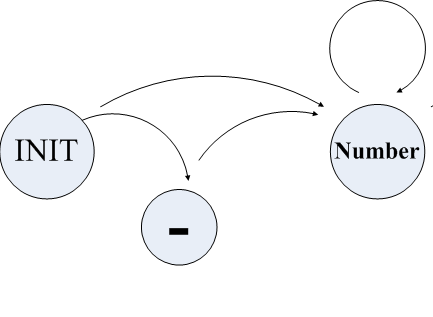
浮点数

一个读取C++源文件 将内容解析成一个个单独的TOKEN的代码
代码1
#include <iostream>

#include <fstream>

#include <cctype>

#include <cstring>

#include <string>

#include <exception>

using namespace std;

#define SOURCE_FILE_NAME    "sourcefile.cpp"

#define DEST_FILE_NAME      "destfile.cpp"

// The input and output file streams.

ifstream fin;

ofstream fout;

bool GetToken(string& token){

    bool bRet = false;

    char ch;

    ch = fin.get();

    if(ch == EOF){

        return false;

    }

    if(isspace(ch)){

        //进入接受连续空白符(' ' '\n'等)

        while(isspace(ch)){

            token += ch;

            ch = fin.get();

        }

        fin.putback(ch);

        bRet = true;

        return bRet;

    }

    if(isalpha(ch)){

        while(isalpha(ch)){

            token += ch;

            ch =fin.get();

        }

        fin.putback(ch);

        bRet = true;

        return bRet;

    }

    if(isdigit(ch)){

        while(isdigit(ch) || ch == '.'){

            token += ch;

            ch = fin.get();

        }

        fin.putback(ch);

        bRet = true;

        return bRet;

    }

    if(ch == '-' || ch == '+'){

        token += ch;

        ch = fin.get();

        while(isdigit(ch) || ch == '.'){

            token += ch;

            ch = fin.get();

        }

        fin.putback(ch);

        bRet = true;

        return bRet;

    }

    if(ch == '<' || ch == '>'){

        token += ch;

        ch = fin.get();

        if(ch == '<' || ch == '>'){

            token += ch;

        }else{

            fin.putback(ch);

        }

        bRet = true;

        return bRet;

    }

    token += ch;

    bRet = true;

    return bRet;

}

int main(int argc, char *argv[])

{

    fin.open(SOURCE_FILE_NAME);

    if(!fin){

        cout << "Open source file error.Exit!!" << endl;

        return -1;

    }

    fout.open(DEST_FILE_NAME);

    if(!fout){

        cout << "Open destinaton  file error.Exit!!" << endl;

        return -1;

    }

    try{

        string token;

        while(GetToken(token)){

            cout << token ;//<< endl;

            token.clear();

        }

    }catch(exception& e){

        cerr << e.what() << endl;

    }

    fin.close();

    fout.close();

    cout << "Hello World!"<<endl;

    return 0;

}
测试文件
293048 24 895523

3.14159

235

		253

		  52435 345

		   459245

 22 .5 .35 2.0

1

 0.0

  1.0

   0

	02345

	63246 0.2346

	34.0
代码2
#include <iostream>

#include <fstream>

#include <exception>

#include <queue>

using namespace std;

#define IN_FILE_NAME    "SourceFile.cpp"

#define OUT_FILE_NAME    "DestinationFile.cpp"

enum STATE{

    state_init = 0,

    state_int,

    state_float,

    state_error

};

class FileParse{

public:

    FileParse(const string& infileName,const string& outfileName){

        fin_.open(infileName);

        fout_.open(outfileName);

    }

    ~FileParse(){

        if(fin_.is_open())

            fin_.close();

        if(fout_.is_open())

            fout_.close();

    }

    bool ParseToTokens(){

        STATE state = state_init;

        bool isFinish = false;

        string token;

        if(linestr_.empty())

            return false;

        for(size_t i = 0;i<linestr_.size();++i){

            char currentChar = linestr_[i];

            if(currentChar == '\0')

                break;

            switch(state){

            case state_init:

                if(isspace(currentChar)){

                    continue;

                }else if(isdigit(currentChar)){

                    state = state_int;

                    token += currentChar;

                    continue;

                }else if(currentChar == '.'){

                    state = state_float;

                    token += currentChar;

                    continue;

                }else{

                    state = state_error;

                    break;

                }

            case state_int:

                if(isdigit(currentChar)){

                    state = state_int;

                    token += currentChar;

                    continue;

                }else if(currentChar == '.'){

                    state = state_float;

                    token += currentChar;

                    continue;

                }else if(isspace(currentChar)){

                    isFinish = true;

                    break;

                }else{

                    state = state_error;

                    break;

                }

            case state_float:

                if(isdigit(currentChar)){

                    state = state_int;

                    token += currentChar;

                    continue;

                }else if(isspace(currentChar)){

                    isFinish = true;

                    break;

                }else{

                    state = state_error;

                    break;

                }

            case state_error:

                break;

            }

            if(isFinish ){

                cout << token <<endl;

                token.clear();

                isFinish = false;

                state = state_init;

            }

         }

        return true;

    }

    bool run(){

        try{

            if(!fin_.is_open() || !fout_.is_open()) {

                throw runtime_error("open file is null");

            }

            while(1){

                if (fin_.eof())

                    break;

                linestr_.clear();

                getline(fin_,linestr_);

                linestr_ += '\n';

                ParseToTokens();

            }

        }catch(exception& e){

            cerr << e.what() << endl;

            return false;

        }

    }

private:

    string linestr_;

    queue<string> vecToken_;

    ifstream fin_;

    ofstream fout_;

};

int main(int argc, char *argv[])

{

    FileParse a(IN_FILE_NAME,OUT_FILE_NAME);

    a.run();

    return 0;

}
显示结果
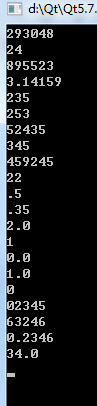
代码3 新增字符串的识别解析
#include <iostream>

#include <fstream>

#include <exception>

#include <queue>

using namespace std;

#define IN_FILE_NAME    "SourceFile.cpp"

#define OUT_FILE_NAME    "DestinationFile.cpp"

enum STATE{

    state_init = 0,

    state_int,

    state_float,

    state_word,

    state_error

};

class FileParse{

public:

    FileParse(const string& infileName,const string& outfileName){

        fin_.open(infileName);

        fout_.open(outfileName);

    }

    ~FileParse(){

        if(fin_.is_open())

            fin_.close();

        if(fout_.is_open())

            fout_.close();

    }

    bool ParseToTokens(){

        STATE state = state_init;

        bool isFinish = false;

        string token;

        if(linestr_.empty())

            return false;

        for(size_t i = 0;i<linestr_.size();++i){

            char currentChar = linestr_[i];

            if(currentChar == '\0')

                break;

            switch(state){

            case state_init:

                if(isspace(currentChar)){

                    continue;

                }else if(isdigit(currentChar)){

                    state = state_int;

                    token += currentChar;

                    continue;

                }else if(currentChar == '.'){

                    state = state_float;

                    token += currentChar;

                    continue;

                }else if(isalpha(currentChar)|| currentChar == '_'){

                    state = state_word;

                    token += currentChar;

                    continue;

                }else{

                    state = state_error;

                    break;

                }

            case state_word:

                if(isalpha(currentChar)||isdigit(currentChar)||

                        currentChar == '_'){

                    state = state_word;

                    token += currentChar;

                    continue;

                }else if(isspace(currentChar)){

                    isFinish = true;

                    break;

                }else{

                    state = state_error;

                    break;

                }

            case state_int:

                if(isdigit(currentChar)){

                    state = state_int;

                    token += currentChar;

                    continue;

                }else if(currentChar == '.'){

                    state = state_float;

                    token += currentChar;

                    continue;

                }else if(isspace(currentChar)){

                    isFinish = true;

                    break;

                }else{

                    state = state_error;

                    break;

                }

            case state_float:

                if(isdigit(currentChar)){

                    state = state_int;

                    token += currentChar;

                    continue;

                }else if(isspace(currentChar)){

                    isFinish = true;

                    break;

                }else{

                    state = state_error;

                    break;

                }

            case state_error:

                break;

            }

            if(isFinish ){

                cout << token <<endl;

                token.clear();

                isFinish = false;

                state = state_init;

            }

         }

        return true;

    }

    bool run(){

        try{

            if(!fin_.is_open() || !fout_.is_open()) {

                throw runtime_error("open file is null");

            }

            while(1){

                if (fin_.eof())

                    break;

                linestr_.clear();

                getline(fin_,linestr_);

                linestr_ += '\n';

                ParseToTokens();

            }

        }catch(exception& e){

            cerr << e.what() << endl;

            return false;

        }

    }

private:

    string linestr_;

    queue<string> vecToken_;

    ifstream fin_;

    ofstream fout_;

};

int main(int argc, char *argv[])

{

    FileParse a(IN_FILE_NAME,OUT_FILE_NAME);

    a.run();

    return 0;

}
测试文本
293048 24 895523

3.14159

235

		253

		  52435 345

MyVar0 MyVar1 MyVar2

		   459245

	rEtUrN

TRUE false

 22 .5 .35 2.0

while

1

 0.0 var

  1.0 var

   0

   	This_is_an_identifier

	02345

		_so_is_this___

	63246 0.2346

	34.0
显示结果
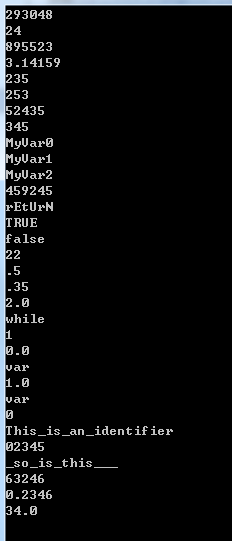
游戏脚本编程 文本token解析的更多相关文章
- 高级Bash脚本编程指南(27):文本处理命令(三)
高级Bash脚本编程指南(27):文本处理命令(三) 成于坚持,败于止步 处理文本和文本文件的命令 tr 字符转换过滤器. 必须使用引用或中括号, 这样做才是合理的. 引用可以阻止shell重新解释出 ...
- shell编程系列24--shell操作数据库实战之利用shell脚本将文本数据导入到mysql中
shell编程系列24--shell操作数据库实战之利用shell脚本将文本数据导入到mysql中 利用shell脚本将文本数据导入到mysql中 需求1:处理文本中的数据,将文本中的数据插入到mys ...
- 转载:[转]如何学好3D游戏引擎编程
[转]如何学好3D游戏引擎编程 Albert 本帖被 gamengines 从 游戏引擎(Game Engine) 此文为转载,但是值得一看. 此篇文章献给那些为了游戏编程不怕困难的热血青年,它的 ...
- linux脚本编程技术
linux脚本编程技术 一.什么是脚本 脚本是一个包含一系列命令序列的可执行(777)文本文件.当运行这个脚本文件时,文件中包含的命令序列将得到自动执行. 二.脚本编程 #!/bin/sh 首行固定格 ...
- linux脚本编程技术---8
一.什么是脚本 脚本是一个包含一系列命令序列的可执行(777)文本文件.当运行这个脚本文件时,文件中包含的命令序列将得到自动执行. 二.脚本编程 #!/bin/sh 首行固定格式 #!表明该脚本的的解 ...
- 《Linux命令行与shell脚本编程大全》 第二十二章 学习笔记
第二十二章:使用其他shell 什么是dash shell Debian的dash shell是ash shell的直系后代,ash shell是Unix系统上原来地Bourne shell的简化版本 ...
- javascript进阶——分离式DOM脚本编程
编写分离式(unobstrusive)代码意味着对HTML内容的完全分离:数据来自服务器端,javascript代码用来动态化和交互.这种分离的好处是在不同浏览器之间使用是可以完全降级或升级运行,对于 ...
- Shell脚本编程(一):初识shell script
Shell简介 Shell是一个命令解释器,它是一个用 C 语言编写的程序,它是用户使用 Linux 的桥梁.Shell 是指一种应用程序,这个应用程序提供了一个界面,用户通过这个界面访问操作系统内核 ...
- 【Shell脚本编程系列】知识储备以及建立规范的脚本
前言 学习shell脚本编程需要的知识储备: vi/vim编辑器命令 vimrc设置要熟练 基础命令,100多个要熟练 基础和常用的网络服务命令要会:nfs . rsync. inotify . la ...
随机推荐
- arcgis10.2 打开CAD文件注记乱码
1.使用ARCGIS10.2打开CAD文件,图面显示的注记内容为乱码,属性表中的注记内容正常2.同样的CAD文件在ARCGIS9.3中打开正常出现此情况影响历史数据使用,请求ESRI技术支持注:系统添 ...
- Flask与WSGI
刚开始接触到python及Flask框架时,总是会听到 wsgi等等相关的名词,以及 项目部署时会用到nginx+gunicorn等等,但是对于一个请求从 nignx到gunicorn再到falsk框 ...
- python 的序列化和反序列化
什么是序列化?简单来说就是将数据存储到物理内存上的过程叫序列化. 什么是反序列化?将数据从物理内存存储到程序内存的过程叫做反序列化. 下面来看一下python中使用json进行序列化和反序列化的实例d ...
- 如何使用 Visual C# .NET 处理 Excel 事件
事件处理概述 Visual C# .NET 使用委派处理来自组件对象模型 (COM) 服务器的事件.委派是 Microsoft Visual Studio .NET 中的一个新概念.对于 COM 事件 ...
- MySQL索引原理及优化
一.各种数据结构介绍 这一小节结合哈希表.完全平衡二叉树.B树以及B+树的优缺点来介绍为什么选择B+树. 假如有这么一张表(表名:sanguo): (1)Hash索引 对name字段建立哈希索引: 根 ...
- C#调用java代码(IKVMC)
参考资料:https://blog.csdn.net/threadroc/article/details/51406587 参考1:http://www.cnblogs.com/Jack-Blog/p ...
- Android Studio2.0 教程从入门到精通Windows版 - 提高篇
第二篇我们开发了一个Hello World应用,并介绍Android Sutdio的界面和如何调试应用,接下来将介绍一些常用的快捷键和必备插件. 常用快捷键 代码跳转 描述:跳转是为了方便代码位置的定 ...
- intellij idea 配置gitlab ssh key
1 安装git,登录官网https://www.git-scm.com/download/ ,选择相应系统版本,下载后安装好. 公司网慢的可以用第三方的软件管家下载. 2 打开git bash,不需要 ...
- springboot注解大全
springboot注解:@Service: 注解在类上,表示这是一个业务层bean@Controller:注解在类上,表示这是一个控制层bean@Repository: 注解在类上,表示这是一个数据 ...
- svg旋转动画
<!doctype html><html><head> <title>test</title> <meta charset=" ...