
tensorflow学习之(六)使用tensorboard展示神经网络的graph
# 创建神经网络, 使用tensorboard 展示graph

import tensorflow as tf

import numpy as np

import matplotlib.pyplot as plt  # 若没有 pip install matplotlib

# 定义一个神经层

def add_layer(inputs, in_size, out_size, activation_function=None):

    #add one more layer and return the output of this layer

    with tf.name_scope('layer'):

        with tf.name_scope('Weights'):

            Weights = tf.Variable(tf.random_normal([in_size, out_size]),name='W')

        with tf.name_scope('biases'):

            biases = tf.Variable(tf.zeros([1, out_size]) + 0.1,name='b')

        with tf.name_scope('Wx_plus_b'):

            Wx_plus_b = tf.matmul(inputs, Weights) + biases

        if activation_function is None:

            outputs = Wx_plus_b

        else:

            outputs = activation_function(Wx_plus_b)###

        return outputs

#make up some real data

x_data = np.linspace(-1, 1, 300)[:, np.newaxis]  # x_data值为-1到1之间,有300个单位(例子),再加一个维度newaxis,即300行*newaxis列

noise = np.random.normal(0, 0.05, x_data.shape)  # 均值为0.方差为0.05,格式和x_data一样

y_data = np.square(x_data) - 0.5 + noise

#define placeholder for inputs to network

with tf.name_scope('inputs'):

    xs = tf.placeholder(tf.float32, [None, 1],name='x_input1')  # none表示无论给多少个例子都行

    ys = tf.placeholder(tf.float32, [None, 1],name='y_input1')

# add hidden layer

l1 = add_layer(xs, 1, 10, activation_function=tf.nn.relu)

# add output layer

prediction = add_layer(l1, 10, 1, activation_function=None)

#the error between prediction and real data

with tf.name_scope('loss'):

    loss = tf.reduce_mean(

        tf.reduce_sum(tf.square(ys - prediction), reduction_indices=[1]))  # 对每个例子进行求和并取平均值 reduction_indices=[1]指按行求和

with tf.name_scope('train'):

    train_step = tf.train.GradientDescentOptimizer(0.1).minimize(loss)  # 以0.1的学习效率对误差进行更正和提升

#两种初始化的方式

#init = tf.initialize_all_variables()

init = tf.global_variables_initializer()

sess = tf.Session()

sess.run(init)

#把整个框架加载到一个文件中去,再从文件中加载出来放到浏览器中查看

#writer=tf.train.SummaryWriter("logs/",sess.graph)

#首先找到tensorboard.exe的路径并进入c:Anaconda\Scripts,执行tensorboard.exe --logdir=代码生成的图像的路径(不能带中文)

writer=tf.summary.FileWriter("../../logs/",sess.graph)

fig = plt.figure()

ax = fig.add_subplot(1, 1, 1)

ax.scatter(x_data, y_data)

plt.ion()

plt.show()   #show()是一次性的展示,为了使连续的展示,加入plt.ion()

for i in range(1000):

    sess.run(train_step, feed_dict={xs: x_data, ys: y_data})

    if i % 50 == 0:

        # to see the step improment 显示实际点的数据

        # print(sess.run(loss,feed_dict = {xs:x_data,ys:y_data}))

        try:

            # 每次划线前抹除上一条线,抹除lines的第一条线,由于lines只有一条线,则为lines[0],第一次没有线

            ax.lines.remove(lines[0])

        except Exception:

            pass

        # 显示预测数据

        prediction_value = sess.run(prediction, feed_dict={xs: x_data})

        # 存储 prediction_value 的值

        lines = ax.plot(x_data, prediction_value, 'r-', lw=5)  # 用红色的线画,且宽度为5

        # 停止0.1秒后再画下一条线

        plt.pause(0.1)
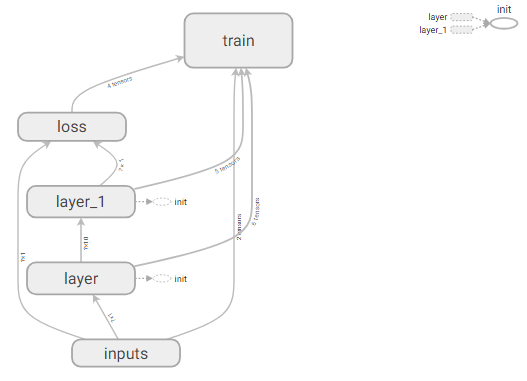
生成的tensorboard的graph:
tensorflow学习之(六)使用tensorboard展示神经网络的graph的更多相关文章
- tensorflow学习之(七)使用tensorboard 展示神经网络的graph/histogram/scalar
# 创建神经网络, 使用tensorboard 展示graph/histogram/scalar import tensorflow as tf import numpy as np import m ...
- Tensorflow学习笔记3:TensorBoard可视化学习
TensorBoard简介 Tensorflow发布包中提供了TensorBoard,用于展示Tensorflow任务在计算过程中的Graph.定量指标图以及附加数据.大致的效果如下所示, Tenso ...
- tensorflow学习笔记六----------神经网络
使用mnist数据集进行神经网络的构建 import numpy as np import tensorflow as tf import matplotlib.pyplot as plt from ...
- TensorFlow学习笔记(二)深层神经网络
一.深度学习与深层神经网络 深层神经网络是实现“多层非线性变换”的一种方法. 深层神经网络有两个非常重要的特性:深层和非线性. 1.1线性模型的局限性 线性模型:y =wx+b 线性模型的最大特点就是 ...
- TensorFlow学习笔记13-循环、递归神经网络
循环神经网络(RNN) 卷积网络专门处理网格化的数据,而循环网络专门处理序列化的数据. 一般的神经网络结构为: 一般的神经网络结构的前提假设是:元素之间是相互独立的,输入.输出都是独立的. 现实世界中 ...
- Tensorflow学习:(二)搭建神经网络
一.神经网络的实现过程 1.准备数据集,提取特征,作为输入喂给神经网络 2.搭建神经网络结构,从输入到输出 3.大量特征数据喂给 NN,迭代优化 NN 参数 4.使 ...
- tensorflow学习之搭建最简单的神经网络
这几天在B站看莫烦的视频,学习一波,给出视频地址:https://www.bilibili.com/video/av16001891/?p=22 先放出代码 #####搭建神经网络测试 def add ...
- TensorFlow 学习(六) —— TensorFlow 与 numpy 的交互
1. 将 numpy 下的多维数组(ndarray)转化为 tensor a = np.zeros((3, 3)) ta = tf.convert_to_tensor(a) with tf.Sessi ...
- tensorflow学习笔记——使用TensorFlow操作MNIST数据(1)
续集请点击我:tensorflow学习笔记——使用TensorFlow操作MNIST数据(2) 本节开始学习使用tensorflow教程,当然从最简单的MNIST开始.这怎么说呢,就好比编程入门有He ...
随机推荐
- Groovy与Java集成常见的坑
摘要: groovy特性 Groovy是一门基于JVM的动态语言,同时也是一门面向对象的语言,语法上和Java非常相似.它结合了Python.Ruby和Smalltalk的许多强大的特性,Groovy ...
- CSS预处理语言
CSS预处理语言 Less,Sass,Stylus 安装 Less yarn add less 运行命令 ./node_modules/.bin/lessc 嵌套规则 Less.Sass嵌套规则一样 ...
- 200. Spring Boot JNDI:在Tomcat中怎么玩JNDI?
[视频&交流平台] àSpringBoot视频:http://t.cn/R3QepWG à SpringCloud视频:http://t.cn/R3QeRZc à Spring Boot源 ...
- java常见面试题及答案 11-20(JVM)
11.JVM内存分哪几个区,每个区的作用是什么? Java虚拟机主要分为以下一个区: 方法区:1. 有时候也成为永久代,在该区内很少发生垃圾回收,但是并不代表不发生GC,在这里进行的GC主要是对方法区 ...
- Java 学习 注解
转载:https://blog.csdn.net/briblue/article/details/73824058 注解语法 因为平常开发少见,相信有不少的人员会认为注解的地位不高.其实同 class ...
- 关于div文字点击编辑的插件
(function(w,i){ w.inputOut = new i(); })( window, function(){ var inputOut = function(){ this.into = ...
- Asp.net之Sql注入与Parameter对象
一.Sql注入实例 using System; using System.Collections.Generic; using System.Data; using System.Data.SqlCl ...
- oracle数据库中存储过程使用MD5算法加密
一.技术点 1. DBMS_OBFUSCATION_TOOLKIT.MD5 DBMS_OBFUSCATION_TOOLKIT.MD5是MD5编码的数据包函数,但偶在使用select DBMS_OBFU ...
- install oracle 12c on redhat
---恢复内容开始--- 1. 确定VM的硬盘空间是否够 df- h, 硬盘空间free disk 15G 比较稳妥 2. 确定好网络,需要remote connect ifconfig 3. ...
- 加入EOS主网
[加入EOS主网] 根据之前的博文,可以直接在本地测试单节点网络.这里再给出一下.详情见[参考1]. alias cleos='docker exec -it eosio /opt/eosio/bin ...