
Vue仿抽屉
创建VUE项目的步骤:
npm install vue-cli -g
vue init webpack myproject
cd myproject
npm run dev
组件:它是可扩展的html
里面包括:
<template></template>
<script></script>
<style></style>
VUE框架的特性:能够实现热重载
import 和require的区别:
import 一定要放在文件顶部
它相当于一个指针引用了文件,并没有把文件包含进来了,需要调用时才引入
require:
可以放在文件中任何位置
它是把文件直接包含进来
设置文件路由的流程:
1)建立组件(.vue文件)
2)配置路由(index.js 文件中的配置)
3)<router-link></router-link>
4)<router-view></router-view>
5)import 包名 from ‘’组件路径''
6)components 进行注册
vue-resource:实现异步数据加载(已经弃用)
axios:实现异步数据加载
Vue组件的生命周期:
1)定义Vue对象并实例化
2)created函数
3)编译muban
4)把HTML元素渲染到页面当中
5)mounted函数
6)如果有元素的更新,就执行updated函数
7)销毁实例
代码如下:(有点小bug)
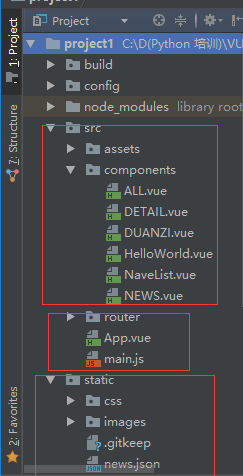
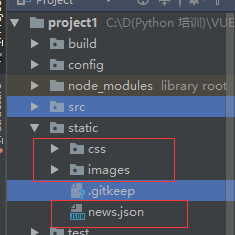
ALL.vue
<template>

  <div class='box'>

    <ul>

      <li v-for='item in arr'>

        <div class='p1'>

          <router-link :to="{path:'/detail',query:{ids:item.id}}">{{item.content}} </router-link>

        </div>

        <div class="p2">

          <img :src="item.imgUrl">

        </div>

      </li>

    </ul>

  </div>

</template>

<script>

  export default {

    name: 'HelloWorld',

    data () {

      return {

        arr: []

      }

    },

    mounted () {

      var url = '../../static/news.json'

      var self=this;

      this.$axios.get(url)

        .then(function (response) {

          console.log(response.data.result.data);

          self.arr = response.data.result.data;

        })

        .catch(function (error) {

          console.log(error);

        })

    }

  }

</script>

<!-- Add "scoped" attribute to limit CSS to this component only -->

<style scoped>

  h1, h2 {

    font-weight: normal;

  }

  ul {

    list-style-type: none;

    padding: 0;

  }

  li {

    display: inline-block;

    margin: 0 10px;

  }

  a {

    color: #42b983;

  }

.box{

  width: 980px;

}

.p1{

  float:left;

  width:780px;

}

 img{

  float:right;

 }

</style>
DETAIL.vue
<template>

  <div class="box">

    <h1>我是详情页{{id}}</h1>

    <ul>

      <li>

        <div class="p1">

          {{obj.content}}

        </div>

        <div class="p2">

          <img :src="obj.imgUrl">

        </div>

      </li>

    </ul>

  </div>

</template>

<script>

  export default {

    name: 'Detail',

    data () {

      return {

        obj: {},

        id: this.$route.query.ids

      }

    },

    mounted () {

      var url = '../../static/news.json'

      var self = this;

      this.$axios.get(url, {

        params: {id: this.id}

      })

        .then(function (response) {

          console.log(response.data.result.data[0])

          self.obj = response.data.result.data[0];

        })

        .catch(function (error) {

          console.log(error);

        })

    }

  }

</script>

<!-- Add "scoped" attribute to limit CSS to this component only -->

<style scoped>

  h1, h2 {

    font-weight: normal;

  }

  ul {

    list-style-type: none;

    padding: 0;

  }

  li {

    display: inline-block;

    margin: 0 10px;

  }

  a {

    color: #42b983;

  }

</style>
DUANZI.vue
<template>

  <div>

<h>我是段子</h>

  </div>

</template>

<script>

export default {

  name: 'HelloWorld',

  data () {

    return {

      msg: 'Welcome to Your Vue.js App'

    }

  }

}

</script>

<!-- Add "scoped" attribute to limit CSS to this component only -->

<style scoped>

h1, h2 {

  font-weight: normal;

}

ul {

  list-style-type: none;

  padding: 0;

}

li {

  display: inline-block;

  margin: 0 10px;

}

a {

  color: #42b983;

}

</style>
NaveList.vue
<template>

  <div>

  <router-link to='/'>首页</router-link>

  <router-link to='/news'>新闻</router-link>

  <router-link to='/duanzi'>段子</router-link>

  <router-link to='/detail'>详情页</router-link>

  </div>

</template>

<script>

export default {

  name: 'HelloWorld',

  data () {

    return {

      msg: 'Welcome to Your Vue.js App'

    }

  }

}

</script>

<!-- Add "scoped" attribute to limit CSS to this component only -->

<style scoped>

h1, h2 {

  font-weight: normal;

}

ul {

  list-style-type: none;

  padding: 0;

}

li {

  display: inline-block;

  margin: 0 10px;

}

a {

  color: #42b983;

}

</style>
NEWS.vue
<template>

  <div>

<h>我是新闻</h>

  </div>

</template>

<script>

export default {

  name: 'HelloWorld',

  data () {

    return {

      msg: 'Welcome to Your Vue.js App'

    }

  }

}

</script>

<!-- Add "scoped" attribute to limit CSS to this component only -->

<style scoped>

h1, h2 {

  font-weight: normal;

}

ul {

  list-style-type: none;

  padding: 0;

}

li {

  display: inline-block;

  margin: 0 10px;

}

a {

  color: #42b983;

}

</style>
index.js
import Vue from 'vue'

import Router from 'vue-router'

import HelloWorld from '@/components/HelloWorld'

import ALL from '@/components/All'

import NEWS from '@/components/NEWS'

import DUANZI from '@/components/DUANZI'

import DETAIL from '@/components/DETAIL'

Vue.use(Router)

export default new Router({

  routes: [

    {

      path: '/ll',

      name: 'HelloWorld',

      component: HelloWorld

    },

    {

      path: '/',

      name: 'ALL',

      component: ALL

    },

    {

      path: '/news',

      name: 'news',

      component: NEWS

    }

    ,

    {

      path: '/duanzi',

      name: 'duanzi',

      component: DUANZI

    },

    {

      path: '/detail',

      name: 'detail',

      component: DETAIL

    }

  ]

})
App.vue
<template>

  <div id="app">

    <img src="./assets/logo.png">

<NaveList></NaveList>

    <router-view></router-view>

  </div>

</template>

<script>

import NaveList from './components/NaveList'

export default {

  name: 'App',

  components: {NaveList}

}

</script>

<style>

#app {

  font-family: 'Avenir', Helvetica, Arial, sans-serif;

  -webkit-font-smoothing: antialiased;

  -moz-osx-font-smoothing: grayscale;

  text-align: center;

  color: #2c3e50;

  margin-top: 60px;

}

</style>
main.js
// The Vue build version to load with the `import` command

// (runtime-only or standalone) has been set in webpack.base.conf with an alias.

import Vue from 'vue'

import App from './App'

import router from './router'

import axios from 'axios'

import VueAxios from 'vue-axios'

Vue.prototype.$axios = axios

//Vue.config.productionTip = false

/* eslint-disable no-new */

new Vue({

  el: '#app',

  router,

  components: {App},

  template: '<App/>'

})
Vue仿抽屉的更多相关文章
- vue-resource使用 (vue仿百度搜索)
1.this.$http.get()方法2.this.$http.post()方法3.this.$http.jsonp()方法 (vue仿百度搜索) 在输入框中输入a, 然后在百度f12 ==> ...
- vue 仿今日头条
vue 仿今日头条 为了增加移动端项目的经验,近一周通过 vue 仿写今日头条,以下就项目实现过程中遇到的问题以及解决方法给出总结,有什么不正确的地方,恳请大家批评指正^ _ ^!,代码仓库地址为 g ...
- Nuxt|Vue仿探探/陌陌卡片式滑动|vue仿Tinder拖拽翻牌效果
探探/Tinder是一个很火的陌生人社交App,趁着国庆假期闲暇时间倒腾了个Nuxt.js项目,项目中有个模块模仿探探滑动切换界面效果.支持左右拖拽滑动like和no like及滑动回弹效果. 一览效 ...
- vue仿微信网页版|vue+web端聊天室|仿微信客户端vue版
一.项目介绍 基于Vue2.5.6+Vuex+vue-cli+vue-router+vue-gemini-scrollbar+swiper+elementUI等技术混合架构开发的仿微信web端聊天室— ...
- vue聊天室|h5+vue仿微信聊天界面|vue仿微信
一.项目简介 基于Vue2.0+Vuex+vue-router+webpack2.0+es6+vuePhotoPreview+wcPop等技术架构开发的仿微信界面聊天室——vueChatRoom,实现 ...
- Vue仿微信app页面跳转动画
10:14:11独立开发者在开发移动端产品时,为了更高效,通常会使用Web技术来开发移动端项目,可以同时适配Android.iOS.H5,稍加改动还可适配微信小程序. 在使用Vue.js开发移动端页面 ...
- 使用 vue 仿写的一个购物商城
在学习了 vue 之后,决定做一个小练习,仿写了一个有关购物商城的小项目.下面就对项目做一个简单的介绍. 项目源码: github 项目的目录结构 -assets 与项目有关的静态资源,包括 css, ...
- vue 仿zTree折叠树
需求: vue实现仿zTree折叠树,此文章仅作为记录文档. 实现: <template> <div class="line-tree"> <div ...
- Vue 仿B站滑动导航
仿照B站制作的滑动导航功能,进行了部分优化,例如可定制默认选中元素,并将选中元素居中显示,可动态更改数据,可定制回调函数取的下标和选中元素内容,可根据需求制作N级联动 已开发成插件,使用方法与源码请前 ...
随机推荐
- 史上最详细nodejs版本管理器nvm的安装与使用(附注意事项和优化方案)
使用场景 在Node版本快速更新迭代的今天,新老项目使用的node版本号可能已经不相同了,node版本更新越来越快,项目越做越多,node切换版本号的需求越来越迫切,传统卸载一个版本在安装另一个版本的 ...
- css布局------左边宽度不定,右边宽度自动填满剩余空间
HTML <div class="container"> <div class="left"></div> <div ...
- oracle 外连接以及用on和where 的区别
Oracle 外连接(OUTER JOIN)包括以下: 左外连接(左边的表不加限制) 右外连接(右边的表不加限制) 全外连接(左右两表都不加限制) 对应SQL:LEFT/RIGHT/FULL OUT ...
- 如何将一个HTML页面嵌套在另一个页面中
一 在原页面嵌入其他页面 1.使用iframe框架 客户端页面嵌套可以使用iframe的方法,弊端是必须事先想好被嵌套的页面在首页中要占多大的位置. 如果被嵌套页面太大,超过事先定义的宽度或高度,则首 ...
- Java并发编程:Java线程池核心ThreadPoolExecutor的使用和原理分析
目录 引出线程池 Executor框架 ThreadPoolExecutor详解 构造函数 重要的变量 线程池执行流程 任务队列workQueue 任务拒绝策略 线程池的关闭 ThreadPoolEx ...
- 最新版本elasticsearch本地搭建入门篇
最新版本elasticsearch本地搭建入门篇 项目介绍 最近工作用到elasticsearch,主要是用于网站搜索,和应用搜索. 工欲善其事,必先利其器. 自己开始关注elasticsearch, ...
- InheritParasitic.js
// 寄生式继承 // 其基本思路是类似创建对象时的工厂模式,将继承过程封装在一个函数里,然后返回一个对象 function createObject(o){ var clone = Object.c ...
- js之搜索框
目标效果:点击搜索框,搜索框内提示信息消失,可输入搜索信息,点击搜索框外搜索框如果没提示信息或者为空时,显示搜索框提示信息,如果有搜索信息,显示搜索信息. 代码如下: <!DOCTYPE htm ...
- form的重置reset
HTML中Form表单的reset方法被用来重置用户所输入的内容,以前一直误以为其是单纯的将input等输入项中的值清空. 但实际上不是这样的,reset方法的本质是将input等输入项中的内容还原为 ...
- python *args,**kwargs用法
*args用于接受传入的值,无限制,但是不能接收key类型的,如c=2 def fun(*args): for i in args: print(i) print("test") ...