
WebFrom 小程序【条件查询】
实现按照各种条件对数据库进行综合查询
基本功能:可以根据用户需要灵活查询
重难点:各种条件的可能、限制。
 public List<users> selectA( string str,Hashtable h)

    {

        List<users> ulist = new List<users>();

        cmd.CommandText = str;

        conn.Open();

        foreach (string s in h.Keys)

        {

            cmd.Parameters.Add(s, h[s]);

        }

        SqlDataReader dr = cmd.ExecuteReader();

        if (dr.HasRows)

        {

            while (dr.Read())

            {

                users u = new users();

                u.Ids = Convert.ToInt32(dr[]);

                u.Username = dr[].ToString();

                u.Password = dr[].ToString();

                u.Nickname = dr[].ToString();

                u.Sex = Convert.ToBoolean(dr[]);

                u.Birthday = Convert.ToDateTime(dr[]);

                u.Nation = dr[].ToString();

                ulist.Add(u);

            }

        }

        conn.Close();

        return ulist;

    }

    //查询共有多少条信息————— 条件查询用

    public  int selectAllline(string str, Hashtable h)

    {

        int a = ;

        cmd.CommandText = str;

        conn.Open();

        foreach (string s in h.Keys)

        {

            cmd.Parameters.Add(s, h[s]);

        }

        SqlDataReader dr = cmd.ExecuteReader();

        if (dr.HasRows)

        {

            dr.Read();

            a = Convert .ToInt32( dr[]);

        }

        conn.Close();

        return a;

    }
方法
<%@ Page Language="C#" AutoEventWireup="true" CodeFile="Default.aspx.cs" Inherits="_Default" %>

<!DOCTYPE html>

<html xmlns="http://www.w3.org/1999/xhtml">

<head runat="server">

    <meta http-equiv="Content-Type" content="text/html; charset=utf-8" />

    <title></title>

    <style type="text/css">

        .div1 {

            width: %;

            height: 80px;

            text-align: center;

            line-height: 80px;

            font-size: 30px;

        }

        /*表格样式*/

        .tab {

            width: %;

            background-color: blue;

            text-align: center;

        }

    </style>

</head>

<body>

    <form id="form1" runat="server">

        <div class="div1">奇点0216班学生信息</div>

        <div>

            用户名:<asp:TextBox ID="Text_name" runat="server"></asp:TextBox>

            性别:<asp:DropDownList ID="Dr_sex" runat="server">

                <asp:ListItem Value="null" Text =""> </asp:ListItem>

                <asp:ListItem Value="">男</asp:ListItem>

                <asp:ListItem Value="">女</asp:ListItem>

            </asp:DropDownList>

            生日:<asp:DropDownList ID="Dr_bir" runat="server">

                  <asp:ListItem Value ="null" Text="" >  </asp:ListItem>

               </asp:DropDownList>

            民族:<asp:DropDownList ID="Dr_nation" runat="server">

                     <asp:ListItem Value="null">===所有===</asp:ListItem>

                 </asp:DropDownList>

            <asp:Button ID="But_tj" runat="server" Text="查询" />

            <asp:Button ID="But_qubu" runat="server" Text="查询全部" />

        </div>

        <asp:Label ID="Label1" runat="server" Text="Label"></asp:Label>

        <br />

        <br />

        <br />

        <br />

        <%--使用  Repeater 添加数据--%>

        <asp:Repeater ID="Repeater1" runat="server">

            <HeaderTemplate>

                <%-- 头模板--%>

                <table class="tab">

                    <tr style="color: white; height: 30px;">

                        <td>编号</td>

                        <td>用户名</td>

                        <td>密码</td>

                        <td>昵称</td>

                        <td>性别</td>

                        <td>生日</td>

                        <td>年龄</td>

                        <td>民族</td>

                        <td>设置</td>

                    </tr>

            </HeaderTemplate>

            <ItemTemplate>

                <%-- 项模板--%>

                <tr style="background-color: white;">

                    <td><%#Eval("Ids") %></td>

                    <td><%#Eval("Username") %></td>

                    <td><%#Eval("Password") %></td>

                    <td><%#Eval("Nickname") %></td>

                    <td><%#Eval("Sexstr") %></td>

                    <td><%#Eval("Birthdaystr") %></td>

                    <td><%#Eval("Age") %></td>

                    <td><%#Eval("NationName") %></td>

                    <td>

                        <a href="xiugai.aspx?i=<%#Eval("Ids") %>">编辑 </a>

                        <a onclick="return confirm('是否要删除<%#Eval("NickName") %>?');" href="shanchu.aspx?i=<%#Eval("Ids") %>">删除</a>

                    </td>

                </tr>

            </ItemTemplate>

            <FooterTemplate>

                <%--脚模板--%>

                <tr style="color: white; height: 30px;">

                    <td>本次查询共有[

                        <asp:Literal ID="Literal1" runat="server"></asp:Literal>]条

                    </td>                   <%-- 在这里取不到控件--%>

                </tr>

                </table>

            </FooterTemplate>

        </asp:Repeater>

        本次查询共有[ <asp:Literal ID="Literal2" runat="server"></asp:Literal> ]条记录

        <a href="zhuce.aspx" target="_blank">添加新同学</a>

    </form>

</body>

</html>
前台展示
using System;

using System.Collections;

using System.Collections.Generic;

using System.Linq;

using System.Web;

using System.Web.UI;

using System.Web.UI.WebControls;

public partial class _Default : System.Web.UI.Page

{

    protected void Page_Load(object sender, EventArgs e)

    {

        if (!IsPostBack)

        {

            //绑定生日

            for (int i = DateTime.Now.Year; i >= ; i--)

            {

                ListItem li = new ListItem();

                li.Text = i.ToString();

                li.Value = i.ToString();

                Dr_bir.Items.Add(li);

            }

            //绑定民族

            List<usernation> ulist = new usernationData().selectAll();

            foreach (usernation u in ulist)

            {

                ListItem li = new ListItem();

                li.Text = u.NationName;

                li.Value = u.NationCode;

                Dr_nation.Items.Add(li);

            }

        }

        But_tj.Click += But_tj_Click;

        But_qubu.Click += But_qubu_Click;

        Repeater1.DataSource = new usersData().selectAll();

        Repeater1.DataBind();

        Literal2.Text = new usersData().selectAll().Count.ToString();

    }

    //查全部

    void But_qubu_Click(object sender, EventArgs e)

    {

        Repeater1.DataSource = new usersData().selectAll();

        Repeater1.DataBind();

        Literal2.Text = new usersData().selectAll().Count.ToString();

    }

    //组合查

    void But_tj_Click(object sender, EventArgs e)

    {

        Hashtable hs = new Hashtable();   //哈希表集合

        string sql = " select * from users ";

        int count = ;

        //匹配用户名

        if (Text_name.Text.Length > )

        {

            sql += "where Username like @a";

            hs.Add("@a", "%" + Text_name.Text.Trim() + "%");    //用哈希表集合装 @a

            count++;        // 如果用户名填写了 记一下,为后面连接字符准备

        }

        //匹配性别

        if (Dr_sex.SelectedValue != "null")

        {

            if (count > )

            {

                sql += " and  Sex=" + Dr_sex.SelectedValue;

            }

            else

            {

                sql += "where Sex=" + Dr_sex.SelectedValue;

            }

            count++;

        }

        //匹配生日

        if (Dr_bir.SelectedValue !="null")

        {

            if (count > )

            {

                sql += " and YEAR( Birthday)= '" + Dr_bir.SelectedValue+"'";

            }

            else

            {

                sql += "where YEAR( Birthday)=' " + Dr_bir.SelectedValue+"'";

            }

            count++;

        }

        //匹配民族

        if (Dr_nation.SelectedValue != "null")

        {

            if (count > )

            {

                sql += " and Nation= '" + Dr_nation.SelectedValue+"'";

            }

            else

            {

                sql += "where Nation= '" + Dr_nation.SelectedValue+"'";

            }

            count++;

        }

       List < users> u =new usersData().selectA(sql , hs);

        Repeater1.DataSource = u;

        Repeater1.DataBind();

       //Literal1.Text = u.Count.ToString ();

        //无法对Literal1 进行定位

        Literal2.Text = u.Count.ToString();

        Label1.Text = sql;

    }

}
后台代码
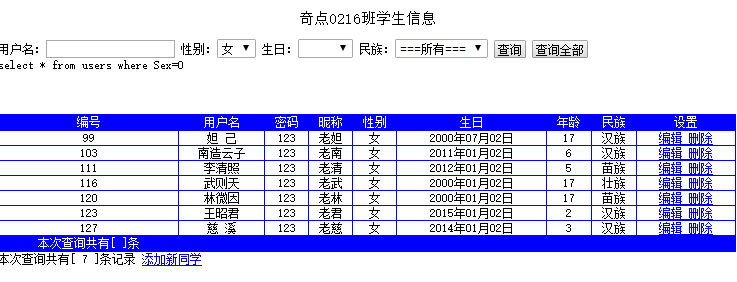
效果图
WebFrom 小程序【条件查询】的更多相关文章
- WebFrom 小程序【条件查询与分页整合】
将前面的条件查询功能与分页显示整合到一个页面中 <%@ Page Language="C#" AutoEventWireup="true" CodeFil ...
- 微信小程序火车票查询 直取12306数据
最终效果图: 样式丑哭了,我毕竟不是前端,宗旨就是练练手,体验微信小程序的开发,以最直接的方式获取12306数据查询火车票. 目录结构: search1是出发站列表,search2是目的站列表,命名没 ...
- 微信小程序--火车票查询
微信小程序--火车票查询 写在最前面 微信小程序自九月份推出内测资格以来,经历了舆论热潮到现在看似冷清,但并不意味着大家不那么关注或者不关注了.我想不管是否有内测资格,只要是感兴趣的开发者已经进入潜心 ...
- 微信小程序节点查询方法:wx.createSelectorQuery()的使用场景与注意事项
小程序由于内置于微信,这使得它有了得天独厚的宣传和使用优势,本着学习的心态,我在官网上看了一遍开发文档,大致得出小程序框架的设计模式与使用注意事项(重点来了,其实开发文档某些方面叙述的并不仔细,甚至存 ...
- 微信小程序 条件渲染 wx:if
1.在框架中,我们用wx:if="{{condition}}"来判断是否需要渲染该代码块 <view wx:if="{{condition}}"> ...
- 【wx:if】小程序条件渲染的使用说明
语法,以view为例: <view xw:if="{{条件}}">aaaa</view> <view xw:elif="{{条件}}&quo ...
- WebFrom 小程序【分页功能 】
实现分页展示功能 基本功能:上一页.下一页.首页.尾页.跳转 两个重要的变量 1.每页显示几条数据 2.现在是第几页 方法 } /*表格样式*/ .tab { width: %; backgr ...
- 微信小程序の条件渲染
<view> 今天吃什么 </view> <view wx:if="{{condition==1}}">饺子</view> < ...
- 微信小程序云开发
什么是云开发? 云开发是由腾讯云联合微信团队为开发者提供的 包含 云函数.云数据库和云文件存储能力的后端云服务 云开发为开发者提供完整的云端支持,弱化后端和运维概念,无需搭建服务器,使用平台提供的 A ...
随机推荐
- apache、nginx、tomcat配置方法
https://www.cnblogs.com/chenmh/p/5121830.html
- Canny边缘检测算法的一些改进
传统的Canny边缘检测算法是一种有效而又相对简单的算法,可以得到很好的结果(可以参考上一篇Canny边缘检测算法的实现).但是Canny算法本身也有一些缺陷,可以有改进的地方. 1. Canny边缘 ...
- 22.LinkedList
LinkedList与ArrayList一样实现List接口,只是ArrayList是List接口的大小可变数组的实现,LinkedList是List接口链表的实现.基于链表实现的方式使得Linked ...
- Android-Java-静态变量
描述Person对象: package android.java.oop09; // 描述Person对象 public class Person { private String name; pri ...
- 使用 Resharper 快速做适配器
如果需要做一个类的重写,需要重新写这个类的所有属性和函数,本文提供一个简单的方法让大家快速重写一个类的所有属性和函数. 在有 Resharper 之后,对一个比较长的类进行重构.例如有这个类 clas ...
- layui 富文本 图片上传 后端PHP接口
<!DOCTYPE html> <html> <head> <link rel="stylesheet" type="text/ ...
- Go语言函数
目录 函数定义 函数返回多个值 函数参数 Go 语言函数值传递 Go语言函数引用传递 函数用法 函数作为值 匿名函数 闭包 方法 不定参数的函数 init函数 内建函数 函数调用机制 总结 函数定义 ...
- linux下把动态链接库加入环境变量的几种方式
一. 将网络SDK各动态库路径加入到LD_LIBRARY_PATH环境变量 1.在终端输入:export LD_LIBRARY_PATH=$LD_LIBRARY_PATH:/XXX 只在当前终端起作用 ...
- .NET手记-JS获取Url参数
最近为App做活动专区,其中很多活动都是采用html 5页面来制作的.一方面体量较小,制作快速,更新维护容易:另一方面,嵌入App后适配效果也不会很差. 这里我们采用混编形式来从native app传 ...
- OC学习5——类和对象
1.OC是在C语言基础上进行扩展得到的一门面向对象的程序设计语言,它也提供了定义类.成员变量和方法的基本功能.类可以被认为是一种自定义的数据类型,使用它可以定义变量,所有使用类定义的变量都是指针类型的 ...