
Spring Boot + Spring Cloud 构建微服务系统(五):熔断监控面板(Hystrix Dashboard)
Hystrix Dashboard
Hystrix-dashboard是一款针对Hystrix进行实时监控的工具,通过Hystrix Dashboard我们可以在直观地看到各Hystrix Command的请求响应时间, 请求成功率等数据。
添加依赖
我们新建一个工程 spring-cloud-consul-monitor,修改 pom 文件,添加相关依赖。
pom.xml
    <dependencies>

        <dependency>

            <groupId>org.springframework.boot</groupId>

            <artifactId>spring-boot-starter-actuator</artifactId>

        </dependency>

        <dependency>

            <groupId>org.springframework.cloud</groupId>

            <artifactId>spring-cloud-starter-netflix-hystrix-dashboard</artifactId>

        </dependency>

    </dependencies>
启动类
在启动类中添加注解 @EnableHystrixDashboard 开启熔断监控支持。
ConsuleMonitorApplication.java
package com.louis.spring.cloud.consul.monitor;

import org.springframework.boot.SpringApplication;

import org.springframework.boot.autoconfigure.SpringBootApplication;

import org.springframework.cloud.netflix.hystrix.dashboard.EnableHystrixDashboard;

@EnableHystrixDashboard

@SpringBootApplication

public class ConsuleMonitorApplication {

    public static void main(String[] args) {

        SpringApplication.run(ConsuleMonitorApplication.class, args);

    }

}
修改配置
修改配置文件,配置启动端口和应用名称。
application.yml
server:

  port: 8531

spring:

  application:

    name: spring-cloud-consul-monitor
配置监控路径
注意,如果你使用的是2.x等比较新的版本,需要在 Hystrix 的消费端配置监控路径,我们这里消费端是 spring-cloud-consul-consumer, 所以修改它的启动类。
ConsuleConsumerApplication.java
    // 此配置是为了服务监控而配置,与服务容错本身无关,

    // ServletRegistrationBean因为springboot的默认路径不是"/hystrix.stream",

    // 只要在自己的项目里配置上下面的servlet就可以了

    @Bean

    public ServletRegistrationBean getServlet() {

        HystrixMetricsStreamServlet streamServlet = new HystrixMetricsStreamServlet();

        ServletRegistrationBean registrationBean = new ServletRegistrationBean(streamServlet);

        registrationBean.setLoadOnStartup(1);

        registrationBean.addUrlMappings("/hystrix.stream");

        registrationBean.setName("HystrixMetricsStreamServlet");

        return registrationBean;

    }
测试效果
先后启动 spring-cloud-consul-producer、 spring-cloud-consul-consumer、spring-cloud-consul-monitor 服务。
访问 http://localhost:8531/hystrix,会看到如下图所示界面。

此时没有任何具体的监控信息,需要输入要监控的消费者地址及监控信息的轮询时间和标题。
Hystrix Dashboard 共支持三种不同的监控方式:
单体Hystrix 消费者:通过URL http://hystrix-app:port/hystrix.stream 开启,实现对具体某个服务实例的监控。
默认集群监控:通过URL http://turbine-hostname:port/turbine.stream 开启,实现对默认集群的监控。
自定集群监控:通过URL http://turbine-hostname:port/turbine.stream?cluster=[clusterName] 开启,实现对clusterName集群的监控。
我们这里现在是对单体 Hystrix 消费者的监控,后面整合 Turbine 集群的时候再说明后两种的监控方式。
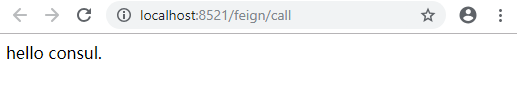
我们先访问 http://localhost:8521/feign/call, 查看要监控的服务是否可以正常访问。
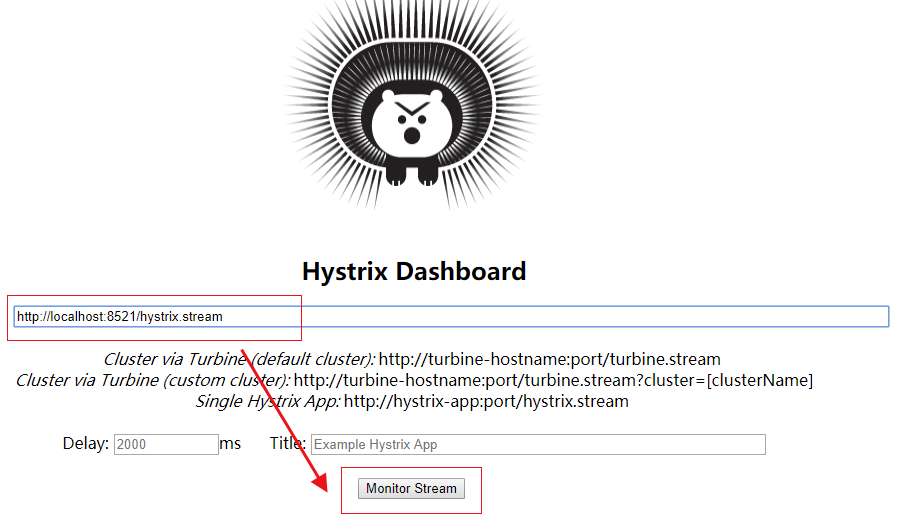
确认服务可以正常访问之后,在监控地址内输入 http://localhost:8521/hystrix.stream,然后点击 Monitor Stream 开始监控。
刚进去,页面先显示 loading... 信息, 多次访问 http://localhost:8521/feign/call 之后,统计图表信息如下图所示。
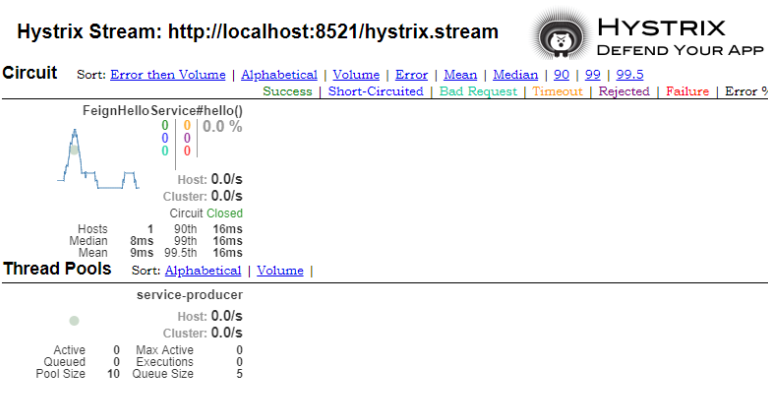
各个指标的含义参见下图。

源码下载
码云:https://gitee.com/liuge1988/spring-cloud-demo.git
作者:朝雨忆轻尘
出处:https://www.cnblogs.com/xifengxiaoma/
版权所有,欢迎转载,转载请注明原文作者及出处。
Spring Boot + Spring Cloud 构建微服务系统(五):熔断监控面板(Hystrix Dashboard)的更多相关文章
- Spring boot学习1 构建微服务:Spring boot 入门篇
Spring boot学习1 构建微服务:Spring boot 入门篇 Spring Boot是由Pivotal团队提供的全新框架,其设计目的是用来简化新Spring应用的初始搭建以及开发过程.该框 ...
- Spring Boot + Spring Cloud 构建微服务系统(六):熔断监控集群(Turbine)
Spring Cloud Turbine 上一章我们集成了Hystrix Dashboard,使用Hystrix Dashboard可以看到单个应用内的服务信息,显然这是不够的,我们还需要一个工具能让 ...
- Spring Boot + Spring Cloud 构建微服务系统(七):API服务网关(Zuul)
技术背景 前面我们通过Ribbon或Feign实现了微服务之间的调用和负载均衡,那我们的各种微服务又要如何提供给外部应用调用呢. 当然,因为是REST API接口,外部客户端直接调用各个微服务是没有问 ...
- Spring Boot + Spring Cloud 构建微服务系统(九):配置中心(Spring Cloud Config)
技术背景 如今微服务架构盛行,在分布式系统中,项目日益庞大,子项目日益增多,每个项目都散落着各种配置文件,且随着服务的增加而不断增多.此时,往往某一个基础服务信息变更,都会导致一系列服务的更新和重启, ...
- Spring Boot + Spring Cloud 构建微服务系统(十):配置中心(Spring Cloud Bus)
技术背景 我们在上一篇讲到,Spring Boot程序只在启动的时候加载配置文件信息,这样在GIT仓库配置修改之后,虽然配置中心服务器能够读取最新的提交信息,但是配置中心客户端却不会重新读取,以至于不 ...
- Spring Boot + Spring Cloud 构建微服务系统(八):分布式链路追踪(Sleuth、Zipkin)
技术背景 在微服务架构中,随着业务发展,系统拆分导致系统调用链路愈发复杂,一个看似简单的前端请求可能最终需要调用很多次后端服务才能完成,那么当整个请求出现问题时,我们很难得知到底是哪个服务出了问题导致 ...
- Spring Boot + Spring Cloud 构建微服务系统(四):容错机制和熔断(Hystrix)
雪崩效应 在微服务架构中,由于服务众多,通常会涉及多个服务层级的调用,而一旦基础服务发生故障,很可能会导致级联故障,进而造成整个系统不可用,这种现象被称为服务雪崩效应.服务雪崩效应是一种因“服务提供者 ...
- Spring Boot + Spring Cloud 构建微服务系统(三):服务消费和负载(Feign)
Spring Cloud Feign Spring Cloud Feign是一套基于Netflix Feign实现的声明式服务调用客户端.它使得编写Web服务客户端变得更加简单.我们只需要通过创建接口 ...
- Spring Boot + Spring Cloud 构建微服务系统(二):服务消费和负载(Ribbon)
使用RestTemplate调用服务 在上一篇教程中,我们是这样调用服务的,先通过 LoadBalancerClient 选取出对应的服务,然后使用 RestTemplate 进行远程调用. Load ...
随机推荐
- stark组件开发之编辑功能实现
编辑功能.和添加一样! 唯一不同的就是, 需要编辑一个指定的 记录.这就需要,在列表页面, 渲染编辑的时候,添加一个 id 值: class UserInfoHandler(StartHandler ...
- (O)WEB:前端网站性能优化(原创)
*从理论.实战编码.实战调试3个方面学习前端性能优化(包括页面加载时间和页面流畅度): -------------------------------理论----------------------- ...
- 别人的Linux私房菜(6)文件权限与目录配置
账号与一般身份用户存放在/etc/passwd文件中 个人密码存放在/etc/shadow文件中 Linux所有组名存放在/etc/group中 ls -al查看所有信息并显示权限等 文件权限的10字 ...
- IPv6下网络编程socket, TCP和UDP例子,以及兼容IPV4和IPV6的类
一.TCP socket ipv6与ipv4的区别 服务器端源代码如下: #include <stdio.h> #include <stdlib.h> #include < ...
- ABP框架系列之五:(Unit Of Work-工作单元)
Introduction Connection and transaction management is one of the most important concepts in an appli ...
- (22)Embrace the near win
https://www.ted.com/talks/sarah_lewis_embrace_the_near_win/transcript?referrer=playlist-talks_to_get ...
- cropper,图片剪辑上传工具的使用
cropper工具是一个功能强,兼容性好的一个图片裁剪和上传工具 GitHub地址:https://github.com/kesixin/Head_Cut_PC <div class=" ...
- C#字符串操作方法签名等
class Program { /// <summary> /// C# 里Main方法不需要public,而且不允许有两个是Main(string[] args)[包括String[] ...
- 长方体类Java编程题
1. 编程创建一个Box类(长方体),在Box类中定义三个变量,分别表示长方体的长(length).宽(width)和高(heigth),再定义一个方法void setBox(int l, int w ...
- 团队博客-第六周:Alpha阶段项目复审(只会嘤嘤嘤队)
小组名 题目 优点 缺点 排名 小谷围驻广东某工业719电竞大队 广工生活社区 功能多样,设计完整,实用,界面美观 界面风格不够统一,当前时间系统尚未发布 1 大猪蹄子队 四六级背单词游戏 界面十分美 ...