
iOS UIAlertController在iPhone与iPad上的区别
很简单的一段代码:
// 首先声明一个UIAlertController对象

private var alertController: UIAlertController!

// 初始化UIAlertController对象,中间省略弹出项

alertController = UIAlertController(title: self.selectDeviceModel?.name, message: nil, preferredStyle: .actionSheet)

// 弹出alertController

self.present(alertController, animated: true, completion: nil)
上面实现在屏幕底部弹出操作列表,在iPhone上面效果如下:
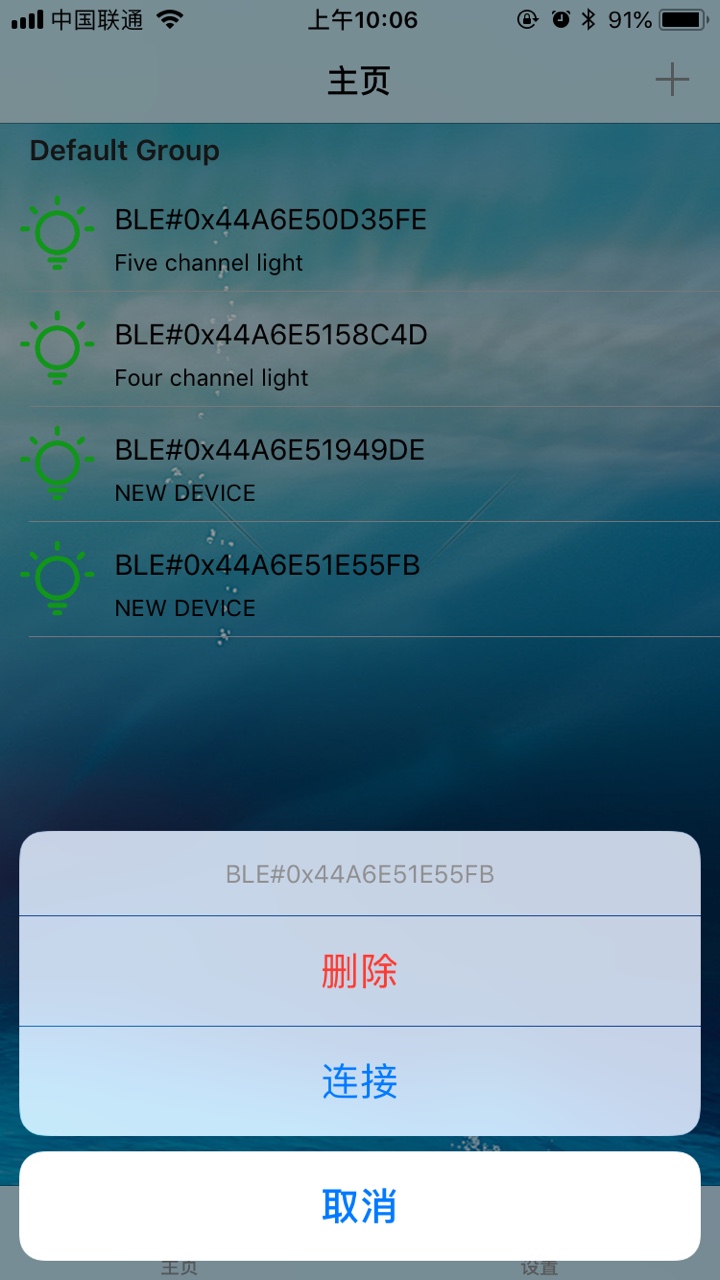
正常显示,所有的列表项及操作都没有问题。
可是就是这么一个简单的功能,在iPad上测试时,直接程序崩溃,输出了以下信息:
2018-08-07 09:25:41.064039+0800 InledcoLightSwift[2555:1299749] *** Terminating app due to uncaught exception 'NSGenericException', reason: 'Your application has presented a UIAlertController (<UIAlertController: 0x146819600>) of style UIAlertControllerStyleActionSheet. The modalPresentationStyle of a UIAlertController with this style is UIModalPresentationPopover. You must provide location information for this popover through the alert controller's popoverPresentationController. You must provide either a sourceView and sourceRect or a barButtonItem. If this information is not known when you present the alert controller, you may provide it in the UIPopoverPresentationControllerDelegate method -prepareForPopoverPresentation.'
*** First throw call stack:
(0x185902d8c 0x184abc5ec 0x190105dd4 0x18f95cd8c 0x18f95af60 0x18f8ba8b8 0x18f8b098c 0x18f795550 0x1858aa910 0x1858a8238 0x1858a8884 0x1857c8da8 0x1877ab020 0x18f7a978c 0x10278f27c 0x185259fc0)
libc++abi.dylib: terminating with uncaught exception of type NSException
崩溃信息原因是你的程序弹出了一个actionSheet类型的alterController.后面说是一个modal类型的,你就必须提供弹出的位置信息,可以是一个View或者一个barButtonItem,也就是说这个弹出框的来源,要从哪里弹出来。上面说到的UIModalPresentationPopover还不知道什么样,只能试一试了。
那我们就按照提示信息设置一下看看都什么效果。
- 设置sourceView
alertController.popoverPresentationController?.sourceView = self.view;
效果如下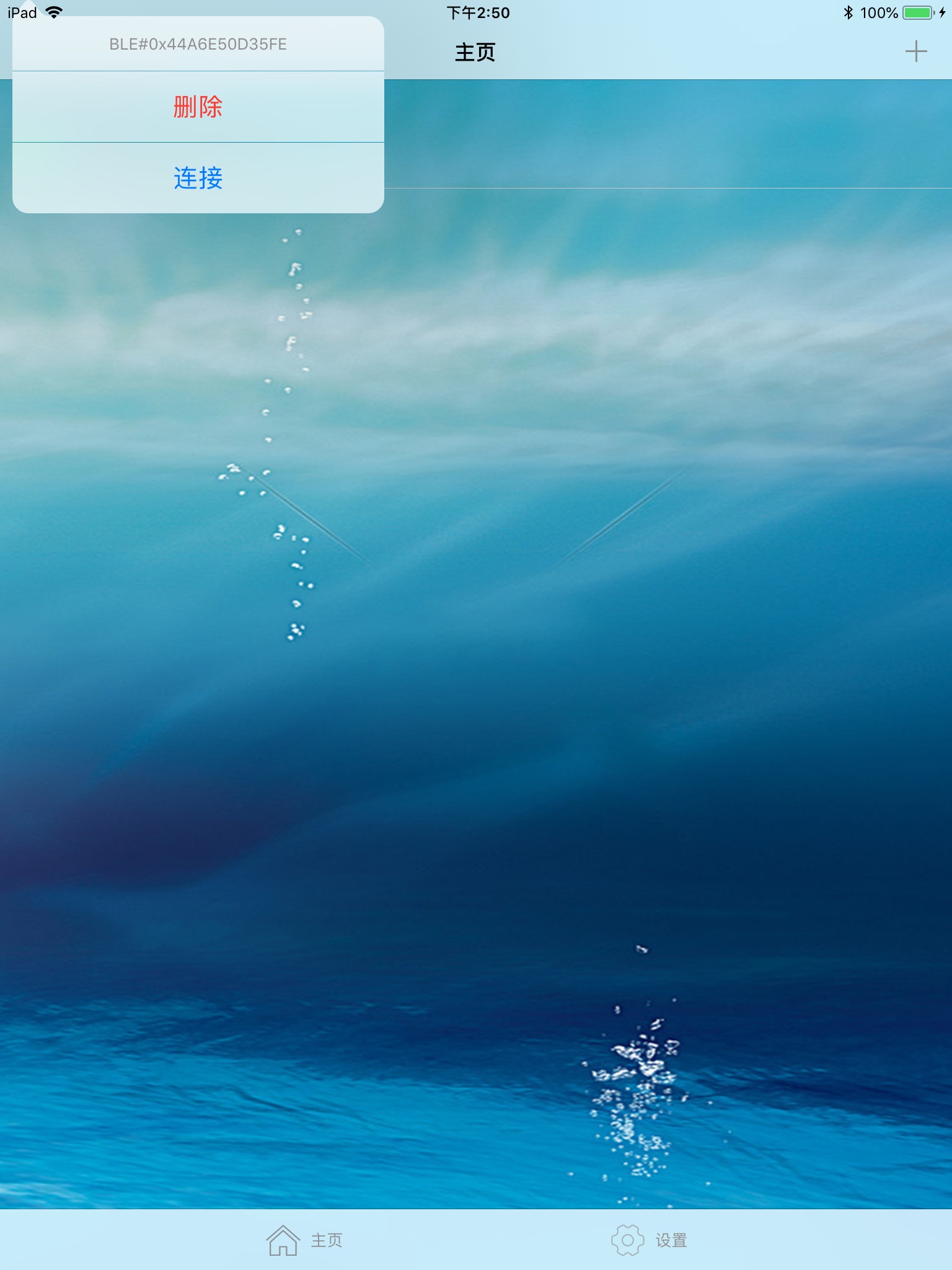
可以看到在屏幕左上角弹出了一个列表。
2.同时设置sourceRect
        alertController.popoverPresentationController?.sourceView = self.view;

        alertController.popoverPresentationController?.sourceRect = CGRect(x: 10.0, y: 10.0, width: 100.0, height: 100.0);
效果如图,在100, 100处弹出列表框
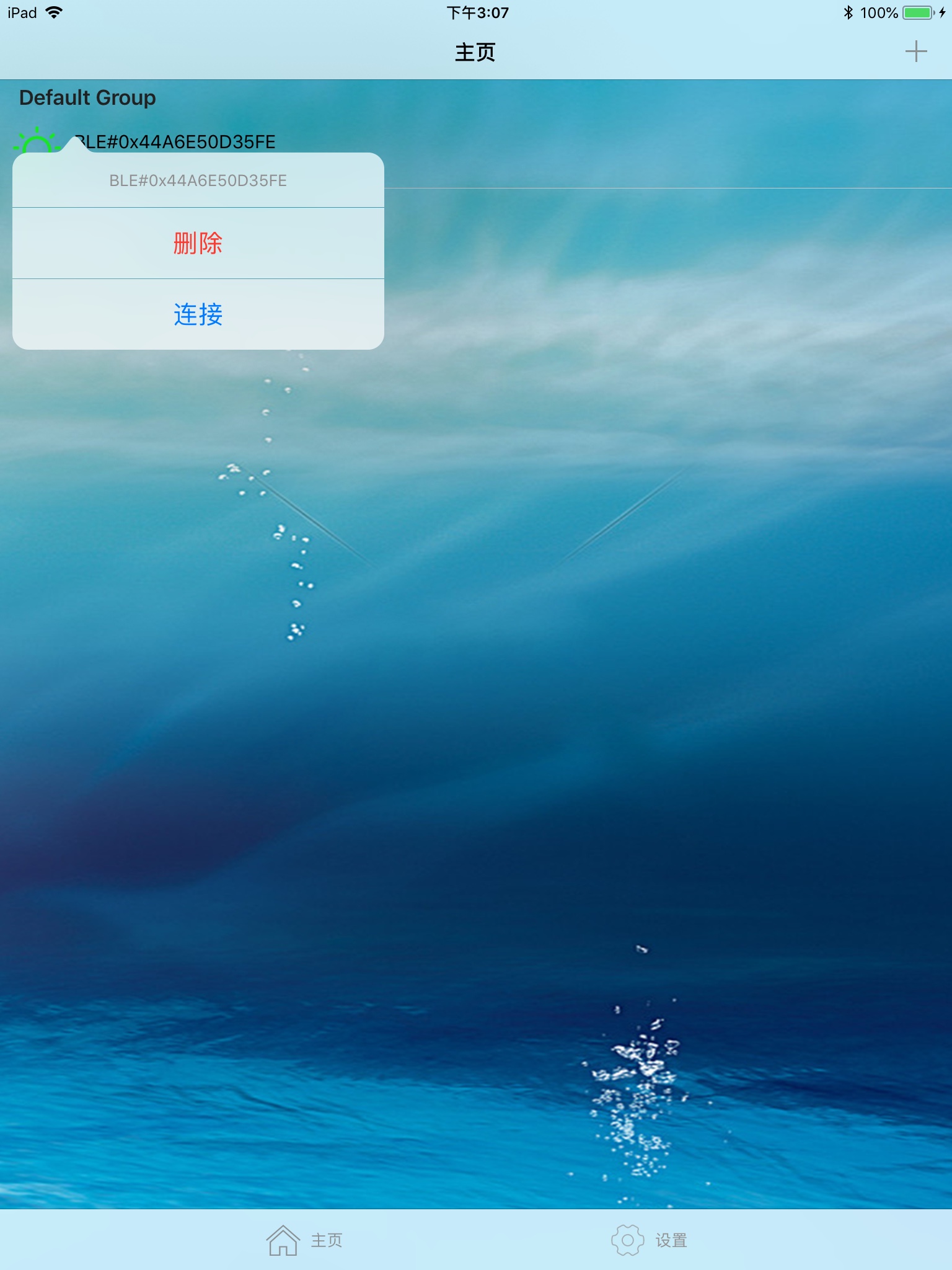
3.错误信息中还有一个barButtonItem,比如我设置self.navigationItem.rightBarButtonItem效果如下
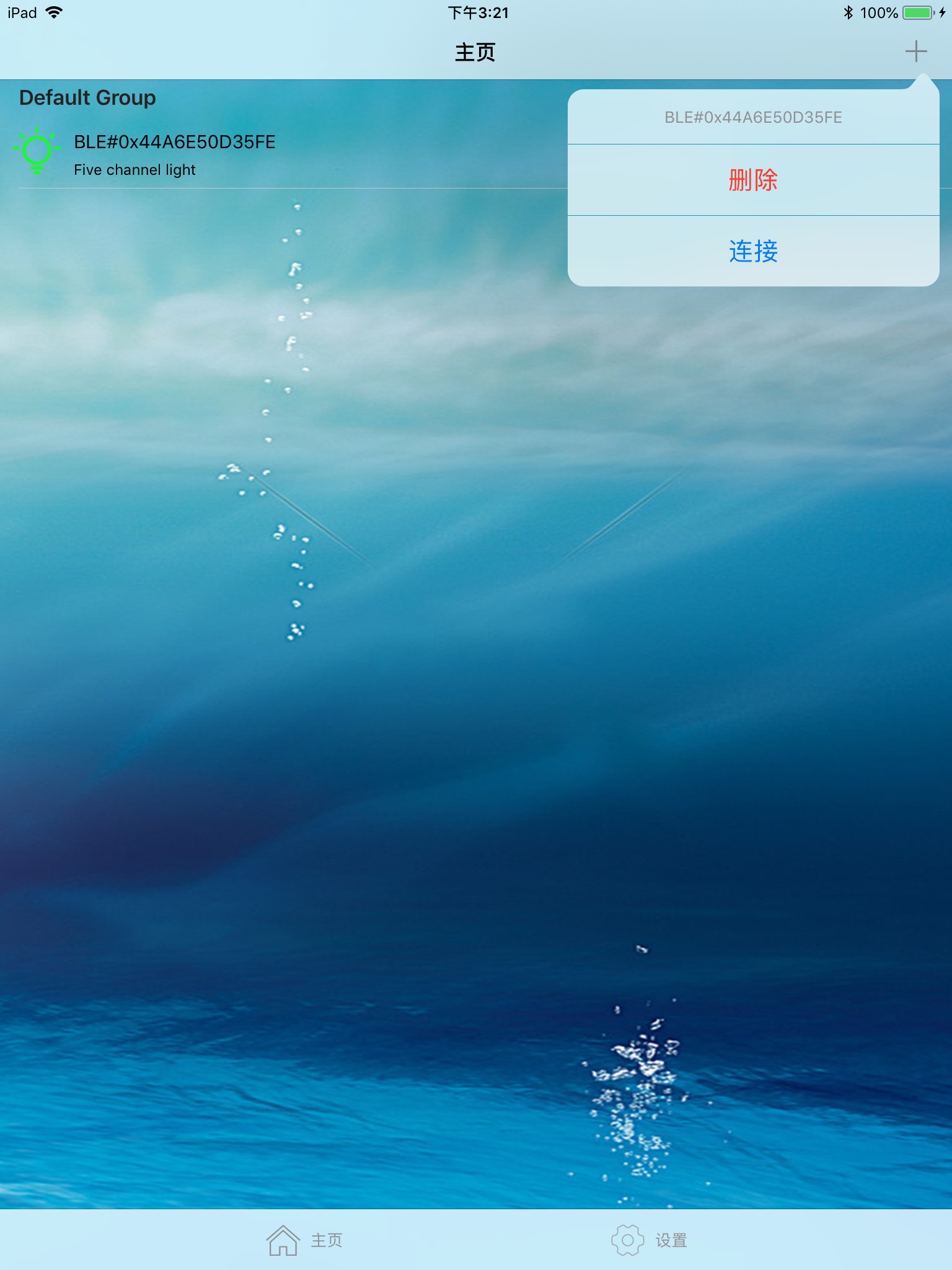
综上所述,在iPad上是没有和iPhone上那种从底部弹出的效果的,我们只能设置sourceView或者barButtonItem来指定弹出的的位置。在iPad UIAlertController的类型为UIModalPresentationPopover,只能实现以上效果。
iOS UIAlertController在iPhone与iPad上的区别的更多相关文章
- ios 新建app iphone 、 ipad or universal ?
很久没有关注这个新建app的 时候 选什么的问题了, 因为我们一般在公司 都是 已经建立好的app 直接 在那上面开发. 所以很久不建立新app 遇到新的app需要你自己去创建的时候 可能就会 有突 ...
- IOS开发之Iphone和Ipad应用程序图标和启动动画
本文转载至 http://blog.csdn.net/yesjava/article/details/8782060 当我们用xcode开发iphone和ipad应用程序的时候,我们可以用一下表中所显 ...
- 如何在iPhone与iPad上开启firebug
原文: MARTIN KOOL games - web - dad - sarien.net - q42 - livejs - handcraft How to use Firebug on your ...
- IOS - IPhone或IPAD,如何恢复出厂操作系统?
IPhone或IPAD的操作系统都是IOS,如果IPhone或IPAD越狱,或其它原因导致不能正常使用了,恢复出厂设置能够得到一个可以正常工作的设备.恢复的方法也比较简单,就是用iTunes,一般情况 ...
- 【转】越狱的 iPhone、iPad 通过网站实现一键安装 ipa 格式的 APP 应用
1.已经越狱的 iPhone.iPad 设备,当通过其自带的 safari 浏览器访问 ipa 应用下载网站时,利用 itms-services 协议,可以一键安装 ipa 文件的 iOS 应用,例如 ...
- iPhone与iPad开发实战读书笔记
iPhone开发一些读书笔记 手机应用分类1.教育工具2.生活工具3.社交应用4.定位工具5.游戏6.报纸和杂志的阅读器7.移动办公应用8.财经工具9.手机购物应用10.风景区相关应用11.旅游相关的 ...
- 在Mac电脑上为iPhone或iPad录屏的方法
在以前的Mac和iOS版本下,录制iPhone或者iPad屏幕操作是一件稍微复杂的事情.但是随着Yosemite的出现,在Mac电脑上为iPhone或iPad录屏的方法就变得简单了.下面就介绍一下具体 ...
- iPhone与iPad在开发上的区别
*:first-child { margin-top: 0 !important; } body > *:last-child { margin-bottom: 0 !important; } ...
- 通过Mac远程调试iPhone/iPad上的网页(转)
我们知道在 Mac/PC 上的浏览器都有 Web 检查器这类的工具(如最著名的 Firebug)对前端开发进行调试,而在 iPhone/iPad 由于限于屏幕的大小和触摸屏的使用习惯,直接对网页调试非 ...
随机推荐
- Redis 主从配置(Windows版)
安装从库 1.复制一份 Redis 文件,当做从库. 2.修改从库文件中 redis.windows.conf 的端口号. 3.安装服务,需要重新设置名称.然后去服务中,开启“redis6380”(此 ...
- git使用——推送本地文件到远程仓库
捣鼓了一下午之后总结如下: 1.首先可以照着这个链接里面博主给出的详细方法进行操作和配置: http://www.open-open.com/lib/view/open1454507333214. ...
- gitlab+jenkins+tomcat CI/CD 部署
整个项目的框架为: gitlab的安装与使用(Centos7) gitlab的安装 新建yum源 vim /etc/yum.repos.d/gitlab-ce.repo [gitlab-ce] nam ...
- 网站美化:CSS3自定义修改浏览器滚动条
滚动条组件 ::-webkit-scrollbar //滚动条整体部分 ::-webkit-scrollbar-thumb //滚动条里面的小方块,能向上向下移动(或往左往右移动,取决于是垂直滚动条还 ...
- Python学习之旅(十三)
Python基础知识(12):函数(Ⅲ) 高阶函数 1.map map()函数接收两个参数,一个是函数,一个是Iterable,map将传入的函数依次作用到序列的每个元素,并把结果作为新的Iterat ...
- easyui textbox 输入小写自动变大写,easyui textbox 绑定oninput事件 easyui textbox 绑定propertychange事件
<input id="id" class="easyui-textbox" name="id" value="@Model. ...
- [qemu] qemu从源码编译安装
环境:CentOS7-1804 下载最新的源码: ┬─[tong@T7:~/Src/thirdparty/PACKAGES]─[:: AM] ╰─>$ axel https://download ...
- Oracle实用操作
查询用户下所有表:select * from tab; 删除表: drop table 表名; 但是删除表后还是会查询到BIN开头的垃圾表,drop后的表存在于回收站: 清空回收站所有表: purg ...
- C#基础加强(8)之委托和事件
委托 简介 委托是一种可以声明出指向方法的变量的数据类型. 声明委托的方式 格式: delegate <返回值类型> 委托类型名(参数) ,例如: delegate void MyDel( ...
- 【LeetCode每天一题】Jump Game II(跳跃游戏II)
Given an array of non-negative integers, you are initially positioned at the first index of the arra ...