
lucene源码分析(3)facet实例
简单的facet实例
public class SimpleFacetsExample {

  private final Directory indexDir = new RAMDirectory();

  private final Directory taxoDir = new RAMDirectory();

  private final FacetsConfig config = new FacetsConfig();

  /** Empty constructor */

  public SimpleFacetsExample() {

    config.setHierarchical("Publish Date", true);

  }

  /** Build the example index. */

  private void index() throws IOException {

    IndexWriter indexWriter = new IndexWriter(indexDir, new IndexWriterConfig(

        new WhitespaceAnalyzer()).setOpenMode(OpenMode.CREATE));

    // Writes facet ords to a separate directory from the main index

    DirectoryTaxonomyWriter taxoWriter = new DirectoryTaxonomyWriter(taxoDir);

    Document doc = new Document();

    doc.add(new FacetField("Author", "Bob"));

    doc.add(new FacetField("Publish Date", "2010", "10", "15"));

    indexWriter.addDocument(config.build(taxoWriter, doc));

    doc = new Document();

    doc.add(new FacetField("Author", "Lisa"));

    doc.add(new FacetField("Publish Date", "2010", "10", "20"));

    indexWriter.addDocument(config.build(taxoWriter, doc));

    doc = new Document();

    doc.add(new FacetField("Author", "Lisa"));

    doc.add(new FacetField("Publish Date", "2012", "1", "1"));

    indexWriter.addDocument(config.build(taxoWriter, doc));

    doc = new Document();

    doc.add(new FacetField("Author", "Susan"));

    doc.add(new FacetField("Publish Date", "2012", "1", "7"));

    indexWriter.addDocument(config.build(taxoWriter, doc));

    doc = new Document();

    doc.add(new FacetField("Author", "Frank"));

    doc.add(new FacetField("Publish Date", "1999", "5", "5"));

    indexWriter.addDocument(config.build(taxoWriter, doc));

    indexWriter.close();

    taxoWriter.close();

  }

  /** User runs a query and counts facets. */

  private List<FacetResult> facetsWithSearch() throws IOException {

    DirectoryReader indexReader = DirectoryReader.open(indexDir);

    IndexSearcher searcher = new IndexSearcher(indexReader);

    TaxonomyReader taxoReader = new DirectoryTaxonomyReader(taxoDir);

    FacetsCollector fc = new FacetsCollector();

    // MatchAllDocsQuery is for "browsing" (counts facets

    // for all non-deleted docs in the index); normally

    // you'd use a "normal" query:

    FacetsCollector.search(searcher, new MatchAllDocsQuery(), 10, fc);

    // Retrieve results

    List<FacetResult> results = new ArrayList<>();

    // Count both "Publish Date" and "Author" dimensions

    Facets facets = new FastTaxonomyFacetCounts(taxoReader, config, fc);

    results.add(facets.getTopChildren(10, "Author"));

    results.add(facets.getTopChildren(10, "Publish Date"));

    indexReader.close();

    taxoReader.close();

    return results;

  }

  /** User runs a query and counts facets only without collecting the matching documents.*/

  private List<FacetResult> facetsOnly() throws IOException {

    DirectoryReader indexReader = DirectoryReader.open(indexDir);

    IndexSearcher searcher = new IndexSearcher(indexReader);

    TaxonomyReader taxoReader = new DirectoryTaxonomyReader(taxoDir);

    FacetsCollector fc = new FacetsCollector();

    // MatchAllDocsQuery is for "browsing" (counts facets

    // for all non-deleted docs in the index); normally

    // you'd use a "normal" query:

    searcher.search(new MatchAllDocsQuery(), fc);

    // Retrieve results

    List<FacetResult> results = new ArrayList<>();

    // Count both "Publish Date" and "Author" dimensions

    Facets facets = new FastTaxonomyFacetCounts(taxoReader, config, fc);

    results.add(facets.getTopChildren(10, "Author"));

    results.add(facets.getTopChildren(10, "Publish Date"));

    indexReader.close();

    taxoReader.close();

    return results;

  }

  /** User drills down on 'Publish Date/2010', and we

   *  return facets for 'Author' */

  private FacetResult drillDown() throws IOException {

    DirectoryReader indexReader = DirectoryReader.open(indexDir);

    IndexSearcher searcher = new IndexSearcher(indexReader);

    TaxonomyReader taxoReader = new DirectoryTaxonomyReader(taxoDir);

    // Passing no baseQuery means we drill down on all

    // documents ("browse only"):

    DrillDownQuery q = new DrillDownQuery(config);

    // Now user drills down on Publish Date/2010:

    q.add("Publish Date", "2010");

    FacetsCollector fc = new FacetsCollector();

    FacetsCollector.search(searcher, q, 10, fc);

    // Retrieve results

    Facets facets = new FastTaxonomyFacetCounts(taxoReader, config, fc);

    FacetResult result = facets.getTopChildren(10, "Author");

    indexReader.close();

    taxoReader.close();

    return result;

  }

  /** User drills down on 'Publish Date/2010', and we

   *  return facets for both 'Publish Date' and 'Author',

   *  using DrillSideways. */

  private List<FacetResult> drillSideways() throws IOException {

    DirectoryReader indexReader = DirectoryReader.open(indexDir);

    IndexSearcher searcher = new IndexSearcher(indexReader);

    TaxonomyReader taxoReader = new DirectoryTaxonomyReader(taxoDir);

    // Passing no baseQuery means we drill down on all

    // documents ("browse only"):

    DrillDownQuery q = new DrillDownQuery(config);

    // Now user drills down on Publish Date/2010:

    q.add("Publish Date", "2010");

    DrillSideways ds = new DrillSideways(searcher, config, taxoReader);

    DrillSidewaysResult result = ds.search(q, 10);

    // Retrieve results

    List<FacetResult> facets = result.facets.getAllDims(10);

    indexReader.close();

    taxoReader.close();

    return facets;

  }

  /** Runs the search example. */

  public List<FacetResult> runFacetOnly() throws IOException {

    index();

    return facetsOnly();

  }

  /** Runs the search example. */

  public List<FacetResult> runSearch() throws IOException {

    index();

    return facetsWithSearch();

  }

  /** Runs the drill-down example. */

  public FacetResult runDrillDown() throws IOException {

    index();

    return drillDown();

  }

  /** Runs the drill-sideways example. */

  public List<FacetResult> runDrillSideways() throws IOException {

    index();

    return drillSideways();

  }

  /** Runs the search and drill-down examples and prints the results. */

  public static void main(String[] args) throws Exception {

    System.out.println("Facet counting example:");

    System.out.println("-----------------------");

    SimpleFacetsExample example = new SimpleFacetsExample();

    List<FacetResult> results1 = example.runFacetOnly();

    System.out.println("Author: " + results1.get(0));

    System.out.println("Publish Date: " + results1.get(1));

    System.out.println("Facet counting example (combined facets and search):");

    System.out.println("-----------------------");

    List<FacetResult> results = example.runSearch();

    System.out.println("Author: " + results.get(0));

    System.out.println("Publish Date: " + results.get(1));

    System.out.println("Facet drill-down example (Publish Date/2010):");

    System.out.println("---------------------------------------------");

    System.out.println("Author: " + example.runDrillDown());

    System.out.println("Facet drill-sideways example (Publish Date/2010):");

    System.out.println("---------------------------------------------");

    for(FacetResult result : example.runDrillSideways()) {

      System.out.println(result);

    }

  }

}
查询及其关系
查询
  /** Lower-level search API.

   *

   * <p>{@link LeafCollector#collect(int)} is called for every matching document.

   *

   * @throws BooleanQuery.TooManyClauses If a query would exceed

   *         {@link BooleanQuery#getMaxClauseCount()} clauses.

   */

  public void search(Query query, Collector results)

    throws IOException {

    query = rewrite(query);

    search(leafContexts, createWeight(query, results.needsScores(), 1), results);

  }
关系
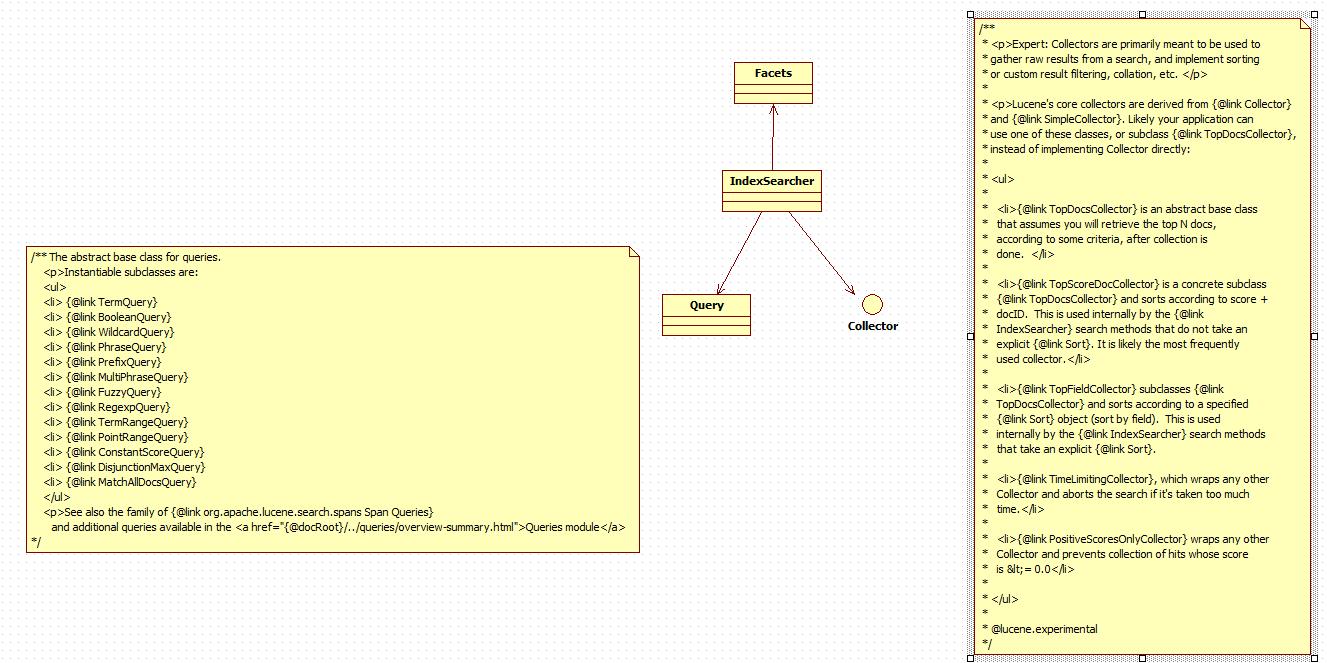
lucene源码分析(3)facet实例的更多相关文章
- Lucene 源码分析之倒排索引(三)
上文找到了 collect(-) 方法,其形参就是匹配的文档 Id,根据代码上下文,其中 doc 是由 iterator.nextDoc() 获得的,那 DefaultBulkScorer.itera ...
- 一个lucene源码分析的博客
ITpub上的一个lucene源码分析的博客,写的比较全面:http://blog.itpub.net/28624388/cid-93356-list-1/
- Vue源码分析(二) : Vue实例挂载
Vue源码分析(二) : Vue实例挂载 author: @TiffanysBear 实例挂载主要是 $mount 方法的实现,在 src/platforms/web/entry-runtime-wi ...
- JVM源码分析-类加载场景实例分析
A类调用B类的静态方法,除了加载B类,但是B类的一个未被调用的方法间接使用到的C类却也被加载了,这个有意思的场景来自一个提问:方法中使用的类型为何在未调用时尝试加载?. 场景如下: public cl ...
- HashMap源码分析和应用实例的介绍
1.HashMap介绍 HashMap 是一个散列表,它存储的内容是键值对(key-value)映射.HashMap 继承于AbstractMap,实现了Map.Cloneable.java.io.S ...
- Stack的源码分析和应用实例
1.Stack介绍 Stack是栈.它的特性是:先进后出(FILO:First In Last Out). java工具包中的Stack是继承于Vector(矢量队列)的,由于Vector是通过数组实 ...
- lucene源码分析的一些资料
针对lucene6.1较新的分析:http://46aae4d1e2371e4aa769798941cef698.devproxy.yunshipei.com/conansonic/article/d ...
- lucene源码分析(1)基本要素
1.源码包 core: Lucene core library analyzers-common: Analyzers for indexing content in different langua ...
- mybatis源码分析(1)——SqlSessionFactory实例的产生过程
在使用mybatis框架时,第一步就需要产生SqlSessionFactory类的实例(相当于是产生连接池),通过调用SqlSessionFactoryBuilder类的实例的build方法来完成.下 ...
随机推荐
- EBS xml publisher中文乱码
http://www.cnblogs.com/benio/archive/2011/11/22/2259313.html 由于本机环境问题,导致做的xml publisher报表跑不出来. 无法显 ...
- git archive命令详解
git archive可以将加了tag的某个版本打包提取出来,例如: git archive -v --format= > v0..zip --format表示打包的格式,如zip,-v表示对应 ...
- nginx backend 健康检查
ngx_http_proxy_module 模块和ngx_http_upstream_module模块(自带) 严格来说,nginx自带是没有针对负载均衡后端节点的健康检查的,但是可以通过默认自带的n ...
- vs2017使用rdlc
写在前面:因为公司要求做个批量打印工具,以前用Delphi+FastReport开发的,现在因为公司就剩下一个Delphi开发工程师了,还外出,所以这是就落在我身上.因为这个打印工具不需要使用人员设计 ...
- C#多线程编程系列(五)- 使用任务并行库
目录 1.1 简介 1.2 创建任务 1.3 使用任务执行基本的操作 1.4 组合任务 1.5 将APM模式转换为任务 1.6 将EAP模式转换为任务 1.7 实现取消选项 1.8 处理任务中的异常 ...
- 批处理系列(18) - 基于BitLocker的开锁上锁
首先要配置好BitLocker. 上锁 lock.bat @echo off rem 上锁前要结束一些程序,浏览器要注意:有恢复上次关闭项功能,按需设置取消该操作 taskkill /f /t /im ...
- Java基础学习篇---------static
一.static的使用 1.使用static定义的属性往往通过类名直接调用,它的属性(方法)不属于某一个的对象的.所以对象没有创建之前就可以对static的属性的调用,方法亦如此. 2.static ...
- Open GL的学习路程
一.EGL的使用 1.Dispaly与原生窗口的链接 -EGLDisplay eglGetDisplay -EGLBoolean egllinitialize 2.Surface 配置和创建sur ...
- Django路由配置系统、视图函数
一.路由配置系统(URLconf) URL配置(URLconf)就像Django 所支撑网站的目录.它的本质是URL与要为该URL调用的视图函数之间的映射表:你就是以这种方式告诉Django,对于这个 ...
- hot code loading in nodejs
Hot Code Loading in Node.js Node.js Web应用代码热更新的另类思路 Reading through Fever today, this post by Jack M ...