
Spring Cloud Eureka 学习记录
SpringCloud版本
           <groupId>org.springframework.cloud</groupId>

           <artifactId>spring-cloud-dependencies</artifactId>

           <version>Finchley.RELEASE</version>
1.1 Eureka Server
引入SpringCloud
 <dependencyManagement>

        <dependencies>

            <dependency>

                <groupId>org.springframework.boot</groupId>

                <artifactId>spring-boot-parent</artifactId>

                <version>2.1.3.RELEASE</version>

                <type>pom</type>

                <scope>import</scope>

            </dependency>

            <!--引入SpringCloud依赖-->

            <dependency>

                <groupId>org.springframework.cloud</groupId>

                <artifactId>spring-cloud-dependencies</artifactId>

                <version>Finchley.RELEASE</version>

                <type>pom</type>

                <scope>import</scope>

            </dependency>

        </dependencies>

    </dependencyManagement>
新建 Module:fly-services-discovery
添加Dependency
<dependencies>

        <dependency>

            <groupId>org.springframework.cloud</groupId>

            <artifactId>spring-cloud-starter-netflix-eureka-server</artifactId>

        </dependency>

    </dependencies>
编写入口类,加上@EnableEurekaServer
@SpringBootApplication

@EnableEurekaServer

public class DiscoveryApplication {

    public static void main(String[] args) {

        SpringApplication.run(DiscoveryApplication.class,args);

    }

}
resources中添加application.yml
server:

  port: 8761

security:

eureka:

  client:

    register-with-eureka: false

    fetch-registry: false

    service-url:

      defaultZone: http://localhost:8761/eureka
启动项目,访问:http://localhost:8761/
注意事项
SpringCloud版本问题,要注意和SpringBoot相应的版本兼容。SpringBoot版本:2.1.3.RELEASE.SpringCloud版本:Finchley.RELEASE
1.2 Eureka Client
新建 Module:fly-user-service
添加Dependency
        <dependency>

            <groupId>org.springframework.cloud</groupId>

            <artifactId>spring-cloud-starter-netflix-eureka-client</artifactId>

        </dependency>
编写入口类,这里不需要加上@EnableEurekaClient。新版的会默认将此服务作为Eureka Client.
@SpringBootApplication

public class UserServiceApplication {

    public static void main(String[] args) {

        SpringApplication.run(UserServiceApplication.class,args);

    }

}
resources中添加application.yml
server:

  port: 8081

spring:

  application:

    name: fly-user-service

eureka:

  client:

    serviceUrl:

      defaultZone: http://localhost:8761/eureka

  instance:

    prefer-ip-address: true

    instanceId: ${spring.application.name}:${spring.application.instance_id:${server.port}}
启动项目.再次访问http://localhost:8761. FLY-USER-SERVICE已经注册上。

1.3 Eureka Client Matadata
在Eureka Client中新建RestController,注入o.s.cloud.client.discovery.DiscoveryClient,通过调用getInstances(serviceId) 返回matadata信息
@RestController

@RequestMapping("/api")

public class UserServiceController {

    @Value("${spring.application.name}")

    private String serviceId;

    @Autowired

    private DiscoveryClient discoveryClient;

    /**

     * 获取用户服务的详细信息

     * */

    @GetMapping("/user-service")

    public List<ServiceInstance> userServiceInfo(){

       return this.discoveryClient.getInstances(serviceId);

    }

}
修改application.yml,增加matadata
instance:

    prefer-ip-address: true

    metadata-map:

      # 这里自定义,些什么都可以 key/value

      description: 用户微服务:包含用户基础信息接口,账户接口等
运行程序,访问:http://localhost:8081/api/user-service
[{

	"host": "192.168.157.1",

	"port": 8081,

	"metadata": {

		"description": "用户微服务:包含用户基础信息接口,账户接口等",

		"management.port": "8081",

		"jmx.port": "52681"

	},

	"secure": false,

	"uri": "http://192.168.157.1:8081",

	"instanceInfo": {

		"instanceId": "fly-user-service:8081",

		"app": "FLY-USER-SERVICE",

		"appGroupName": null,

		"ipAddr": "192.168.157.1",

		"sid": "na",

		"homePageUrl": "http://192.168.157.1:8081/",

		"statusPageUrl": "http://192.168.157.1:8081/actuator/info",

		"healthCheckUrl": "http://192.168.157.1:8081/actuator/health",

		"secureHealthCheckUrl": null,

		"vipAddress": "fly-user-service",

		"secureVipAddress": "fly-user-service",

		"countryId": 1,

		"dataCenterInfo": {

			"@class": "com.netflix.appinfo.InstanceInfo$DefaultDataCenterInfo",

			"name": "MyOwn"

		},

		"hostName": "192.168.157.1",

		"status": "UP",

		"overriddenStatus": "UNKNOWN",

		"leaseInfo": {

			"renewalIntervalInSecs": 30,

			"durationInSecs": 90,

			"registrationTimestamp": 1551449194524,

			"lastRenewalTimestamp": 1551449194524,

			"evictionTimestamp": 0,

			"serviceUpTimestamp": 1551448771780

		},

		"isCoordinatingDiscoveryServer": false,

		"metadata": {

			"description": "用户微服务:包含用户基础信息接口,账户接口等",

			"management.port": "8081",

			"jmx.port": "52681"

		},

		"lastUpdatedTimestamp": 1551449194524,

		"lastDirtyTimestamp": 1551449194336,

		"actionType": "ADDED",

		"asgName": null

	},

	"serviceId": "FLY-USER-SERVICE",

	"scheme": null

}]
1.4 Eureka Authentication
在fly-services-discovery项目中添加引用
        <dependency>

            <groupId>org.springframework.boot</groupId>

            <artifactId>spring-boot-starter-security</artifactId>

        </dependency>
修改配置文件application.yml,增加以下配置:
spring:

  security:

    user:

      name: panzi

      password: 123456
将defaultZone改为http://user:password@host:port/eureka格式
defaultZone: http://panzi:123456@localhost:${server.port}/eureka
这里需要注意的是,在高版本中,Eureka Client并不能成功注册,会出现401错误.所以还需要在服务端增加配置类:
import org.springframework.context.annotation.Configuration;

import org.springframework.security.config.annotation.web.builders.HttpSecurity;

import org.springframework.security.config.annotation.web.configuration.EnableWebSecurity;

import org.springframework.security.config.annotation.web.configuration.WebSecurityConfigurerAdapter;

@EnableWebSecurity

@Configuration

public class WebSecurityConfig extends WebSecurityConfigurerAdapter {

    @Override

    protected void configure(HttpSecurity http) throws Exception {

        //关闭csrf

        http.csrf().ignoringAntMatchers("/eureka/**");

        //开启认证

        http.authorizeRequests().anyRequest().authenticated().and().httpBasic();

    }

}
修改Eureka Client:fly-user-service的配置文件,将defaultZone改为上文中的地址:
defaultZone: http://panzi:123456@localhost:${server.port}/eureka
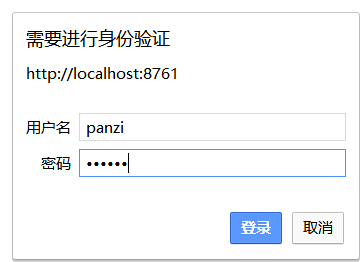
启动服务端和客户端:访问http://localhost:8761/
1.5 Eureka High Availability
搭建Eureka Server高可用,本机模拟先将hosts修改,windows下:C:\Windows\System32\drivers\etc
127.0.0.1 eureka1 eureka2
增加 application-eureka1.yml
spring:

  application:

    name: eureka-server

  profiles: eureka1

server:

  port: 8761

eureka:

  instance:

    hostname: eureka1

  client:

    service-url:

    # server1 注册到server2上

      defaultZone: http://panzi:123456@eureka2:8762/eureka/

    register-with-eureka: true
增加 application-eureka2.yml
spring:

  application:

    name: eureka-server

  profiles: eureka2

server:

  port: 8762

eureka:

  instance:

    hostname: eureka2

  client:

    service-url:

    # server2 注册到server1 上

      defaultZone: http://panzi:123456@eureka1:8761/eureka/

    register-with-eureka: true
分别执行两个命令启动服务
java -jar fly-services-discovery-1.0-SNAPSHOT.jar --spring.profiles.active=eureka1

java -jar fly-services-discovery-1.0-SNAPSHOT.jar --spring.profiles.active=eureka2
启动成功之后,输入用户名和密码

修改Eureka Client的配置文件
defaultZone:http://panzi:123456@eureka1:8761/eureka/,http://panzi:123456@eureka2:8762/eureka/
运行Eureka Client,访问:http://eureka1:8761/,http://eureka2:8761/

原文地址:https://github.com/fanpan26/Fly.SpringCloud/wiki
项目地址:https://github.com/fanpan26/Fly.SpringCloud
Spring Cloud Eureka 学习记录的更多相关文章
- Spring Cloud Eureka(一): 开篇说明及目录汇总
开篇简述 基于Spring Boot 和 Spring Cloud 的微服务应用,本人在工作中已经使用两年有余了,伴随着个人学习计划的实施,希望借助博文的方式,将工作中使用到的技术点体系化的总结出来, ...
- spring cloud(学习笔记)高可用注册中心(Eureka)的实现(二)
绪论 前几天我用一种方式实现了spring cloud的高可用,达到两个注册中心,详情见spring cloud(学习笔记)高可用注册中心(Eureka)的实现(一),今天我意外发现,注册中心可以无限 ...
- spring cloud深入学习(四)-----eureka源码解析、ribbon解析、声明式调用feign
基本概念 1.Registe 一一服务注册当eureka Client向Eureka Server注册时,Eureka Client提供自身的元数据,比如IP地址.端口.运行状况指标的Uri.主页地址 ...
- Spring Cloud 学习 之 Spring Cloud Eureka(源码分析)
Spring Cloud 学习 之 Spring Cloud Eureka(源码分析) Spring Boot版本:2.1.4.RELEASE Spring Cloud版本:Greenwich.SR1 ...
- 【SpringCloud微服务实战学习系列】服务治理Spring Cloud Eureka
Spring Cloud Eureka是Spring Cloud Netflix微服务中的一部分,它基于NetFlix Sureka做了二次封装,主要负责完成微服务架构中的服务治理功能. 一.服务治理 ...
- spring cloud深入学习(二)-----服务注册中心spring cloud eureka
服务治理 主要用来实现各个微服务实例的自动化注册与发现,为啥需要这玩意呢?在一开始比如A系统调用B服务,可能通过手工维护B服务的实例,并且还得采用负载均衡等方式,这些全部都得需要手工维护,等后面系统越 ...
- Spring Cloud 学习 之 Spring Cloud Eureka(概述)
Spring Boot版本:2.1.4.RELEASE Spring Cloud版本:Greenwich.SR1 前述: 服务治理可以说是微服务架构中最为核心和基础的模块,它主要用来实现各个微服务 ...
- 《Spring Cloud》学习(一) 服务治理!
前言:之前网上学习过Spring Cloud,对于工作上需要是足够了,总归对于一些方面一知半解,最近难得有些闲暇时间,有幸读了崔永超先生的<Spring Cloud 微服务实战>,一方面记 ...
- Spring Cloud Eureka 实践(一)
Spring Cloud Eureka是Spring Cloud Netflix微服务套件中的一部分,主要在Spring Cloud架构中提供服务注册发现的功能.那么是不是可以尝试在本地搭一个单例Eu ...
随机推荐
- LDA和PCA区别
https://blog.csdn.net/brucewong0516/article/details/78684005
- 个人遗漏知识的回顾-HTML
常用的一些快捷键: Windows + e 我的电脑Ctrl + Tab 网页间不同页面切换F2 重命名Ctrl+Shift+S 另存为 前端的一些常识:前端意义:将效果图生成网页网页组成:文字.图片 ...
- LNMP下安装memcache
转自:LNMP 添加 memcached服务 由于memcached具有更多的功能和服务,已经不推荐使用memcache了.(缺少个字母d) 1. 首先安装memcached服务端. 这里使用yum源 ...
- .NET Core 微服务架构-Docker部署
本文主要介绍通过Docker来部署通过.NET Core开发的微服务架构,部署的微服务主要包括统一网关(使用Ocelot开发).统一认证(IdentityServer4).应用服务(ASP.NET C ...
- 当div元素内的内容超出其宽度时,自动隐藏超出的内容
word-break:keep-all;/* 不换行 */ white-space:nowrap;/* 不换行 */ overflow:hidden;/* 内容超出宽度时隐藏超出部分的内容 */ te ...
- ArcGIS for JavaScript 关于路径开发的一些记录(一)
今年毕业,进入公司的第一个任务就是单独负责一个项目的地图模块,用ArcGIS API for JavaScript来开发web地图.花了大概一个礼拜的时间学会了安装和搭建ArcGIS Server和A ...
- java实现Kafka的消费者示例
使用java实现Kafka的消费者 1 2 3 4 5 6 7 8 9 10 11 12 13 14 15 16 17 18 19 20 21 22 23 24 25 26 27 28 29 30 3 ...
- Ubuntu 16.04下 - vi编辑器使用【backspace】无法删除
参考:https://blog.csdn.net/leiwangzhongde/article/details/83339589
- leetCode题解之求二叉树每层的平均值
1.题目描述 Given a non-empty binary tree, return the average value of the nodes on each level in the for ...
- 打开struts-config.xml 报错 解决方法Could not open the editor
打开struts-config.xml 报错 解决办法Could not open the editor 错误信息:Could not open the editor: Project XXX is ...