
全网最详细使用Scrapy时遇到0: UserWarning: You do not have a working installation of the service_identity module: 'cannot import name 'opentype''. Please install it from ..的问题解决(图文详解)
不多说,直接上干货!
但是在运行爬虫程序的时候报错了,如下:

D:\Code\PycharmProfessionalCode\study\python_spider\30HoursGetWebCrawlerByPython>cd shop

D:\Code\PycharmProfessionalCode\study\python_spider\30HoursGetWebCrawlerByPython\shop>scrapy crawl tb

:: UserWarning: You do not have a working installation of the service_identity module: 'cannot import name 'opentype''.  Please install it from <https://pypi.python.org/pypi/service_identity> and make sure all of its dependencies are satisfied.  Without the service_identity module, Twisted can perform only rudimentary TLS client hostname verification.  Many valid certificate/hostname mappings may be rejected.

-- :: [scrapy.utils.log] INFO: Scrapy 1.5. started (bot: shop)

-- :: [scrapy.utils.log] INFO: Versions: lxml 4.1.1.0, libxml2 2.9., cssselect 1.0., parsel 1.3., w3lib 1.18., Twisted 17.9., Python 3.5. |Anaconda custom (-bit)| (default, Jul   , ::) [MSC v.  bit (AMD64)], pyOpenSSL 16.2. (OpenSSL 1.0.2j   Sep ), cryptography 1.5, Platform Windows--10.0.-SP0

-- :: [scrapy.crawler] INFO: Overridden settings: {'NEWSPIDER_MODULE': 'shop.spiders', 'SPIDER_MODULES': ['shop.spiders'], 'ROBOTSTXT_OBEY': True, 'BOT_NAME': 'shop'}

-- :: [scrapy.middleware] INFO: Enabled extensions:

['scrapy.extensions.logstats.LogStats',

 'scrapy.extensions.corestats.CoreStats',

 'scrapy.extensions.telnet.TelnetConsole']

-- :: [scrapy.middleware] INFO: Enabled downloader middlewares:

['scrapy.downloadermiddlewares.robotstxt.RobotsTxtMiddleware',

 'scrapy.downloadermiddlewares.httpauth.HttpAuthMiddleware',

 'scrapy.downloadermiddlewares.downloadtimeout.DownloadTimeoutMiddleware',

 'scrapy.downloadermiddlewares.defaultheaders.DefaultHeadersMiddleware',

 'scrapy.downloadermiddlewares.useragent.UserAgentMiddleware',

 'scrapy.downloadermiddlewares.retry.RetryMiddleware',

 'scrapy.downloadermiddlewares.redirect.MetaRefreshMiddleware',

 'scrapy.downloadermiddlewares.httpcompression.HttpCompressionMiddleware',

 'scrapy.downloadermiddlewares.redirect.RedirectMiddleware',

 'scrapy.downloadermiddlewares.cookies.CookiesMiddleware',

 'scrapy.downloadermiddlewares.httpproxy.HttpProxyMiddleware',

 'scrapy.downloadermiddlewares.stats.DownloaderStats']

-- :: [scrapy.middleware] INFO: Enabled spider middlewares:

['scrapy.spidermiddlewares.httperror.HttpErrorMiddleware',

 'scrapy.spidermiddlewares.offsite.OffsiteMiddleware',

 'scrapy.spidermiddlewares.referer.RefererMiddleware',

 'scrapy.spidermiddlewares.urllength.UrlLengthMiddleware',

 'scrapy.spidermiddlewares.depth.DepthMiddleware']

-- :: [scrapy.middleware] INFO: Enabled item pipelines:

[]

-- :: [scrapy.core.engine] INFO: Spider opened

-- :: [scrapy.extensions.logstats] INFO: Crawled  pages (at  pages/min), scraped  items (at  items/min)

-- :: [scrapy.extensions.telnet] DEBUG: Telnet console listening on 127.0.0.1:

-- :: [scrapy.core.downloader.tls] WARNING: Remote certificate is not valid for hostname "www.taobao.com"; '*.tmall.com'!='www.taobao.com'

-- :: [scrapy.core.engine] DEBUG: Crawled () <GET https://www.taobao.com/robots.txt> (referer: None)

-- :: [scrapy.downloadermiddlewares.robotstxt] DEBUG: Forbidden by robots.txt: <GET https://www.taobao.com/>

-- :: [scrapy.core.engine] INFO: Closing spider (finished)

-- :: [scrapy.statscollectors] INFO: Dumping Scrapy stats:

{'downloader/exception_count': ,

 'downloader/exception_type_count/scrapy.exceptions.IgnoreRequest': ,

 'downloader/request_bytes': ,

 'downloader/request_count': ,
根据提示,去下载和安装service_identity,地址为:https://pypi.python.org/pypi/service_identity#downloads,下载whl文件 

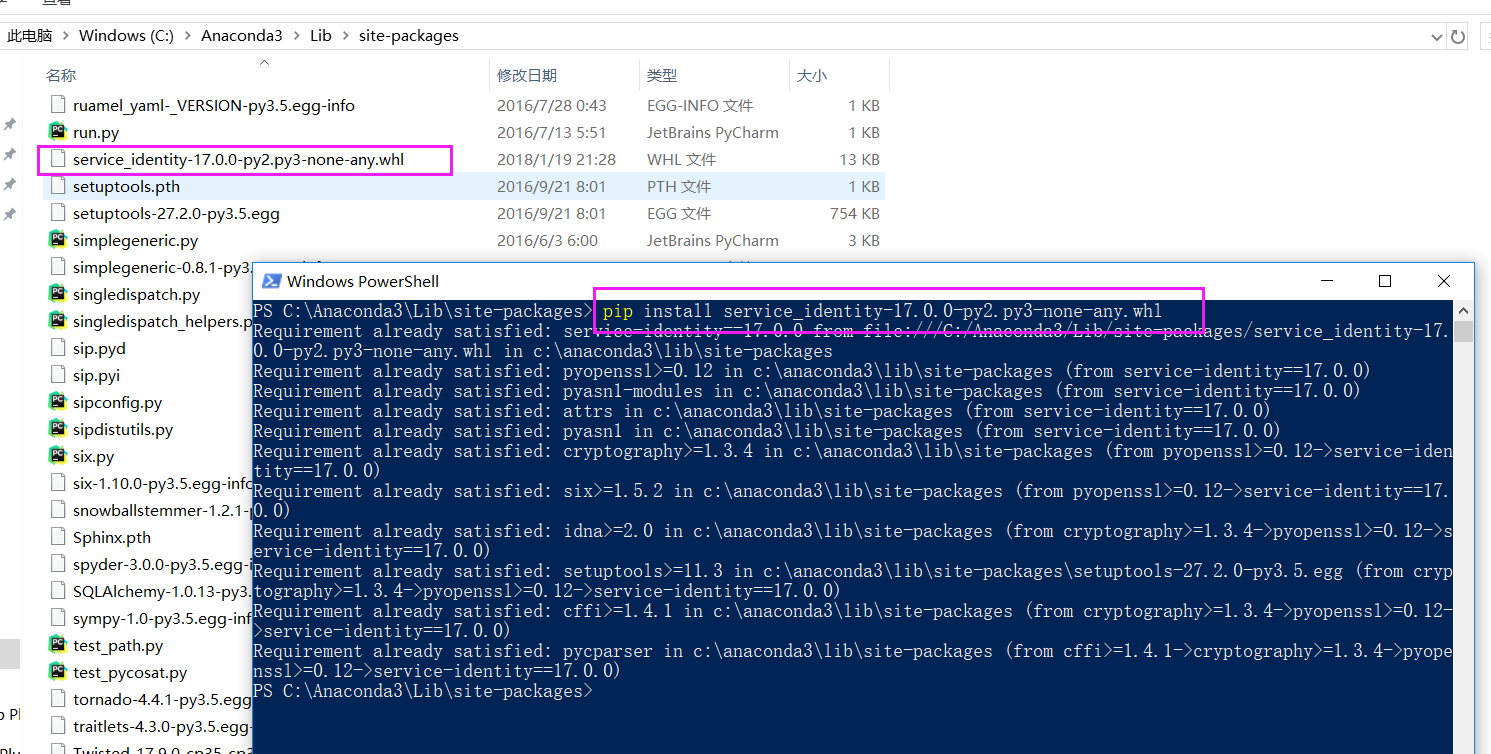
PS C:\Anaconda3\Lib\site-packages> pip install service_identity-17.0.-py2.py3-none-any.whl

Requirement already satisfied: service-identity==17.0. from file:///C:/Anaconda3/Lib/site-packages/service_identity-17.0.0-py2.py3-none-any.whl in c:\anaconda3\lib\site-packages

Requirement already satisfied: pyopenssl>=0.12 in c:\anaconda3\lib\site-packages (from service-identity==17.0.)

Requirement already satisfied: pyasn1-modules in c:\anaconda3\lib\site-packages (from service-identity==17.0.)

Requirement already satisfied: attrs in c:\anaconda3\lib\site-packages (from service-identity==17.0.)

Requirement already satisfied: pyasn1 in c:\anaconda3\lib\site-packages (from service-identity==17.0.)

Requirement already satisfied: cryptography>=1.3. in c:\anaconda3\lib\site-packages (from pyopenssl>=0.12->service-identity==17.0.)

Requirement already satisfied: six>=1.5. in c:\anaconda3\lib\site-packages (from pyopenssl>=0.12->service-identity==17.0.)

Requirement already satisfied: idna>=2.0 in c:\anaconda3\lib\site-packages (from cryptography>=1.3.->pyopenssl>=0.12->service-identity==17.0.)

Requirement already satisfied: setuptools>=11.3 in c:\anaconda3\lib\site-packages\setuptools-27.2.-py3..egg (from cryptography>=1.3.->pyopenssl>=0.12->service-identity==17.0.)

Requirement already satisfied: cffi>=1.4. in c:\anaconda3\lib\site-packages (from cryptography>=1.3.->pyopenssl>=0.12->service-identity==17.0.)

Requirement already satisfied: pycparser in c:\anaconda3\lib\site-packages (from cffi>=1.4.->cryptography>=1.3.->pyopenssl>=0.12->service-identity==17.0.)

PS C:\Anaconda3\Lib\site-packages>
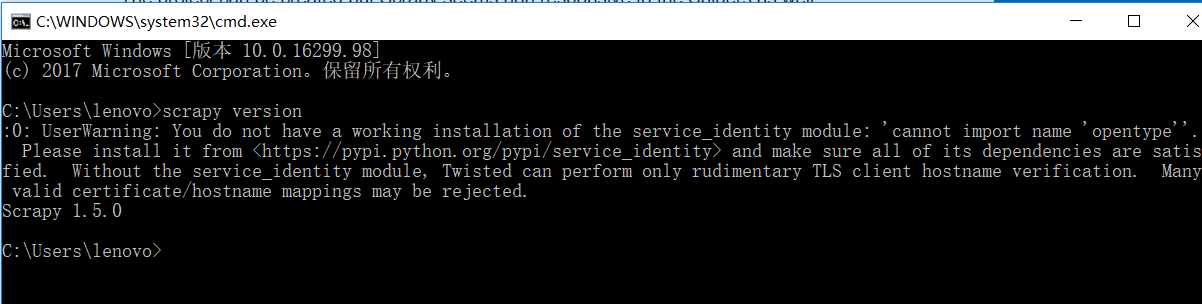
Microsoft Windows [版本 10.0.16299.98]

(c)  Microsoft Corporation。保留所有权利。

C:\Users\lenovo>scrapy version

:: UserWarning: You do not have a working installation of the service_identity module: 'cannot import name 'opentype''.  Please install it from <https://pypi.python.org/pypi/service_identity> and make sure all of its dependencies are satisfied.  Without the service_identity module, Twisted can perform only rudimentary TLS client hostname verification.  Many valid certificate/hostname mappings may be rejected.

Scrapy 1.5.

C:\Users\lenovo>
可见,在scrapy安装时,其实还有点问题的。
原因是不知道因为什么原因导致本机上的service_identity模块太老旧,而你通过install安装的时候 不会更新到最新版本。
然后,再执行

Microsoft Windows [版本 10.0.16299.98]

(c)  Microsoft Corporation。保留所有权利。

C:\Users\lenovo>scrapy version

:: UserWarning: You do not have a working installation of the service_identity module: 'cannot import name 'opentype''.  Please install it from <https://pypi.python.org/pypi/service_identity> and make sure all of its dependencies are satisfied.  Without the service_identity module, Twisted can perform only rudimentary TLS client hostname verification.  Many valid certificate/hostname mappings may be rejected.

Scrapy 1.5.

C:\Users\lenovo>pip install service_identity

Requirement already satisfied: service_identity in c:\anaconda3\lib\site-packages

Requirement already satisfied: pyasn1-modules in c:\anaconda3\lib\site-packages (from service_identity)

Requirement already satisfied: attrs in c:\anaconda3\lib\site-packages (from service_identity)

Requirement already satisfied: pyopenssl>=0.12 in c:\anaconda3\lib\site-packages (from service_identity)

Requirement already satisfied: pyasn1 in c:\anaconda3\lib\site-packages (from service_identity)

Requirement already satisfied: cryptography>=1.3. in c:\anaconda3\lib\site-packages (from pyopenssl>=0.12->service_identity)

Requirement already satisfied: six>=1.5. in c:\anaconda3\lib\site-packages (from pyopenssl>=0.12->service_identity)

Requirement already satisfied: idna>=2.0 in c:\anaconda3\lib\site-packages (from cryptography>=1.3.->pyopenssl>=0.12->service_identity)

Requirement already satisfied: setuptools>=11.3 in c:\anaconda3\lib\site-packages\setuptools-27.2.-py3..egg (from cryptography>=1.3.->pyopenssl>=0.12->service_identity)

Requirement already satisfied: cffi>=1.4. in c:\anaconda3\lib\site-packages (from cryptography>=1.3.->pyopenssl>=0.12->service_identity)

Requirement already satisfied: pycparser in c:\anaconda3\lib\site-packages (from cffi>=1.4.->cryptography>=1.3.->pyopenssl>=0.12->service_identity)

C:\Users\lenovo>pip3 install service_identity --force --upgrade

Collecting service_identity

  Using cached service_identity-17.0.-py2.py3-none-any.whl

Collecting attrs (from service_identity)

  Using cached attrs-17.4.-py2.py3-none-any.whl

Collecting pyasn1-modules (from service_identity)

  Using cached pyasn1_modules-0.2.-py2.py3-none-any.whl

Collecting pyasn1 (from service_identity)

  Downloading pyasn1-0.4.-py2.py3-none-any.whl (71kB)

    % |████████████████████████████████| 71kB .3kB/s

Collecting pyopenssl>=0.12 (from service_identity)

  Downloading pyOpenSSL-17.5.-py2.py3-none-any.whl (53kB)

    % |████████████████████████████████| 61kB .0kB/s

Collecting six>=1.5. (from pyopenssl>=0.12->service_identity)

  Cache entry deserialization failed, entry ignored

  Cache entry deserialization failed, entry ignored

  Downloading six-1.11.-py2.py3-none-any.whl

Collecting cryptography>=2.1. (from pyopenssl>=0.12->service_identity)

  Downloading cryptography-2.1.-cp35-cp35m-win_amd64.whl (.3MB)

    % |████████████████████████████████| .3MB .5kB/s

Collecting idna>=2.1 (from cryptography>=2.1.->pyopenssl>=0.12->service_identity)

  Downloading idna-2.6-py2.py3-none-any.whl (56kB)

    % |████████████████████████████████| 61kB 15kB/s

Collecting asn1crypto>=0.21. (from cryptography>=2.1.->pyopenssl>=0.12->service_identity)

  Downloading asn1crypto-0.24.-py2.py3-none-any.whl (101kB)

    % |████████████████████████████████| 102kB 10kB/s

Collecting cffi>=1.7; platform_python_implementation != "PyPy" (from cryptography>=2.1.->pyopenssl>=0.12->service_identity)

  Downloading cffi-1.11.-cp35-cp35m-win_amd64.whl (166kB)

    % |████████████████████████████████| 174kB .2kB/s

Collecting pycparser (from cffi>=1.7; platform_python_implementation != "PyPy"->cryptography>=2.1.->pyopenssl>=0.12->service_identity)

  Downloading pycparser-2.18.tar.gz (245kB)

    % |████████████████████████████████| 256kB .2kB/s
同时,大家可以关注我的个人博客:
http://www.cnblogs.com/zlslch/ 和 http://www.cnblogs.com/lchzls/
详情请见:http://www.cnblogs.com/zlslch/p/7473861.html
人生苦短,我愿分享。本公众号将秉持活到老学到老学习无休止的交流分享开源精神,汇聚于互联网和个人学习工作的精华干货知识,一切来于互联网,反馈回互联网。
目前研究领域:大数据、机器学习、深度学习、人工智能、数据挖掘、数据分析。 语言涉及:Java、Scala、Python、Shell、Linux等 。同时还涉及平常所使用的手机、电脑和互联网上的使用技巧、问题和实用软件。 只要你一直关注和呆在群里,每天必须有收获
以及对应本平台的QQ群:161156071(大数据躺过的坑)



全网最详细使用Scrapy时遇到0: UserWarning: You do not have a working installation of the service_identity module: 'cannot import name 'opentype''. Please install it from ..的问题解决(图文详解)的更多相关文章
- 执行Hive时出现org.apache.hadoop.util.RunJar.main(RunJar.java:136) Caused by: java.lang.NumberFormatException: For input string: "1s"错误的解决办法(图文详解)
不多说,直接上干货 问题详情 [kfk@bigdata-pro01 apache-hive--bin]$ bin/hive Logging initialized -bin/conf/hive-log ...
- 全网最详细的Cloudera Hue执行./build/env/bin/supervisor 时出现KeyError: "Couldn't get user id for user hue"的解决办法(图文详解)
不多说,直接上干货! 问题详情 如下: [root@bigdata-pro01 hue--cdh5.12.1]# ./build/env/bin/supervisor Traceback (most ...
- 全网最详细的启动或格式化zkfc时出现java.net.NoRouteToHostException: No route to host ... Will not attempt to authenticate using SASL (unknown error)错误的解决办法(图文详解)
不多说,直接上干货! 全网最详细的启动zkfc进程时,出现INFO zookeeper.ClientCnxn: Opening socket connection to server***/192.1 ...
- 基于Web的Kafka管理器工具之Kafka-manager的编译部署详细安装 (支持kafka0.8、0.9和0.10以后版本)(图文详解)(默认端口或任意自定义端口)
不多说,直接上干货! 至于为什么,要写这篇博客以及安装Kafka-manager? 问题详情 无奈于,在kafka里没有一个较好自带的web ui.启动后无法观看,并且不友好.所以,需安装一个第三方的 ...
- 全网最详细的Windows系统里Oracle 11g R2 Database(64bit)安装后的初步使用(图文详解)
不多说,直接上干货! 前期博客 全网最详细的Windows系统里Oracle 11g R2 Database(64bit)的下载与安装(图文详解) 命令行方式测试安装是否成功 1) 打开服务(cm ...
- 全网最详细的Windows系统里Oracle 11g R2 Database(64bit)的完全卸载(图文详解)
不多说,直接上干货! 前期博客 全网最详细的Windows系统里Oracle 11g R2 Database(64bit)的下载与安装(图文详解) 若你不想用了,则可安全卸载. 完全卸载Oracle ...
- Apache版本的Hadoop HA集群启动详细步骤【包括Zookeeper、HDFS HA、YARN HA、HBase HA】(图文详解)
不多说,直接上干货! 1.先每台机器的zookeeper启动(bigdata-pro01.kfk.com.bigdata-pro02.kfk.com.bigdata-pro03.kfk.com) 2. ...
- cloudemanager安装时出现failed to receive heartbeat from agent问题解决方法(图文详解)
不多说,直接上干货! 安装cdh5到最后报如下错误: 安装失败,无法接受agent发出的检测信号. 确保主机名称正确 确保端口7182可在cloudera manager server上访问(检查防火 ...
- 基于Web的Kafka管理器工具之Kafka-manager启动时出现Exception in thread "main" java.lang.UnsupportedClassVersionError错误解决办法(图文详解)
不多说,直接上干货! 前期博客 基于Web的Kafka管理器工具之Kafka-manager的编译部署详细安装 (支持kafka0.8.0.9和0.10以后版本)(图文详解) 问题详情 我在Kaf ...
随机推荐
- Codeforces801C Voltage Keepsake 2017-04-19 00:26 109人阅读 评论(0) 收藏
C. Voltage Keepsake time limit per test 2 seconds memory limit per test 256 megabytes input standard ...
- HDU1258 Sum It Up(DFS) 2016-07-24 14:32 57人阅读 评论(0) 收藏
Sum It Up Problem Description Given a specified total t and a list of n integers, find all distinct ...
- hdu 1348 凸包模板
http://acm.hdu.edu.cn/showproblem.php?pid=1348 造城墙问题,求出凸包加上一圈圆的周长即可 凸包模板题 #include <cstdio> #i ...
- nodejs+express+mysql+handsontable
介绍:做一个医疗数据分析的系统 现在看是写后端的功能,按照PHP的功能,在node上一个个实现. 1.route引用controller,controller引用model,所以会先执行model可以 ...
- mySQl数据库中不能插入中文的处理办法
1. 修改MySQL安装目录下(C:\Program Files\MySQL\MySQL Server 5.5)的my.ini文件 设置: default-character-set=utf8 cha ...
- linux系统编程之文件与IO(五):stat()系统调用获取文件信息
一.stat()获取文件元数据 stat系统调用原型: #include <sys/stat.h> int stat(const char *path, struct stat *buf) ...
- centos:开启和关闭selinux
5.4. Enabling and Disabling SELinux Use the /usr/sbin/getenforce or /usr/sbin/sestatus commands to c ...
- RESTful Android
RESTful Android API 定义 约定 回复中默认包含标头: Content-Type: application/json;charset=UTF-8 异步操作以(*)号标记 大多数异步操 ...
- selenium下拉框踩坑埋坑
本文来自网易云社区 作者:王利蓉 最近web端全站重构,所有的页面都大大小小都有些变动,UI就全军覆没了,用例从登录改,改到个人信息页面发现根以前的实现方式完全不一样,这可怎么解决 1.以前的实现(o ...
- 如何使用socket进行java网络编程(五)
本篇记录: 1.再谈readLine()方法 2.什么是真正的长连接 最近又参与了一个socket的项目,又遇到了老生常谈的readLine()问题:对方通过其vb程序向我方socketServer程 ...