
Dalvik模式下System.loadLibrary函数的执行流程分析
本文博客地址:http://blog.csdn.net/qq1084283172/article/details/78212010
Android逆向分析的过程中免不了碰到Android so被加固的情况,要对被加固的Android so进行脱壳处理,就需要先了解Android so的加载流程,进而了解Android so的加固原理。学习Android so加固的思路和学习Android dex文件加固的思路是类似的,下面就以Android so加固的源头System.loadLibrary函数为入口点进行学习,这里的源码分析以Android 4.4.4 r1版本的源码为基础。
1.System.loadLibrary函数和System.load函数的调用区别。
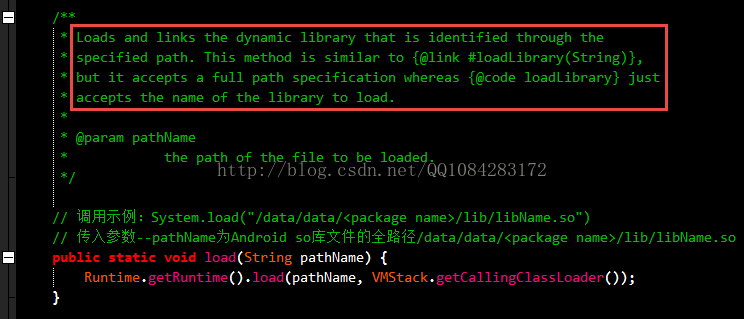
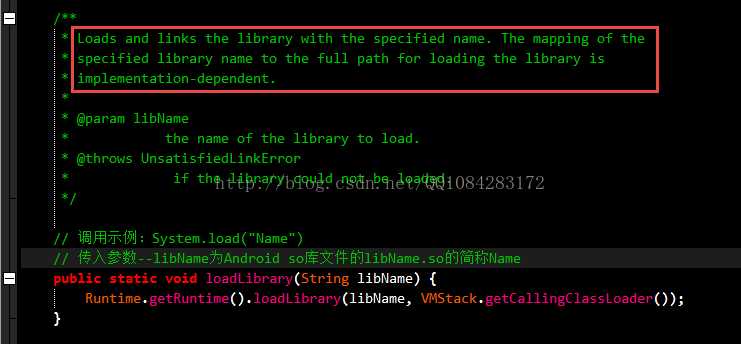
关于Android系统中System.loadLibrary函数和System.load函数的调用区别,可以参考System.loadLibrary函数和System.load函数的注释说明。System.loadLibrary函数调用传入的参数为Android so库文件的文件名称的约定简写,而System.load函数调用传入的参数为Android
so库文件的文件全路径,这就是调用的区别。
System.load函数的调用参数的说明:
System.loadLibrary函数的调用参数的说明:
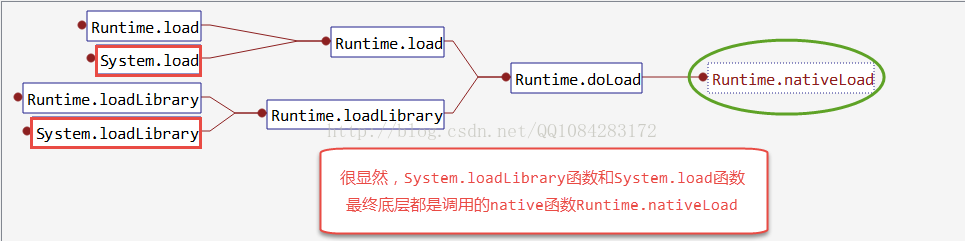
2.System.loadLibrary函数和System.load函数仅仅在调用参数上有一些区别(java层的代码实现上有一些差别),具体的底层函数实现是一样的,System.loadLibrary函数和System.load函数最终底层都是调用的Native函数Runtime.nativeLoad来实现。
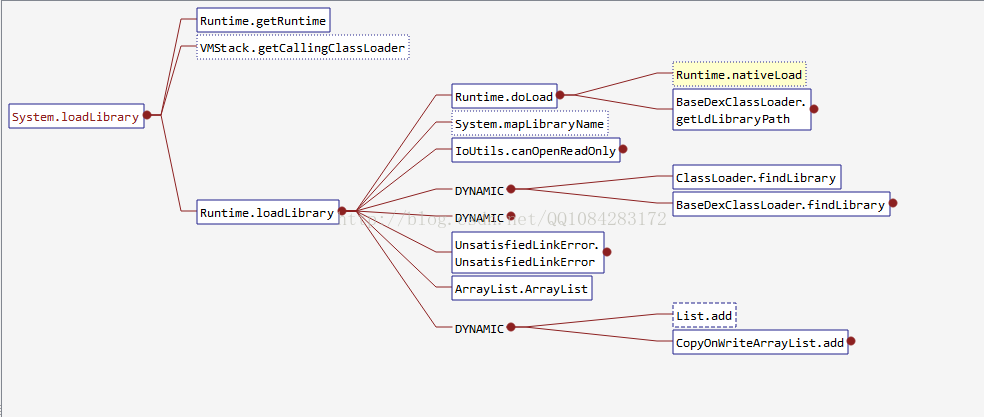
3.System.loadLibrary函数的java层代码实现的调用流程图,如下:
4.System.load函数的java层代码实现的调用流程图,如下:

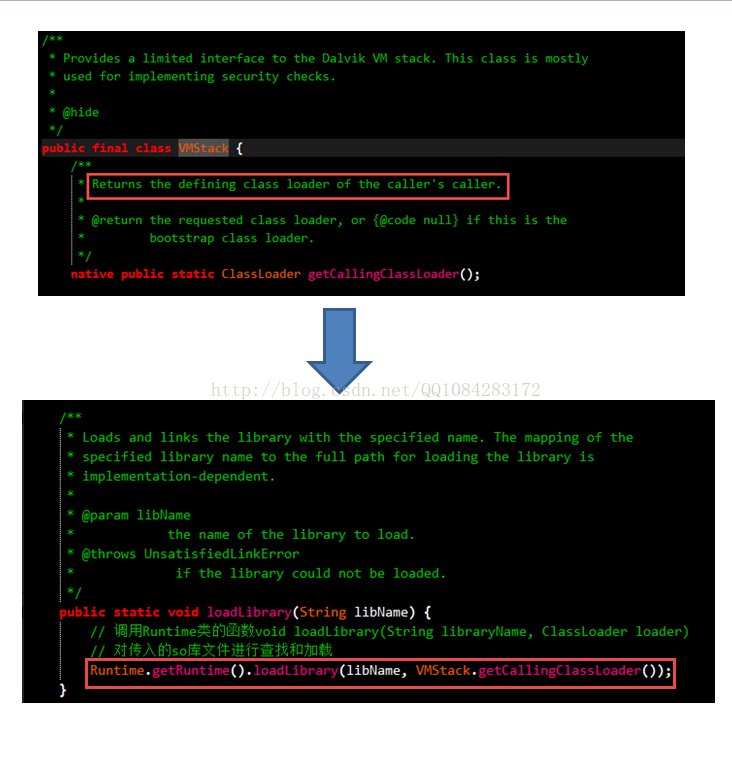
5.System.loadLibrary函数是在Android 4.4.4 r1源码的文件路径 /libcore/luni/src/main/java/java/lang/System.java 中实现的,在System.loadLibrary函数实现中调用Runtime类的函数getRuntime获取Runtime类的实例对象,调用类VMStack的Native函数getCallingClassLoader获取当前进程调用者的class
loader(类加载器),然后调用Runtime类的函数loadLibrary对so库文件进行查找和加载。
http://androidxref.com/4.4.4_r1/xref/libcore/luni/src/main/java/java/lang/System.java
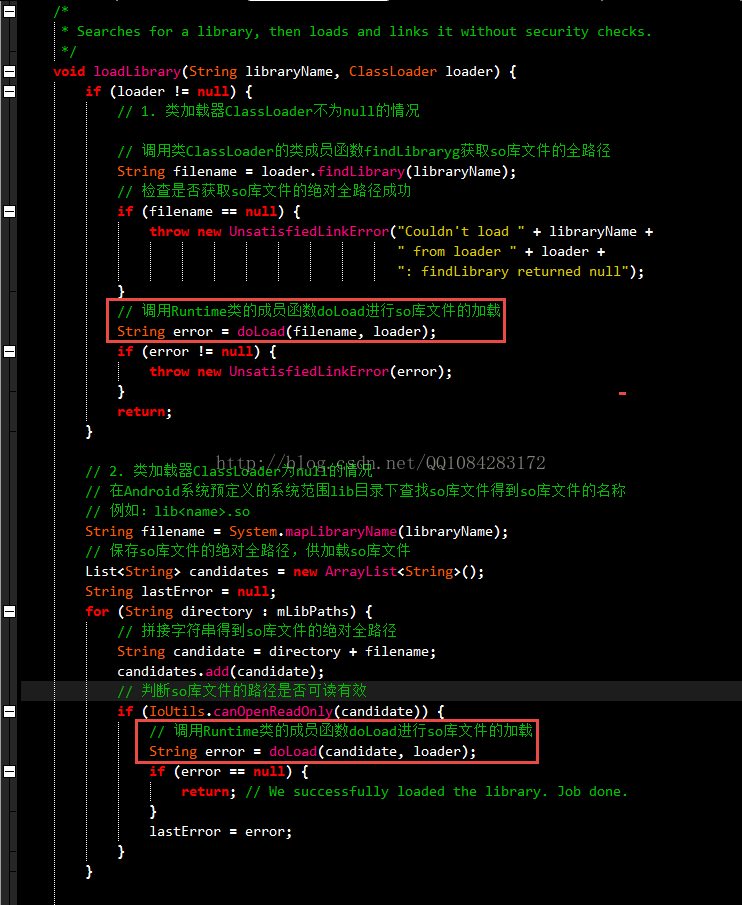
6.Runtime类的函数loadLibrary,在Android
4.4.4 r1源码的文件路径 /libcore/luni/src/main/java/java/lang/Runtime.java 中实现,比较深层的代码原理分析可以参考老罗的博客《Dalvik虚拟机JNI方法的注册过程分析》。Runtime类的函数loadLibrary实现中对于类加载器ClassLoader实例对象loader不为null的情况,调用loader的成员函数findLibrary获取需要加载so库文件的绝对路径,调用Runtime类的函数doLoad进行so库文件的加载;当类加载器ClassLoader实例对象loader为null的情况时,在Android系统预定义范围lib文件目录下进行so库文件的查找,查找需要加载的so库文件的名称如:lib<name>.so,则调用Runtime类的函数doLoad进行so库文件的加载;如果找不到该so库文件所在的文件路径再会抛出异常。
http://androidxref.com/4.4.4_r1/xref/libcore/luni/src/main/java/java/lang/Runtime.java
    /*

     * Searches for a library, then loads and links it without security checks.

     */

    void loadLibrary(String libraryName, ClassLoader loader) {

        if (loader != null) {

			// 1. 类加载器ClassLoader不为null的情况

			// 调用类ClassLoader的类成员函数findLibraryg获取so库文件的全路径

            String filename = loader.findLibrary(libraryName);

			// 检查是否获取so库文件的绝对全路径成功

            if (filename == null) {

                throw new UnsatisfiedLinkError("Couldn't load " + libraryName +

                                               " from loader " + loader +

                                               ": findLibrary returned null");

            }

			// 调用Runtime类的成员函数doLoad进行so库文件的加载

            String error = doLoad(filename, loader);

            if (error != null) {

                throw new UnsatisfiedLinkError(error);

            }

            return;

        }

		// 2. 类加载器ClassLoader为null的情况

		// 在Android系统预定义的系统范围lib目录下查找so库文件得到so库文件的名称

		// 例如:lib<name>.so

        String filename = System.mapLibraryName(libraryName);

		// 保存so库文件的绝对全路径,供加载so库文件

        List<String> candidates = new ArrayList<String>();

        String lastError = null;

        for (String directory : mLibPaths) {

			// 拼接字符串得到so库文件的绝对全路径

            String candidate = directory + filename;

            candidates.add(candidate);

			// 判断so库文件的路径是否可读有效

            if (IoUtils.canOpenReadOnly(candidate)) {

				// 调用Runtime类的成员函数doLoad进行so库文件的加载

                String error = doLoad(candidate, loader);

                if (error == null) {

                    return; // We successfully loaded the library. Job done.

                }

                lastError = error;

            }

        }

		// so库文件的文件路径查找或者so库文件加载出现错误的情况

        if (lastError != null) {

            throw new UnsatisfiedLinkError(lastError);

        }

        throw new UnsatisfiedLinkError("Library " + libraryName + " not found; tried " + candidates);

    }
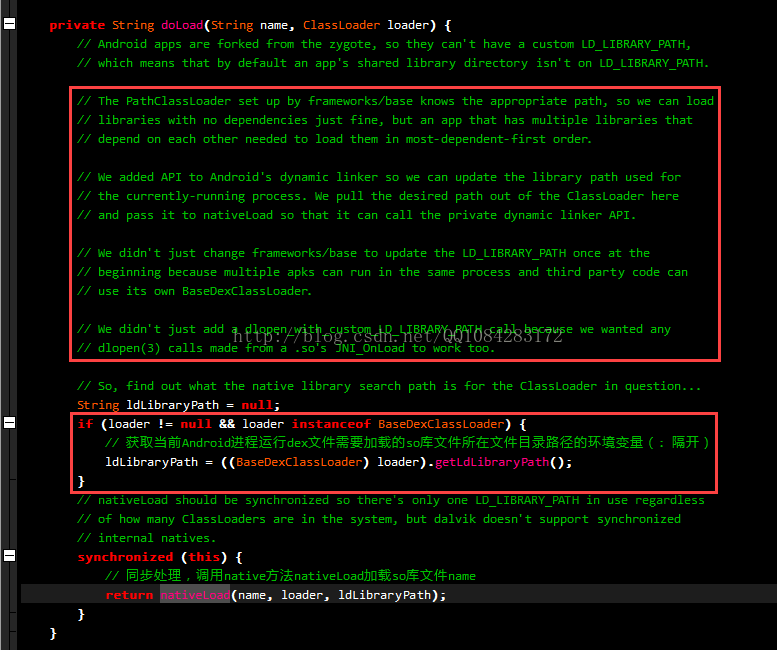
7.Runtime类的函数loadLibrary最终调用Runtime类的成员函数doLoad实现so库文件的加载,doLoad函数先调用ClassLoader的实例成员方法getLdLibraryPath获取当前Android进程运行所需要加载的so库文件的所有文件目录路径的环境变量列表(:隔开类似linux环境变量的字符串),并以此为传入参数之一调用Native函数nativeLoad对目标so库文件进行加载。
    private String doLoad(String name, ClassLoader loader) {

        // Android apps are forked from the zygote, so they can't have a custom LD_LIBRARY_PATH,

        // which means that by default an app's shared library directory isn't on LD_LIBRARY_PATH.

        // The PathClassLoader set up by frameworks/base knows the appropriate path, so we can load

        // libraries with no dependencies just fine, but an app that has multiple libraries that

        // depend on each other needed to load them in most-dependent-first order.

        // We added API to Android's dynamic linker so we can update the library path used for

        // the currently-running process. We pull the desired path out of the ClassLoader here

        // and pass it to nativeLoad so that it can call the private dynamic linker API.

        // We didn't just change frameworks/base to update the LD_LIBRARY_PATH once at the

        // beginning because multiple apks can run in the same process and third party code can

        // use its own BaseDexClassLoader.

        // We didn't just add a dlopen_with_custom_LD_LIBRARY_PATH call because we wanted any

        // dlopen(3) calls made from a .so's JNI_OnLoad to work too.

        // So, find out what the native library search path is for the ClassLoader in question...

        String ldLibraryPath = null;

        if (loader != null && loader instanceof BaseDexClassLoader) {

            // 获取当前Android进程运行dex文件需要加载的so库文件所在文件目录路径的环境变量(: 隔开)

            ldLibraryPath = ((BaseDexClassLoader) loader).getLdLibraryPath();

        }

        // nativeLoad should be synchronized so there's only one LD_LIBRARY_PATH in use regardless

        // of how many ClassLoaders are in the system, but dalvik doesn't support synchronized

        // internal natives.

        synchronized (this) {

            // 同步处理,调用native方法nativeLoad加载so库文件name

            return nativeLoad(name, loader, ldLibraryPath);

        }

    }
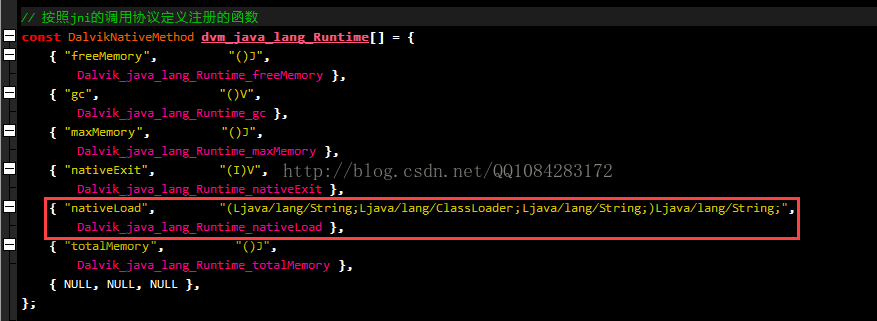
8.类Runtime的成员方法nativeLoad是Native函数,最终调用NDK编写的底层jni方法,并且当前Android进程所运行的虚拟机模式不同,Runtime.nativeLoad函数的实现也会有所差别。在Dalvik虚拟机模式下,Runtime.nativeLoad函数最终调用Android
4.4.4 r1 源码文件 /dalvik/vm/native/java_lang_Runtime.cpp 中的函数Dalvik_java_lang_Runtime_nativeLoad;Art虚拟机模式下,Runtime.nativeLoad函数最终调用的是Android
4.4.4 r1 源码文件 /art/runtime/native/java_lang_Runtime.cc 中的函数Runtime_nativeLoad。
http://androidxref.com/4.4.4_r1/xref/art/runtime/native/java_lang_Runtime.cc#95

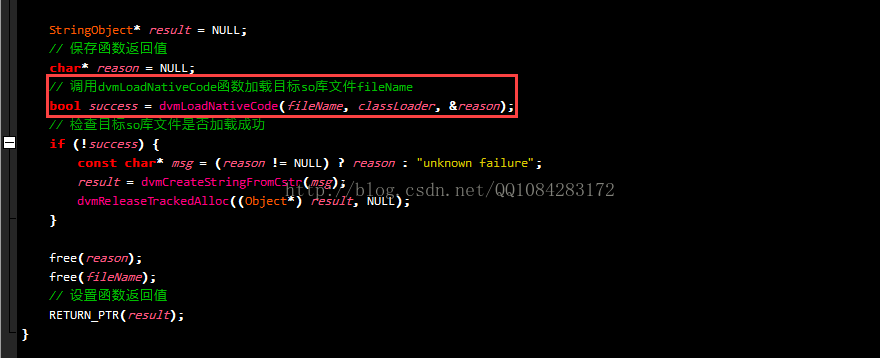
Dalvik虚拟机模式下,Runtime.nativeLoad函数的Native层实现。
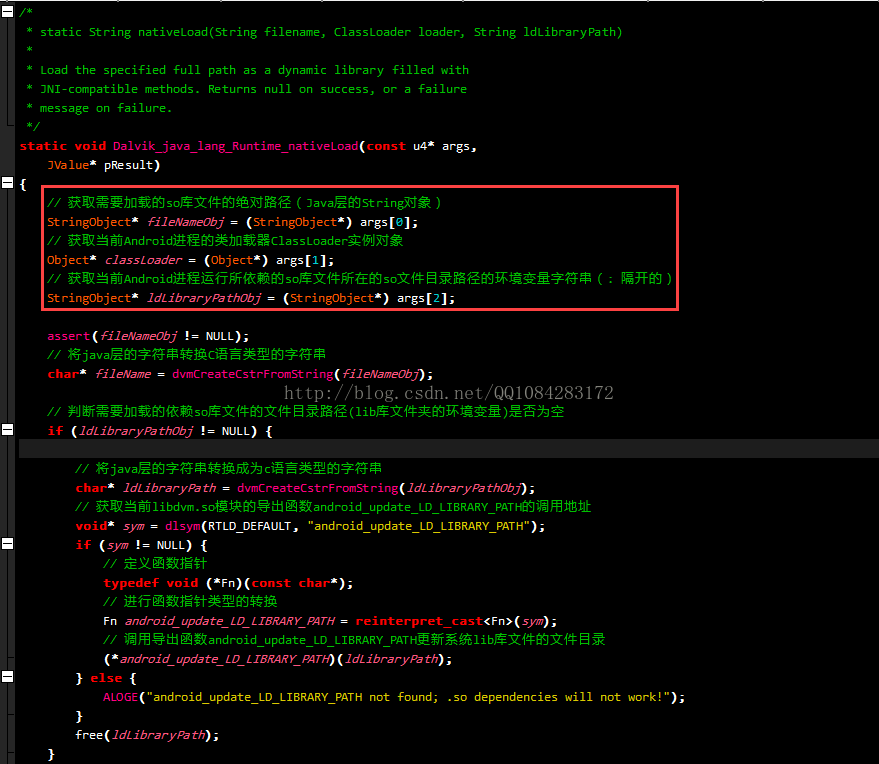
/*

 * static String nativeLoad(String filename, ClassLoader loader, String ldLibraryPath)

 *

 * Load the specified full path as a dynamic library filled with

 * JNI-compatible methods. Returns null on success, or a failure

 * message on failure.

 */

static void Dalvik_java_lang_Runtime_nativeLoad(const u4* args,

    JValue* pResult)

{

    // 获取需要加载的so库文件的绝对路径(Java层的String对象)

    StringObject* fileNameObj = (StringObject*) args[0];

    // 获取当前Android进程的类加载器ClassLoader实例对象

    Object* classLoader = (Object*) args[1];

    // 获取当前Android进程运行所依赖的so库文件所在的so文件目录路径的环境变量字符串(: 隔开的)

    StringObject* ldLibraryPathObj = (StringObject*) args[2];

    assert(fileNameObj != NULL);

    // 将java层的字符串转换C语言类型的字符串

    char* fileName = dvmCreateCstrFromString(fileNameObj);

    // 判断需要加载的依赖so库文件的文件目录路径(lib库文件夹的环境变量)是否为空

    if (ldLibraryPathObj != NULL) {

        // 将java层的字符串转换成为c语言类型的字符串

        char* ldLibraryPath = dvmCreateCstrFromString(ldLibraryPathObj);

        // 获取当前libdvm.so模块的导出函数android_update_LD_LIBRARY_PATH的调用地址

        void* sym = dlsym(RTLD_DEFAULT, "android_update_LD_LIBRARY_PATH");

        if (sym != NULL) {

            // 定义函数指针

            typedef void (*Fn)(const char*);

            // 进行函数指针类型的转换

            Fn android_update_LD_LIBRARY_PATH = reinterpret_cast<Fn>(sym);

            // 调用导出函数android_update_LD_LIBRARY_PATH更新系统lib库文件的文件目录

            (*android_update_LD_LIBRARY_PATH)(ldLibraryPath);

        } else {

            ALOGE("android_update_LD_LIBRARY_PATH not found; .so dependencies will not work!");

        }

        free(ldLibraryPath);

    }

    StringObject* result = NULL;

    // 保存函数返回值

    char* reason = NULL;

    // 调用dvmLoadNativeCode函数加载目标so库文件fileName

    bool success = dvmLoadNativeCode(fileName, classLoader, &reason);

    // 检查目标so库文件是否加载成功

    if (!success) {

        const char* msg = (reason != NULL) ? reason : "unknown failure";

        result = dvmCreateStringFromCstr(msg);

        dvmReleaseTrackedAlloc((Object*) result, NULL);

    }

    free(reason);

    free(fileName);

    // 设置函数返回值

    RETURN_PTR(result);

}
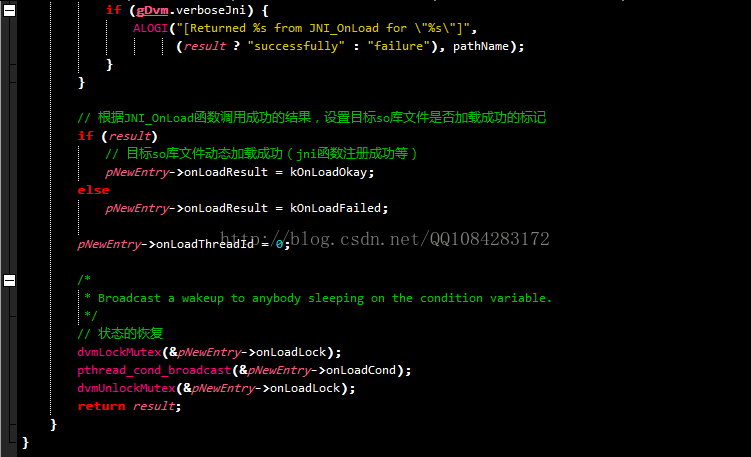
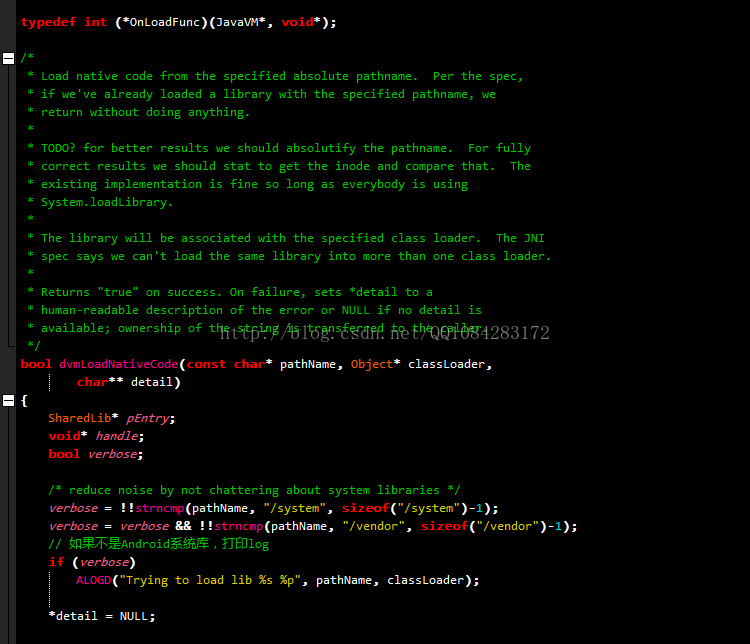
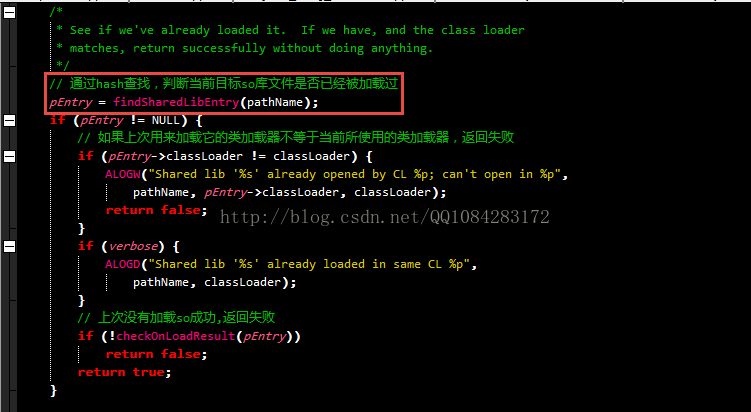
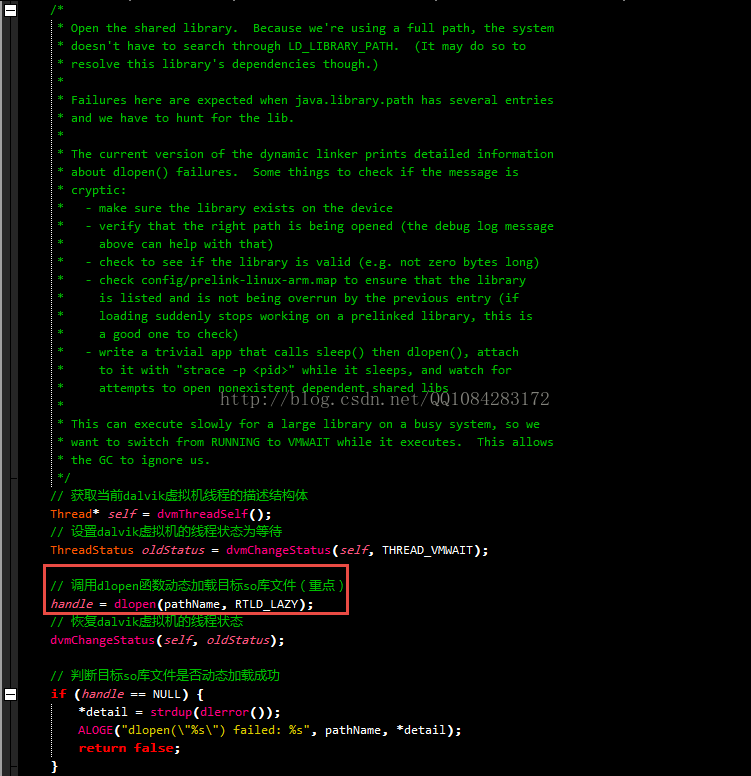
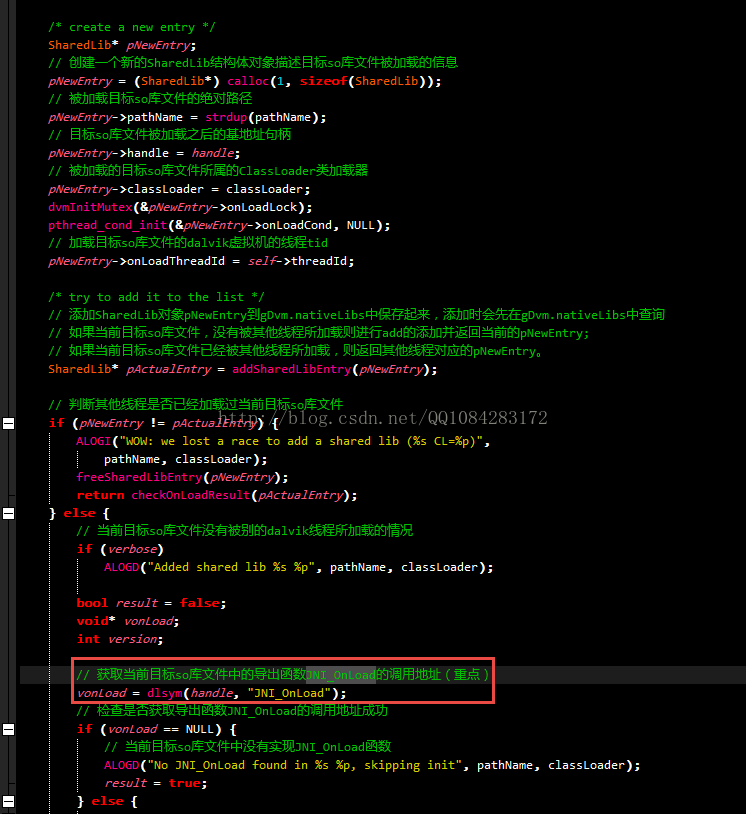
9.Android 4.4.4 r1 源码文件 /dalvik/vm/native/java_lang_Runtime.cpp 中的函数Dalvik_java_lang_Runtime_nativeLoad,最终调用源码文件 /dalvik/vm/Native.cpp 中的dvmLoadNativeCode函数,并函数dvmLoadNativeCode是libdvm.so库文件中的导出函数。dvmLoadNativeCode函数主要实现是先调用dlopen函数加载目标so库文件,然后调用目标so库文件中的导出函数JNI_OnLoad,实现jni函数的注册以及其他的初始化操作等。
http://androidxref.com/4.4.4_r1/xref/dalvik/vm/Native.cpp#318

typedef int (*OnLoadFunc)(JavaVM*, void*);

/*

 * Load native code from the specified absolute pathname.  Per the spec,

 * if we've already loaded a library with the specified pathname, we

 * return without doing anything.

 *

 * TODO? for better results we should absolutify the pathname.  For fully

 * correct results we should stat to get the inode and compare that.  The

 * existing implementation is fine so long as everybody is using

 * System.loadLibrary.

 *

 * The library will be associated with the specified class loader.  The JNI

 * spec says we can't load the same library into more than one class loader.

 *

 * Returns "true" on success. On failure, sets *detail to a

 * human-readable description of the error or NULL if no detail is

 * available; ownership of the string is transferred to the caller.

 */

bool dvmLoadNativeCode(const char* pathName, Object* classLoader,

        char** detail)

{

    SharedLib* pEntry;

    void* handle;

    bool verbose;

    /* reduce noise by not chattering about system libraries */

    verbose = !!strncmp(pathName, "/system", sizeof("/system")-1);

    verbose = verbose && !!strncmp(pathName, "/vendor", sizeof("/vendor")-1);

	// 如果不是Android系统库,打印log

    if (verbose)

        ALOGD("Trying to load lib %s %p", pathName, classLoader);

    *detail = NULL;

    /*

     * See if we've already loaded it.  If we have, and the class loader

     * matches, return successfully without doing anything.

     */

	// 通过hash查找,判断当前目标so库文件是否已经被加载过

    pEntry = findSharedLibEntry(pathName);

    if (pEntry != NULL) {

		// 如果上次用来加载它的类加载器不等于当前所使用的类加载器,返回失败

        if (pEntry->classLoader != classLoader) {

            ALOGW("Shared lib '%s' already opened by CL %p; can't open in %p",

                pathName, pEntry->classLoader, classLoader);

            return false;

        }

        if (verbose) {

            ALOGD("Shared lib '%s' already loaded in same CL %p",

                pathName, classLoader);

        }

		// 上次没有加载so成功,返回失败

        if (!checkOnLoadResult(pEntry))

            return false;

        return true;

    }

    /*

     * Open the shared library.  Because we're using a full path, the system

     * doesn't have to search through LD_LIBRARY_PATH.  (It may do so to

     * resolve this library's dependencies though.)

     *

     * Failures here are expected when java.library.path has several entries

     * and we have to hunt for the lib.

     *

     * The current version of the dynamic linker prints detailed information

     * about dlopen() failures.  Some things to check if the message is

     * cryptic:

     *   - make sure the library exists on the device

     *   - verify that the right path is being opened (the debug log message

     *     above can help with that)

     *   - check to see if the library is valid (e.g. not zero bytes long)

     *   - check config/prelink-linux-arm.map to ensure that the library

     *     is listed and is not being overrun by the previous entry (if

     *     loading suddenly stops working on a prelinked library, this is

     *     a good one to check)

     *   - write a trivial app that calls sleep() then dlopen(), attach

     *     to it with "strace -p <pid>" while it sleeps, and watch for

     *     attempts to open nonexistent dependent shared libs

     *

     * This can execute slowly for a large library on a busy system, so we

     * want to switch from RUNNING to VMWAIT while it executes.  This allows

     * the GC to ignore us.

     */

	// 获取当前dalvik虚拟机线程的描述结构体

    Thread* self = dvmThreadSelf();

	// 设置dalvik虚拟机的线程状态为等待

    ThreadStatus oldStatus = dvmChangeStatus(self, THREAD_VMWAIT);

	// 调用dlopen函数动态加载目标so库文件(重点)

    handle = dlopen(pathName, RTLD_LAZY);

	// 恢复dalvik虚拟机的线程状态

    dvmChangeStatus(self, oldStatus);

	// 判断目标so库文件是否动态加载成功

    if (handle == NULL) {

        *detail = strdup(dlerror());

        ALOGE("dlopen(\"%s\") failed: %s", pathName, *detail);

        return false;

    }

    /* create a new entry */

    SharedLib* pNewEntry;

	// 创建一个新的SharedLib结构体对象描述目标so库文件被加载的信息

    pNewEntry = (SharedLib*) calloc(1, sizeof(SharedLib));

	// 被加载目标so库文件的绝对路径

    pNewEntry->pathName = strdup(pathName);

	// 目标so库文件被加载之后的基地址句柄

    pNewEntry->handle = handle;

	// 被加载的目标so库文件所属的ClassLoader类加载器

    pNewEntry->classLoader = classLoader;

    dvmInitMutex(&pNewEntry->onLoadLock);

    pthread_cond_init(&pNewEntry->onLoadCond, NULL);

	// 加载目标so库文件的dalvik虚拟机的线程tid

    pNewEntry->onLoadThreadId = self->threadId;

    /* try to add it to the list */

	// 添加SharedLib对象pNewEntry到gDvm.nativeLibs中保存起来,添加时会先在gDvm.nativeLibs中查询

	// 如果当前目标so库文件,没有被其他线程所加载则进行add的添加并返回当前的pNewEntry;

	// 如果当前目标so库文件已经被其他线程所加载,则返回其他线程对应的pNewEntry。

    SharedLib* pActualEntry = addSharedLibEntry(pNewEntry);

	// 判断其他线程是否已经加载过当前目标so库文件

    if (pNewEntry != pActualEntry) {

        ALOGI("WOW: we lost a race to add a shared lib (%s CL=%p)",

            pathName, classLoader);

        freeSharedLibEntry(pNewEntry);

        return checkOnLoadResult(pActualEntry);

    } else {

		// 当前目标so库文件没有被别的dalvik线程所加载的情况

        if (verbose)

            ALOGD("Added shared lib %s %p", pathName, classLoader);

        bool result = false;

        void* vonLoad;

        int version;

		// 获取当前目标so库文件中的导出函数JNI_OnLoad的调用地址(重点)

        vonLoad = dlsym(handle, "JNI_OnLoad");

		// 检查是否获取导出函数JNI_OnLoad的调用地址成功

        if (vonLoad == NULL) {

			// 当前目标so库文件中没有实现JNI_OnLoad函数

            ALOGD("No JNI_OnLoad found in %s %p, skipping init", pathName, classLoader);

            result = true;

        } else {

            /*

             * Call JNI_OnLoad.  We have to override the current class

             * loader, which will always be "null" since the stuff at the

             * top of the stack is around Runtime.loadLibrary().  (See

             * the comments in the JNI FindClass function.)

             */

			// 进行函数指针类型的转换

            OnLoadFunc func = (OnLoadFunc)vonLoad;

			// 保存当前线程原来的classLoaderOverride

            Object* prevOverride = self->classLoaderOverride;

			// 暂时修改当前dalvik线程的classLoaderOverride

            self->classLoaderOverride = classLoader;

			// 修改当前dalvik虚拟机线程的状态

            oldStatus = dvmChangeStatus(self, THREAD_NATIVE);

            if (gDvm.verboseJni) {

                ALOGI("[Calling JNI_OnLoad for \"%s\"]", pathName);

            }

			// 调用JNI_OnLoad函数进行jni函数的注册等操作

            version = (*func)(gDvmJni.jniVm, NULL);

			// 恢复dalvik虚拟机线程的状态

            dvmChangeStatus(self, oldStatus);

			// 恢复dalvik虚拟机的classLoaderOverride

            self->classLoaderOverride = prevOverride;

			// 检查是否调用JNI_OnLoad函数成功

            if (version == JNI_ERR) {

                *detail = strdup(StringPrintf("JNI_ERR returned from JNI_OnLoad in \"%s\"",

                                              pathName).c_str());

            } else if (dvmIsBadJniVersion(version)) {

                *detail = strdup(StringPrintf("Bad JNI version returned from JNI_OnLoad in \"%s\": %d",

                                              pathName, version).c_str());

                /*

                 * It's unwise to call dlclose() here, but we can mark it

                 * as bad and ensure that future load attempts will fail.

                 *

                 * We don't know how far JNI_OnLoad got, so there could

                 * be some partially-initialized stuff accessible through

                 * newly-registered native method calls.  We could try to

                 * unregister them, but that doesn't seem worthwhile.

                 */

            } else {

				// 调用成功,设置标记

                result = true;

            }

            if (gDvm.verboseJni) {

                ALOGI("[Returned %s from JNI_OnLoad for \"%s\"]",

                      (result ? "successfully" : "failure"), pathName);

            }

        }

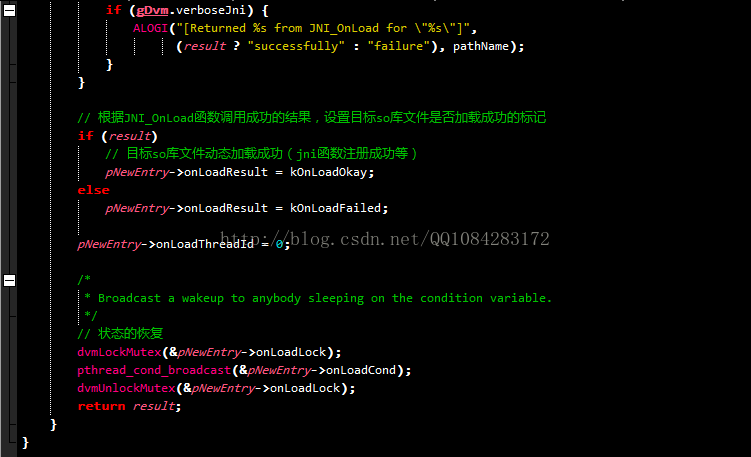
		// 根据JNI_OnLoad函数调用成功的结果,设置目标so库文件是否加载成功的标记

        if (result)

			// 目标so库文件动态加载成功(jni函数注册成功等)

            pNewEntry->onLoadResult = kOnLoadOkay;

        else

            pNewEntry->onLoadResult = kOnLoadFailed;

        pNewEntry->onLoadThreadId = 0;

        /*

         * Broadcast a wakeup to anybody sleeping on the condition variable.

         */

		// 状态的恢复

        dvmLockMutex(&pNewEntry->onLoadLock);

        pthread_cond_broadcast(&pNewEntry->onLoadCond);

        dvmUnlockMutex(&pNewEntry->onLoadLock);

        return result;

    }

}10.Dalvik模式下System.loadLibrary函数的执行流程基本分析完了,理解的不是很透彻,可以结合老罗的博客《Dalvik虚拟机JNI方法的注册过程分析》进行深入的学习。System.loadLibrary函数的执行流程中还有两个重点函数需要深入分析:dlopen函数动态加载so库文件,JNI_OnLoad函数调用,实现jni函数的注册,后面我再深入学习。
Dalvik模式下System.loadLibrary函数的执行流程分析的更多相关文章
- Dalvik模式下基于Android运行时类加载的函数dexFindClass脱壳
本文博客地址:http://blog.csdn.net/qq1084283172/article/details/78003184 前段时间在看雪论坛发现了<发现一个安卓万能脱壳方法>这篇 ...
- Android平台dalvik模式下java Hook框架ddi的分析(2)--dex文件的注入和调用
本文博客地址:http://blog.csdn.net/qq1084283172/article/details/77942585 前面的博客<Android平台dalvik模式下java Ho ...
- Android平台dalvik模式下java Hook框架ddi的分析(1)
本文博客地址:http://blog.csdn.net/qq1084283172/article/details/75710411 一.前 言 在前面的博客中已经学习了作者crmulliner编写的, ...
- 基于dalvik模式下的Xposed Hook开发的某加固脱壳工具
本文博客地址:http://blog.csdn.net/qq1084283172/article/details/77966109 这段时间好好的学习了一下Android加固相关的知识和流程也大致把A ...
- Dalvik模式下在Android so库文件.init段、.init_array段构造函数上下断点
本文博客地址:http://blog.csdn.net/qq1084283172/article/details/78244766 在前面的博客<在Android so文件的.init..ini ...
- 在Debug模式下中断, 在Release模式下跳出当前函数的断言
在Debug模式下中断, 在Release模式下跳出当前函数的断言 #ifdef DEBUG #define __breakPoint_on_debug asm("int3") # ...
- 报时机器人的rasa shell执行流程分析
本文以报时机器人为载体,介绍了报时机器人的对话能力范围.配置文件功能和训练和运行命令,重点介绍了rasa shell命令启动后的程序执行过程. 一.报时机器人项目结构 1.对话能力范围 (1)能够 ...
- 严格模式下顶层箭头函数this指向的是全局对象
我们知道普通函数调用,this在非严格模式下指向全局对象,在严格模式下是undefined.那箭头函数呢?我们知道,箭头函数没有自己的this,它的this是最近外层非箭头函数的this,那直接在顶层 ...
- Java基础毕向东day05 对象与对象的区别,匿名内部类,函数的执行流程。
1.Car c = new Car(); Car c2 = new Car(); 1> c 和 c2之间的区别? public static void main(String[] args) { ...
随机推荐
- 技术基础 | 在Apache Cassandra中改变VNodes数量的影响
Apache Cassandra中num_tokens的默认值在4.0版本中将会有变化!这看起来好像只是在CHANGES.txt文件中做了个小小的改动,但实际上这个改动将会对集群的日常运维有着深远的影 ...
- 面试常备,字符串三剑客 String、StringBuffer、StringBuilder
尽人事,听天命.博主东南大学硕士在读,热爱健身和篮球,乐于分享技术相关的所见所得,关注公众号 @ 飞天小牛肉,第一时间获取文章更新,成长的路上我们一起进步 本文已收录于 「CS-Wiki」Gitee ...
- java基础:变量、常量与作用域
变量就是可以变化的量,每个变量都必须声明其类型,Java 变量是程序中最基本的存储单元,其要素包括变量名,变量类型和作用域.作用域 类变量 实例变量 局部变量常量初始化后不能在改变值,不会变动的值,它 ...
- 你真的懂 i++ 和 ++i 吗?
对于 ++i 和 i++,许多人可能都知道,不就是先加1再取值,和先取值再加1嘛.然而,真的是这样吗?请先看以下4道题,能全部答对可以忽略这篇文章. 题目 // 示例1 int i = 1; i = ...
- P1090 合并果子(JAVA语言)
题目描述 在一个果园里,多多已经将所有的果子打了下来,而且按果子的不同种类分成了不同的堆.多多决定把所有的果子合成一堆. 每一次合并,多多可以把两堆果子合并到一起,消耗的体力等于两堆果子的重量之和.可 ...
- MVC中"删除"按钮无法实现
出现原因:MVC视图中定义了空的模板页 解决办法:删除模板页 或 改成定义页面标题都可以
- Codeforces-121C(逆康托展开)
题目大意: 给你两个数n,k求n的全排列的第k小,有多少满足如下条件的数: 首先定义一个幸运数字:只由4和7构成 对于排列p[i]满足i和p[i]都是幸运数字 思路: 对于n,k<=1e9 一眼 ...
- HarmonyOS三方件开发指南(16)-VideoCache 视频缓存
目录: 1.引言 2.功能介绍 3.VideoCache使用指南 4.VideoCache开发指南 5.<HarmonyOS三方件开发指南>系列文章合集 引言 对于视频播放器这个app大家 ...
- [模拟]P1047 校门外的树
校门外的树 题目描述 某校大门外长度为L的马路上有一排树,每两棵相邻的树之间的间隔都是1米.我们可以把马路看成一个数轴,马路的一端在数轴0的位置,另一端在L的位置:数轴上的每个整数点,即0,1,2,- ...
- element Notification 通知文字换行小技巧
this.$notify({ title: "通知", message: res.result, iconClass: "el-icon-bell",//自定义 ...