
java 图形化小工具Abstract Window Toolit 常用组件:对话框Dialog FileDialog
对话框
- (1),对话框通常依赖于其他窗口,就是通常有parent窗口。
- (2),对话框有非模式(non-model)和模式(modal)两种,模式(modal)方式当某个模式对话框被打开之后,该模式对话框总是位于它依赖的窗口之上:在模式对话框被关闭之前,它依赖的窗口无法获得焦点。

import java.awt.*;

import java.awt.event.ActionListener;

/**

 * @ClassName DialogTest

 * @projectName: object1

 * @author: Zhangmingda

 * @description: XXX

 * date: 2021/5/5.

 */

public class DialogTest {

    public static void main(String[] args) {

        Frame frame = new Frame("测试新对话框");

        Dialog dia1 = new Dialog(frame,"非模式对话框",false);

        dia1.setBounds(100,100,200,300);

        Dialog dia2 = new Dialog(frame,"模式对话框",true);

        dia2.setBounds(100,100,200,300);

        ActionListener btnClickListener = e -> {

            switch (e.getActionCommand()) {

                case "打开非模式对话框":

                    dia1.setVisible(true);

                    break;

                case "打开模式对话框":

                    dia2.setVisible(true);

                    break;

            }

        };

        Button btn1 = new Button("打开非模式对话框");

        btn1.addActionListener(btnClickListener);

        Button btn2 = new Button("打开模式对话框");

        btn2.addActionListener(btnClickListener);

        frame.setLocation(400,300);

        frame.add(btn1);frame.add(btn2,BorderLayout.SOUTH);

        frame.pack();

        frame.setVisible(true);

    }

}
import java.awt.*;

import java.io.*;

/**

 * @ClassName FileDialogTest

 * @projectName: object1

 * @author: Zhangmingda

 * @description: XXX

 * date: 2021/5/6.

 */

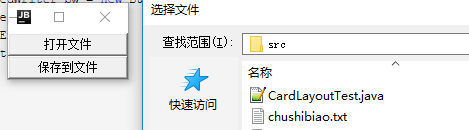
public class FileDialogTest {

    public static void main(String[] args) {

        Frame frame = new Frame("打开/保存文件窗口");

        Button openFileButton = new Button("打开文件");

        Button saveFileButton = new Button("保存到文件");

        //选择文件对话框

        FileDialog openFileDialog = new FileDialog(frame,"选择文件",FileDialog.LOAD);

        //保存文件对话框

        FileDialog saveFileDialog = new FileDialog(frame,"保存文件",FileDialog.SAVE);

        //打开文件对话框事件

        StringBuffer sb = new StringBuffer(); //读取文件存放字符数据的变量

        openFileButton.addActionListener(e ->{

            openFileDialog.setVisible(true);

            String openFilePath = openFileDialog.getDirectory() + openFileDialog.getFile();

            //用字符流、缓冲流方式打开读取文件,存放为String字符串变量中

            try(BufferedReader br = new BufferedReader(new FileReader(openFilePath))) {

                String line = null;

                while ((line = br.readLine()) != null){

                    sb.append(line + "\n");

                }

                System.out.println(sb);

            } catch (FileNotFoundException ex) {

                ex.printStackTrace();

            } catch (IOException ex) {

                ex.printStackTrace();

            }

        });

        //保存文件对话框事件

        saveFileButton.addActionListener(e ->{

            saveFileDialog.setVisible(true);

            String saveFilePath = saveFileDialog.getDirectory() + saveFileDialog.getFile();

            System.out.println(saveFilePath);

            if (sb.length() != 0){

                try (BufferedWriter bw = new BufferedWriter(new FileWriter(saveFilePath))){

                    bw.write(sb.toString());

                } catch (IOException ex) {

                    ex.printStackTrace();

                }

            }

        });

        frame.add(openFileButton);frame.add(saveFileButton,BorderLayout.SOUTH);

        frame.setLocation(400,300);

        frame.pack();

        frame.setVisible(true);

    }

}
teacher版本:原子化操作变量
AtomicReference<String> fileContent = new AtomicReference<>();
import java.awt.*;

import java.io.*;

import java.util.concurrent.atomic.AtomicReference;

/**

 * @ClassName FileDialogTest

 * @projectName: object1

 * @author: Zhangmingda

 * @description: XXX

 * date: 2021/5/6.

 */

public class FileDialogTestTeacher {

    public static void main(String[] args) {

        Frame frame = new Frame("打开/保存文件窗口");

        Button openFileButton = new Button("打开文件");

        Button saveFileButton = new Button("保存到文件");

        //选择文件对话框

        FileDialog openFileDialog = new FileDialog(frame,"选择文件",FileDialog.LOAD);

        //保存文件对话框

        FileDialog saveFileDialog = new FileDialog(frame,"保存文件",FileDialog.SAVE);

        //打开文件对话框事件

        AtomicReference<String> fileContent = new AtomicReference<>();

        openFileButton.addActionListener(e ->{

            openFileDialog.setVisible(true);

            String openFilePath = openFileDialog.getDirectory() + openFileDialog.getFile();

            //用字符流、缓冲流方式打开读取文件,存放为String字符串变量中

            StringBuffer sb = new StringBuffer(); //读取文件存放字符数据的变量

            try(BufferedReader br = new BufferedReader(new FileReader(openFilePath))) {

                String line = null;

                while ((line = br.readLine()) != null){

                    sb.append(line + "\n");

                }

                System.out.println(sb);

                fileContent.set(sb.toString());

            } catch (FileNotFoundException ex) {

                ex.printStackTrace();

            } catch (IOException ex) {

                ex.printStackTrace();

            }

        });

        //保存文件对话框事件

        saveFileButton.addActionListener(e ->{

            saveFileDialog.setVisible(true);

            String saveFilePath = saveFileDialog.getDirectory() + saveFileDialog.getFile();

            System.out.println(saveFilePath);

            if (fileContent.get() != null){

                try (BufferedWriter bw = new BufferedWriter(new FileWriter(saveFilePath))){

                    bw.write(fileContent.get());

                } catch (IOException ex) {

                    ex.printStackTrace();

                }

            }

            else {

                System.out.println("您还没有打开/读取文件内容");

            }

        });

        frame.add(openFileButton);frame.add(saveFileButton,BorderLayout.SOUTH);

        frame.setLocation(400,300);

        frame.pack();

        frame.setVisible(true);

    }

}
java 图形化小工具Abstract Window Toolit 常用组件:对话框Dialog FileDialog的更多相关文章
- java 图形化小工具Abstract Window Toolit 常用组件
基本组件 Button: 按钮,可接受单击操作 Canvas: 用于绘图的画布 Checkbox: 复选框组(也可变成单选框组件) CheckboxGroup: 用于将多个checkbox组件组合成一 ...
- java 图形化小工具Abstract Window Toolit
老掉牙的历史 Java1.0在发布的时候,就为我们提供了GUI操作的库,这个库系统在所有的平台下都可以运行,这套基本的类库被称作抽象窗口工具集(Abstract Window Toolit),简称 ...
- java 图形化小工具Abstract Window Toolit 事件处理
事件处理设计到了三个对象: EventSource(事件源):事件发生的场所,通常就是各个组件,例如按钮.窗口,菜单等. Event (事件封装了GUI组件上发生的特定事情(通常就是一次用户操作).如 ...
- java 图形化小工具Abstract Window Toolit :画笔Graphics,画布Canvas(),弹球小游戏
画笔Graphics Java中提供了Graphics类,他是一个抽象的画笔,可以在Canvas组件(画布)上绘制丰富多彩的几何图和位图. Graphics常用的画图方法如下: drawLine(): ...
- java 图形化小工具Abstract Window Toolit ImageIO缩放图片,添加水印
实现步骤: 读取图像Image src = ImageIO.read 创建目标图像BufferedImage distImage = new BufferedImage(dstWidth, dstHe ...
- java 图形化小工具Abstract Window Toolit 画笔 处理位图
具体编程来处理位图 知识点: 实现逻辑: 画板上的图片 new BufferedImage(canvasWidth,canvasHeight,BufferedImage.TYPE_INT_BGR); ...
- java 图形化小工具Abstract Window Toolit 菜单项
AWT 中的菜单由如下几个类组合而成 MenuBar: 菜单条,菜单的容器. Menu: 菜单组件,菜单项的容器,它也是Menultem的子类,所以可作为菜单项使用. PopupMenu: 上下文菜单 ...
- java 图形化小工具Abstract Window Toolit ;布局管理器FlowLayout流式布局;BorderLayout边界布局;GridLayout网格布局;CardLayou重叠卡片布局;BoxLayout方框布局;绝对定位
1.FlowLayout流式布局管理器: FlowLayout布局管理器中,组件像水流一样向某方向流动(排列),遇到障碍(边界)就折回,重头开始排列 .在默认情况下,FlowLayout局管理器从左向 ...
- 转:二十七、Java图形化界面设计——容器(JFrame)
转:http://blog.csdn.net/liujun13579/article/details/7756729 二十七.Java图形化界面设计——容器(JFrame) 程序是为了方便用户使用的, ...
随机推荐
- 『学了就忘』Linux用户管理 — 52、用户组管理相关命令
目录 1.添加用户组 2.删除用户组 3.把用户添加进组或从组中删除 4.有效组(了解) 1.添加用户组 添加用户组的命令是groupadd. 命令格式如下: [root@localhost ~]# ...
- Sentry 监控 - Snuba 数据中台架构(编写和测试 Snuba 查询)
系列 1 分钟快速使用 Docker 上手最新版 Sentry-CLI - 创建版本 快速使用 Docker 上手 Sentry-CLI - 30 秒上手 Source Maps Sentry For ...
- nginx配置8081端口异常
1.为nginx配置8081端口,结果nginx报错. (nginx配置8081端口监听,通过查看日志,出现nginx: [emerg] bind() to 0.0.0.0:8081 failed ( ...
- Linux——基础命令用法(上)
一.Linux基础命令 1.Linux命令行的格式 命令行的格式为:用户名+主机名+当前工作目录 输入内容的命令格式为:命令 [-短选项/--长选项] [参数] [root@localhost ~]# ...
- [spring-core]作用域
本文试图从原理上讲解Spring IoC容器的作用域机制,建议对着源码阅读,事半功倍. 0 引入问题 当我们谈到Spring作用域的时候,自然而然会想到如下作用域(来自spring-core官方文档) ...
- 矩阵树定理&BEST定理学习笔记
终于学到这个了,本来准备省选前学来着的? 前置知识:矩阵行列式 矩阵树定理 矩阵树定理说的大概就是这样一件事:对于一张无向图 \(G\),我们记 \(D\) 为其度数矩阵,满足 \(D_{i,i}=\ ...
- [ARC 122]
最近状态差到爆炸. \(AT\)连掉两把分,啥时候能上黄啊. \(A\) 考虑直接动归. 把\(O(n^2)\)的动归后缀和优化成\(O(n)\) A #include<iostream> ...
- chmod文件权限分配问题
一. 文件(文件夹)的权限问题 一个文件或者文件夹,使用它的人有三类:root.当前用户和其他用户,例如,我们可以通过 ls -l xxx.xxx 来查看文件 "xxx.xxx" ...
- ubuntu 常用指令
1.进入到root权限的指令 sudo su,效果同su,只是不需要root的密码,而需要当前用户的密码.(亲测有效) 2.从root权限里面退出到 普通用户模式 exit---指令亲测有效 3.下载 ...
- Redis | 第11章 服务器的复制《Redis设计与实现》
目录 前言 1. 旧版复制功能的实现 1.1 同步与命令传播 1.2 旧版复制功能的缺陷 2. 新版复制功能的实现 2.1 部分重同步的实现原理 3. PSYNC 命令的实现 4. 复制的详细步骤 4 ...