
java 图形化小工具Abstract Window Toolit 常用组件:对话框Dialog FileDialog
对话框
- (1),对话框通常依赖于其他窗口,就是通常有parent窗口。
- (2),对话框有非模式(non-model)和模式(modal)两种,模式(modal)方式当某个模式对话框被打开之后,该模式对话框总是位于它依赖的窗口之上:在模式对话框被关闭之前,它依赖的窗口无法获得焦点。

import java.awt.*;

import java.awt.event.ActionListener;

/**

 * @ClassName DialogTest

 * @projectName: object1

 * @author: Zhangmingda

 * @description: XXX

 * date: 2021/5/5.

 */

public class DialogTest {

    public static void main(String[] args) {

        Frame frame = new Frame("测试新对话框");

        Dialog dia1 = new Dialog(frame,"非模式对话框",false);

        dia1.setBounds(100,100,200,300);

        Dialog dia2 = new Dialog(frame,"模式对话框",true);

        dia2.setBounds(100,100,200,300);

        ActionListener btnClickListener = e -> {

            switch (e.getActionCommand()) {

                case "打开非模式对话框":

                    dia1.setVisible(true);

                    break;

                case "打开模式对话框":

                    dia2.setVisible(true);

                    break;

            }

        };

        Button btn1 = new Button("打开非模式对话框");

        btn1.addActionListener(btnClickListener);

        Button btn2 = new Button("打开模式对话框");

        btn2.addActionListener(btnClickListener);

        frame.setLocation(400,300);

        frame.add(btn1);frame.add(btn2,BorderLayout.SOUTH);

        frame.pack();

        frame.setVisible(true);

    }

}
import java.awt.*;

import java.io.*;

/**

 * @ClassName FileDialogTest

 * @projectName: object1

 * @author: Zhangmingda

 * @description: XXX

 * date: 2021/5/6.

 */

public class FileDialogTest {

    public static void main(String[] args) {

        Frame frame = new Frame("打开/保存文件窗口");

        Button openFileButton = new Button("打开文件");

        Button saveFileButton = new Button("保存到文件");

        //选择文件对话框

        FileDialog openFileDialog = new FileDialog(frame,"选择文件",FileDialog.LOAD);

        //保存文件对话框

        FileDialog saveFileDialog = new FileDialog(frame,"保存文件",FileDialog.SAVE);

        //打开文件对话框事件

        StringBuffer sb = new StringBuffer(); //读取文件存放字符数据的变量

        openFileButton.addActionListener(e ->{

            openFileDialog.setVisible(true);

            String openFilePath = openFileDialog.getDirectory() + openFileDialog.getFile();

            //用字符流、缓冲流方式打开读取文件,存放为String字符串变量中

            try(BufferedReader br = new BufferedReader(new FileReader(openFilePath))) {

                String line = null;

                while ((line = br.readLine()) != null){

                    sb.append(line + "\n");

                }

                System.out.println(sb);

            } catch (FileNotFoundException ex) {

                ex.printStackTrace();

            } catch (IOException ex) {

                ex.printStackTrace();

            }

        });

        //保存文件对话框事件

        saveFileButton.addActionListener(e ->{

            saveFileDialog.setVisible(true);

            String saveFilePath = saveFileDialog.getDirectory() + saveFileDialog.getFile();

            System.out.println(saveFilePath);

            if (sb.length() != 0){

                try (BufferedWriter bw = new BufferedWriter(new FileWriter(saveFilePath))){

                    bw.write(sb.toString());

                } catch (IOException ex) {

                    ex.printStackTrace();

                }

            }

        });

        frame.add(openFileButton);frame.add(saveFileButton,BorderLayout.SOUTH);

        frame.setLocation(400,300);

        frame.pack();

        frame.setVisible(true);

    }

}
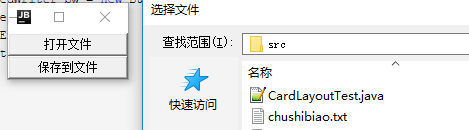
teacher版本:原子化操作变量
AtomicReference<String> fileContent = new AtomicReference<>();
import java.awt.*;

import java.io.*;

import java.util.concurrent.atomic.AtomicReference;

/**

 * @ClassName FileDialogTest

 * @projectName: object1

 * @author: Zhangmingda

 * @description: XXX

 * date: 2021/5/6.

 */

public class FileDialogTestTeacher {

    public static void main(String[] args) {

        Frame frame = new Frame("打开/保存文件窗口");

        Button openFileButton = new Button("打开文件");

        Button saveFileButton = new Button("保存到文件");

        //选择文件对话框

        FileDialog openFileDialog = new FileDialog(frame,"选择文件",FileDialog.LOAD);

        //保存文件对话框

        FileDialog saveFileDialog = new FileDialog(frame,"保存文件",FileDialog.SAVE);

        //打开文件对话框事件

        AtomicReference<String> fileContent = new AtomicReference<>();

        openFileButton.addActionListener(e ->{

            openFileDialog.setVisible(true);

            String openFilePath = openFileDialog.getDirectory() + openFileDialog.getFile();

            //用字符流、缓冲流方式打开读取文件,存放为String字符串变量中

            StringBuffer sb = new StringBuffer(); //读取文件存放字符数据的变量

            try(BufferedReader br = new BufferedReader(new FileReader(openFilePath))) {

                String line = null;

                while ((line = br.readLine()) != null){

                    sb.append(line + "\n");

                }

                System.out.println(sb);

                fileContent.set(sb.toString());

            } catch (FileNotFoundException ex) {

                ex.printStackTrace();

            } catch (IOException ex) {

                ex.printStackTrace();

            }

        });

        //保存文件对话框事件

        saveFileButton.addActionListener(e ->{

            saveFileDialog.setVisible(true);

            String saveFilePath = saveFileDialog.getDirectory() + saveFileDialog.getFile();

            System.out.println(saveFilePath);

            if (fileContent.get() != null){

                try (BufferedWriter bw = new BufferedWriter(new FileWriter(saveFilePath))){

                    bw.write(fileContent.get());

                } catch (IOException ex) {

                    ex.printStackTrace();

                }

            }

            else {

                System.out.println("您还没有打开/读取文件内容");

            }

        });

        frame.add(openFileButton);frame.add(saveFileButton,BorderLayout.SOUTH);

        frame.setLocation(400,300);

        frame.pack();

        frame.setVisible(true);

    }

}
java 图形化小工具Abstract Window Toolit 常用组件:对话框Dialog FileDialog的更多相关文章
- java 图形化小工具Abstract Window Toolit 常用组件
基本组件 Button: 按钮,可接受单击操作 Canvas: 用于绘图的画布 Checkbox: 复选框组(也可变成单选框组件) CheckboxGroup: 用于将多个checkbox组件组合成一 ...
- java 图形化小工具Abstract Window Toolit
老掉牙的历史 Java1.0在发布的时候,就为我们提供了GUI操作的库,这个库系统在所有的平台下都可以运行,这套基本的类库被称作抽象窗口工具集(Abstract Window Toolit),简称 ...
- java 图形化小工具Abstract Window Toolit 事件处理
事件处理设计到了三个对象: EventSource(事件源):事件发生的场所,通常就是各个组件,例如按钮.窗口,菜单等. Event (事件封装了GUI组件上发生的特定事情(通常就是一次用户操作).如 ...
- java 图形化小工具Abstract Window Toolit :画笔Graphics,画布Canvas(),弹球小游戏
画笔Graphics Java中提供了Graphics类,他是一个抽象的画笔,可以在Canvas组件(画布)上绘制丰富多彩的几何图和位图. Graphics常用的画图方法如下: drawLine(): ...
- java 图形化小工具Abstract Window Toolit ImageIO缩放图片,添加水印
实现步骤: 读取图像Image src = ImageIO.read 创建目标图像BufferedImage distImage = new BufferedImage(dstWidth, dstHe ...
- java 图形化小工具Abstract Window Toolit 画笔 处理位图
具体编程来处理位图 知识点: 实现逻辑: 画板上的图片 new BufferedImage(canvasWidth,canvasHeight,BufferedImage.TYPE_INT_BGR); ...
- java 图形化小工具Abstract Window Toolit 菜单项
AWT 中的菜单由如下几个类组合而成 MenuBar: 菜单条,菜单的容器. Menu: 菜单组件,菜单项的容器,它也是Menultem的子类,所以可作为菜单项使用. PopupMenu: 上下文菜单 ...
- java 图形化小工具Abstract Window Toolit ;布局管理器FlowLayout流式布局;BorderLayout边界布局;GridLayout网格布局;CardLayou重叠卡片布局;BoxLayout方框布局;绝对定位
1.FlowLayout流式布局管理器: FlowLayout布局管理器中,组件像水流一样向某方向流动(排列),遇到障碍(边界)就折回,重头开始排列 .在默认情况下,FlowLayout局管理器从左向 ...
- 转:二十七、Java图形化界面设计——容器(JFrame)
转:http://blog.csdn.net/liujun13579/article/details/7756729 二十七.Java图形化界面设计——容器(JFrame) 程序是为了方便用户使用的, ...
随机推荐
- idea内存配置
找到IDEA安装的bin目录 打开idea.exe.vmoptions 文件 如果嫌麻烦还打开了idea 那么就可以点击这个.. 关键的三个参数的说明 1. -Xms 是最小启动内存参数 2. -X ...
- 随笔:关于.net core单文件AOT编译
.Net Core单文件发布已经很流畅了(vs已支持图形化操作发布). 但类似Go或者Graalvm JDK的完全事前编译为本地机器码的红能功能,还未发布于.net 6特性中,还处于实验室中. 另外, ...
- 分布式多任务学习论文阅读(四):去偏lasso实现高效通信
1.难点-如何实现高效的通信 我们考虑下列的多任务优化问题: \[ \underset{\textbf{W}}{\min} \sum_{t=1}^{T} [\frac{1}{m_t}\sum_{i=1 ...
- Go语言核心36讲(Go语言实战与应用二十)--学习笔记
42 | bufio包中的数据类型 (上) 今天,我们来讲另一个与 I/O 操作强相关的代码包bufio.bufio是"buffered I/O"的缩写.顾名思义,这个代码包中的程 ...
- R语言与医学统计图形-【9】过渡函数qplot
ggplot2绘图系统 基础绘图包向ggplot2过渡--qplot 绘图理念的不同: 基础绘图包是先铺好画布,再在这张画布上作图(常规思维): ggplot2打破常规,采用图层叠加的方法. qplo ...
- R语言与医学统计图形-【12】ggplot2几何对象之条图
ggplot2绘图系统--几何对象之条图(包括误差条图) 1.条图 格式: geom_bar(mapping = , data = , stat = 'count', #统计变换默认计数 positi ...
- 毕业设计之mysql+主从复制+keepalived
环境介绍 mysql_VIP:192.168.111.123 mysql_M!:192.168.111.151 mysql_M2:192.168.111.152 安装mysql可以查看 两个数据库都需 ...
- C语言 自定义函数按行读入文件2
再改进下上次的读入一行函数,利用zlib库的gzgtec函数读取文件,动态分配内存,最后没有多出空行. 1 #include <stdio.h> 2 #include <stdlib ...
- Linux搭建rsync备份服务器备份
环境: 1台rsync备份服务器,IP:10.0.0.188 1台rsync备份客户端,IP:10.0.0.51 备份数据需注意: 1. 在业务低谷时间进行备份 2. 进行备份限速 一.搭建rsync ...
- 【模板】单源最短路径(Dijkstra)/洛谷P4779
题目链接 https://www.luogu.com.cn/problem/P4779 题目大意 给定一个 \(n\) 个点 \(m\) 条边有向图,每个点有一个非负权值,求从 \(s\) 点出发,到 ...