
Git中使用.gitignore忽略文件的推送
转载自:https://blog.csdn.net/lk142500/article/details/82869018
windows下可以用另存为生成gitignore 文件
1 简介
在使用Git管理自己的代码版本时,由于编译生成的中间文件,Git使用SHA-1算法来对文件进行加密,进而得出来一个40位的十六进制加密字符串。
325525d8b1f67b5ddd37956a8a728fd26c4ba5ce
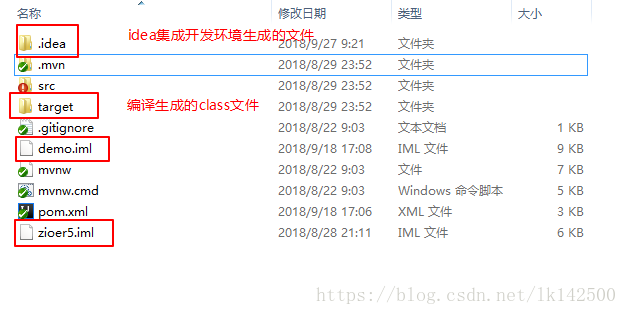
但这种算法对于文本文件有效,对于二进制之类的文件则无法正常的进行加密。因此Git版本管理多管理文本文件,而非二进制之类的文件,例如obj文件、.class文件,,并且一些敏感文件和临时文件、日志文件是不能上传到Git远程仓库中的。在Git中提供了.gitignore文件,可以制定自己忽略文件。比如说使用IDEA集成开发环境编写一个项目,在项目根路径下,文件结构如下:
在上图中,由IDEA开发的项目的目录结构如上图所示,其中target目录存放的是项目编译产生的文件,而.idea目录则是特定于IDEA集成开发环境的文件。demo.iml文件也不需要上传到Git。
2 Git忽略文件提交方法
由于作者在撰写本文时使用IDEA开发,因此以忽略某些IDEA开发环境的特定文件做例子演示
2.1 在Git项目中定义 .gitignore 文件
2.1.1 初始化git仓库
首先打开Git Bash,并且切换到demo根目录,执行git init让git管理该目录。
$ ls -la

total 48

drwxr-xr-x 1 全恒 197609    0 9月  27 09:44 ./

drwxr-xr-x 1 全恒 197609    0 9月  27 09:45 ../

drwxr-xr-x 1 全恒 197609    0 9月  27 09:38 .idea/

drwxr-xr-x 1 全恒 197609    0 8月  29 23:52 .mvn/

-rw-r--r-- 1 全恒 197609 8205 9月  18 17:08 demo.iml

-rwxr-xr-x 1 全恒 197609 6468 8月  22 09:03 mvnw*

-rw-r--r-- 1 全恒 197609 4994 8月  22 09:03 mvnw.cmd

-rw-r--r-- 1 全恒 197609 2707 9月  18 17:06 pom.xml

drwxr-xr-x 1 全恒 197609    0 8月  29 23:52 src/

drwxr-xr-x 1 全恒 197609    0 8月  29 23:52 target/

-rw-r--r-- 1 全恒 197609 5162 8月  28 21:11 zioer5.iml

全恒@Lenovo-PC MINGW64 /d/Git/demo/demo

$ git init

Initialized empty Git repository in D:/Git/demo/demo/.git/
2.1.2 添加远端仓库路径
添加远端仓库,在GitHub上建立repository,demo。拷贝远程仓库目录:
git@github.com:yanchenmochen/demo.git
- 1
在demo目录执行命令如下:
全恒@Lenovo-PC MINGW64 /d/Git/demo/demo (master)

$ git remote add origin git@github.com:yanchenmochen/demo.git

全恒@Lenovo-PC MINGW64 /d/Git/demo/demo (master)

$ git remote -v

origin  git@github.com:yanchenmochen/demo.git (fetch)

origin  git@github.com:yanchenmochen/demo.git (push)
然后执行git add .,和执行git commit –m “first commit”,表示该项目的所有文件均被git管理。
2.1.3 新建.gitignore配置文件
在当前目录生成文件.gitignore,并在其中添加要忽略的文件或目录,每行表示一个忽略规则。
全恒@Lenovo-PC MINGW64 /d/Git/demo/demo (master)

$ vim .gitignore

全恒@Lenovo-PC MINGW64 /d/Git/demo/demo (master)

$ cat .git

.git/       .gitignore

全恒@Lenovo-PC MINGW64 /d/Git/demo/demo (master)

$ cat .gitignore

target/

*.iml

.idea/
2.1.4 git管理.gitignore
在上述的代码片段中新建了配置文件.gitignore,然后忽略了target目录,.idea目录,以后缀.iml结尾的文件。
$ git status

On branch master

Untracked files:

  (use "git add <file>..." to include in what will be committed)

        .gitignore

nothing added to commit but untracked files present (use "git add" to track)

全恒@Lenovo-PC MINGW64 /d/Git/demo/demo (master)

$ git add .gitignore

warning: LF will be replaced by CRLF in .gitignore.

The file will have its original line endings in your working directory.

全恒@Lenovo-PC MINGW64 /d/Git/demo/demo (master)

$ git status

On branch master

Changes to be committed:

  (use "git reset HEAD <file>..." to unstage)

        new file:   .gitignore

全恒@Lenovo-PC MINGW64 /d/Git/demo/demo (master)

$ git commit -m "[ADD]添加.gitignore配置文件"

[master 202e7b0] [ADD]添加.gitignore配置文件

 1 file changed, 3 insertions(+)

 create mode 100644 .gitignore
上述的代码片段让Git管理了文件.gitignore,并且执行了一次提交,提交到本地仓库。
2.1.5 让Git识别该配置文件
使用命令git config配置忽略配置文件.gitignore。
git config core. excludesfile .gitignore与配置用户名和邮箱是一样的。
$ cat .git/config

[core]

        repositoryformatversion = 0

        filemode = false

        bare = false

        logallrefupdates = true

        symlinks = false

        ignorecase = true

[remote "origin"]

        url = git@github.com:yanchenmochen/demo.git

        fetch = +refs/heads/*:refs/remotes/origin/*

全恒@Lenovo-PC MINGW64 /d/Git/demo/demo (master)

$ git config core.excludesfile .gitignore

全恒@Lenovo-PC MINGW64 /d/Git/demo/demo (master)

$ cat .git/config

[core]

        repositoryformatversion = 0

        filemode = false

        bare = false

        logallrefupdates = true

        symlinks = false

        ignorecase = true

        excludesfile = .gitignore

[remote "origin"]

        url = git@github.com:yanchenmochen/demo.git

        fetch = +refs/heads/*:refs/remotes/origin/*
2.1.6 推送到远端
全恒@Lenovo-PC MINGW64 /d/Git/demo/demo (master)

$ git push origin master

Enumerating objects: 155, done.

Counting objects: 100% (155/155), done.

Delta compression using up to 8 threads.

Compressing objects: 100% (138/138), done.

Writing objects: 100% (155/155), 83.41 KiB | 749.00 KiB/s, done.

Total 155 (delta 69), reused 0 (delta 0)

remote: Resolving deltas: 100% (69/69), done.

remote:

remote: Create a pull request for 'master' on GitHub by visiting:

remote:      https://github.com/yanchenmochen/demo/pull/new/master

remote:

To github.com:yanchenmochen/demo.git

 * [new branch]      master -> master
2.1.7 网页查看上传的文件
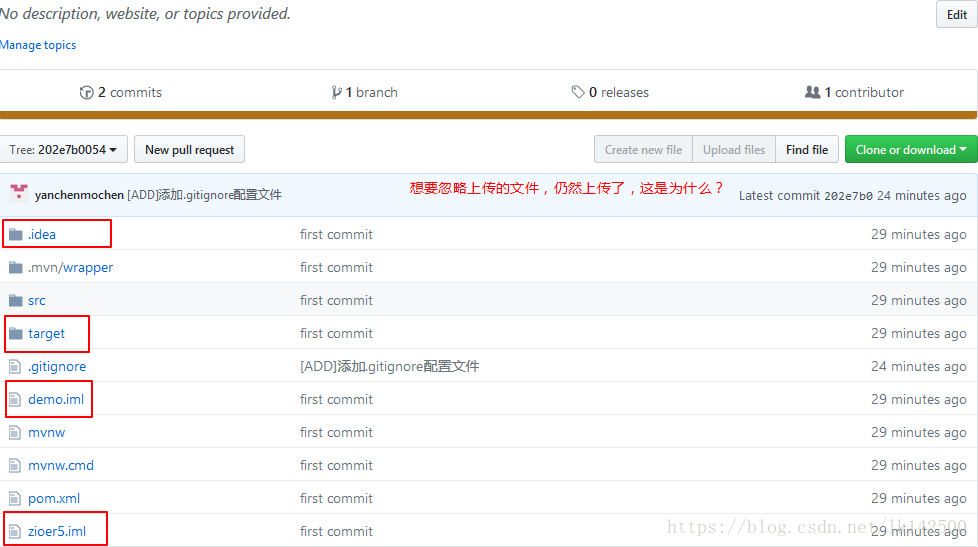
在这里我们发现,.idea目录,target目录,demo.iml文件等我们想要忽略的文件。
2.1.8 .gitignore不生效
.gitignore只能忽略那些原来没有被track的文件,如果某些文件已经被纳入了版本管理中,则修改.gitignore是无效的。这是因为在之前,自己直接使用git add .把所有的文件,包括target目录,.idea目录,然后执行了
git config core.excludesfile ***
.gitignore只能忽略原来没有被跟踪的文件,因此跟踪过的文件是无法被忽略的。因此在网页上可以看到target等目录的存在。
解决方法就是先把本地缓存删除(改变成未track状态),然后再提交:
git rm -r --cached .
git add .
git commit -m ‘update .gitignore’
2.1.9 再次推送
$ git push origin master

Enumerating objects: 3, done.

Counting objects: 100% (3/3), done.

Delta compression using up to 8 threads.

Compressing objects: 100% (2/2), done.

Writing objects: 100% (2/2), 232 bytes | 232.00 KiB/s, done.

Total 2 (delta 1), reused 0 (delta 0)

remote: Resolving deltas: 100% (1/1), completed with 1 local object.

To github.com:yanchenmochen/demo.git

   202e7b0..9f4fc9c  master -> master
2.1.10 验证
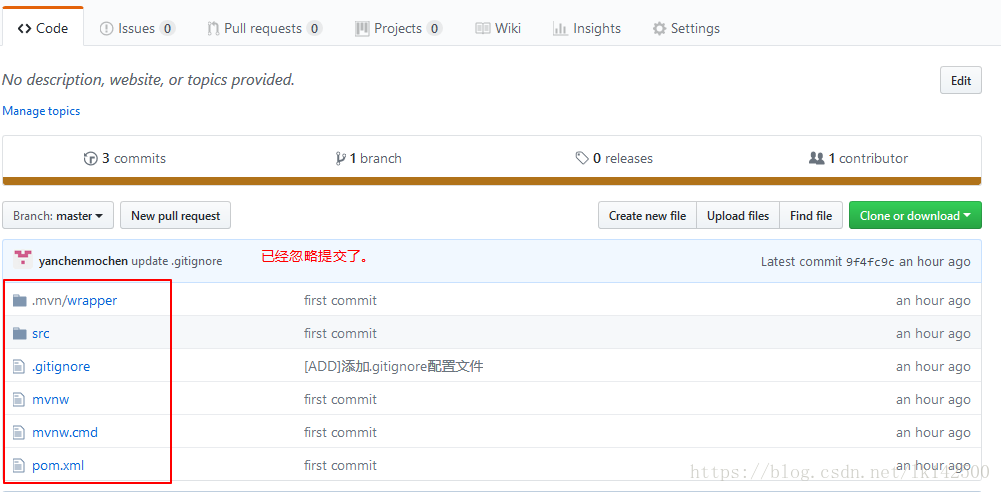
登陆网页,查看本次提交:
2.2 定义Git全局的.gitignore文件
如果一直使用某个开发工具进行开发项目,则相对于特定项目的忽略文件,所有的项目均要忽略的文件,则可以使用配置全局忽略文件。
使用命令
git config --global core.excludesfile ~/.gitignore
该配置信息位于~/.gitignore。
整体的操作步骤与上述特定于项目的.gitignore是一致的,不再赘述。
2.3 在Git项目的设置中指定排除文件
这种方式只是临时指定该项目的行为,需要编辑当前项目下的 .git/info/exclude 文件,然后将需要忽略提交的文件写入其中。
需要注意的是,这种方式指定的忽略文件的根目录是项目根目录。
3 忽略规则
在 .gitignore 文件中,每一行的忽略规则的语法如下:
- 空格不匹配任意文件,可作为分隔符,可用反斜杠转义
- #开头的文件标识注释,可以使用反斜杠进行转义
- ! 开头的模式标识否定,该文件将会再次被包含,如果排除了该文件的父级目录,则使用 ! 也不会再次被包含。可以使用反斜杠进行转义
- / 结束的模式只匹配文件夹以及在该文件夹路径下的内容,但是不匹配该文件
- / 开始的模式匹配项目跟目录
- 如果一个模式不包含斜杠,则它匹配相对于当前 .gitignore 文件路径的内容,如果该模式不在 .gitignore 文件中,则相对于项目根目录
- ** 匹配多级目录,可在开始,中间,结束
- ? 通用匹配单个字符
- [] 通用匹配单个字符列表
4 引用
https://www.cnblogs.com/youyoui/p/8337147.html
https://download.csdn.net/download/lk142500/10692479
5 总结
Git在程序员开发过程中,不可或缺,因此熟练掌握Git的方方面面,对于提升自己的个人素养和开发效率,不可或缺。
Git中使用.gitignore忽略文件的推送的更多相关文章
- Git 的两种忽略文件方式 gitignore 和 exclude
Git 的两种忽略文件方式 gitignore 和 exclude .gitignore 不用说了,大家都知道. 有一个 exclude 可能接触比较少. 知道这个功能后发现,用在服务器上非常方便,因 ...
- 详解Github的.gitignore忽略文件+.gitignore不生效解决方案+生产配置大奉送
详解Github的.gitignore忽略文件+.gitignore不生效解决方案+生产配置大奉送 Git中有一个非常重要的一个文件-----.gitignore 今天给大家免费送一个.gitigno ...
- git 学习记录—— git 中的仓库、文件状态、修改和提交操作等
最近开始学习使用版本控制工具 git .学习方式主要通过阅读 git 网站上的 Pro git 和动手实践,使用的系统为 Ubuntu16.04LTS,以及 Windows 8.1. 本文主要关注 ...
- 码源中国.gitignore忽略文件配置
码源中国.gitignore忽略文件配置 ## Ignore Visual Studio temporary files, build results, and ## files generated ...
- 记一次使用commit提交大文件无法推送到远程库解决问题过程及git rebase使用
记一次使用commit提交大文件无法推送到远程库解决问题过程及git rebase使用 目录 大文件无法push到远程仓库 问题 commit的大文件无法push到远程库解决办法 git filter ...
- NO.A.0006——Git在IntelliJ IDEA中的使用/创建项目并推送到GitHub仓库/分支管理及分支合并
一.在IntelliJ IDEA中使用Git: 1.在IDEA下创建项目并编写一个main方法的工程: 在IDEA下新建一个Project IDEA-->新建一个Project-->Fil ...
- android studio git 将项目分享到github,推送到其他平台 码云 等。
android studio git 将项目分享到github,推送到其他平台 码云 等. 作者:韩梦飞沙 Author:han_meng_fei_sha 邮箱:313134555@qq.com E- ...
- Git中.gitignore忽略文件(maven项目)
使用情景: 有些时候,你必须把某些文件放到Git工作目录中,但又不能提交它们 解决方案: 在Git工作区的根目录下创建一个特殊的.gitignore文件,然后把要忽略的文件名填进去,Git就会自动忽略 ...
- git中 gitignore 忽略文件操作
通常,.gitignore文件被放置在存储库的根目录中.根目录也称为父目录和当前工作目录.根文件夹包含组成项目的所有文件和其他文件夹.也就是说,您可以将它放在存储库中的任何文件夹中.你甚至可以有多个. ...
随机推荐
- Java基础00-继承17
1. 继承 1.1 继承概述 但是我们将相同的类提取出来就会变成这个样子 让他们之间产生一个继承的关系 1.2 继承的好处和弊端 IS-A.HAS-A和USE-A关系 苹果是水果的一种可以使用继承猫是 ...
- final修饰符(6)-final类
final修饰的类不可以有子类,例如:java.lang.Math类就是一个final类,它不可以有子类 子类继承父类,可以访问父类的内部数据,可以重写父类的方法来改变父类方法的实现细节,可能导致不安 ...
- war项目依赖war项目
还没有看,立个flag:https://my.oschina.net/u/588379/blog/1817077
- 痞子衡嵌入式:嵌入式Cortex-M裸机环境下临界区保护的三种实现
大家好,我是痞子衡,是正经搞技术的痞子.今天痞子衡给大家分享的是Cortex-M裸机环境下临界区保护的三种实现. 搞嵌入式玩过 RTOS 的朋友想必都对 OS_ENTER_CRITICAL().OS_ ...
- FactoryBean简介以及Mybatis-Spring应用
一.BeanFactory和FactoryBean区别? BeanFactory是工厂类,提供了获取和检索Bean的接口.它代表着Spring的IoC容器,负责Bean实例化以及管理Bean之间的依赖 ...
- JDK的安装与配置java环境变量
JDK安装与配置java环境变量 安装JDK 1.百度搜索jdk8找到下载地址 下载地址:Java SE Development Kit 8 - Downloads (oracle.com) 2.点击 ...
- DC-5靶机
仅供个人娱乐 靶机信息 下载地址:http://www.five86.com/downloads/DC-5.zip 一.主机扫描 arp-scan -l nmap -p 1-65535 -A -sV ...
- selenium WebDriverWait
Selenium WebDriverWait的知识: 一.webdrivewait 示例代码 from selenium import webdriver from selenium.webdri ...
- Linux命令(三)vim编辑器的常用命令
.subTitle { background: rgba(51, 153, 0, 0.53); border-bottom: 1px solid rgba(0, 102, 0, 1); border- ...
- 实战爬取拷背漫画-Python
一.抓包获取链接 以爬取<前科者>为例 获取搜索链接 https://api.copymanga.com/api/v3/search/comic?limit=5&q=前科者 ...