
Mybatis的联合查询
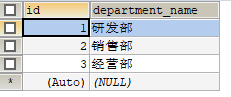
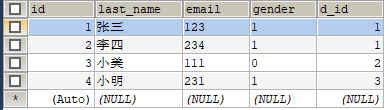
数据库表结构
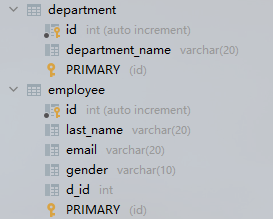
department
employee
要求一
现在的要求是输入 id 把 employee 表的对应员工数据查询出来,并且查询出该员工的所处部门信息
JavaBean
public class Employee {

    private Integer id;

    private String lastName;

    private String email;

    private String gender;

    private Department dept;

	setter和getter.......

}
public class Department {

    private Integer id;

    private String departmentName;

    setter和getter.......

}
1、级联属性封装结果集
实现
这个要求很明显就要用到两个表,想要把部门信息封装到
Employee对象的dept字段需要用到resultMap属性
方法一
 <!-- public Employee getEmployee(int id); -->

<select id="getEmployee" resultMap="emp1">

	select e.*, d.id did, d.department_name

	from employee e,

		department d

	where e.d_id = d.id

	and e.id = #{id}

</select>

<resultMap id="emp1" type="employee">

	<id column="id" property="id"/>

	<result column="last_name" property="lastName"/>

	<result column="email" property="email"/>

	<result column="gender" property="gender"/>

	<result column="did" property="dept.id"/>

	<result column="department_name" property="dept.departmentName"/>

</resultMap>
方法二
<!-- public Employee getEmployee(int id); -->

<select id="getEmployee" resultMap="emp2">

	select e.*, d.id did, d.department_name

	from employee e,

		department d

	where e.d_id = d.id

	and e.id = #{id}

</select>

<resultMap id="emp2" type="employee">

	<id column="id" property="id"/>

	<result column="last_name" property="lastName"/>

	<result column="email" property="email"/>

	<result column="gender" property="gender"/>

	<association property="dept" javaType="department">

		<id column="did" property="id"/>

		<result column="department_name" property="departmentName"/>

	</association>

</resultMap>
测试
 	@Test

    public void test1() {

        SqlSession sqlSession = MyTest.getSqlSession();

        EmployeeMapper mapper = sqlSession.getMapper(EmployeeMapper.class);

        System.out.println(mapper.getEmployee(1));

    }
结果

2、分步查询
方法
DepartmentMapper.xml
<!-- public Department getDepartment2(int id); -->

<select id="getDepartment2" resultType="department">

	select * from department where id = #{id}

</select>
EmployeeMaper.xml
<!-- public Employee getEmployee2(int id); -->

<!-- 分步查询 -->

<select id="getEmployee2" resultMap="emp3">

	select * from employee where id = #{id}

</select>

<resultMap id="emp3" type="employee">

	<id column="id" property="id"/>

	<result column="last_name" property="lastName"/>

	<result column="email" property="email"/>

	<result column="gender" property="gender"/>

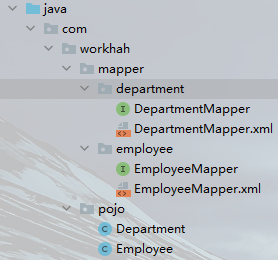
	<association property="dept" select="com.workhah.mapper.department.DepartmentMapper.getDepartment2" column="d_id"/>

</resultMap>
测试
 	@Test

    public void test1() {

        SqlSession sqlSession = MyTest.getSqlSession();

        EmployeeMapper mapper = sqlSession.getMapper(EmployeeMapper.class);

        System.out.println(mapper.getEmployee2(1));

    }
结果
要求二
现在的要求是输入 id 把 department 表对应的部门信息查询出来,并且查询该部门下的所有员工信息
JavaBean
public class Employee {

    private Integer id;

    private String lastName;

    private String email;

    private String gender;

	setter和getter.......

}
public class Department {

    private Integer id;

    private String departmentName;

    private List<Employee> employees;

    setter和getter.......

}
1、级联属性封装结果集
方法
<!--   public Department getDepartment(int id); -->

<select id="getDepartment" resultMap="dep1">

	select d.*, e.id eid, e.last_name, e.email, e.gender

	from department d

		left join employee e on d.id = e.d_id

	where d.id = #{id}

</select>

<resultMap id="dep1" type="department">

	<id column="id" property="id"/>

	<result column="department_name" property="departmentName"/>

	<collection property="employees" ofType="employee">

		<id column="eid" property="id"/>

		<result column="last_name" property="lastName"/>

		<result column="email" property="email"/>

		<result column="gender" property="gender"/>

	</collection>

</resultMap>
测试
 	@Test

    public void test2() {

        SqlSession sqlSession = MyTest.getSqlSession();

        DepartmentMapper mapper = sqlSession.getMapper(DepartmentMapper.class);

        System.out.println(mapper.getDepartment(1));

    }
结果

2、分步查询
EmployeeMaper.xml
<!--  public List<Employee> getEmployeeByDid(int did); -->

<select id="getEmployeeByDid" resultType="employee">

	select *

	from employee

	where d_id = #{did}

</select>
DepartmentMapper.xml
<!-- public Department getDepartment3(int id); -->

<select id="getDepartment3" resultMap="dep2">

	select *

	from department

	where id = #{id}

</select>

<resultMap id="dep2" type="department">

	<id column="id" property="id"/>

	<result column="depart_name" property="departName"/>

	<collection property="employees" ofType="employee"

		select="com.workhah.mapper.employee.EmployeeMapper.getEmployeeByDid" column="id"/>

</resultMap>
测试
 	@Test

    public void test2() {

        SqlSession sqlSession = MyTest.getSqlSession();

        DepartmentMapper mapper = sqlSession.getMapper(DepartmentMapper.class);

        System.out.println(mapper.getDepartment3(1));

    }
结果
Mybatis的联合查询的更多相关文章
- MyBatis 示例-联合查询
简介 MyBatis 提供了两种联合查询的方式,一种是嵌套查询,一种是嵌套结果.先说结论:在项目中不建议使用嵌套查询,会出现性能问题,可以使用嵌套结果. 测试类:com.yjw.demo.JointQ ...
- Mybatis实现联合查询(六)
1. 疑问 在之前的章节中我们阐述了如何用Mybatis实现检查的查询,而我们实际的需求中,绝大部分查询都不只是针对单张数据表的简单查询,所以我们接下来要看一下Mybatis如何实现联合查询. 2. ...
- mybatis plus 联合查询
在xml中只需要需要写如下的代码即可实现分页: <select id="selectUserList" parameterType="map" resul ...
- mybatis的嵌套查询(嵌套查询nested select和嵌套结果nested results查询)区别
(转自:http://blog.csdn.net/canot/article/details/51485955) Mybatis表现关联关系比hibernate简单,没有分那么细致one-to-man ...
- mybatis的嵌套查询与嵌套结果查询的不同
原文:https://blog.csdn.net/qq_39706071/article/details/85156840 实体类: 嵌套查询mapper方法:嵌套查询的弊端:即嵌套查询的N+1问题尽 ...
- MyBatis 多表联合查询及优化 以及自定义返回结果集
下面就来说一下 mybatis 是通过什么来实现多表联合查询的.首先看一下表关系,如图: 这 里,我已经搭好了开发的环境,用到的是 SpringMVC + Spring + MyBatis,当然,为了 ...
- MyBatis之三:多表联合查询
在这篇文章里面主要讲解如何在mybatis里面使用一对一.一对多.多表联合查询(类似视图)操作的例子. 注:阅读本文前请先大概看一下之前两篇文章. 一.表结构 班级表class,学生表student, ...
- Mybatis.net与MVC入门配置及联合查询动态SQL拼接和简单事务
第一次学习Mybatis.net,在博客园也找到好多资料,但是在配置成功之后也遇到了一些问题,尤其是在动态SQl拼接时候,这里把遇到的问题还有自己写的一个Demo贴出来,希望能帮到新手,有不适合的地方 ...
- MyBatis 多表联合查询,字段重复的解决方法
MyBatis 多表联合查询,两张表中字段重复时,在配置文件中,sql语句联合查询时使用字段别名,resultMap中对应的column属性使用相应的别名: <resultMap type=&q ...
随机推荐
- mysqldump冷备份
数据库备份的重要性 提高系统的高可用性和灾难可恢复性,在数据库系统崩溃时,没有数据备份就没法找到数据. 使用数据库备份还原数据库,是数据库崩溃时提供数据恢复最小代价的最优方案. 没有数据库就没有一切, ...
- InnoDB的行锁模式及加锁方法
MYSQL:InnoDB的行锁模式及加锁方法 共享锁:允许一个事务度一行,阻止其他事务获取相同数据集的排他锁. SELECT * FROM table_name WHERE ... LOCK IN S ...
- dbeaver可视化工具-连接clickhouse
下载地址 https://dbeaver.io/download/ 本次下载的是ZIP包,这种方式方便移动/备份软件 此软件可连接多种数据库,这里是连接clickhouse 新建连接 点击 上面的倒三 ...
- vue2.x入门学习
vue安装 # 最新稳定版本 $ npm install vue # 最新稳定 CSP 兼容版本 $ npm install vue@csp 引包 cd /d/vue/demo cnpm instal ...
- proxysql+MHA+半同步复制
先配置成主从同步 先在各节点安装服务 [root@inotify ~]# yum install mariadb-server -y 编辑主节点的配置文件,并启动 [root@centos7 ~]# ...
- 🏆【Alibaba中间件技术系列】「RocketMQ技术专题」Broker配置介绍及发送流程、异常(XX Busy)问题分析
参考资料 Rocketmq官网:http://rocketmq.apache.org/ Rocketmq的其它项目:https://github.com/apache/rocketmq-externa ...
- Java知识点总结——IO流框架
IO框架 一.流的概念 概念:内存与存储设备之间传输数据的通道. 二.流的分类 按方向分类: 输入流:将<存储设备>中的内容读入到<内存>中 输出流:将<内存>中的 ...
- 赋能开发:捷码携手达内教育打造IT职业教育新生态
近日,达内教育与远眺科技签约联合培养的第一批低代码开发方向的高职学生,在杭州未来科技城捷码总部顺利毕业,首期合格学员总数超过30名.随着这些接受了"捷码"低代码平台全程" ...
- Redis哨兵日常维护
目录 一.日常操作 指定一个从做新主 添加一个从节点 添加一个Setinel节点 一.日常操作 指定一个从做新主 有时候需要将当前主节点机器下线,并指定一个高一些性能的从节点接替 将其它从节点的sla ...
- Python绘制面积图
一.Python绘制面积图对应代码如下图所示 import matplotlib.pyplot as plt from pylab import mpl mpl.rcParams['font.sans ...