
Mybatis的联合查询
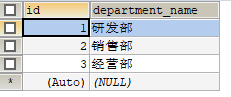
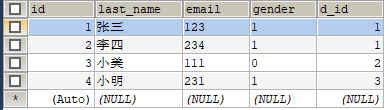
数据库表结构
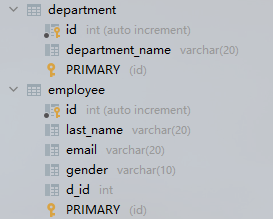
department
employee
要求一
现在的要求是输入 id 把 employee 表的对应员工数据查询出来,并且查询出该员工的所处部门信息
JavaBean
public class Employee {

    private Integer id;

    private String lastName;

    private String email;

    private String gender;

    private Department dept;

	setter和getter.......

}
public class Department {

    private Integer id;

    private String departmentName;

    setter和getter.......

}
1、级联属性封装结果集
实现
这个要求很明显就要用到两个表,想要把部门信息封装到
Employee对象的dept字段需要用到resultMap属性
方法一
 <!-- public Employee getEmployee(int id); -->

<select id="getEmployee" resultMap="emp1">

	select e.*, d.id did, d.department_name

	from employee e,

		department d

	where e.d_id = d.id

	and e.id = #{id}

</select>

<resultMap id="emp1" type="employee">

	<id column="id" property="id"/>

	<result column="last_name" property="lastName"/>

	<result column="email" property="email"/>

	<result column="gender" property="gender"/>

	<result column="did" property="dept.id"/>

	<result column="department_name" property="dept.departmentName"/>

</resultMap>
方法二
<!-- public Employee getEmployee(int id); -->

<select id="getEmployee" resultMap="emp2">

	select e.*, d.id did, d.department_name

	from employee e,

		department d

	where e.d_id = d.id

	and e.id = #{id}

</select>

<resultMap id="emp2" type="employee">

	<id column="id" property="id"/>

	<result column="last_name" property="lastName"/>

	<result column="email" property="email"/>

	<result column="gender" property="gender"/>

	<association property="dept" javaType="department">

		<id column="did" property="id"/>

		<result column="department_name" property="departmentName"/>

	</association>

</resultMap>
测试
 	@Test

    public void test1() {

        SqlSession sqlSession = MyTest.getSqlSession();

        EmployeeMapper mapper = sqlSession.getMapper(EmployeeMapper.class);

        System.out.println(mapper.getEmployee(1));

    }
结果

2、分步查询
方法
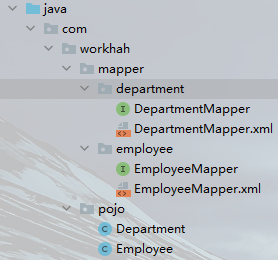
DepartmentMapper.xml
<!-- public Department getDepartment2(int id); -->

<select id="getDepartment2" resultType="department">

	select * from department where id = #{id}

</select>
EmployeeMaper.xml
<!-- public Employee getEmployee2(int id); -->

<!-- 分步查询 -->

<select id="getEmployee2" resultMap="emp3">

	select * from employee where id = #{id}

</select>

<resultMap id="emp3" type="employee">

	<id column="id" property="id"/>

	<result column="last_name" property="lastName"/>

	<result column="email" property="email"/>

	<result column="gender" property="gender"/>

	<association property="dept" select="com.workhah.mapper.department.DepartmentMapper.getDepartment2" column="d_id"/>

</resultMap>
测试
 	@Test

    public void test1() {

        SqlSession sqlSession = MyTest.getSqlSession();

        EmployeeMapper mapper = sqlSession.getMapper(EmployeeMapper.class);

        System.out.println(mapper.getEmployee2(1));

    }
结果
要求二
现在的要求是输入 id 把 department 表对应的部门信息查询出来,并且查询该部门下的所有员工信息
JavaBean
public class Employee {

    private Integer id;

    private String lastName;

    private String email;

    private String gender;

	setter和getter.......

}
public class Department {

    private Integer id;

    private String departmentName;

    private List<Employee> employees;

    setter和getter.......

}
1、级联属性封装结果集
方法
<!--   public Department getDepartment(int id); -->

<select id="getDepartment" resultMap="dep1">

	select d.*, e.id eid, e.last_name, e.email, e.gender

	from department d

		left join employee e on d.id = e.d_id

	where d.id = #{id}

</select>

<resultMap id="dep1" type="department">

	<id column="id" property="id"/>

	<result column="department_name" property="departmentName"/>

	<collection property="employees" ofType="employee">

		<id column="eid" property="id"/>

		<result column="last_name" property="lastName"/>

		<result column="email" property="email"/>

		<result column="gender" property="gender"/>

	</collection>

</resultMap>
测试
 	@Test

    public void test2() {

        SqlSession sqlSession = MyTest.getSqlSession();

        DepartmentMapper mapper = sqlSession.getMapper(DepartmentMapper.class);

        System.out.println(mapper.getDepartment(1));

    }
结果

2、分步查询
EmployeeMaper.xml
<!--  public List<Employee> getEmployeeByDid(int did); -->

<select id="getEmployeeByDid" resultType="employee">

	select *

	from employee

	where d_id = #{did}

</select>
DepartmentMapper.xml
<!-- public Department getDepartment3(int id); -->

<select id="getDepartment3" resultMap="dep2">

	select *

	from department

	where id = #{id}

</select>

<resultMap id="dep2" type="department">

	<id column="id" property="id"/>

	<result column="depart_name" property="departName"/>

	<collection property="employees" ofType="employee"

		select="com.workhah.mapper.employee.EmployeeMapper.getEmployeeByDid" column="id"/>

</resultMap>
测试
 	@Test

    public void test2() {

        SqlSession sqlSession = MyTest.getSqlSession();

        DepartmentMapper mapper = sqlSession.getMapper(DepartmentMapper.class);

        System.out.println(mapper.getDepartment3(1));

    }
结果
Mybatis的联合查询的更多相关文章
- MyBatis 示例-联合查询
简介 MyBatis 提供了两种联合查询的方式,一种是嵌套查询,一种是嵌套结果.先说结论:在项目中不建议使用嵌套查询,会出现性能问题,可以使用嵌套结果. 测试类:com.yjw.demo.JointQ ...
- Mybatis实现联合查询(六)
1. 疑问 在之前的章节中我们阐述了如何用Mybatis实现检查的查询,而我们实际的需求中,绝大部分查询都不只是针对单张数据表的简单查询,所以我们接下来要看一下Mybatis如何实现联合查询. 2. ...
- mybatis plus 联合查询
在xml中只需要需要写如下的代码即可实现分页: <select id="selectUserList" parameterType="map" resul ...
- mybatis的嵌套查询(嵌套查询nested select和嵌套结果nested results查询)区别
(转自:http://blog.csdn.net/canot/article/details/51485955) Mybatis表现关联关系比hibernate简单,没有分那么细致one-to-man ...
- mybatis的嵌套查询与嵌套结果查询的不同
原文:https://blog.csdn.net/qq_39706071/article/details/85156840 实体类: 嵌套查询mapper方法:嵌套查询的弊端:即嵌套查询的N+1问题尽 ...
- MyBatis 多表联合查询及优化 以及自定义返回结果集
下面就来说一下 mybatis 是通过什么来实现多表联合查询的.首先看一下表关系,如图: 这 里,我已经搭好了开发的环境,用到的是 SpringMVC + Spring + MyBatis,当然,为了 ...
- MyBatis之三:多表联合查询
在这篇文章里面主要讲解如何在mybatis里面使用一对一.一对多.多表联合查询(类似视图)操作的例子. 注:阅读本文前请先大概看一下之前两篇文章. 一.表结构 班级表class,学生表student, ...
- Mybatis.net与MVC入门配置及联合查询动态SQL拼接和简单事务
第一次学习Mybatis.net,在博客园也找到好多资料,但是在配置成功之后也遇到了一些问题,尤其是在动态SQl拼接时候,这里把遇到的问题还有自己写的一个Demo贴出来,希望能帮到新手,有不适合的地方 ...
- MyBatis 多表联合查询,字段重复的解决方法
MyBatis 多表联合查询,两张表中字段重复时,在配置文件中,sql语句联合查询时使用字段别名,resultMap中对应的column属性使用相应的别名: <resultMap type=&q ...
随机推荐
- 转Android Canvas和Paint基本使用
Android Canvas和Paint基本使用 这篇文章主要介绍下画笔Paint和画布Canvas的基本使用 1.Paint 创建对象Paint mPaint = new Paint(); 常 ...
- linux ln用法
这是linux中一个非常重要命令,请大家一定要熟悉.它的功能是为某一个文件在另外一个位置建立一个同不的链接,这个命令最常用的参数是-s,具体用法是:ln -s 源文件 目标文件 这是linux中一个非 ...
- 【力扣】95. 不同的二叉搜索树 II
二叉查找树(Binary Search Tree),(又:二叉搜索树,二叉排序树)它或者是一棵空树,或者是具有下列性质的二叉树: 若它的左子树不空,则左子树上所有结点的值均小于它的根结点的值: 若它的 ...
- 11、Redis的配置文件
Redis的配置文件 一.Redis配置文件简介 Redis是通过配置文件启动的 Redis对大小写字母不敏感 Redis基本上环境搭建都在配置文件 关于Redis配置文件位置是安装时放的位置,关于R ...
- Redis cluster 集群命令合集
目录 一.常用命令 二.操作命令 三.redis-trib.rb脚本 一.常用命令 打印集群的信息 CLUSTER INFO 列出集群当前已知的所有节点(node),以及这些节点的相关信息. CLUS ...
- Nginx区分搜索引擎
目录 一.简介 二.配置 一.简介 场景: 当从百度点进来显示中文页面,而谷歌显示英文界面. 原理: 根据referer头来判断 二.配置 这样配置以后,凡是从百度或者google点过来的请求都会跳转 ...
- 数组队列如何手撕?解密ArrayBlockingQueue的实现内幕!
队列 聊起队列,你一定会联想到一个与队列相似的数据结构:栈. 为了更好的理解什么是队列,我们将它和栈来比较一下: 队列的特点是:先进先出,如下图,1先进,1就先出. 图1:队列的图解 栈的特点是:先进 ...
- Django中的常用字段类型与参数
Django中的常用字段类型 1. 数值型 以下都是数值相关的,比如AutoField,它在MySQL中的类型为int(11),而BooleanField在MySQL中对应的类型是tinyint(1) ...
- CF158A Next Round 题解
Content 有 \(n\) 个人参加比赛,第 \(i\) 名在第一轮的分数是 \(a_i\)(保证 \(a_i\geqslant a_{i+1}\))已知下一轮预计能进 \(k\) 人,当然如果有 ...
- Docker从入门到精通(八)——Docker Compose
恭喜大家,学到这里,对于 docker 的基础玩法大家应该都会了,下面会介绍 docker的一些编排工具. 1.为什么需要 Docker Compose? 官网镇楼:https://www.runoo ...