
3. servlet 和 springmvc框架关系
在springmvc上我们会编写很多相关的配置
- 编写springmvc.xml
- 配置映射器
- 配置 处理适配器
...
- web.xml
- 配置前端控制器 (DispatcherServlet)
官网: https://spring.io/
弱小和无知并不是生存的障碍,傲慢才是。

=================================================================

=================================================================
- 注解方式

public class MyWebApplicationInitializer implements WebApplicationInitializer {

    @Override

    public void onStartup(ServletContext servletCxt) {

        // Load Spring web application configuration

        AnnotationConfigWebApplicationContext ac = new AnnotationConfigWebApplicationContext();

        ac.register(AppConfig.class);

        ac.refresh();

        // Create and register the DispatcherServlet

        DispatcherServlet servlet = new DispatcherServlet(ac);

        ServletRegistration.Dynamic registration = servletCxt.addServlet("app", servlet);

        registration.setLoadOnStartup(1);

        registration.addMapping("/app/*");

    }

}
=================================================================
- 配置方式

<web-app>

    <listener>

        <listener-class>org.springframework.web.context.ContextLoaderListener</listener-class>

    </listener>

    <context-param>

        <param-name>contextConfigLocation</param-name>

        <param-value>/WEB-INF/app-context.xml</param-value>

    </context-param>

    <servlet>

        <servlet-name>app</servlet-name>

        <servlet-class>org.springframework.web.servlet.DispatcherServlet</servlet-class>

        <init-param>

            <param-name>contextConfigLocation</param-name>

            <param-value></param-value>

        </init-param>

        <load-on-startup>1</load-on-startup>

    </servlet>

    <servlet-mapping>

        <servlet-name>app</servlet-name>

        <url-pattern>/app/*</url-pattern>

    </servlet-mapping>

</web-app>
=================================================================
* 创建maven项目,然后导入web支持

=================================================================

- 导入springmvc相关依赖
<dependencies>

        <!--springmvc框架-->

        <dependency>

            <groupId>org.springframework</groupId>

            <artifactId>spring-webmvc</artifactId>

            <version>5.0.8.RELEASE</version>

        </dependency>

        <!--servlet3.0-->

        <dependency>

            <groupId>javax.servlet</groupId>

            <artifactId>javax.servlet-api</artifactId>

            <version>3.1.0</version>

            <scope>provided</scope>

        </dependency>

        <!-- 嵌入式tomcat -->

        <dependency>

            <groupId>org.apache.tomcat.embed</groupId>

            <artifactId>tomcat-embed-core</artifactId>

            <version>9.0.20</version>

        </dependency>

        <!--解决JSP异常-->

        <dependency>

            <groupId>org.apache.tomcat.embed</groupId>

            <artifactId>tomcat-embed-jasper</artifactId>

            <version>9.0.20</version>

        </dependency>

</dependencies>
=================================================================

=================================================================
* 创建一个跟官网上一样的类

package com.min.mvc;

import com.min.config.AppConfig;

import org.springframework.web.WebApplicationInitializer;

import org.springframework.web.context.support.AnnotationConfigWebApplicationContext;

import org.springframework.web.servlet.DispatcherServlet;

import javax.servlet.ServletContext;

import javax.servlet.ServletRegistration;

public class MyWebApplicationInitializer implements WebApplicationInitializer {

    public void onStartup(ServletContext servletCxt) {

        // 通过 注解的方式 创建 IOC容器

        AnnotationConfigWebApplicationContext ac = new AnnotationConfigWebApplicationContext();

        // 注册一个配置类

        ac.register(AppConfig.class);

        // 刷新 IOC 容器配置

        ac.refresh();

        // 创建和注册servlet

        DispatcherServlet servlet = new DispatcherServlet(ac);

        // 注册 servlet

        ServletRegistration.Dynamic registration = servletCxt.addServlet("app", servlet);

        // 启动加载

        registration.setLoadOnStartup(1);

        // DistpatcherServlet 映射关系

        registration.addMapping("*.do");

    }

}
* 创建配置类

package com.min.config;

import org.springframework.context.annotation.ComponentScan;

import org.springframework.context.annotation.Configuration;

/**

 * 配置类

 * @Configuration : 通过他注册一个配置类

 * @ComponentScan : 通过他开启一个扫描

 */

@Configuration

@ComponentScan(value = "com.min.controller")

public class AppConfig {

}
=================================================================
- 编写一个controller
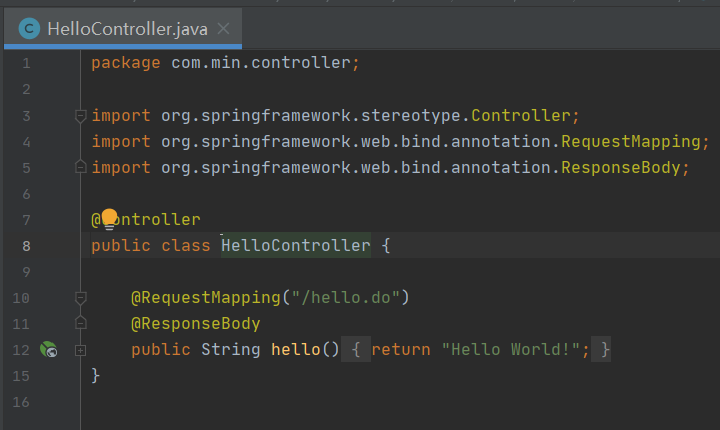
package com.min.controller;

import org.springframework.stereotype.Controller;

import org.springframework.web.bind.annotation.RequestMapping;

import org.springframework.web.bind.annotation.ResponseBody;

@Controller

public class HelloController {

    @RequestMapping("/hello.do")

    @ResponseBody

    public String hello(){

        return "Hello World!";

    }

}
=================================================================
* 访问hello.do

经过一番波折发现通过官网上的代码也能跑通。。我丢
=================================================================
更有趣的是这哥们跟我们之前写的Servlet3.0的似曾相识哈哈,那我们一探究竟吧。

=================================================================
- 会发现这个类也是实现ServletContainerInitializer 接口,@HandlesTypes注解以及重写onStartup方法

package org.springframework.web;

import java.lang.reflect.Modifier;

import java.util.Iterator;

import java.util.LinkedList;

import java.util.List;

import java.util.Set;

import javax.servlet.ServletContainerInitializer;

import javax.servlet.ServletContext;

import javax.servlet.ServletException;

import javax.servlet.annotation.HandlesTypes;

import org.springframework.core.annotation.AnnotationAwareOrderComparator;

import org.springframework.lang.Nullable;

import org.springframework.util.ReflectionUtils;

@HandlesTypes({WebApplicationInitializer.class})

public class SpringServletContainerInitializer implements ServletContainerInitializer {

    public SpringServletContainerInitializer() {

    }

    public void onStartup(@Nullable Set<Class<?>> webAppInitializerClasses, ServletContext servletContext) throws ServletException {

        List<WebApplicationInitializer> initializers = new LinkedList();

        Iterator var4;

        if (webAppInitializerClasses != null) {

            var4 = webAppInitializerClasses.iterator();

            while(var4.hasNext()) {

                Class<?> waiClass = (Class)var4.next();

                if (!waiClass.isInterface() && !Modifier.isAbstract(waiClass.getModifiers()) && WebApplicationInitializer.class.isAssignableFrom(waiClass)) {

                    try {

                        initializers.add((WebApplicationInitializer)ReflectionUtils.accessibleConstructor(waiClass, new Class[0]).newInstance());

                    } catch (Throwable var7) {

                        throw new ServletException("Failed to instantiate WebApplicationInitializer class", var7);

                    }

                }

            }

        }

        if (initializers.isEmpty()) {

            servletContext.log("No Spring WebApplicationInitializer types detected on classpath");

        } else {

            servletContext.log(initializers.size() + " Spring WebApplicationInitializers detected on classpath");

            AnnotationAwareOrderComparator.sort(initializers);

            var4 = initializers.iterator();

            while(var4.hasNext()) {

                WebApplicationInitializer initializer = (WebApplicationInitializer)var4.next();

                initializer.onStartup(servletContext);

            }

        }

    }

}
=================================================================
- WebApplicationInitializer接口


package org.springframework.web;

import javax.servlet.ServletContext;

import javax.servlet.ServletException;

public interface WebApplicationInitializer {

    void onStartup(ServletContext var1) throws ServletException;

}
所以经过以上的查看和测试,发现其中的原理就是这样子的!!!
底层源码
- 迭代
- 通过反射实例化对象
- 调用这些实现类的 startup 方法
3. servlet 和 springmvc框架关系的更多相关文章
- 简单实现springmvc框架(servlet+自定义注解)
个人水平比较菜,没有这么高的实力简单实现springmvc框架,我是看了一个老哥的博客,这老哥才是大神! 原文链接:https://www.cnblogs.com/xdp-gacl/p/4101727 ...
- 带着新人简单看看servlet到springmvc
好久都没有写博客了,不是因为自己懒了,而是总感觉自己知道的只是太少了,每次想写博客的时候都不知道怎么下手,不过最近看到一篇博客说的是springmvc,给了我比较大的兴趣,感觉一下子对整个spring ...
- SpringMVC 框架介绍以及环境搭建
目录 前端设计模式介绍 分析前端设计模式 Spring MVC简单介绍 Spring和Spring MVC的关系 配置Spring MVC的环境并简单测试 前端设计模式介绍 前端设计模式其实和前端没啥 ...
- 手写SpringMVC 框架
手写SpringMVC框架 细嗅蔷薇 心有猛虎 背景:Spring 想必大家都听说过,可能现在更多流行的是Spring Boot 和Spring Cloud 框架:但是SpringMVC 作为一款实现 ...
- SpringMVC框架 课程笔记
SpringMVC框架 课程笔记 第0章 SpringMVC框架的核心内容 1.SpringMVC 概述 2.SpringMVC 的 HelloWorld 3.使用 @RequestMapping 映 ...
- MyBatis+SpringMVC 框架搭建小结
前言:最近再写一款视频播放器的后台,踩了很多坑,在此总结. 设计顺序: 前提:搭建配置完好的Spring-MyBatis项目 1.流程分析,数据库设计(看似无用,真正做起来真的需要这个东西帮忙整理下思 ...
- SpringMVC框架搭建流程(完整详细版)
SpringMVC框架搭建流程 开发过程 1)配置DispatcherServlet前端控制器 2)开发处理具体业务逻辑的Handler(@Controller. @RequestMapping) 3 ...
- 手写SpringMVC框架(三)-------具体方法的实现
续接前文 手写SpringMVC框架(二)结构开发设计 本节我们来开始具体方法的代码实现. doLoadConfig()方法的开发 思路:我们需要将contextConfigLocation路径读取过 ...
- 手写SpringMVC框架(二)-------结构开发设计
续接前文, 手写SpringMVC框架(一)项目搭建 本节我们来开始手写SpringMVC框架的第二阶段:结构开发设计. 新建一个空的springmvc.properties, 里面写我们要扫描的包名 ...
随机推荐
- 【WPF】将控件事件中的参数,传递到ViewModel中
在MVVM模式下,在通常使用命令(Command)绑定的方式的时候 ,使用的是 CommandParameter 属性进行参数的传递. 但是很多时候,有一些事件我们需要使用其中的一些事件里面的参数,以 ...
- IDEA常用个性化设置
自己对于IDEA一些个性化设置,这里简单记录一下,省的之后四处百度 常用插件安装 CodeGlance:代码编写区域右侧小地图 GenerateAllSetter:针对new出来的实体类对象快速调用G ...
- Web安全实践
目录 前言 编码安全 反序列化命令执行 SQL 注入 跨站 XSS(Cross-site scripting) 跨站请求伪造 CSRF(Cross-site request forgery) URL跳 ...
- 趁五一撸个纯Flutter版的心情日记App
前言 最近真的是太忙了,只能趁着五一期间把之前Android版的心情日记App移植到Flutter平台,并且已经上架华为应用市场以及苹果App Store. 整体框架沿用了两个星期,用Flutter撸 ...
- js弹窗的3种方式:alert、confirm、prompt
<!DOCTYPE html PUBLIC "-//W3C//DTD XHTML 1.0 Transitional//EN" "http://www.w3.org/ ...
- 技术面试问题汇总第002篇:猎豹移动反病毒工程师part2
这次拿三个问题来讨论,是关于调试器的.因为对于反病毒工程师而言,类似于OllyDbg和IDA的使用方法是必须掌握的,但是在面试中又不太方便考察,所以只能对其快捷键或者调试器实现原理之类的问题进行提问. ...
- Linux中的DHCP服务
目录 DHCP DHCP的报文类型 DHCP的部署 DHCP中继(DHCP代理) DHCP DHCP(Dynamic Host Configuration Protocol,动态主机配置协议)是一个局 ...
- Day009 冒泡排序
冒泡排序 冒泡排序无疑是最为出名的排序算法之一,总共有八大排序! 冒泡排序的代码还是相当简单的,两层循环,外层冒泡轮数,里层依次比较,江湖中人人尽皆知. 我们看到嵌套循环,应该立马就可以得出这个算法的 ...
- linux当前运行进程
一:linux查询服务器服务进程 inux中的ps命令是Process Status的缩写.ps命令用来列出系统中当前运行的那些进程.ps命令列出的是当前那些进程的快照, 就是执行ps命令的那个时刻的 ...
- vue中v-if与v-show的区别以及使用场景
区别 1.手段:v-if是通过控制dom节点的存在与否来控制元素的显隐:v-show是通过设置DOM元素的display样式,block为显示,none为隐藏: 2.编译过程:v-if切换有一个局部编 ...