
WPF绘制图表-LiveCharts
LiveCharts是一款非常好用的WPF图表绘制类库,相比其他同类类库,LiveCharts的UI风格样式更加多样更加美观。
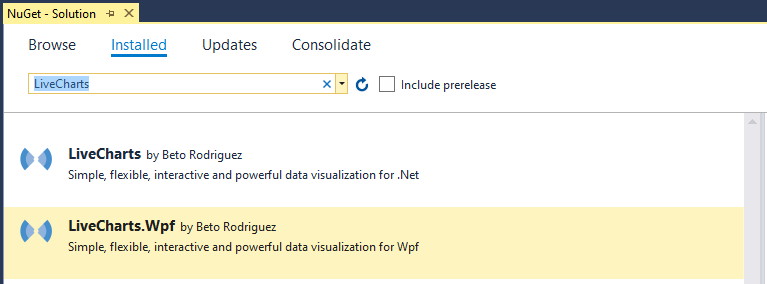
准备工作:安装以下两个类库:
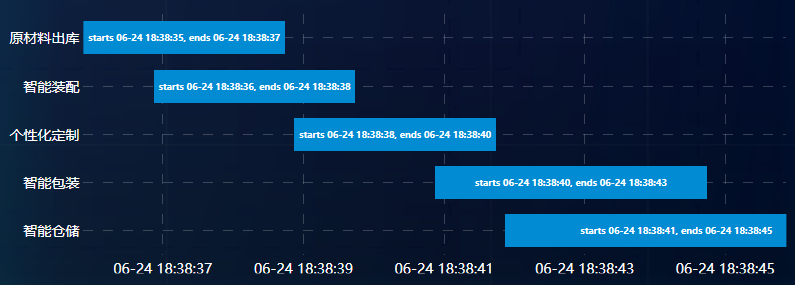
1、甘特图
前台View代码


 1 <lvc:CartesianChart Grid.Row="2" Zoom="None" Margin="0,40">

 2     <lvc:CartesianChart.AxisX>

 3         <!--LabelFormatter-轴坐标标签样式;MinValue-轴坐标起点;MaxValue-轴坐标终点-->

 4         <lvc:Axis Style="{StaticResource FontChartAxis}"

 5                   LabelFormatter="{Binding Path=Formatter}"

 6                   MinValue="{Binding Path=From, Mode=TwoWay}"

 7                   MaxValue="{Binding Path=To, Mode=TwoWay}">

 8             <!--Separator-坐标平面分割线 StrokeDashArray-分割线虚线间隔-->

 9             <lvc:Axis.Separator>

10                 <lvc:Separator Stroke="#33ffffff" StrokeDashArray="10"/>

11             </lvc:Axis.Separator>

12         </lvc:Axis>

13     </lvc:CartesianChart.AxisX>

14     <lvc:CartesianChart.AxisY>

15         <!--Labels-轴坐标标签列表-->

16         <lvc:Axis Style="{StaticResource FontChartAxis}"

17                   Labels="{Binding Path=Labels}">

18             <lvc:Axis.Separator>

19                 <lvc:Separator Stroke="#33ffffff" StrokeDashArray="10"/>

20             </lvc:Axis.Separator>

21         </lvc:Axis>

22     </lvc:CartesianChart.AxisY>

23     <!--Series-数据序列-->

24     <lvc:CartesianChart.Series>

25         <!--RowSeries-数据序列按行显示 LabelPosition-数据标签位置 DataLabels-是否显示数据标签 Values-数据序列值-->

26         <lvc:RowSeries Style="{StaticResource FontRowSeries}"

27                        Fill="#008bd3" LabelsPosition="Parallel" DataLabels="True" Values="{Binding Path=Values}"/>

28     </lvc:CartesianChart.Series>

29 </lvc:CartesianChart>
Gantt Chart xaml
后台ViewModel代码
 1 private double _from;

 2 private double _to;

 3 private Func<double, string> _formatter;

 4 private string[] _labels;

 5 private ChartValues<GanttPoint> _values;

 6 public double From { get { return _from; } set { _from = value; NotifyOfPropertyChange(() => From); } }

 7 public double To { get { return _to; } set { _to = value; NotifyOfPropertyChange(() => To); } }

 8 public Func<double, string> Formatter { get { return _formatter; } set { _formatter = value; NotifyOfPropertyChange(() => Formatter); } }

 9 public string[] Labels { get { return _labels; } set { _labels = value; NotifyOfPropertyChange(() => Labels); } }

10 public ChartValues<GanttPoint> Values { get { return _values; } set { _values = value; NotifyOfPropertyChange(() => Values); } }

11

12 public void ShowGanttChart()

13 {

14     var now = DateTime.Now;

15

16     Values = new ChartValues<GanttPoint>

17     {

18         new GanttPoint(now.Ticks, now.AddSeconds(2).Ticks),

19         new GanttPoint(now.AddSeconds(1).Ticks, now.AddSeconds(3).Ticks),

20         new GanttPoint(now.AddSeconds(3).Ticks, now.AddSeconds(5).Ticks),

21         new GanttPoint(now.AddSeconds(5).Ticks, now.AddSeconds(8).Ticks),

22         new GanttPoint(now.AddSeconds(6).Ticks, now.AddSeconds(10).Ticks)

23     };

24

25     Formatter = value => new DateTime((long)value).ToString("MM-dd HH:mm:ss");

26

27     Labels = new[]

28     {

29         "原材料出库", "智能装配","个性化定制", "智能包装", "智能仓储"

30     };

31     From = _values.First().StartPoint;

32     To = _values.Last().EndPoint;

33 }
Gantt Chart cs
效果图
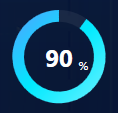
2、进度环
前台View代码
 1 <!--Gauge进度环 GaugeBackground背景环颜色 HighFontSize环内数字字号 Uses360Mode半圆还是整圆 InnerRadius内圆半径 Value环内数字值-->

 2 <lvc:Gauge Grid.Row="0" GaugeBackground="#11ffffff" HighFontSize="24"

 3            Uses360Mode="False" From="0" To="100" InnerRadius="35" Value="{Binding OrderProgress}" >

 4     <!--该设置:起点零点 方向逆时针-->

 5     <lvc:Gauge.GaugeRenderTransform>

 6         <TransformGroup>

 7             <RotateTransform Angle="90"></RotateTransform>

 8             <ScaleTransform ScaleX="-1"></ScaleTransform>

 9         </TransformGroup>

10     </lvc:Gauge.GaugeRenderTransform>

11     <!--设置圆环的颜色渐变-->

12     <lvc:Gauge.GaugeActiveFill>

13         <LinearGradientBrush>

14             <GradientStop Color="#539fff" Offset="0.0" />

15             <GradientStop Color="#00eaff" Offset="0.5" />

16             <GradientStop Color="#6af0ff" Offset="1.0" />

17         </LinearGradientBrush>

18     </lvc:Gauge.GaugeActiveFill>

19 </lvc:Gauge>
Gauge xaml
后台ViewModel代码
1 private double _orderProgress;

2 public double OrderProgress { get { return _orderProgress; } set { _orderProgress = value; NotifyOfPropertyChange(() => OrderProgress); } }

3

4 private void ShowGauge()

5 {

6     OrderProgress = 90;

7 }
Gauge cs
效果图
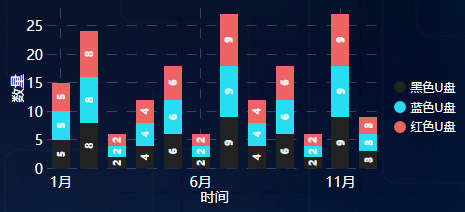
3、柱状堆积图
前台View代码
 1 <!--柱状堆积图-->

 2 <!--LegendLocation图例位置-->

 3 <lvc:CartesianChart Grid.Column="1" LegendLocation="Right" Margin="20,0">

 4     <lvc:CartesianChart.AxisX>

 5         <lvc:Axis Style="{StaticResource FontChartAxis}" Labels="{Binding Labels}" Title="时间">

 6             <lvc:Axis.Separator>

 7                 <!--Step柱间隔-->

 8                 <lvc:Separator Step="5" Stroke="#33ffffff" StrokeDashArray="10"/>

 9             </lvc:Axis.Separator>

10         </lvc:Axis>

11     </lvc:CartesianChart.AxisX>

12     <lvc:CartesianChart.AxisY>

13         <lvc:Axis Style="{StaticResource FontChartAxis}" Title="数量">

14             <lvc:Axis.Separator>

15                 <lvc:Separator Stroke="#33ffffff" StrokeDashArray="10"/>

16             </lvc:Axis.Separator>

17         </lvc:Axis>

18     </lvc:CartesianChart.AxisY>

19     <lvc:CartesianChart.Series>

20         <!--StackedColumnSeries要比较的其中一类 MaxColumnWidth柱状图宽度 DataLabels是否显示柱状图数值 Title图例中名称-->

21         <lvc:StackedColumnSeries Style="{StaticResource FontStackedColumnSeries}"

22                                  Fill="#222222" LabelsPosition="Merged" MaxColumnWidth="20" DataLabels="True"

23                                  Values="{Binding V1}" Title="黑色U盘">

24         </lvc:StackedColumnSeries>

25         <lvc:StackedColumnSeries Style="{StaticResource FontStackedColumnSeries}"

26                                  Fill="#26def2" LabelsPosition="Merged" MaxColumnWidth="20" DataLabels="True"

27                                  Values="{Binding V2}" Title="蓝色U盘">

28         </lvc:StackedColumnSeries>

29         <lvc:StackedColumnSeries Style="{StaticResource FontStackedColumnSeries}"

30                                  Fill="#ee6363" LabelsPosition="Merged" MaxColumnWidth="20" DataLabels="True"

31                                  Values="{Binding V3}" Title="红色U盘">

32         </lvc:StackedColumnSeries>

33     </lvc:CartesianChart.Series>

34     <lvc:CartesianChart.ChartLegend>

35         <!--BulletSize图例中圆点尺寸-->

36         <lvc:DefaultLegend BulletSize="12" Style="{StaticResource FontChartLegend}"/>

37     </lvc:CartesianChart.ChartLegend>

38 </lvc:CartesianChart>
StackedColumn xaml
后台ViewModel代码
 1 private string[] _labels;

 2 private IChartValues _v1;

 3 private IChartValues _v2;

 4 private IChartValues _v3;

 5 public IChartValues V1 { get { return _v1; } set { _v1 = value; NotifyOfPropertyChange(() => V1); } }

 6 public IChartValues V2 { get { return _v2; } set { _v2 = value; NotifyOfPropertyChange(() => V2); } }

 7 public IChartValues V3 { get { return _v3; } set { _v3 = value; NotifyOfPropertyChange(() => V3); } }

 8 public string[] Labels { get { return _labels; } set { _labels = value; NotifyOfPropertyChange(() => Labels); } }

 9 private void ShowStackedColumn()

10 {

11     V1 = new ChartValues<ObservableValue>

12             {

13                 new ObservableValue(5),

14                 new ObservableValue(8),

15                 new ObservableValue(2),

16                 new ObservableValue(4),

17                 new ObservableValue(6),

18                 new ObservableValue(2),

19                 new ObservableValue(9),

20                 new ObservableValue(4),

21                 new ObservableValue(6),

22                 new ObservableValue(2),

23                 new ObservableValue(9),

24                 new ObservableValue(3)

25             };

26     V2 = new ChartValues<ObservableValue>

27             {

28                 new ObservableValue(5),

29                 new ObservableValue(8),

30                 new ObservableValue(2),

31                 new ObservableValue(4),

32                 new ObservableValue(6),

33                 new ObservableValue(2),

34                 new ObservableValue(9),

35                 new ObservableValue(4),

36                 new ObservableValue(6),

37                 new ObservableValue(2),

38                 new ObservableValue(9),

39                 new ObservableValue(3)

40             };

41     V3 = new ChartValues<ObservableValue>

42             {

43                 new ObservableValue(5),

44                 new ObservableValue(8),

45                 new ObservableValue(2),

46                 new ObservableValue(4),

47                 new ObservableValue(6),

48                 new ObservableValue(2),

49                 new ObservableValue(9),

50                 new ObservableValue(4),

51                 new ObservableValue(6),

52                 new ObservableValue(2),

53                 new ObservableValue(9),

54                 new ObservableValue(3)

55             };

56

57     Labels = new[]

58     {

59         "1月", "2月","3月", "4月", "5月", "6月", "7月", "8月", "9月", "10月", "11月", "12月"

60     };

61 }
StackedColumn cs
效果图
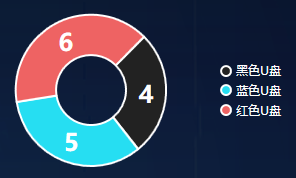
4、饼状图
前台代码
 1 <!--环形饼状图-->

 2 <!--InnerRadius内圆半径-->

 3 <lvc:PieChart Grid.Column="0"  Margin="80,25" LegendLocation="Right" InnerRadius="35">

 4     <lvc:PieChart.Series>

 5         <!--PieSeries要比较的其中一类 -->

 6         <lvc:PieSeries Style="{StaticResource FontPieSeries}" Fill="#222222" DataLabels="True" Values="4" Title="黑色U盘"/>

 7         <lvc:PieSeries Style="{StaticResource FontPieSeries}" Fill="#26def2" DataLabels="True" Values="5" Title="蓝色U盘"/>

 8         <lvc:PieSeries Style="{StaticResource FontPieSeries}" Fill="#ee6363" DataLabels="True" Values="6" Title="红色U盘"/>

 9     </lvc:PieChart.Series>

10     <lvc:PieChart.ChartLegend>

11         <lvc:DefaultLegend BulletSize="12" Style="{StaticResource FontChartLegend}"/>

12     </lvc:PieChart.ChartLegend>

13 </lvc:PieChart>
Pie xaml
效果图
或者:
前台代码
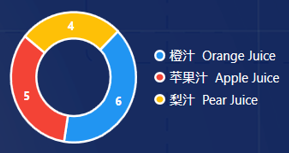
1 <lvc:PieChart Name="Chart" Grid.Row="1" Grid.Column="3" Grid.ColumnSpan="4"

2                               Series="{Binding OrderCountSeries}" Margin="0,0,35,0" LegendLocation="Right" InnerRadius="25">

3                     <lvc:PieChart.ChartLegend>

4                         <lvc:DefaultLegend BulletSize="18" Style="{StaticResource FontDefaultStyle}"></lvc:DefaultLegend>

5                     </lvc:PieChart.ChartLegend>

6                 </lvc:PieChart>
Pie2 xaml
后台代码
 1 private SeriesCollection _orderCountSeries;

 2 public SeriesCollection OrderCountSeries { get { return _orderCountSeries; } set { _orderCountSeries = value; NotifyOfPropertyChange(() => OrderCountSeries); } }

 3 public ObservableValue OrangeOrderCount { get; set; } = new ObservableValue();

 4 public ObservableValue AppleOrderCount { get; set; } = new ObservableValue();

 5 public ObservableValue PearOrderCount { get; set; } = new ObservableValue();

 6

 7 private void InitializeChartSeries()

 8 {

 9     OrderCountSeries = new SeriesCollection

10     {

11         new PieSeries

12         {

13             Title = "橙    汁    Orange",

14             Values = new ChartValues<ObservableValue> { new ObservableValue() },

15             DataLabels = true,

16             FontSize = 28

17         },

18         new PieSeries

19         {

20             Title = "苹果汁    Apple",

21             Values = new ChartValues<ObservableValue> { new ObservableValue() },

22             DataLabels = true,

23             FontSize = 28

24         },

25         new PieSeries

26         {

27             Title = "梨    汁    Pear",

28             Values = new ChartValues<ObservableValue> { new ObservableValue() },

29             DataLabels = true,

30             FontSize = 28

31         }

32     };

33 }

34

35 private void UpdateChartSeries()

36 {

37     OrangeOrderCount.Value = TodaysFinishedOrderList != null ? TodaysFinishedOrderList.FindAll(o => o.PRODUCT_CODE == (int)ItemType.Orange).Count : 0;

38     AppleOrderCount.Value = TodaysFinishedOrderList != null ? TodaysFinishedOrderList.FindAll(o => o.PRODUCT_CODE == (int)ItemType.Apple).Count : 0;

39     PearOrderCount.Value = TodaysFinishedOrderList != null ? TodaysFinishedOrderList.FindAll(o => o.PRODUCT_CODE == (int)ItemType.Pear).Count : 0;

40

41     OrderCountSeries[0].Values[0] = OrangeOrderCount;

42     OrderCountSeries[1].Values[0] = AppleOrderCount;

43     OrderCountSeries[2].Values[0] = PearOrderCount;

44 }
Pie2 cs
效果图
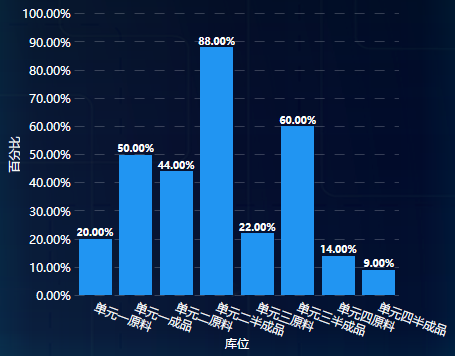
5、柱状图
前台代码
 1 <!--LegendLocation图例位置-->

 2 <lvc:CartesianChart Margin="20,75,20,15">

 3     <lvc:CartesianChart.AxisX>

 4         <lvc:Axis Style="{StaticResource FontChartAxis}" FontSize="12" Labels="{Binding Path=StorageLabels}" Title="库位" LabelsRotation="20">

 5             <lvc:Axis.Separator>

 6                 <!--Step柱间隔-->

 7                 <lvc:Separator Step="1" IsEnabled="False"/>

 8             </lvc:Axis.Separator>

 9         </lvc:Axis>

10     </lvc:CartesianChart.AxisX>

11     <lvc:CartesianChart.AxisY>

12         <lvc:Axis Style="{StaticResource FontChartAxis}" FontSize="12" Title="百分比" LabelFormatter="{Binding Path=AxisPercentage}">

13             <lvc:Axis.Separator>

14                 <lvc:Separator Stroke="#33ffffff" StrokeDashArray="10"/>

15             </lvc:Axis.Separator>

16         </lvc:Axis>

17     </lvc:CartesianChart.AxisY>

18     <lvc:CartesianChart.Series>

19         <lvc:ColumnSeries Style="{StaticResource FontColumnSeries}" Values="{Binding Path=StoragePercentages}"

20                           DataLabels="True" LabelsPosition="Top"/>

21     </lvc:CartesianChart.Series>

22     <lvc:CartesianChart.ChartLegend>

23         <!--BulletSize图例中圆点尺寸-->

24         <lvc:DefaultLegend BulletSize="12" Style="{StaticResource FontChartLegend}"/>

25     </lvc:CartesianChart.ChartLegend>

26 </lvc:CartesianChart>
Column xaml
后台代码
 1 private Func<double, string> _axisPercentage;

 2 private string[] _storageLabels;

 3 private IChartValues _storagePercentages;

 4 public Func<double, string> AxisPercentage { get { return _axisPercentage; } set { _axisPercentage = value; NotifyOfPropertyChange(() => AxisPercentage); } }

 5 public string[] StorageLabels { get { return _storageLabels; } set { _storageLabels = value; NotifyOfPropertyChange(() => StorageLabels); } }

 6 public IChartValues StoragePercentages { get { return _storagePercentages; } set { _storagePercentages = value; NotifyOfPropertyChange(() => StoragePercentages); } }

 7 private void ShowStoragePercentageColumnChart()

 8 {

 9     StorageLabels = new[]

10     {

11         "单元一原料","单元一成品","单元二原料","单元二半成品","单元三原料","单元三半成品","单元四原料","单元四半成品"

12     };

13     AxisPercentage = val => val.ToString("P");

14     StoragePercentages = new ChartValues<double> { 0.2, 0.5, 0.44, 0.88, 0.22, 0.6, 0.14, 0.09 };

15 }
Column cs
效果图
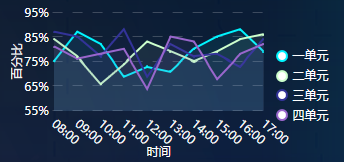
6、折线图
前台代码
 1 <lvc:CartesianChart Grid.Column="2" LegendLocation="Right" Margin="15,0">

 2     <lvc:CartesianChart.AxisX>

 3         <lvc:Axis Style="{StaticResource FontChartAxis}" FontSize="12" Labels="{Binding Path=XTimeLabels}" Title="时间" LabelsRotation="40">

 4             <lvc:Axis.Separator>

 5                 <!--Step柱间隔-->

 6                 <lvc:Separator Step="1" IsEnabled="False"/>

 7             </lvc:Axis.Separator>

 8         </lvc:Axis>

 9     </lvc:CartesianChart.AxisX>

10     <lvc:CartesianChart.AxisY>

11         <lvc:Axis Style="{StaticResource FontChartAxis}" FontSize="12" Title="百分比" LabelFormatter="{Binding Path=YPercentageFormat}">

12             <lvc:Axis.Separator>

13                 <lvc:Separator Stroke="#33ffffff" StrokeDashArray="10"/>

14             </lvc:Axis.Separator>

15         </lvc:Axis>

16     </lvc:CartesianChart.AxisY>

17     <lvc:CartesianChart.Series>

18         <lvc:LineSeries Values="{Binding OccupancyRatesCell1}" PointGeometrySize="2" Stroke="#00f5ff" Fill="#1100f5ff" LineSmoothness="0" Title="一单元"/>

19         <lvc:LineSeries Values="{Binding OccupancyRatesCell2}" PointGeometrySize="2" Stroke="#ccffcc" Fill="#11ccffcc" LineSmoothness="0" Title="二单元"/>

20         <lvc:LineSeries Values="{Binding OccupancyRatesCell3}" PointGeometrySize="2" Stroke="#333399" Fill="#11333399" LineSmoothness="0" Title="三单元"/>

21         <lvc:LineSeries Values="{Binding OccupancyRatesCell4}" PointGeometrySize="2" Stroke="#9966cc" Fill="#119966cc" LineSmoothness="0" Title="四单元"/>

22     </lvc:CartesianChart.Series>

23     <lvc:CartesianChart.ChartLegend>

24         <!--BulletSize图例中圆点尺寸-->

25         <lvc:DefaultLegend BulletSize="12" Style="{StaticResource FontChartLegend}"/>

26     </lvc:CartesianChart.ChartLegend>

27 </lvc:CartesianChart>
Line xaml
后台代码
 1 private string[] _xTimeLabels;

 2 private Func<double, string> _yPercentageFormat;

 3 private ChartValues<double> _occupancyRatesCell1;

 4 private ChartValues<double> _occupancyRatesCell2;

 5 private ChartValues<double> _occupancyRatesCell3;

 6 private ChartValues<double> _occupancyRatesCell4;

 7 public string[] XTimeLabels { get { return _xTimeLabels; } set { _xTimeLabels = value; NotifyOfPropertyChange(() => XTimeLabels); } }

 8 public Func<double, string> YPercentageFormat { get { return _yPercentageFormat; } set { _yPercentageFormat = value; NotifyOfPropertyChange(() => YPercentageFormat); } }

 9 public ChartValues<double> OccupancyRatesCell1 { get { return _occupancyRatesCell1; } set { _occupancyRatesCell1 = value; NotifyOfPropertyChange(() => OccupancyRatesCell1); } }

10 public ChartValues<double> OccupancyRatesCell2 { get { return _occupancyRatesCell2; } set { _occupancyRatesCell2 = value; NotifyOfPropertyChange(() => OccupancyRatesCell2); } }

11 public ChartValues<double> OccupancyRatesCell3 { get { return _occupancyRatesCell3; } set { _occupancyRatesCell3 = value; NotifyOfPropertyChange(() => OccupancyRatesCell3); } }

12 public ChartValues<double> OccupancyRatesCell4 { get { return _occupancyRatesCell4; } set { _occupancyRatesCell4 = value; NotifyOfPropertyChange(() => OccupancyRatesCell4); } }

13 private void InitOccupancyRate()

14 {

15     YPercentageFormat = value => value.ToString("P0"); //P0表示只保留整数,P表示保留小数点后两位

16     XTimeLabels = new[] { "08:00", "09:00", "10:00", "11:00", "12:00", "13:00", "14:00", "15:00", "16:00", "17:00" }; ;

17     OccupancyRatesCell1 = new ChartValues<double> { 0.75, 0.87, 0.82, 0.69, 0.73, 0.71, 0.80, 0.85, 0.88, 0.79 };

18     OccupancyRatesCell2 = new ChartValues<double> { 0.84, 0.77, 0.66, 0.74, 0.83, 0.79, 0.75, 0.79, 0.84, 0.86 };

19     OccupancyRatesCell3 = new ChartValues<double> { 0.87, 0.85, 0.77, 0.88, 0.69, 0.82, 0.77, 0.78, 0.73, 0.84 };

20     OccupancyRatesCell4 = new ChartValues<double> { 0.81, 0.76, 0.78, 0.80, 0.64, 0.85, 0.83, 0.68, 0.78, 0.82 };

21 }
Line cs
效果图
7、LiveCharts所用到的样式Style.xaml
 1 <!--LiveCharts文字样式-->

 2 <!--图表坐标轴文字-->

 3 <Style x:Key="FontChartAxis" TargetType="{x:Type lvc:Axis}">

 4     <Setter Property="HorizontalAlignment" Value="Center"/>

 5     <Setter Property="VerticalAlignment" Value="Center"/>

 6     <Setter Property="FontFamily" Value="Microsoft Yahei"/>

 7     <Setter Property="FontSize" Value="14"/>

 8     <Setter Property="Foreground" Value="White"/>

 9 </Style>

10 <!--柱状堆积图文字-->

11 <Style x:Key="FontStackedColumnSeries" TargetType="{x:Type lvc:StackedColumnSeries}">

12     <Setter Property="HorizontalAlignment" Value="Center"/>

13     <Setter Property="VerticalAlignment" Value="Center"/>

14     <Setter Property="FontFamily" Value="Microsoft Yahei"/>

15     <Setter Property="FontSize" Value="10"/>

16     <Setter Property="Foreground" Value="White"/>

17 </Style>

18 <!--柱状图文字-->

19 <Style x:Key="FontColumnSeries" TargetType="{x:Type lvc:ColumnSeries}">

20     <Setter Property="HorizontalAlignment" Value="Center"/>

21     <Setter Property="VerticalAlignment" Value="Center"/>

22     <Setter Property="FontFamily" Value="Microsoft Yahei"/>

23     <Setter Property="FontSize" Value="10"/>

24     <Setter Property="Foreground" Value="White"/>

25 </Style>

26 <!--图例文字-->

27 <Style x:Key="FontChartLegend" TargetType="{x:Type lvc:DefaultLegend}">

28     <Setter Property="HorizontalAlignment" Value="Center"/>

29     <Setter Property="VerticalAlignment" Value="Center"/>

30     <Setter Property="FontFamily" Value="Microsoft Yahei"/>

31     <Setter Property="FontSize" Value="12"/>

32     <Setter Property="Foreground" Value="White"/>

33 </Style>

34 <!--图表行文字-->

35 <Style x:Key="FontRowSeries" TargetType="{x:Type lvc:RowSeries}">

36     <Setter Property="HorizontalAlignment" Value="Center"/>

37     <Setter Property="VerticalAlignment" Value="Center"/>

38     <Setter Property="FontFamily" Value="Microsoft Yahei"/>

39     <Setter Property="FontSize" Value="9"/>

40     <Setter Property="Foreground" Value="White"/>

41 </Style>

42 <!--饼状图文字-->

43 <Style x:Key="FontPieSeries" TargetType="{x:Type lvc:PieSeries}">

44     <Setter Property="HorizontalAlignment" Value="Center"/>

45     <Setter Property="VerticalAlignment" Value="Center"/>

46     <Setter Property="FontFamily" Value="Microsoft Yahei"/>

47     <Setter Property="FontSize" Value="24"/>

48     <Setter Property="Foreground" Value="White"/>

49 </Style>
style
WPF绘制图表-LiveCharts的更多相关文章
- WPF 应用 - 图表 LiveCharts
引用:LiveCharts,LiveCharts.Wpf 1. 示例 折线图 <Window ... xmlns:lvc="clr-namespace:LiveCharts.Wpf;a ...
- 使用D3绘制图表(7)--饼状图
这次是绘制饼状图,也是这一次使用D3绘制图表的最后一篇,大家可以从其他地方深入学习D3绘制图表,也可以直接查看D3的API进行学习,本次绘制饼状图的数据跟之前的卸载数组里面的不一样,这一次是使用d3的 ...
- 网页绘制图表 Google Charts with JavaScript #2 ....与ASP.NET网页结合 (ClientScriptManager.RegisterStartupScript 方法)
此为文章备份,原文出处(我的网站) 网页绘制图表 Google Charts with JavaScript #2 ....与ASP.NET网页结合 (ClientScriptManager.Regi ...
- 网页绘制图表 Google Charts with JavaScript #1....好强、好简单啊!
此为文章备份,原文出处(我的网站) 网页绘制图表 Google Charts with JavaScript....好强.好简单啊!#1 http://www.dotblogs.com.tw/mis2 ...
- DevExpress使用之ChartControl控件绘制图表(多坐标折线图、柱状图、饼状图)
最近因为公司项目需要用到WinForm的DecExpress控件,在这里把一些使用方法总结一下. DevExpress中有一个专门用来绘制图表的插件ChartControl,可以绘制折线图.饼状图.柱 ...
- ZedGrap控件绘制图表曲线
问题描述: 使用C#中ZedGrap控件绘制图表曲线图 ZedGrap 介绍说明: 安装ZedGrap控件 ZedGraph控件dll文件: 添加ZedGraph控件,首先在新建立的C#图像工 ...
- c#调用Excel绘制图表
c#调用Excel需要引用命名空间 using Microsoft.Office.Interop.Excel; 由于该程序不复杂,主要是根据不同数据画表和图,画的图像也并不复杂,因为画图和画表的操作会 ...
- WPF绘制党徽(立体效果,Cool)
原文:WPF绘制党徽(立体效果,Cool) 前面用WPF方式绘制了党旗(WPF制作的党旗) ,去年3月份利用C# 及GDI+绘制过党徽,这次使用WPF来绘制党徽. ------------------ ...
- vue+echarts 动态绘制图表以及异步加载数据
前言 背景:vue写的后台管理,需要将表格数据绘制成图表(折线图,柱状图),图表数据都是通过接口请求回来的. 安装 cnpm install echarts --s (我这里用了淘宝镜像,不知道同学自 ...
随机推荐
- 微服务架构 | 7.1 基于 OAuth2 的安全认证
目录 前言 1. OAuth2 基础知识 1.1 安全性的 4 个组成部分 1.2 OAuth2 的工作原理 1.3 OAuth2 规范的 4 种类型的授权 1.4 OAuth2 的优势 1.5 OA ...
- PyCharm专业版破解教程
破解步骤: 1. 下载激活包和注册码:https://pan.baidu.com/s/1_1nrQdTElf4aEg8vGnMTzg 2. 将下载的破解包放入PyCham安装目录的bin文件夹中 3. ...
- 「CTSC 2011」幸福路径
[「CTSC 2011」幸福路径 蚂蚁是可以无限走下去的,但是题目对于精度是有限定的,只要满足精度就行了. \({(1-1e-6)}^{2^{25}}=2.6e-15\) 考虑使用倍增的思想. 定义\ ...
- SnapKit
SnapKit 是 Masonry 框架的团队针对 Swift 全新开发的一套自动布局框架 官方网站:http://snapkit.io github网站:https://github.com/Sna ...
- 需求: 使用LinkedList存储一副扑克牌,然后实现洗牌功能。
import java.util.LinkedList; import java.util.Random; /* 需求: 使用LinkedList存储一副扑克牌,然后实现洗牌功能. */ //扑克类 ...
- springcloud+gateway微服务整合swagger
单一的微服务集成swagger: maven: <dependency> <groupId>io.springfox</groupId> <artifactI ...
- Git配置多个github账号免密登录
在公司开发中,有时候会存在公司账户跟私人账户共存,并随时需要切换的情况,这种情况下git可以配置多个ssh-key,无缝切换账号. 假如有两个github账号,一个是私人github账号,一个是公司g ...
- 生产环境搭建高可用Harbor(包括恢复演练实操)
生产环境搭建高可用Harbor(包括恢复演练实操) 前言 因资源成本问题,本Harbor高可用架构为最小开销方案,如果资源充足,可以将PG.Redis全部使用使用云厂商集群模式. 同时为了配置简单,并 ...
- 赠送4本《 PHP 程序员面试笔试宝典》
< PHP 程序员面试笔试宝典>历时一年,由机械工业出版社出版,在 2018 年 11 月问世.全书共八个章节,涉及 面试笔试经验技巧.PHP 基础知识.PHP 进阶知识,PHP 面向对象 ...
- Linux基础:网络协议篇
01.网络协议 1. 操作系统基础 操作系统(operating System 简称OS)是管理和控制计算机硬件与软件自愿的计算机程序,是直接运行在"裸机"上的基本的系统软件,任何 ...