
OpenShift和F5的集成手册
OpenShift和F5的集成步骤,记录如下,如实际操作中有变更会再度编辑修改。
1.整体架构
使用BIG-IP作为Openshift的Router,能实现以下功能:
- 为Services创建BIG-IP本地流量规则
- 提供HTTP/HTTPS路由
- 为Route资源添加BIG-IP健康检查
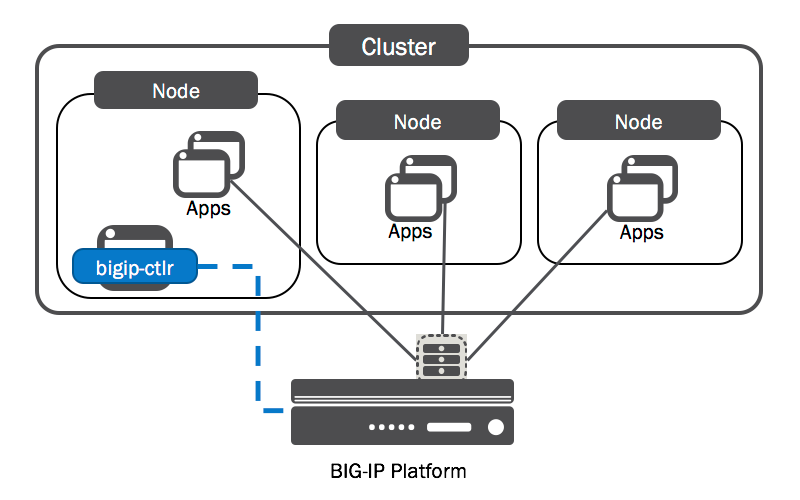
本文步骤是通过F5替换OpenShift中的Router,整体的架构如下
2.安装步骤
为BIG-IP设备建立节点
- 在OCP集群中建立一个f5-kctlr-openshift-hostsubnet.yaml文件,内容如下
apiVersion: v1

kind: HostSubnet

metadata:

  name: f5-bigip-

  annotations:

    pod.network.openshift.io/fixed-vnid-host: ""

    pod.network.openshift.io/assign-subnet: "true"

# provide a name for the BIG-IP device's host Node

host: f5-bigip-node-

# Provide an IP address to serve as the BIG-IP VTEP in the OpenShift SDN

hostIP: 172.16.1.28
Host为F5的主机名,hostIP为F5的地址
- 建立Host Subnet
oc create -f f5-kctlr-openshift-hostsubnet.yaml

hostsubnet "f5-bigip-01" created
验证一下
oc get hostsubnet

NAME                  HOST                  HOST IP         SUBNET

f5-big-ip             f5-bigip-node         172.16.1.28     10.129.2.0/
BIG-IP系统设置
需要以管理员或资源管理员身份登录BIG-IP系统
建立VXLAN tunnel
- 建立vxlan profile
create /net tunnels vxlan ose-vxlan flooding-type multipoint
- 建立vxlan tunnel
设置local-address为HostSubnet’s hostip
设置key=0允许设备访问所有的openshift的项目和子网
create /net tunnels tunnel openshift_vxlan key profile ose-vxlan local-address 172.16.1.28
- 生成一个Self IP在VXLAN中
Self IP的地址范围必须落在集群的子网掩码中,可以通过oc get clusternetwork来查看集群的子网掩码
A self IP address is an IP address on the BIG-IPsystem that you associate with a VLAN, to access hosts in that VLAN. By virtue of its netmask, a self IPaddress represents an address space , that is, a range of IP addresses spanning the hosts in the VLAN, rather than a single host address.
Self IP are used for each device. Each BIG-IP has a self-IP in a VLAN which is the IP defined on the interface.
Floating IP are for a cluster. They are VIPs, and this is the IP shared by your cluster members.
create /net self 10.129.2.3/ allow-service none vlan openshift_vxlan
- 在VXLAN中建立一个浮动的self IP
使用Openshift SDN分配给BIG-IP HostSubnet的子网地址
create /net self 10.129.2.4/ allow-service none traffic-group traffic-group- vlan openshift_vxlan
- 验证BIG IP的对象建立
show /net tunnels tunnel openshift_vxlan

show /net running-config self 10.129.2.3/

show /net running-config self 10.129.2.4/
- 建立一个partition
create auth partition OpenShift
- 在partition下建立一个virtual server
部署BIG-IP Controller
- 建立service account
oc create serviceaccount bigip-ctlr [-n kube-system]

serviceaccount "bigip-ctlr" created
- 建立Cluster role和 Cluster Role binding
# For use in OpenShift clusters

apiVersion: v1

kind: ClusterRole

metadata:

  annotations:

    authorization.openshift.io/system-only: "true"

  name: system:bigip-ctlr

rules:

- apiGroups: ["", "extensions"]

  resources: ["nodes", "services", "endpoints", "namespaces", "ingresses", "routes" ]

  verbs: ["get", "list", "watch"]

- apiGroups: ["", "extensions"]

  resources: ["configmaps", "events", "ingresses/status"]

  verbs: ["get", "list", "watch", "update", "create", "patch" ]

- apiGroups: ["", "extensions"]

  resources: ["secrets"]

  resourceNames: ["<secret-containing-bigip-login>"]

  verbs: ["get", "list", "watch"]

---

apiVersion: v1

kind: ClusterRoleBinding

metadata:

    name: bigip-ctlr-role

userNames:

- system:serviceaccount:kube-system:bigip-ctlr

subjects:

- kind: ServiceAccount

  name: bigip-ctlr

roleRef:

  name: system:bigip-ctlr
oc create -f f5-kctlr-openshift-clusterrole.yaml [-n kube-system]

clusterrole "system:bigip-ctlr" created

clusterrolebinding "bigip-ctlr-role" created
- 建立Deployment
- --bigip-url 为设备的IP
- --bigip-partition为之前F5下创建的Partition,Openshift
- --route-vserver-addr 为F5对外提供服务的IP
- openshift-sdn-name指向tunnel的名字
apiVersion: extensions/v1beta1

kind: Deployment

metadata:

  name: k8s-bigip-ctlr

spec:

  replicas:

  template:

    metadata:

      name: k8s-bigip-ctlr

      labels:

        app: k8s-bigip-ctlr

    spec:

      # Name of the Service Account bound to a Cluster Role with the required

      # permissions

      serviceAccountName: bigip-ctlr

      containers:

        - name: k8s-bigip-ctlr

          image: "f5networks/k8s-bigip-ctlr"

          env:

            - name: BIGIP_USERNAME

              valueFrom:

                secretKeyRef:

                  # Replace with the name of the Secret containing your login

                  # credentials

                  name: bigip-login

                  key: username

            - name: BIGIP_PASSWORD

              valueFrom:

                secretKeyRef:

                  # Replace with the name of the Secret containing your login

                  # credentials

                  name: bigip-login

                  key: password

          command: ["/app/bin/k8s-bigip-ctlr"]

          args: [

            # See the k8s-bigip-ctlr documentation for information about

            # all config options

            # https://clouddocs.f5.com/products/connectors/k8s-bigip-ctlr/latest

            "--bigip-username=$(BIGIP_USERNAME)",

            "--bigip-password=$(BIGIP_PASSWORD)",

            "--bigip-url=10.10.10.10",

            "--bigip-partition=openshift",

            "--pool-member-type=cluster",

            "--openshift-sdn-name=/Common/openshift_vxlan",

            "--manage-routes=true",

            "--route-vserver-addr=1.2.3.4",

            "--route-label="App1"

            ]

      imagePullSecrets:

        - name: f5-docker-images

        - name: bigip-login
oc create -f f5-k8s-bigip-ctlr_openshift-sdn.yaml [-n kube-system]

deployment "k8s-bigip-ctlr" created
- 验证部署成功
oc get pods

NAME                              READY     STATUS    RESTARTS   AGE

k8s-bigip-ctlr--s31l4   /       Running             1m
验证
- 建立route
创建项目,创建应用,然后创建Route
apiVersion: v1

kind: Route

metadata:

  labels:

    name: myService

  name: myService-route-unsecured

  annotations:

    # See the k8s-bigip-ctlr documentation for information about

    # all Route Annotations

    # https://clouddocs.f5.com/products/connectors/k8s-bigip-ctlr/latest/#supported-route-annotations

    virtual-server.f5.com/balance: least-connections-node

spec:

  host: mysite.example.com

  path: "/myApp"

  port:

    targetPort:

  to:

    kind: Service

    name: myService
在本地hosts文件中添加mysite.example.com到F5的virtual ip,然后浏览器访问
- 创建https route
apiVersion: route.openshift.io/v1

kind: Route

metadata:

  annotations:

    virtual-server.f5.com/balance: least-connections-node

  labels:

    app: f5-test

  name: f5-test-

spec:

  host: f5-tes-2t.example.com

  tls:

    insecureEdgeTerminationPolicy: Allow

    termination: edge

  to:

    kind: Service

    name: f5-test
浏览器访问https://f5-test.example.com,即能看到应用页面。
- Openshit上创建Service后,F5会自动创建新的Pool,Pool里的资源即为Service下的Pod
- 请求到达F5后,F5根据请求的域名,找到对应的Pool,请求直接到达Pod。不会请求集群里的Route。
详细参考
https://clouddocs.f5.com/containers/v2/openshift/kctlr-use-bigip-openshift.html
OpenShift和F5的集成手册的更多相关文章
- Openshift 和Harbor的集成
1.安装配置Harbor 环境rhel 7.6 安装docker,python 安装docker-compose sudo curl -L https://github.com/docker/comp ...
- Apache Hudi 与 Hive 集成手册
1. Hudi表对应的Hive外部表介绍 Hudi源表对应一份HDFS数据,可以通过Spark,Flink 组件或者Hudi客户端将Hudi表的数据映射为Hive外部表,基于该外部表, Hive可以方 ...
- ASP.NET协作应用集成到trsids身份验证服务器的开发流程
开发Actor协同模块: (参考TRSIDS4.0 协作应用集成手册[asp.net]) ASP.Net协作应用集成到IDS之前,需要开发Actor类实现协作应用回调接口中定义的本地登录.退出.用户信 ...
- [转帖]两大容器管理平台,Kubernetes与OpenShift有什么区别?
两大容器管理平台,Kubernetes与OpenShift有什么区别? https://www.sohu.com/a/327413642_100159565 原来openshift 就是 k8s的一个 ...
- 新书《OpenShift云原生架构:原理与实践》第一章第三节:企业级PaaS平台OpenShift
近十年来,信息技术领域在经历一场技术大变革,这场变革正将我们由传统IT架构及其所支撑的臃肿应用系统时代,迁移至云原生架构及其所支撑的敏捷应用系统时代.在这场变革中,新技术的出现.更新和淘汰之迅速,以及 ...
- iOS--通过MOB平台实现第三方登录与分享
适合刚开始接触第三方登录与分享的IOS小白!! 这两天看了一下有关IOS第三方登录与分享的一些知识,发现在QQ开放平台与微信开放平台实现这些功能很繁琐,不容易实现,在导师的推荐下,找到了这样一个平台 ...
- Kubernetes Ingress Controller的使用及高可用落地
Kubernetes Ingress Controller的使用及高可用落地 看懂本文要具备一下知识点: Service实现原理和会应用 知道反向代理原理,了解nginx和apache的vhost概念 ...
- (1)go 环境搭建
1 .下载安装 https://golang.org/ 2.环境变量配置 安装后会自动配置三个环境变量 (1) GOROOT: (2) PATH: (3) GOPATH GOPATH 从1.8开始,w ...
- K2 BPM_携手捷普:让流程立于云端,臻于至上_全球领先的工作流引擎
在工业4.0地催化下,新一代信息技术与高科制造业深度融合,正在引发影响深远的产业变革,形成了新的生产方式.产业形态.商业模式和经济增长点. 捷普作为世界上最大型的电子制造服务公司之一,正站在新的历史发 ...
随机推荐
- SICP第三章题解
目录 SICP第三章题解 ex3-17 ex3-18 ex3-19 队列 ex3-21 ex3-22 ex3-24 ex3-25 3.4 并发:时间是一个本质问题 ex3-38 3.4.2 控制并发的 ...
- 「Ionic」WebStorm的使用錯誤-
前言:遇到這個錯誤,不要慌張,搶按照濤叔下面的方式處理就可以了. 1.Couldn't find ionic.config.json file. Are you in an Ionic project ...
- c++ 容器学习 理论
[转载]http://blog.csdn.net/acosoft/article/details/4395468 在面向对象的语言中,大多引入了容器的概念.那么 什么 是 容器?实质上就是一组相同类型 ...
- ASP.NET WebAPI 06 HttpMessageHandler管道
HttpMessageHandler管道 在Web API的中,微软为了更好的进行架构扩展,采用的了一套管道设计----HttpMessageHander(其实WCF也有类似架构). 在整个管道中的头 ...
- 【LOJ】#2085. 「NOI2016」循环之美
题解 我们要求的其实是这个东西= = \(\sum_{i = 1}^{n}\sum_{j = 1}^{n}[(i,j) == 1][(j,k) == 1]\) 然后变一下形 \(\sum_{j = 1 ...
- karma+seajs
下面的介绍以karma能正常运行为前提,看karma系列文章:http://www.cnblogs.com/laixiangran/tag/Karma/ 目录结构 步骤 安装 npm install ...
- 【转载】ARouter-万能路由协议
Github源码地址:https://github.com/alibaba/ARouter 一.功能介绍 支持直接解析标准URL进行跳转,并自动解析参数注入 支持多模块工程使用 支持添加多个拦截器,自 ...
- linux网络管理----网络命令
1 Linux网络命令之网络环境查看命令 ifconfig 2 Linux网络命令之网络测试命令 telnet 基本已经被ssh替代了,telnet是明文传递,不安全
- 【BZOJ 2665】 2665: [cqoi2012]编号(暴力?)
2665: [cqoi2012]编号 Time Limit: 3 Sec Memory Limit: 128 MBSubmit: 347 Solved: 217 Description 你需要给一 ...
- BZOJ3238 [Ahoi2013]差异 SA+单调栈
题面 戳这里 题解 考虑把要求的那个东西拆开算,前面一个东西像想怎么算怎么算,后面那个东西在建出\(height\)数组后相当于是求所有区间\(min\)的和*2,单调栈维护一波即可. #includ ...