
使用npm install报错- operation not permitted解决
原文:https://blog.csdn.net/weixin_41715295/article/details/79508104
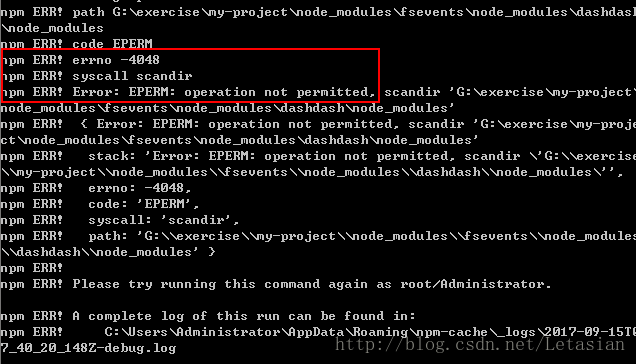
这几天使用npm install时一直报错-4048 operation not permitted,也尝试了多种方法,终于使问题得到解决,这里总结几种方法,先贴图:
一:权限问题
首先看到operation not permitted我们能想到权限问题,所以这时候我们可以以管理员身份运行cmd或者直接快捷键Win+X来打开。
二:依赖包错误
如上图,根据错误日志我们可以明显看到这个错误minimatch版本过低和dashdash错误,我们只要全局安装好这两个包问题就可以得到完美解决。
当我们在npm install或者通过npm install安装好一些脚手架如vue-cli或者angular-cli等,而后构建项目时报错,我们可以通过错误提示正确全局安装好所需要的依赖包就好了。
一般在这种情况下我们需要重点看operation not permitted后面这个关键单词和后面的目录。
三:npm版本问题
npm最新版本5.4.0在安装包时有些缺少依赖包,这种情况就需要我们安装低一点的npm版本:npm i -g npm@5.3.0(这里填写你需要的指定版本)。
以上是个人根据自己遇到情况总结的一些方法,当然重点在看自己的错误日志提示。
使用npm install报错- operation not permitted解决的更多相关文章
- 执行npm install报错:npm ERR! code EINTEGRITY
命令行执行npm install报错如下: D:\frontend\viewsdev>npm install npm ERR! code EINTEGRITY npm ERR! sha512-8 ...
- npm install 报错:node-pre-gyp ERR! 问题解决
npm install报错问题解决 问题: E:\CodeSpace\GitlabTest\desktop>npm install > lifeccp-desktop@1.1.9 post ...
- npm install 报错 error Unexpected end of JSON input while parsing near '...sShrinkwrap":false,"d' 解决办法
npm install 报错 : error Unexpected end of JSON input while parsing near '...sShrinkwrap":false,& ...
- 在运行vue项目时,执行npm install报错小记
在运行vue项目时,执行npm install 报错,导致后续的执行报各种错误,根据报错,尝试了网上的各种办法,最后发现时网络问题下载失败导致,解决办法: 安装cnpm==>npm instal ...
- npm install 报错解决办法
npm install 报错解决办法 原因是因为node_modules可能有意外改动,导致依赖库不完整,删除项目下的node_modules,在你的项目目录下,重新执行npm install,这会重 ...
- npm install 报错(npm ERR! errno -4048,Error: EPERM: operation not permitted,)解决方法
npm ERR! path E:\SouthernPowerGridProject\web_project\AutoOPS\autoops\node_modules\fsevents\node_mod ...
- npm install 报错:ERR! code EINTEGRITY 解决方案
npm升级后,npm install 报错了,报错信息:ERR! code EINTEGRITY到处百度搜索解决方案,终于找到了!“npm cache verify”这条命令帮助了不少人 npm ca ...
- npm install报错类似于npm WARN tar ENOENT: no such file or directory, open '***\node_modules\.staging\***
报错类似于如下图 解决方法: 删除文件 package-lock.json,再重新执行npm i或者npm install
- 前端vue项目执行npm install 报错cd() never called()
前端我刚开始接触Vue,从GitHub上下载了代码程序,但缺少一些插件,用vscode打开并下载插件执行报错cd() never called! 解决的方式 1.执行cmd命令行不要再vscode里执 ...
随机推荐
- DataTable 操作
public void CreateTable() { //创建表 DataTable dt = new DataTable(); //1.添加列 dt.Columns.Add("Name& ...
- centos 7网速监控脚本
#!/bin/bashif [ $# -ne 1 ];thendev="eth0"elsedev=$1fi while :doRX1=`/sbin/ifconfig $dev |a ...
- C++(二十七) — 深拷贝、浅拷贝、复制构造函数举例
1.复制构造函数.及new空间申请 复制构造函数,也是构造函数.只在初始化时调用,如果定义对象后赋值,比如,t1=t2,则只是运算符重载,没有调用构造函数. #include <iostream ...
- 【Demo】CSS3 过渡
CSS3 过渡transition 应用于宽度属性的过渡效果,时长为 2 秒: div { transition: width 2s; -webkit-transition: width 2s; /* ...
- Java的序列化机制
1. 所有实现序列化的类都必须实现Serializable接口,序列化有如下两个特点: 如果一个类可以被序列化,那么它的子类也可以被序列化 由于static代表类成员,trasient代表对象的临时数 ...
- HDU 5694 分治+规律
http://acm.hdu.edu.cn/showproblem.php?pid=5694 此题一开始我也找到了规律,也知道是分治可是,,,想的太复杂了没写开, 我一直想的通过L,R两个参数分治,可 ...
- 河南省多校联盟二-C
1281: 邪能炸弹 时间限制: 1 秒 内存限制: 128 MB提交: 222 解决: 80 题目描述 正在入侵艾泽拉斯的古尔丹偶然间得到了一颗邪能炸弹,经过研究,他发现这是一颗威力极其巨大且难 ...
- nyoj1015——二分图染色
二部图 时间限制:1000 ms | 内存限制:65535 KB 难度:1 描述 二部图又叫二分图,我们不是求它的二分图最大匹配,也不是完美匹配,也不是多重匹配,而是证明一个图是不是二部图.证 ...
- IOS-pch文件配置
--到Xcode7都可以这么解决.亲测. 发现一个好东西.就是这个.pch文件.我的理解是他里面存放了我们在各个controller里面需要的头文件,那这样一来,就免去了在不同的ViewControl ...
- Mutations
蛤蟆可以吃队友,也可以吃对手. 如果数组第一个字符串元素包含了第二个字符串元素的所有字符,函数返回true. 举例,["hello", "Hello"]应该返回 ...