
SQL映射文件-----MySQL关系映射【1对1,1对多,多对多】
SSM框架下,mapper.xml 中 association 标签和 collection 标签的使用
当数据库中表与表之间有关联时,在对数据库进行操作时,就不只是针对某一张表了,需要联表查询
MyBatis中如何实现联表查询
1、首先新建两张表
学生表(student)
- ID:stu_id
- 姓名:stu_name
- 年龄:stu_age
- 性别:stu_gender
- 所在班级:g_id
班级表(grade)
- ID:g_id
- 班级名称:g_name
学生表和班级表通过 g_id 进行关联,一个班级对应多个学生

2、创建相应的实体类和mapper接口
(1)创建 Student 类和 Grade 类(包名:com.bwlu.bean)
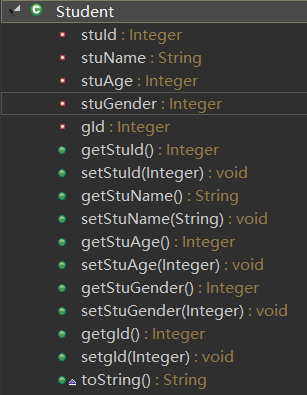
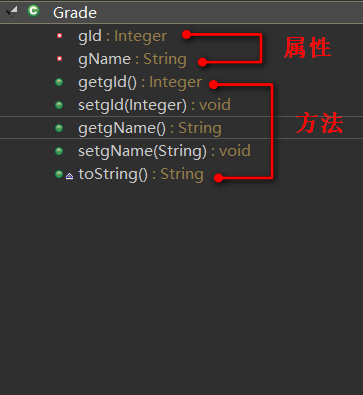
(2)创建 StudentMapper 接口和 GradeMapper 接口和相应的 XML 文件(使用逆向生成可直接生成)
StudentMapper.java 接口
Student selectByPrimaryKey(Integer stuId);//按主键查询一条记录
StudentMapper.xml
<mapper namespace="com.bwlu.mapper.StudentMapper" >

  <resultMap id="BaseResultMap" type="com.bwlu.bean.Student" >

    <id column="stu_id" property="stuId" jdbcType="INTEGER" />

    <result column="stu_name" property="stuName" jdbcType="VARCHAR" />

    <result column="stu_age" property="stuAge" jdbcType="INTEGER" />

    <result column="stu_gender" property="stuGender" jdbcType="INTEGER" />

    <result column="g_id" property="gId" jdbcType="INTEGER" />

  </resultMap>

  <select id="selectByPrimaryKey" resultMap="BaseResultMap" parameterType="java.lang.Integer" >

    select stu_id, stu_name, stu_age, stu_gender, g_id from student

    where stu_id = #{stuId,jdbcType=INTEGER}

  </select>

</mapper>
GradeMapper.java
Grade selectByPrimaryKey(Integer gId);//按主键查询一条记录
GradeMapper.xml
<mapper namespace="com.bwlu.mapper.GradeMapper" >

  <resultMap id="BaseResultMap" type="com.bwlu.bean.Grade" >

    <id column="g_id" property="gId" jdbcType="INTEGER" />

    <result column="g_name" property="gName" jdbcType="VARCHAR" />

  </resultMap>

  <select id="selectByPrimaryKey" resultMap="BaseResultMap" parameterType="java.lang.Integer" >

    select g_id, g_name from grade

    where g_id = #{gId,jdbcType=INTEGER}

  </select>

</mapper>
3、在sql映射文件中写映射sql语句【联合查询:级联属性封装结果集】
3.1第一种
(1)在 Student.java 中将 g_id 属性换成班级类型(Grade),并添加相应的getter和setter方法
//private Integer g_id;

private Grade grade;

public Grade getGrade() {

    return grade;

}

public void setGrade(Grade grade) {

    this.grade = grade;

}
(2)在 xml 中封装结果集,并编写相应的 sql 语句
<resultMap id="BaseResultMap" type="com.bwlu.bean.Student" >

  <id column="stu_id" property="stuId" jdbcType="INTEGER" />

  <result column="stu_name" property="stuName" jdbcType="VARCHAR" />

  <result column="stu_age" property="stuAge" jdbcType="INTEGER" />

  <result column="stu_gender" property="stuGender" jdbcType="INTEGER" />

  <result column="g_id" property="grade.gId" jdbcType="INTEGER" />

  <result column="g_name" property="grade.gName" jdbcType="VARCHAR" />

</resultMap>

<select id="selectByPrimaryKey" resultMap="BaseResultMap" parameterType="java.lang.Integer" >

  select stu_id, stu_name, stu_age, stu_gender, g.g_id, g_name

  from student s,grade g

  where s.g_id = g.g_id AND stu_id = #{stuId,jdbcType=INTEGER}

</select>
(3)测试
@Autowired

private StudentMapper studentMapper;

@Test

public void testAssociation() {

    Student student = studentMapper.selectByPrimaryKey(6);

    System.out.println(student);//Student [stuId=6, stuName=lixiang, stuAge=22, stuGender=1, grade=Grade [gId=3, gName=软件(3)班]]

}
3.2第二种
(1)在 Student.java 中将 g_id 属性换成班级类型(Grade),并添加相应的getter和setter方法,同 3.1 的(1)
(2)使用association来定义关联对象的规则【比较正规的,推荐的方式】
<resultMap id="BaseResultMap" type="com.bwlu.bean.Student" >

  <id column="stu_id" property="stuId" jdbcType="INTEGER" />

  <result column="stu_name" property="stuName" jdbcType="VARCHAR" />

  <result column="stu_age" property="stuAge" jdbcType="INTEGER" />

  <result column="stu_gender" property="stuGender" jdbcType="INTEGER" />

  <!-- association可以指定联合的javaBean对象

    property="grade":指定哪个属性是联合的对象

    javaType:指定这个属性对象的类型【不能省略】-->

  <association property="grade" javaType="com.bwlu.bean.Grade">

      <id column="g_id" property="gId" jdbcType="INTEGER"/>

      <result column="g_name" property="gName" jdbcType="VARCHAR"/>

  </association>

</resultMap>

<select id="selectByPrimaryKey" resultMap="BaseResultMap" parameterType="java.lang.Integer" >

  select stu_id, stu_name, stu_age, stu_gender, g.g_id, g_name

  from student s,grade g

  where s.g_id = g.g_id AND stu_id = #{stuId,jdbcType=INTEGER}

</select>
(3)测试(同 3.1 的(3),结果也一样)
3.3第三种
(1)在 Student.java 中将 g_id 属性换成班级类型(Grade),并添加相应的getter和setter方法,同 3.1 的(1)
(2)使用Association进行分步查询【上述结果相当于使用嵌套结果集的形式】
<resultMap id="BaseResultMap" type="com.bwlu.bean.Student" >

  <id column="stu_id" property="stuId" jdbcType="INTEGER" />

  <result column="stu_name" property="stuName" jdbcType="VARCHAR" />

  <result column="stu_age" property="stuAge" jdbcType="INTEGER" />

  <result column="stu_gender" property="stuGender" jdbcType="INTEGER" />

  <!-- 使用association进行分步查询

     1.先按照学生id查询学生信息

     2.根据查询学生信息中g_id值去班级表查出班级信息

     3.将班级信息设置到学生中:

    association定义关联对象的封装规则

    select:表明当前属性是调用指定的方法查出的结果

    column:指定将哪一列的值传给这个方法

    流程:使用select指定的方法(传入column指定的这列参数的值)查出对象,并封装给property指定的属性。-->

  <association property="grade" select="getGradeById" column="g_id"></association>

</resultMap>

<select id="getGradeById"resultType="com.bwlu.bean.Grade" parameterType="java.lang.Integer" >

  select g_id, g_name from grade

  where g_id = #{gId,jdbcType=INTEGER}

</select>

<select id="selectByPrimaryKey" resultMap="BaseResultMap" parameterType="java.lang.Integer" >

  select stu_id, stu_name, stu_age, stu_gender, g_id

  from student

  where stu_id = #{stuId,jdbcType=INTEGER}

</select>
注:使用 resultType 返回值类型进行接收,必须使用驼峰式命名,使数据库中的字段和实体类中的字段对应。
(3)测试(同 3.1 的(3),结果也一样)
(2)中也可以指定为 GradeMapper 下的方法。
<association property="grade" select="com.bwlu.mapper.GradeMapper.selectByPrimaryKey" column="g_id"></association>
懒加载机制【按需加载,也叫懒加载】
在 3.3 分步查询中,每次查询 Student 对象的时候,都将关联 Grade 的对象查询出来了。
使用延迟加载,可以在需要 班级 信息的时候,再去查询,不需要的时候就不用查询。
在 MyBatis 的全局配置文件中,加入两个配置
<settings>

    <!-- 驼峰式命名 -->

    <setting name="mapUnderscoreToCamelCase" value="true"/>

    <!-- 开启懒加载机制 ,默认值为true-->

    <setting name="lazyLoadingEnabled" value="true"/>

    <!-- 开启的话,每个属性都会直接全部加载出来;禁用的话,只会按需加载出来 -->

    <setting name="aggressiveLazyLoading" value="false"/>

</settings>
这样,当我们查询 Student 对象的时候,
如果只输出学生姓名,就不会执行查询班级信息的 sql 语句(只执行一条 sql 语句),
select stu_id, stu_name, stu_age, stu_gender, g_id from student where stu_id = ? Parameters: 6(Integer)
当需要班级信息的时候才会执行,(执行两条 sql 语句)
select stu_id, stu_name, stu_age, stu_gender, g_id from student where stu_id = ? Parameters: 6(Integer)
select g_id, g_name from grade where g_id = ? Parameters: 3(Integer)
3.4 上述是在多端(学生)查询一端(班级)的信息,用 association,当我们在一端查询多端信息的时候,需要使用 collection,查出的是一个集合
(1)在班级类(Grade)类中添加一个属性 List<Student> stuList,并添加相应的 getter 和 setter 方法
private List<Student> stuList;

public List<Student> getStuList() {

    return stuList;

}

public void setStuList(List<Student> stuList) {

    this.stuList = stuList;

}
(2)使用collection标签定义关联的集合类型元素的封装规则【collection:嵌套结果集的方式】
<resultMap id="BaseResultMap" type="com.bwlu.bean.Grade" >

  <id column="g_id" property="gId" jdbcType="INTEGER" />

  <result column="g_name" property="gName" jdbcType="VARCHAR" />

  <!--

    collection:定义关联集合类型的属性的封装规则

    ofType:指定集合里面元素的类型

  -->

  <collection property="stuList" ofType="com.bwlu.bean.Student">

    <!-- 定义这个集合中元素的封装规则 -->

      <id column="stu_id" property="stuId" jdbcType="INTEGER" />

    <result column="stu_name" property="stuName" jdbcType="VARCHAR" />

    <result column="stu_age" property="stuAge" jdbcType="INTEGER" />

    <result column="stu_gender" property="stuGender" jdbcType="INTEGER" />

  </collection>

</resultMap>

<select id="selectByPrimaryKey" resultMap="BaseResultMap" parameterType="java.lang.Integer" >

  select g.g_id, g_name, stu_id, stu_name, stu_age, stu_gender

  from grade g,student s

  where g.g_id = s.g_id AND g.g_id = #{gId,jdbcType=INTEGER}

</select>
(3)测试
@Autowired

private GradeMapper gradeMapper;

@Test

public void testCollection() {

    Grade grade = gradeMapper.selectByPrimaryKey(3);

    List<Student> stuList = grade.getStuList();

    for(Student stu:stuList){

        System.out.println(stu);

        //Student [stuId=3, stuName=fenghen, stuAge=12, stuGender=1, grade=null]

        //Student [stuId=6, stuName=lixiang, stuAge=22, stuGender=1, grade=null]

    }

}
注意:grade为null,因为 Student 和 Grade 相互嵌套,如果用 resultMap 进行接收的话,会相互嵌套,最终导致栈溢出,应用 resultType 进行接收,嵌套的类型为 null 值。
3.5 使用分步查询结果集的方式
(1)在班级类(Grade)类中添加一个属性 List<Student> stuList,并添加相应的 getter 和 setter 方法,同 3.4 中的(1)
(2)在 GradeMapper.xml 中添加如下方法
<resultMap id="BaseResultMap" type="com.bwlu.bean.Grade" >

  <id column="g_id" property="gId" jdbcType="INTEGER" />

  <result column="g_name" property="gName" jdbcType="VARCHAR" />

  <collection property="stuList" select="com.bwlu.mapper.StudentMapper.selectByGId" column="g_id"></collection>

</resultMap>

<select id="selectByPrimaryKey" resultMap="BaseResultMap" parameterType="java.lang.Integer" >

  select g_id, g_name from grade

  where g_id = #{gId,jdbcType=INTEGER}

</select>
在 StudentMapper.xml 中添加如下方法 selectByGId :根据 g_id 查询学生集合
<select id="selectByGId" resultType="com.bwlu.bean.Student" parameterType="java.lang.Integer" >

  select

  stu_id, stu_name, stu_age, stu_gender,g_id

  from student

  where g_id = #{gId,jdbcType=INTEGER}

</select>
(3)测试(同 3.4 的(3),结果也一样)
SQL映射文件-----MySQL关系映射【1对1,1对多,多对多】的更多相关文章
- XML映射文件中关系映射
映射(多)对一.(一)对一的关联关系 1).使用列的别名 ①.若不关联数据表,则可以得到关联对象的id属性 ②.若还希望得到关联对象的其它属性.则必须关联其它的数据表 1.创建表: 员工表: DROP ...
- 用MyGeneration模板生成NHibernate映射文件和关系
用我的MyGeneration模板生成NHibernate映射文件和关系(one-to-one,one-to-many,many-to-many) MyGeneration的几个NHibernate模 ...
- Java-MyBatis-MyBatis3-XML映射文件:结果映射
ylbtech-Java-MyBatis-MyBatis3-XML映射文件:结果映射 1.返回顶部 1. 结果映射 resultMap 元素是 MyBatis 中最重要最强大的元素.它可以让你从 90 ...
- Java-MyBatis-MyBatis3-XML映射文件:XML映射文件
ylbtech-Java-MyBatis-MyBatis3-XML映射文件:XML映射文件 1. XML 映射文件 MyBatis 的真正强大在于它的映射语句,这是它的魔力所在.由于它的异常强大,映射 ...
- 框架学习系列 mybatis mapper映射文件之输出映射
1: mapper映射文件输出映射(输入类型) 2:resultType的使用 3:resultMap的使用 3:总结&下节预告 本文是<凯哥陪你学系列-框架学习之mybatis框架学习 ...
- ORM映射(对象关系映射)
ORM映射(对象关系映射)分创建表和操作表两个部分创建单表创建关联表(foreignKey) 一对一 一对多(重点) 多对多(重点) 创建表后加str方法把打印的地址转换成对应字符表的操作(增删改查) ...
- Java-MyBatis-MyBatis3-XML映射文件:自动映射
ylbtech-Java-MyBatis-MyBatis3-XML映射文件:自动映射 1.返回顶部 1. 自动映射 正如你在前面一节看到的,在简单的场景下,MyBatis 可以为你自动映射查询结果.但 ...
- hibernate课程 初探单表映射1-9 创建关系映射文件
创建关系映射文件:(把实体类映射成一个表) 1 右键src==>new==>other==>hibernate==>hbm.xml==>Student==>Fini ...
- MyGeneration模板生成NHibernate映射文件和关系(one-to-one,one-to-many,many-to-many)
MyGeneration的几个NHibernate模板功能已经很强,但还是存在些问题.例如:Guid主键支持不佳,代码不易修改,不支持中文注释等等.所以我决定自己来改写此模版.我把一部分通用的函数提取 ...
随机推荐
- winform实现QQ聊天气泡200行代码
c# winform实现QQ聊天气泡界面,原理非常简单,通过webKitBrowser(第三方浏览器控件,因为自带的兼容性差)加载html代码实现,聊天界面是一个纯HTML的代码,与QQ的聊天界面可以 ...
- Macbook pro 13" Installs Ubuntu 18.04
最新版的 MacBook对Ubuntu的支持(或者反过来?)不是很好,但是除了Suspend和resume功能没找到方法使用外,其他都还好,可用. 1.mac在OSX中先安装refind引导,如果开启 ...
- php中var_dump、var_export和print_r的用法区别
void var_dump ( mixed $expression [, mixed $... ] )此函数显示关于一个或多个表达式的结构信息,包括表达式的类型与值.数组将递归展开值,通过缩进显示其结 ...
- IPython的基本功能(转)
原文:http://kochiya.me/www/posts/Ipython!.html 前几天偶然在公司内网上拖了一本 Learning IPython for Interactive Comput ...
- Incorrect key file for table ' '; try to repair it
场景:为有150W的数据表增加字段时,报错 解决:在my.ini配置临时目录configure tmpdir. Where MySQL Stores Temporary Files
- 你没见过的python语法
目录: 1.不一样的列表 2.改变type中的规则,创建类:类属性大写 3.%s字串格式化,不用元组用字典 4.没有参数抛出异常 5.字符串签名加f 格式化字符串 6.attr库 1.不一样的列表 l ...
- java7(2)——使用mutilcatch注意事项
从java7推出mutilcatch后,到现在都少有看到人使用,可能是这个功能真正用起来,比起多个catch并不快多少,而且现在的工IDE具太厉害了,什么都有快捷键!说是这么说,我们还是得了解一下如何 ...
- JavaWeb—Tomcat
简介 Tomcat 是由 Apache 开发的一个 Servlet 容器,实现了对 Servlet 和 JSP 的支持,并提供了作为Web服务器的一些特有功能,如Tomcat管理和控制平台.安全域管理 ...
- HDU1003:Max Sum(简单dp)
题目:http://acm.hdu.edu.cn/showproblem.php?pid=1003 题意一目了然就不说了,算法是从左往右扫,一个暂时保存结果的值,如果区间结果<0,那么就更改左右 ...
- python 中字典的操作(增、删、改、查)
字典是另一种可变容器模型,且可存储任意类型对象,下标从0开始,最后一个为-1. 字典的每个键值(key=>value)对用冒号(:)分割,每个对之间用逗号(,)分割,整个字典包括在花括号({}) ...