
QtGui.QInputDialog
The QtGui.QInputDialog provides a simple convenience dialog to get a single value from the user. The input value can be a string, a number or an item from a list.
#!/usr/bin/python

# -*- coding: utf-8 -*-

"""

ZetCode PyQt4 tutorial

In this example, we receive data from

a QtGui.QInputDialog dialog.

author: Jan Bodnar

website: zetcode.com

last edited: October 2011

"""

import sys

from PyQt4 import QtGui

class Example(QtGui.QWidget):

    def __init__(self):

        super(Example, self).__init__()

        self.initUI()

    def initUI(self):

        self.btn = QtGui.QPushButton('Dialog', self)

        self.btn.move(20, 20)

        self.btn.clicked.connect(self.showDialog)

        self.le = QtGui.QLineEdit(self)

        self.le.move(130, 22)

        self.setGeometry(300, 300, 290, 150)

        self.setWindowTitle('Input dialog')

        self.show()

    def showDialog(self):

        text, ok = QtGui.QInputDialog.getText(self, 'Input Dialog',

            'Enter your name:')

        if ok:

            self.le.setText(str(text))

def main():

    app = QtGui.QApplication(sys.argv)

    ex = Example()

    sys.exit(app.exec_())

if __name__ == '__main__':

    main()
The example has a button and a line edit widget. The button shows the input dialog for getting text values. The entered text will be displayed in the line edit widget.
text, ok = QtGui.QInputDialog.getText(self, 'Input Dialog',

    'Enter your name:')
This line displays the input dialog. The first string is a dialog title, the second one is a message within the dialog. The dialog returns the entered text and a boolean value. If we click the Ok button, the boolean value is true.
if ok:

    self.le.setText(str(text))
The text that we have received from the dialog is set to the line edit widget.
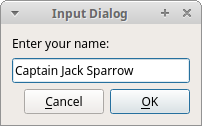 Figure: Input Dialog
QtGui.QInputDialog的更多相关文章
- PyQt4入门学习笔记(五)
PyQt4里的对话框 对话框是大多数GUI应用中不可分割的一部分.一个对话框是两者或多者的会话.在GUI内,对话框是应用向人说话的方式.一个对话框可以用来输入数据,修改数据,改变应用设置等等. QtG ...
- PyQt4入门
PyQt4入门教程(6)_对话框 文中译者的话将用方括号[]标出.对话框(Dialogs)是现代GUI程序中不可缺少的一部分.对话本来指的是两个或者更多人之间的交流,而在计算机应用中,对话是一个可以让 ...
- Qt: 内建对话框(各种对话框都有了,且用到了qobject_cast解析sender的技术)
#include "BuiltinDialog.h" #include <QtGui/QTextEdit> #include <QtGui/QPushButton ...
- pyqt小例子 音乐盒
源代码1: # -*- coding: utf-8 -*- import sys,time,os import ctypes from PyQt4 import QtCore, QtGui,Qt fr ...
- pyqt tabliwdget表头属性修改
# -*- coding: utf-8 -*-__author__ = 'Administrator'import sysfrom PyQt4 import QtGui class MyWindow( ...
- Pyqt4的对话框 -- 预定义对话框
QinputDialog提供了一种获取用户单值数据的简介形式. 它接受的数据有字符串.数字.列表中的一项数据 # QInputDialog 输入对话框 # 本示例包含一个按钮和一个行编辑部件.单击按钮 ...
- QDialog:输入对话框、颜色对话框、字体对话框、文件对话框
# _*_ coding:utf-8 _*_ import sys from PyQt4 import QtCore,QtGui class Example(QtGui.QWidget): def _ ...
- PyQt4预定义对话框
PyQt4中的对话框 对话窗口和对话框是现代GUI应用程序必不可少的一部分.生活中“对话”被定义为发生在两人或更多人之间的会话.而在计算机世界,“对话”则时人与应用程序之间的“会话”.人及对话的形式有 ...
- ZetCode PyQt4 tutorial Dialogs
#!/usr/bin/python # -*- coding: utf-8 -*- """ ZetCode PyQt4 tutorial In this example, ...
随机推荐
- 【带修改的主席树】BZOJ1901-Dynamic Rankings
稍后整理笔记.这题数据范围好像有点问题? #include<iostream> #include<cstdio> #include<cstring> #includ ...
- 使用百度ai接口加图灵机器人完成简单web版语音对话
app文件 from flask import Flask, request, render_template, jsonify, send_file from uuid import uuid4 i ...
- 什么是ClassLoader
ClassLoader 做什么的? 顾名思义,它是用来加载 Class 的.它负责将 Class 的字节码形式转换成内存形式的 Class 对象.字节码可以来自于磁盘文件 *.class,也可以是 j ...
- 《python学习手册》第34章 异常对象
基于字符串的异常 python在2.6之前可以使用字符串来定义异常,并且是通过对象标识符来匹配的(即通过is 而不是==) myexc = "My excetion string" ...
- SpringMVC 3.1.1版本下的单元测试WEB-INF路径问题
假设Spring配置文件为applicationContext.xml 一.Spring配置文件在类路径下面 在Spring的java应用程序中,一般我们的Spring的配置文件都是放在放在类路径下面 ...
- Octopress + GitHub Page 搭建个人博客
Tips:博客已搬家,新地址:http://wanxudong.top 首先说明两个关键术语: Octopress Octopress是基于 Jekyll 的博客框架.他们的关系就像 jQuery 与 ...
- Java中应该返回零长度数组或空集合,而不是返回null(转)
说明:为了避免在数组和集合的获取上增加null的判断,同时也能减少不必要的空指针异常,通常会在业务返回零数组或空集合. 方法: 1.数组: 定义全局静态常量来减少内存开销:private static ...
- (转)Ext.Button点击事件的三种写法
转自:http://maidini.blog.163.com/blog/static/377627042008111061844345/ ExtJs的写法太灵活了,现在收集了关于Button点击事件的 ...
- 给WebAPI的REST接口服务添加测试页面(一)
当使用WebAPI提供REST服务的时候,一个经常进行的操作是对接口进行测试.Asp.net WebAPI框架本身并没有提供这一接口,不过由于提供的是标准的REST服务,是可以非常方便的使用一些第三方 ...
- Added components improve switching-regulator stability
Added components improve switching-regulator stability