
QtGui.QInputDialog
The QtGui.QInputDialog provides a simple convenience dialog to get a single value from the user. The input value can be a string, a number or an item from a list.
#!/usr/bin/python

# -*- coding: utf-8 -*-

"""

ZetCode PyQt4 tutorial

In this example, we receive data from

a QtGui.QInputDialog dialog.

author: Jan Bodnar

website: zetcode.com

last edited: October 2011

"""

import sys

from PyQt4 import QtGui

class Example(QtGui.QWidget):

    def __init__(self):

        super(Example, self).__init__()

        self.initUI()

    def initUI(self):

        self.btn = QtGui.QPushButton('Dialog', self)

        self.btn.move(20, 20)

        self.btn.clicked.connect(self.showDialog)

        self.le = QtGui.QLineEdit(self)

        self.le.move(130, 22)

        self.setGeometry(300, 300, 290, 150)

        self.setWindowTitle('Input dialog')

        self.show()

    def showDialog(self):

        text, ok = QtGui.QInputDialog.getText(self, 'Input Dialog',

            'Enter your name:')

        if ok:

            self.le.setText(str(text))

def main():

    app = QtGui.QApplication(sys.argv)

    ex = Example()

    sys.exit(app.exec_())

if __name__ == '__main__':

    main()
The example has a button and a line edit widget. The button shows the input dialog for getting text values. The entered text will be displayed in the line edit widget.
text, ok = QtGui.QInputDialog.getText(self, 'Input Dialog',

    'Enter your name:')
This line displays the input dialog. The first string is a dialog title, the second one is a message within the dialog. The dialog returns the entered text and a boolean value. If we click the Ok button, the boolean value is true.
if ok:

    self.le.setText(str(text))
The text that we have received from the dialog is set to the line edit widget.
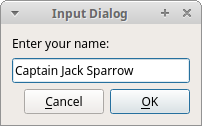 Figure: Input Dialog
QtGui.QInputDialog的更多相关文章
- PyQt4入门学习笔记(五)
PyQt4里的对话框 对话框是大多数GUI应用中不可分割的一部分.一个对话框是两者或多者的会话.在GUI内,对话框是应用向人说话的方式.一个对话框可以用来输入数据,修改数据,改变应用设置等等. QtG ...
- PyQt4入门
PyQt4入门教程(6)_对话框 文中译者的话将用方括号[]标出.对话框(Dialogs)是现代GUI程序中不可缺少的一部分.对话本来指的是两个或者更多人之间的交流,而在计算机应用中,对话是一个可以让 ...
- Qt: 内建对话框(各种对话框都有了,且用到了qobject_cast解析sender的技术)
#include "BuiltinDialog.h" #include <QtGui/QTextEdit> #include <QtGui/QPushButton ...
- pyqt小例子 音乐盒
源代码1: # -*- coding: utf-8 -*- import sys,time,os import ctypes from PyQt4 import QtCore, QtGui,Qt fr ...
- pyqt tabliwdget表头属性修改
# -*- coding: utf-8 -*-__author__ = 'Administrator'import sysfrom PyQt4 import QtGui class MyWindow( ...
- Pyqt4的对话框 -- 预定义对话框
QinputDialog提供了一种获取用户单值数据的简介形式. 它接受的数据有字符串.数字.列表中的一项数据 # QInputDialog 输入对话框 # 本示例包含一个按钮和一个行编辑部件.单击按钮 ...
- QDialog:输入对话框、颜色对话框、字体对话框、文件对话框
# _*_ coding:utf-8 _*_ import sys from PyQt4 import QtCore,QtGui class Example(QtGui.QWidget): def _ ...
- PyQt4预定义对话框
PyQt4中的对话框 对话窗口和对话框是现代GUI应用程序必不可少的一部分.生活中“对话”被定义为发生在两人或更多人之间的会话.而在计算机世界,“对话”则时人与应用程序之间的“会话”.人及对话的形式有 ...
- ZetCode PyQt4 tutorial Dialogs
#!/usr/bin/python # -*- coding: utf-8 -*- """ ZetCode PyQt4 tutorial In this example, ...
随机推荐
- 【原创】MySQL+MyEclipse+对象映射文件,schema与category的关系
(一) 1.映射文件的类如下写法:class name="com.sanqing.po.SysUser" table="sys_user" catalog=& ...
- MySQL单表恢复方法
正休息的时候一个电话将我的睡意完全打散,“开发童鞋写update SQL的时候忘了加where条件了”,相信每一个DBA同学听到这个消息的时候都有骂街的冲动吧.万幸只是单表写花了,而不是哪位大神在DB ...
- ALAssetsLibrary使用
在iOS中,我们调用摄像头和选择相册中的资源,我们可以使用:UIImagePickerController类来完成. 当然,我们也可以不使用UI的形式来访问iOS设备的相册资源. 那就是使用:AL ...
- HDU 4687 Boke and Tsukkomi (一般图匹配带花树)
Boke and Tsukkomi Time Limit: 3000/3000 MS (Java/Others) Memory Limit: 102400/102400 K (Java/Othe ...
- springMvc 的参数验证 BindingResult result 的使用
http://blog.sina.com.cn/s/blog_6829be5c0101alxh.html 非常详细的一篇讲解 并且值得深入探讨 http://bbs.csdn.NET/topics/3 ...
- 怎样教你牢记17个的Win7快捷键!
常规快捷键在开始使用Win7中神奇的快捷键加速我们的电脑操作之前,先给大家介绍几个从Win2000到现在一直通用的“资源管理器”快捷键,权当作热身吧!Win+E: 打开“资源管理器”.Win+R: 打 ...
- 接口安全--http数字签名
原文:https://blog.csdn.net/u011521890/article/details/55506716 import java.io.UnsupportedEncodingExcep ...
- openfire Hazelcast插件集群配置
原文:http://blog.csdn.net/frankcheng5143/article/details/48708899 注意虽然hazelcast 官方已经有了3.5.2版本,但是openfi ...
- 如何使用花生壳 发布WCF服务 进行外网访问 z
http://www.cnblogs.com/wanglg/p/5375230.html 当我们发布WCF服务的时候,可以直接通过服务器的域名或者IP进行. 但是如果仅仅是通过花生壳进行域名解析,需要 ...
- Java:终结器防卫者,顺便看一下 C# 如何做的。
背景 多数情况我们不需要重写 finalize 方法,只有当我们需要持有未托管资源的时候才需要,而此时重写 finalize 方法,只是作为一个“安全网”,不能作为常规的资源释放模式,必须提供显式的释 ...