
Android 手机卫士--自定义属性
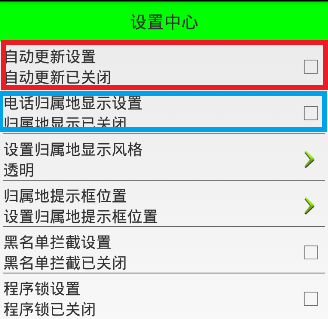
在前面的文章中,已经实现了“设置中心”第一栏的功能以及布局
本文地址:http://www.cnblogs.com/wuyudong/p/5936016.html,转载请注明出处。
自定义属性声明
接下来实现其他栏的布局和功能,由于它们之间的功能和布局类似,只是属性名称不同。所以本文在自定义控件的基础上实现自定义属性
首先参考标准控件的源码,这里选择TextView
源码路径为:D:\adt-bundle-windows-x86_64_20140101\sdk\platforms\android-18\data\res\values
打开本文件夹下的attrs.xml文件,找到下面的代码:
    <declare-styleable name="TextView">

        <!-- Determines the minimum type that getText() will return.

             The default is "normal".

             Note that EditText and LogTextBox always return Editable,

             even if you specify something less powerful here. -->

        <attr name="bufferType">

            <!-- Can return any CharSequence, possibly a

             Spanned one if the source text was Spanned. -->

            <enum name="normal" value="0" />

            <!-- Can only return Spannable. -->

            <enum name="spannable" value="1" />

            <!-- Can only return Spannable and Editable. -->

            <enum name="editable" value="2" />

        </attr>

        <!-- Text to display. -->

        <attr name="text" format="string" localization="suggested" />

        <!-- Hint text to display when the text is empty. -->

        <attr name="hint" format="string" />
于是我们也可以模仿关键节点,写出自定义属性,工程res\values文件夹下新建attrs.xml文件,添加代码如下:
<?xml version="1.0" encoding="utf-8"?>

<resources>

    <declare-styleable name="com.wuyudong.mobilesafe.view.SettingItemView">

        <attr name="destitle" format="string"/>

        <attr name="desoff" format="string"/>

        <attr name="deson" format="string"/>

    </declare-styleable>

</resources>
构造方法中获取自定义属性值
接下来定义命名空间,也是参考android标准来写
<?xml version="1.0" encoding="utf-8"?>

<LinearLayout xmlns:android="http://schemas.android.com/apk/res/android"

……
mobilesafe替换掉原有android
com.wuyudong.mobilesafe必须这样编写,替换掉了android,代表当前应用自定义属性
xmlns:mobilesafe="http://schemas.android.com/apk/res/com.wuyudong.mobilesafe"
修改后的代码如下:
    <com.wuyudong.mobilesafe.view.SettingItemView

        xmlns:mobilesafe="http://schemas.android.com/apk/res/com.wuyudong.mobilesafe"

        android:id="@+id/siv_update"

        android:layout_width="match_parent"

        android:layout_height="wrap_content"

        mobilesafe:destitle="自动更新设置"

        mobilesafe:desoff="自动更新已关闭"

        mobilesafe:deson="自动更新已开启" >

    </com.wuyudong.mobilesafe.view.SettingItemView>
自定义属性值已经搞定,现在是SettingItemView类如何获取这些值?
在SettingItemView类的构造函数中调用initAttrs函数,然后通过initAttrs函数实现属性的返回。先通过一些小的实践来熟悉相关的API
   /**

     * 返回属性集合中自定义属性的属性值

     * @param attrs  构造方法中维护好的属性集合

     */

    private void initAttrs(AttributeSet attrs) {

        //获取属性的总个数

        Log.i(tag,"attrs.getAttributeCount(): " + attrs.getAttributeCount());

        //获取属性名称以及属性值

        for (int i = 0; i < attrs.getAttributeCount(); i++) {

            Log.i(tag, "name = " + attrs.getAttributeName(i));

            Log.i(tag, "value = " + attrs.getAttributeValue(i));

            Log.i(tag, "==================分割线======================");

        }

    }
运行项目后在Logcat中打印下面的日志信息:
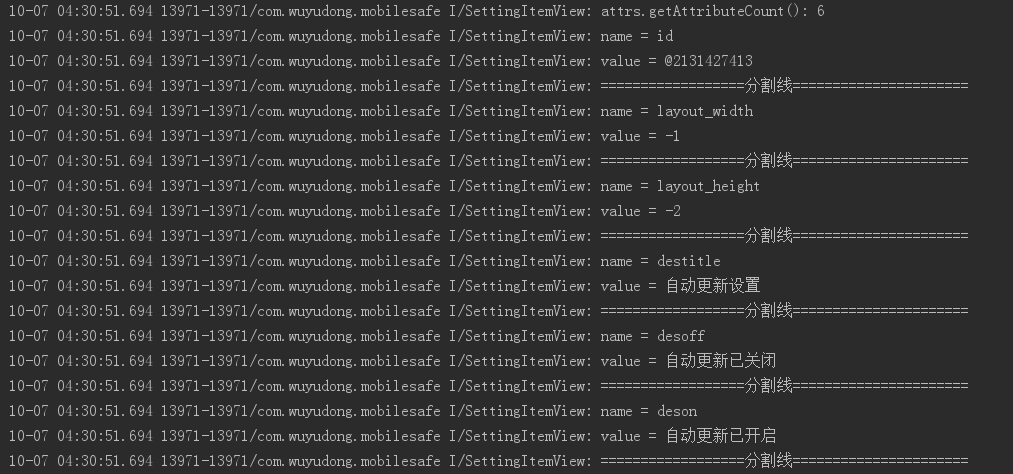
解释一下上面的部分代码:
value = @2131427413对应的十六进制值为:7F0B0055,其实就是对应的R文件中
public static final int siv_update=0x7f0b0055;
其他的都很简单
接着我们使用其他的API来进行获取属性的值
private static final String NAMESPACE = "http://schemas.android.com/apk/res/com.wuyudong.mobilesafe";

...........

 /**

     * 返回属性集合中自定义属性的属性值

     * @param attrs  构造方法中维护好的属性集合

     */

    private void initAttrs(AttributeSet attrs) {

     /*   //获取属性的总个数

        Log.i(tag,"attrs.getAttributeCount(): "+attrs.getAttributeCount());

        //获取属性名称以及属性值

        for (int i = 0; i < attrs.getAttributeCount(); i++) {

            Log.i(tag, "name = " + attrs.getAttributeName(i));

            Log.i(tag, "value = " + attrs.getAttributeValue(i));

            Log.i(tag, "==================分割线======================");

        }*/

        String destitle = attrs.getAttributeValue(NAMESPACE, "destitle");

        String desoff = attrs.getAttributeValue(NAMESPACE, "desoff");

        String deson = attrs.getAttributeValue(NAMESPACE, "deson");

        Log.i(tag, destitle);

        Log.i(tag, desoff);

        Log.i(tag, deson);

    }
运行项目后在Logcat中打印下面的日志信息:

说明已经成功获取所设置的属性值
这样就可以复用代码实现第二栏的电话归属地的布局
    <com.wuyudong.mobilesafe.view.SettingItemView

        xmlns:mobilesafe="http://schemas.android.com/apk/res/com.wuyudong.mobilesafe"

        android:id="@+id/siv_update"

        android:layout_width="match_parent"

        android:layout_height="wrap_content"

        mobilesafe:destitle="自动更新设置"

        mobilesafe:desoff="自动更新已关闭"

        mobilesafe:deson="自动更新已开启" >

    </com.wuyudong.mobilesafe.view.SettingItemView>

    <com.wuyudong.mobilesafe.view.SettingItemView

        xmlns:mobilesafe="http://schemas.android.com/apk/res/com.wuyudong.mobilesafe"

        android:layout_width="match_parent"

        android:layout_height="wrap_content"

        mobilesafe:destitle="电话归属地的显示设置"

        mobilesafe:desoff="归属地的显示已关闭"

        mobilesafe:deson="归属地的显示已开启" >

    </com.wuyudong.mobilesafe.view.SettingItemView>
Android 手机卫士--自定义属性的更多相关文章
- Android 手机卫士--参照文档编写选择器
本文来实现<Android 手机卫士--导航界面1的布局编写>中的图片选择器部分的代码. 本文地址:http://www.cnblogs.com/wuyudong/p/5944356.ht ...
- Android 手机卫士--设置界面&功能列表界面跳转逻辑处理
在<Android 手机卫士--md5加密过程>中已经实现了加密类,这里接着实现手机防盗功能 本文地址:http://www.cnblogs.com/wuyudong/p/5941959. ...
- Android 手机卫士--确认密码对话框编写
本文接着实现“确认密码”功能,也即是用户以前设置过密码,现在只需要输入确认密码 本文地址:http://www.cnblogs.com/wuyudong/p/5940718.html,转载请注明出处. ...
- Android 手机卫士--签名文件说明&包名说明
在<Android 手机卫士--打包生成apk维护到服务器>一文中,实现了新版本的apk到服务器,当打开客户端apk的时候,发现有新版本,提示更新.还实现了利用xutils工具实现了从服务 ...
- Android 手机卫士--弹出对话框
在<Android 手机卫士--解析json与消息机制发送不同类型消息>一文中,消息机制发送不同类型的信息还没有完全实现,在出现异常的时候,应该弹出吐司提示异常,代码如下: private ...
- android手机卫士、3D指南针、动画精选、仿bilibli客户端、身份证银行卡识别等源码
Android精选源码 android身份证.银行卡号扫描源码 android仿bilibili客户端 android一款3D 指南针 源码 android手机卫士app源码 android提醒应用, ...
- Android 手机卫士--阶段小结1
本文地址:http://www.cnblogs.com/wuyudong/p/5904528.html,转载请注明源地址. 本文对之前手机卫士开发进行一个小结. 1.SplashActivity 版本 ...
- Android 手机卫士--安装过程中点击回退按钮
本文地址:http://www.cnblogs.com/wuyudong/p/5903707.html,转载请注明源地址. 在手机卫士之前的版本升级的对话框中: 有的用户暂时不想更新,没有点击“稍后再 ...
- Android 手机卫士--xutils说明与下载方法使用
xUtils简介 xUtils 包含了很多实用的android工具. xUtils 最初源于Afinal框架,进行了大量重构,使得xUtils支持大文件上传,更全面的http请求协议支持(10种谓词) ...
随机推荐
- 深入学习jQuery选择器系列第七篇——表单选择器
× 目录 [1]表单元素 [2]对象属性 前面的话 无论是提交还是传递数据,表单元素在动态交互页面的作用是非常重要的.jQuery专门加入了表单选择器,从而能够极其方便地获取到某个类型的表单元素 表单 ...
- 部署 instance 到 VXLAN - 每天5分钟玩转 OpenStack(112)
上一节我们创建了 vxlan 100_net,今天将部署 instance 并分析网络的连通性. launch 新的 instance "cirros-vm1",网络选择 vxla ...
- 通过配置http拦截器,来进行ajax请求验证用户登录的页面跳转
在.NET中验证用户是否登录或者是否过期,若需要登录时则将请求转向至登录页面. 这个流程在进行页面请求时是没问题的,能正确进行页面跳转. 然而在使用xmlhttprequest时,或者jq的getJs ...
- EasyUI DataGrid formatter 格式化增加链接
function fLoadTable() { $('#tt').datagrid({ title: '', ...
- 关于Docker官方CentOS镜像无法启动mysqld的总结
很多童鞋反映,在Docker官方CentOS镜像中安装了Mysql server后,无法正常启动. 无法正常启动表现为两种情况: 1> 初始完数据库后,mysqld启动报错 2> syst ...
- (转)使用minicpan创建本地CPAN
在临时的办公场所网络不畅,有时不能下载cpan上的软件包,所有只能自建一个cpan. 这里使用了工具'minicpan',简单地说:就是把互联网上的CPAN搬到自己的电脑里,它的最初想法来自Randa ...
- Tomcat服务器本地的搭建,以及在 IDEA软件下的配置,以及项目的测试运行(基于supermvc框架下的web)
一.声明 使用了基于springmvc的supermvc的web框架.实习公司的框架. 二.tomact的下载与安装 1选择适合自己电脑配置的jdk和jre版本(截图来自tomcat的官方网站http ...
- js实现String.Fomat
引言 拼接字符串用习惯了C#的String.Format.今天看别人的代码在js中也封装了一个js的String.Format,用来拼接字符串和DOM. js实现和调用String.Format St ...
- Yahoo军规
一.尽可能的减少HTTP请求 每一个图片,文字,js文件,css文件都是一个请求. 可以通过合并来请求来减少HTTP请求 比如:图片为一个请求,js文件为一个请求,css为一个请求 二.使用CDN C ...
- git版本回退, github版本回退
上周提交了更改,过了周末回来说要撤销上个story.于是,需要找到上周提交的版本,rollback回来. git版本管理命令,自从习惯使用管理工具之后就很少接触了,当突然寻找其他指令的时候就成浆糊了, ...