
mybatis-generator1.3.6的使用
下载地址:
http://blog.mybatis.org/2017/12/mybatis-generator-version-136-released.html
参考了
http://blog.csdn.net/qr719169236/article/details/51086997
在使用mybatis开发的过程中,通常我们会给数据库的每张表编写对应的domain、dao、mapping,很简单,但是工作很大,所以我们通常会使用代码生成器帮我们自动生成。具体方法如下:
mybatis-generator 下载
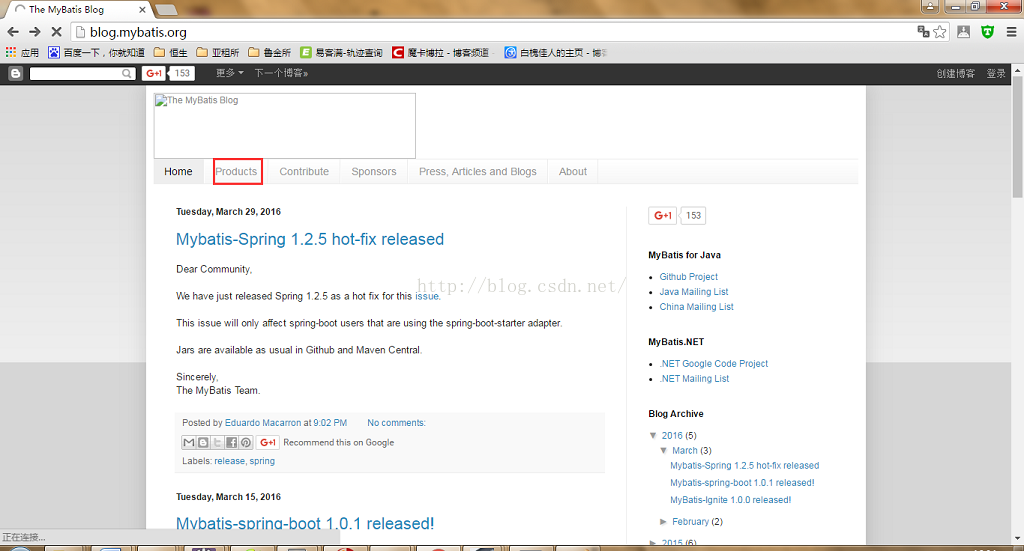
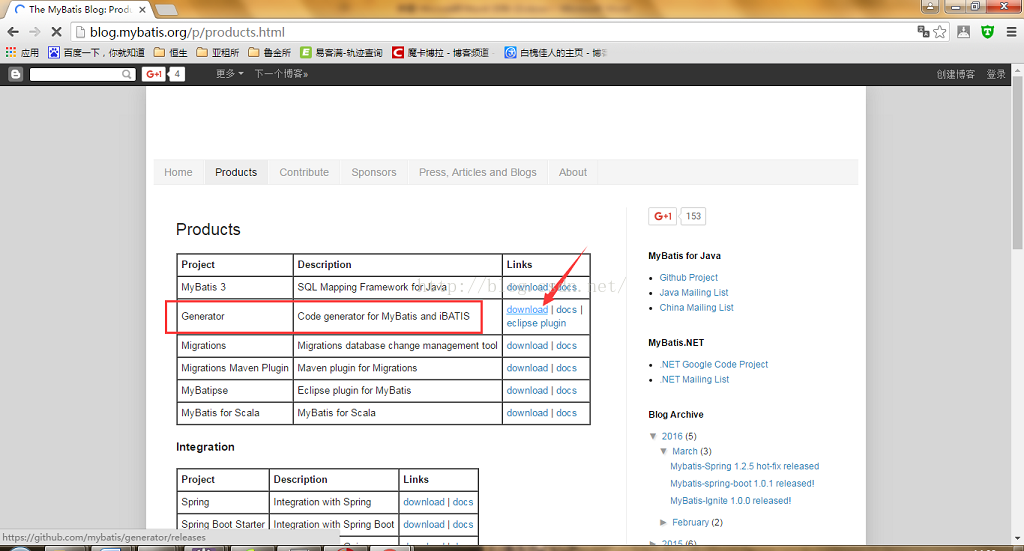
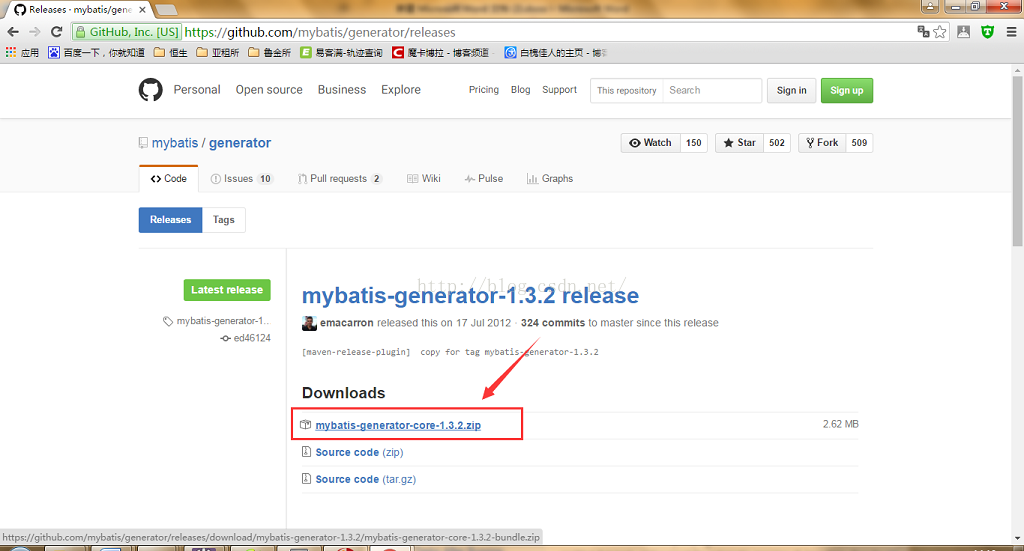
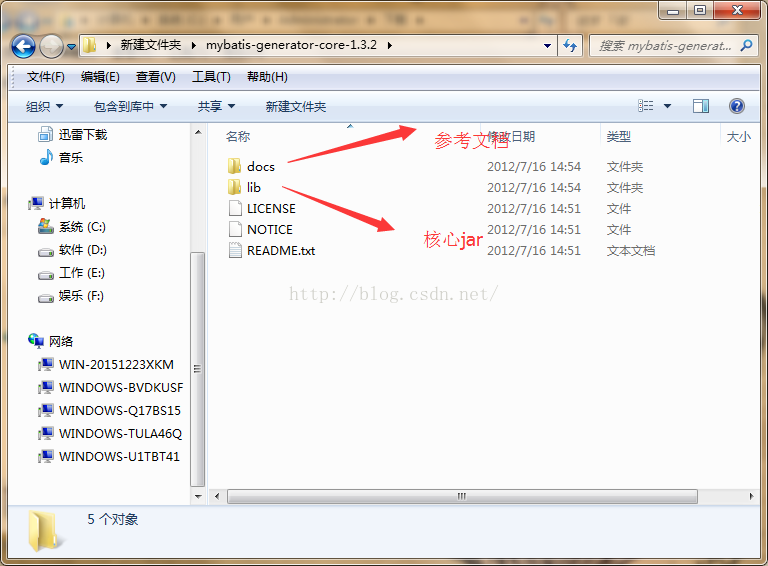
generatorConfiguration文件配置
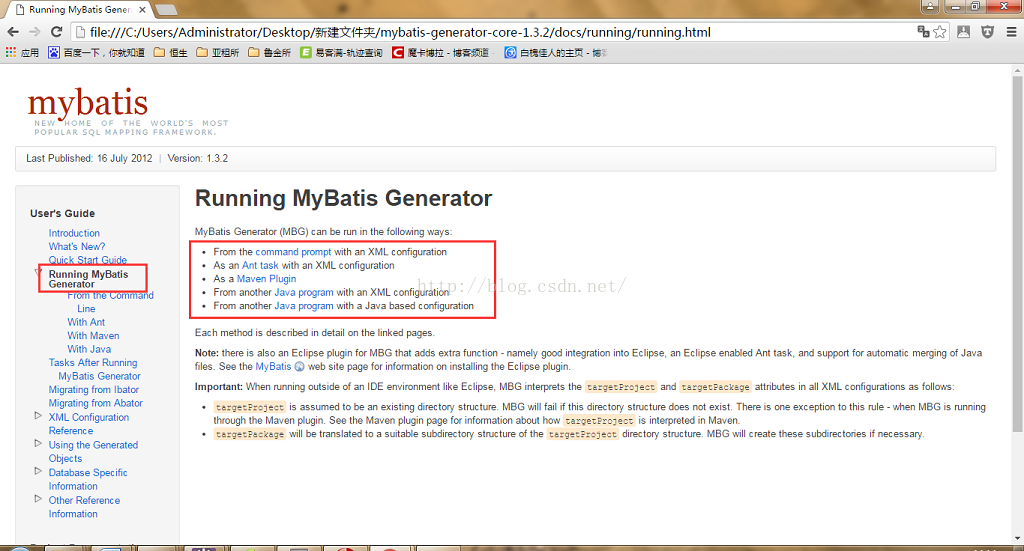
点击From the Command Line,显示must create an XML configuration file to run MBG from the command line,就是说必须要创建一个configuration 配置文件,然后执行下面的命令:
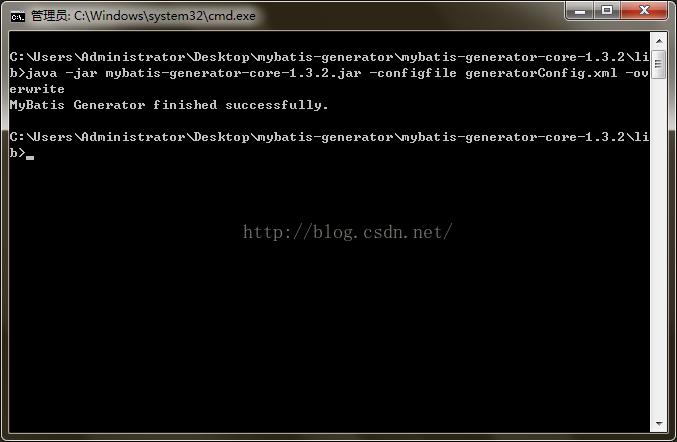
   java -jar mybatis-generator-core-x.x.x.jar -configfile generatorConfig.xml

   java -jar mybatis-generator-core-x.x.x.jar -configfile generatorConfig.xml -overwrite

   java -cp mybatis-generator-core-x.x.x.jar org.mybatis.generator.api.ShellRunner -configfile generatorConfig.xml

   java -cp mybatis-generator-core-x.x.x.jar org.mybatis.generator.api.ShellRunner -configfile generatorConfig.xml -overwrite
在lib目录下新建一个generatorConfig.xml文件,点击XML Configuration Reference 将里面的代码拷贝到 generatorConfig.xml 中
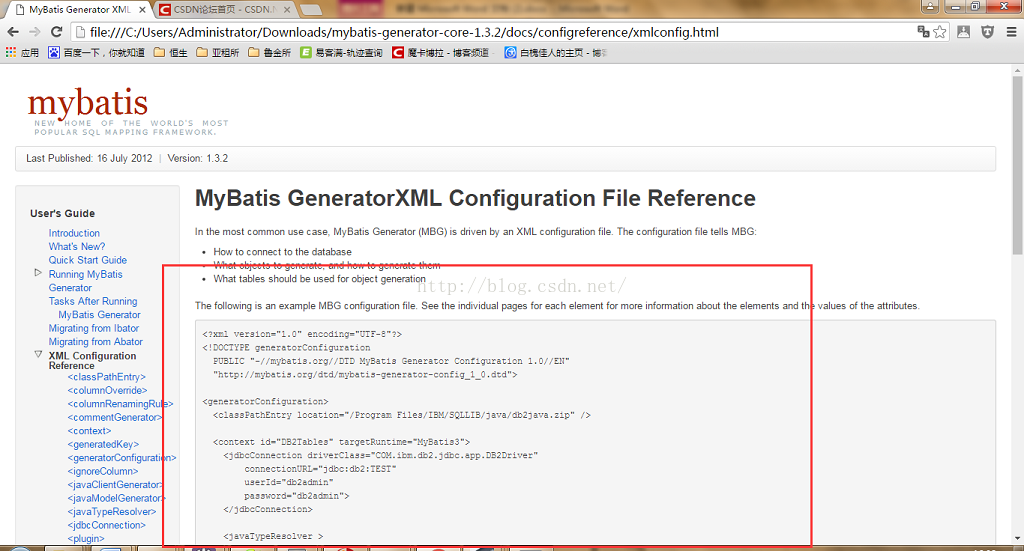
修改generatorConfig.xml文件。在上图中的代码中,classPathEntry为数据库连接驱动,多以将对应的jar文件放入lib文件中,location指定其路径。实例如下:
- <?xml version="1.0" encoding="UTF-8"?>
- <!DOCTYPE generatorConfiguration
- PUBLIC "-//mybatis.org//DTD MyBatis Generator Configuration 1.0//EN"
- "http://mybatis.org/dtd/mybatis-generator-config_1_0.dtd">
- <generatorConfiguration>
- <!--MySQL连接驱动-->
- <classPathEntry location="mysql-connector-java-5.1.9.jar" />
- <!--数据库链接URL,用户名、密码 -->
- <context id="MySQL" targetRuntime="MyBatis3">
- <commentGenerator>
- <property name="suppressDate" value="true"/>
- <!-- 是否去除自动生成的注释 true:是 : false:否 -->
- <property name="suppressAllComments" value="true"/>
- </commentGenerator>
- <jdbcConnection driverClass="com.mysql.jdbc.Driver"
- connectionURL="jdbc:mysql://127.0.0.1/test"
- userId="root"
- password="123456">
- </jdbcConnection>
- <!--是否启用java.math.BigDecimal-->
- <javaTypeResolver >
- <property name="forceBigDecimals" value="false" />
- </javaTypeResolver>
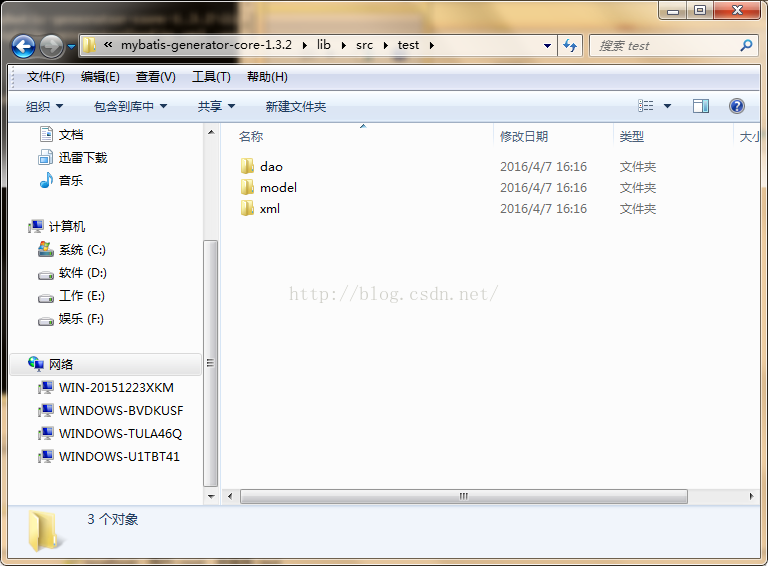
- <javaModelGenerator targetPackage="test.model" targetProject="src">
- <property name="enableSubPackages" value="true" />
- <property name="trimStrings" value="true" />
- </javaModelGenerator>
- <sqlMapGenerator targetPackage="test.xml" targetProject="src">
- <property name="enableSubPackages" value="true" />
- </sqlMapGenerator>
- <javaClientGenerator type="XMLMAPPER" targetPackage="test.dao" targetProject="src">
- <property name="enableSubPackages" value="true" />
- </javaClientGenerator>
- <table tableName="salary" enableCountByExample="false" enableUpdateByExample="false" enableDeleteByExample="false" enableSelectByExample="false" selectByExampleQueryId="false">
- </table>
- <table tableName="persons" enableCountByExample="false" enableUpdateByExample="false" enableDeleteByExample="false" enableSelectByExample="false" selectByExampleQueryId="false">
- </table>
- <table tableName="orders" enableCountByExample="false" enableUpdateByExample="false" enableDeleteByExample="false" enableSelectByExample="false" selectByExampleQueryId="false">
- </table>
- </context>
- </generatorConfiguration>
- <?xml version="1.0" encoding="UTF-8"?>
- <!DOCTYPE generatorConfiguration
- PUBLIC "-//mybatis.org//DTD MyBatis Generator Configuration 1.0//EN"
- "http://mybatis.org/dtd/mybatis-generator-config_1_0.dtd">
- <generatorConfiguration>
- <!--MySQL连接驱动-->
- <classPathEntry location="mysql-connector-java-5.1.9.jar" />
- <!--数据库链接URL,用户名、密码 -->
- <context id="MySQL" targetRuntime="MyBatis3">
- <commentGenerator>
- <property name="suppressDate" value="true"/>
- <!-- 是否去除自动生成的注释 true:是 : false:否 -->
- <property name="suppressAllComments" value="true"/>
- </commentGenerator>
- <jdbcConnection driverClass="com.mysql.jdbc.Driver"
- connectionURL="jdbc:mysql://127.0.0.1/test"
- userId="root"
- password="123456">
- </jdbcConnection>
- <!--是否启用java.math.BigDecimal-->
- <javaTypeResolver >
- <property name="forceBigDecimals" value="false" />
- </javaTypeResolver>
- <javaModelGenerator targetPackage="test.model" targetProject="src">
- <property name="enableSubPackages" value="true" />
- <property name="trimStrings" value="true" />
- </javaModelGenerator>
- <sqlMapGenerator targetPackage="test.xml" targetProject="src">
- <property name="enableSubPackages" value="true" />
- </sqlMapGenerator>
- <javaClientGenerator type="XMLMAPPER" targetPackage="test.dao" targetProject="src">
- <property name="enableSubPackages" value="true" />
- </javaClientGenerator>
- <table tableName="salary" enableCountByExample="false" enableUpdateByExample="false" enableDeleteByExample="false" enableSelectByExample="false" selectByExampleQueryId="false">
- </table>
- <table tableName="persons" enableCountByExample="false" enableUpdateByExample="false" enableDeleteByExample="false" enableSelectByExample="false" selectByExampleQueryId="false">
- </table>
- <table tableName="orders" enableCountByExample="false" enableUpdateByExample="false" enableDeleteByExample="false" enableSelectByExample="false" selectByExampleQueryId="false">
- </table>
- </context>
- </generatorConfiguration>
<?xml version="1.0" encoding="UTF-8"?>
<!DOCTYPE generatorConfiguration
PUBLIC "-//mybatis.org//DTD MyBatis Generator Configuration 1.0//EN"
"http://mybatis.org/dtd/mybatis-generator-config_1_0.dtd"> <generatorConfiguration> <!--MySQL连接驱动-->
<classPathEntry location="mysql-connector-java-5.1.9.jar" /> <!--数据库链接URL,用户名、密码 -->
<context id="MySQL" targetRuntime="MyBatis3">
<commentGenerator>
<property name="suppressDate" value="true"/>
<!-- 是否去除自动生成的注释 true:是 : false:否 -->
<property name="suppressAllComments" value="true"/>
</commentGenerator>
<jdbcConnection driverClass="com.mysql.jdbc.Driver"
connectionURL="jdbc:mysql://127.0.0.1/test"
userId="root"
password="123456">
</jdbcConnection><!--是否启用java.math.BigDecimal-->
<javaTypeResolver >
<property name="forceBigDecimals" value="false" />
</javaTypeResolver> <javaModelGenerator targetPackage="test.model" targetProject="src">
<property name="enableSubPackages" value="true" />
<property name="trimStrings" value="true" />
</javaModelGenerator> <sqlMapGenerator targetPackage="test.xml" targetProject="src">
<property name="enableSubPackages" value="true" />
</sqlMapGenerator> <javaClientGenerator type="XMLMAPPER" targetPackage="test.dao" targetProject="src">
<property name="enableSubPackages" value="true" />
</javaClientGenerator> <table tableName="salary" enableCountByExample="false" enableUpdateByExample="false" enableDeleteByExample="false" enableSelectByExample="false" selectByExampleQueryId="false">
</table>
<table tableName="persons" enableCountByExample="false" enableUpdateByExample="false" enableDeleteByExample="false" enableSelectByExample="false" selectByExampleQueryId="false">
</table>
<table tableName="orders" enableCountByExample="false" enableUpdateByExample="false" enableDeleteByExample="false" enableSelectByExample="false" selectByExampleQueryId="false">
</table>
</context>
</generatorConfiguration>
Running MyBatis Generator
mybatis-generator1.3.6的使用的更多相关文章
- eclipse 4.5 离线安装mybatis generator1.3.6卡在Install New Software的解决方法
转载:https://blog.csdn.net/ssshen14/article/details/80004459 离线插件 下载:https://github.com/mybatis/genera ...
- mybatis generator插件开发
mybatis现在普遍使用的每一个人DAO框架.mybatis generator它可以基于数据库中的表结构,生成自己主动mybatis代码和配置文件,方便使用,当然,实际的使用过程中.generat ...
- MyBatis generator配置 overwrite 文件覆盖失效
工具:IDEA.jdk1.8.mysql 底部有解决方法! pom.xml配置 <plugins> <!--Mybatis自动代码插入--> <plugin> &l ...
- MyBatis:Mybatis逆向工程问题记录
近日我在搭建springboot+mybatis+mysql 的整合项目(自己测试玩)的时候用到了mybatis的逆向工程,来这里记录一下我的菜鸟编码过程 首先我在maven中引入这些依赖 <d ...
- 【分享】标准springMVC+mybatis项目maven搭建最精简教程
文章由来:公司有个实习同学需要做毕业设计,不会搭建环境,我就代劳了,顺便分享给刚入门的小伙伴,我是自学的JAVA,所以我懂的.... (大图直接观看显示很模糊,请在图片上点击右键然后在新窗口打开看) ...
- Java MyBatis 插入数据库返回主键
最近在搞一个电商系统中由于业务需求,需要在插入一条产品信息后返回产品Id,刚开始遇到一些坑,这里做下笔记,以防今后忘记. 类似下面这段代码一样获取插入后的主键 User user = new User ...
- [原创]mybatis中整合ehcache缓存框架的使用
mybatis整合ehcache缓存框架的使用 mybaits的二级缓存是mapper范围级别,除了在SqlMapConfig.xml设置二级缓存的总开关,还要在具体的mapper.xml中开启二级缓 ...
- 【SSM框架】Spring + Springmvc + Mybatis 基本框架搭建集成教程
本文将讲解SSM框架的基本搭建集成,并有一个简单demo案例 说明:1.本文暂未使用maven集成,jar包需要手动导入. 2.本文为基础教程,大神切勿见笑. 3.如果对您学习有帮助,欢迎各种转载,注 ...
- mybatis plugins实现项目【全局】读写分离
在之前的文章中讲述过数据库主从同步和通过注解来为部分方法切换数据源实现读写分离 注解实现读写分离: http://www.cnblogs.com/xiaochangwei/p/4961807.html ...
- MyBatis基础入门--知识点总结
对原生态jdbc程序的问题总结 下面是一个传统的jdbc连接oracle数据库的标准代码: public static void main(String[] args) throws Exceptio ...
随机推荐
- _mysql_exceptions.IntegrityError: (1062, "Duplicate entry, Python操作MySQL数据库,插入重复数据
[python] view plain copy sql = "INSERT INTO test_c(id,name,sex)values(%s,%s,%s)" param = ...
- JS---案例:表格隔行变色(鼠标划过背景色恢复)
案例:表格隔行变色(鼠标划过背景色恢复) <!DOCTYPE html> <html> <head lang="en"> <meta ch ...
- Nginx负载均衡反向代理
http{ upstream test.com { server 118.118.66.88:8080; } server { listen 80; server_name www.test.com; ...
- MySQL--python关联MySQL、练习题
1.python关联MySQL pymysql: 安装:pip3 install pymysql 1.0:连接到数据库中 import pymysql conn = pymysql.connect( ...
- 2019.10.22 csp-s模拟测试82 反思总结
重来重来,刚刚就当什么都没发生 今天的题属实有些迷惑,各种意义上…总之都很有难度吧.不满归不满,这套题的确不是什么没有意义的题目. 为了考验自己的学习能力记忆力,决定不写题解,扔个代码完事了 其实是懒 ...
- oracle function学习1
oracle function学习基层: 函数就是一个有返回值的过程. 首先 知道oracle 使用限制: 函数调用限制: 1. SQL语句中只能调用存储函数(服务器端),而不能调用客户端 ...
- day37 04-Hibernate二级缓存:list和iterate方法比较
get()和load()方法既可以向一级缓存区放数据,也可以向二级缓存区放数据.这是查询一个的情况.要是查询所有呢?注意, // 查询所有.Query接口的list()方法. // list()方法会 ...
- 【weex】h5weex-example
这个就是一个练手的基础性的demo,不过也是有很多值得学习的东西的 效果如下 项目地址为:https://github.com/h5weex/h5weex-example 可能是我找到的项目比较少,很 ...
- 警告: deleting object of polymorphic class type which has non_virtual destructor
如果基类里有虚函数,定义了基类指针指向派生类,就会需要定义基类虚析构,这样,基类指针析构的时候,就会先析构派生类,再析构基类. 在用基类指针指向派生类时, 在基类析构函数声明为virtual的时候,d ...
- vim中NERDTREE插件的使用
一个显示目录树的插件,很不错 学习于: http://blog.csdn.net/xiongzhengxiang/article/details/7375607