
mybatis-generator1.3.6的使用
下载地址:
http://blog.mybatis.org/2017/12/mybatis-generator-version-136-released.html
参考了
http://blog.csdn.net/qr719169236/article/details/51086997
在使用mybatis开发的过程中,通常我们会给数据库的每张表编写对应的domain、dao、mapping,很简单,但是工作很大,所以我们通常会使用代码生成器帮我们自动生成。具体方法如下:
mybatis-generator 下载
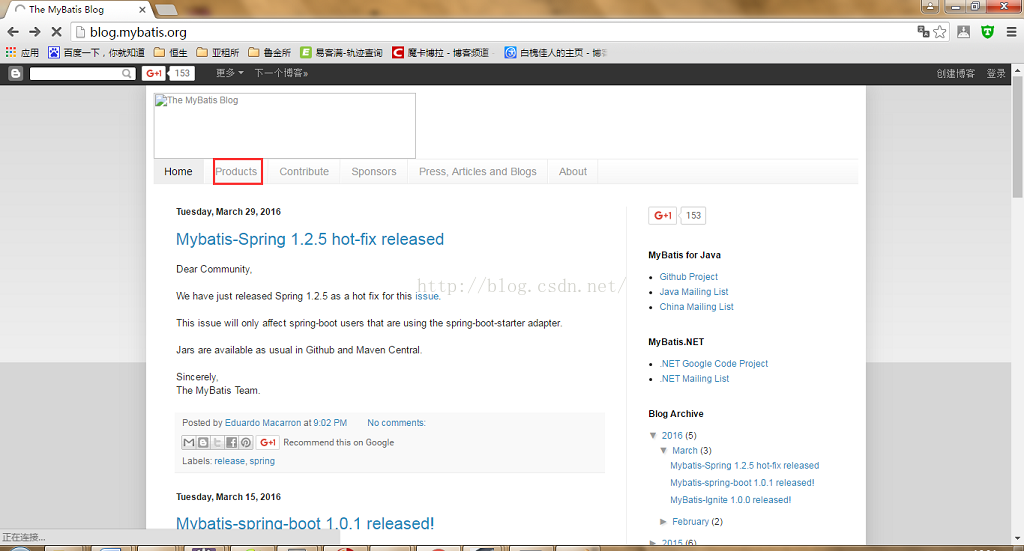
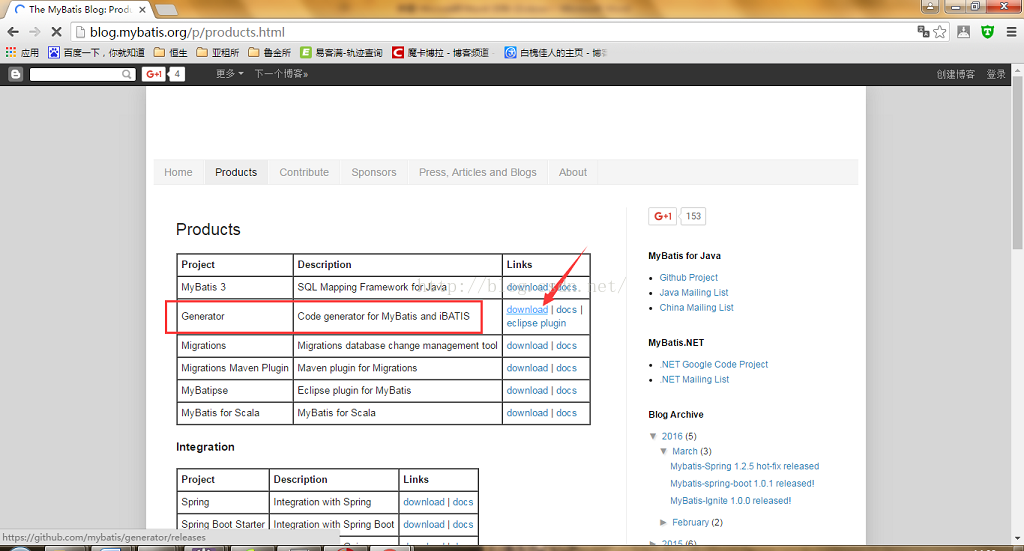
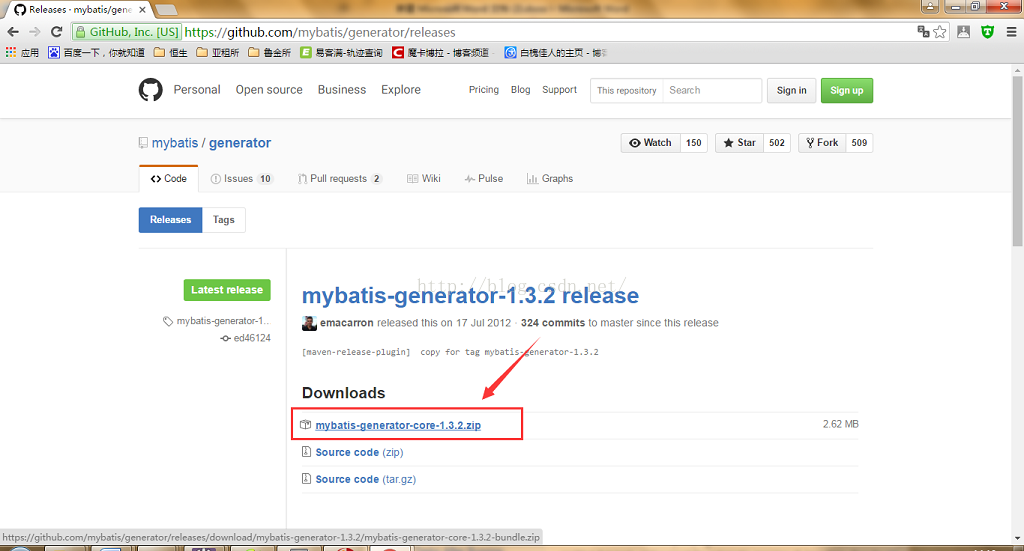
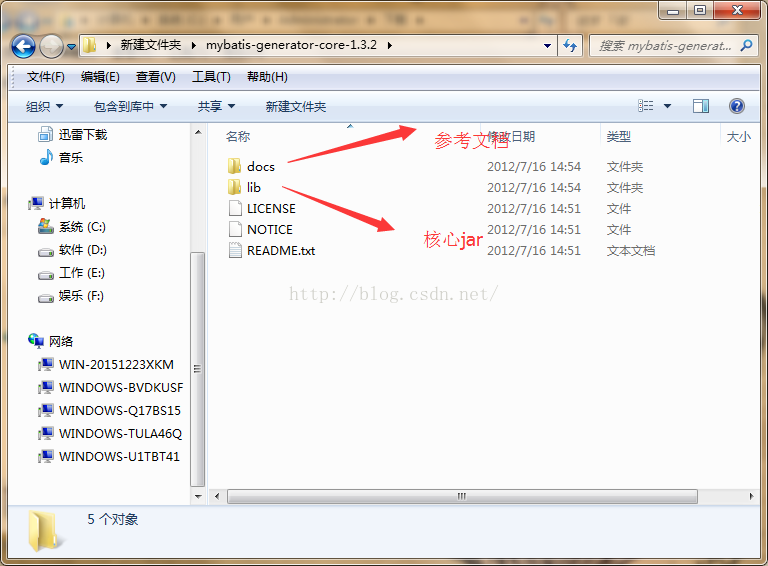
generatorConfiguration文件配置
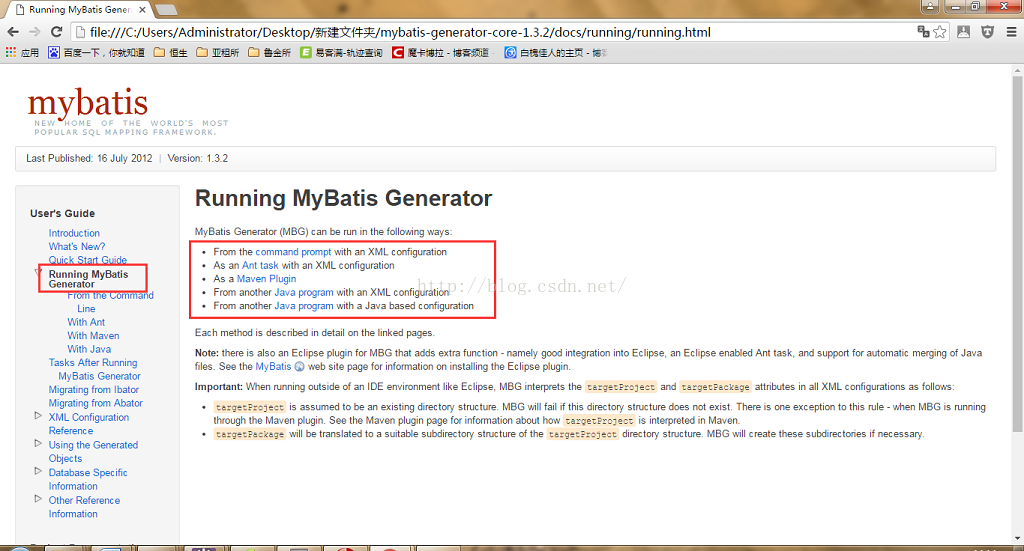
点击From the Command Line,显示must create an XML configuration file to run MBG from the command line,就是说必须要创建一个configuration 配置文件,然后执行下面的命令:
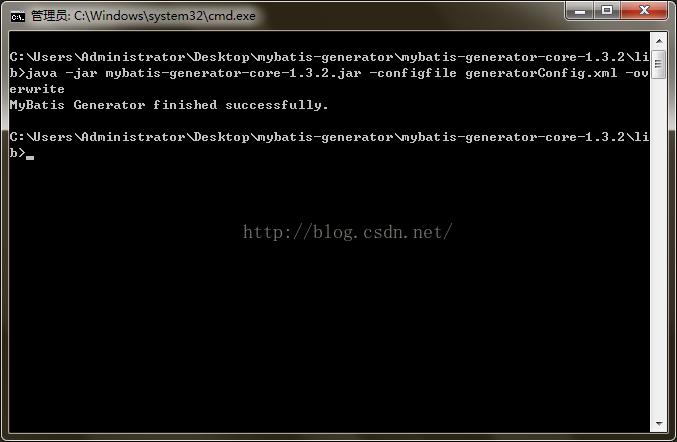
   java -jar mybatis-generator-core-x.x.x.jar -configfile generatorConfig.xml

   java -jar mybatis-generator-core-x.x.x.jar -configfile generatorConfig.xml -overwrite

   java -cp mybatis-generator-core-x.x.x.jar org.mybatis.generator.api.ShellRunner -configfile generatorConfig.xml

   java -cp mybatis-generator-core-x.x.x.jar org.mybatis.generator.api.ShellRunner -configfile generatorConfig.xml -overwrite
在lib目录下新建一个generatorConfig.xml文件,点击XML Configuration Reference 将里面的代码拷贝到 generatorConfig.xml 中
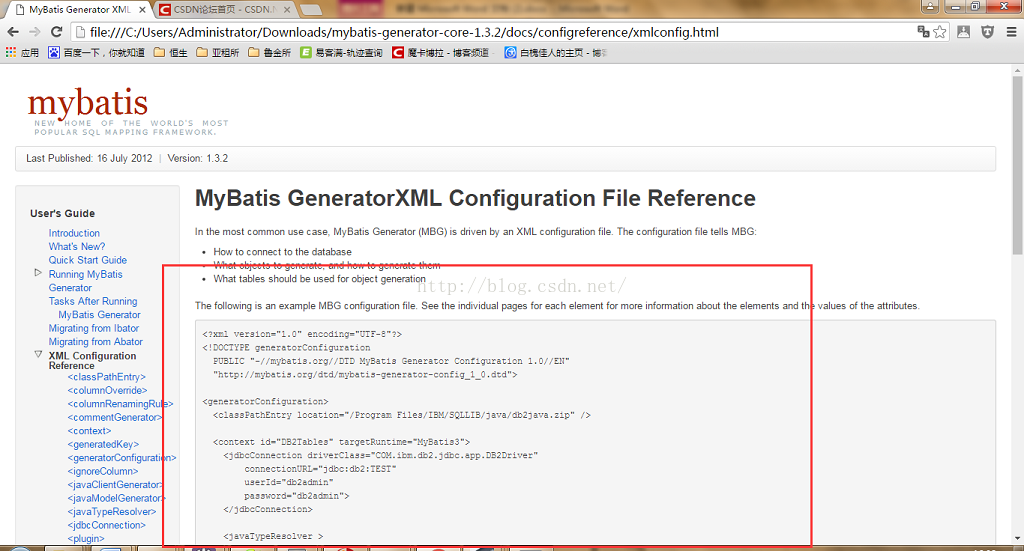
修改generatorConfig.xml文件。在上图中的代码中,classPathEntry为数据库连接驱动,多以将对应的jar文件放入lib文件中,location指定其路径。实例如下:
- <?xml version="1.0" encoding="UTF-8"?>
- <!DOCTYPE generatorConfiguration
- PUBLIC "-//mybatis.org//DTD MyBatis Generator Configuration 1.0//EN"
- "http://mybatis.org/dtd/mybatis-generator-config_1_0.dtd">
- <generatorConfiguration>
- <!--MySQL连接驱动-->
- <classPathEntry location="mysql-connector-java-5.1.9.jar" />
- <!--数据库链接URL,用户名、密码 -->
- <context id="MySQL" targetRuntime="MyBatis3">
- <commentGenerator>
- <property name="suppressDate" value="true"/>
- <!-- 是否去除自动生成的注释 true:是 : false:否 -->
- <property name="suppressAllComments" value="true"/>
- </commentGenerator>
- <jdbcConnection driverClass="com.mysql.jdbc.Driver"
- connectionURL="jdbc:mysql://127.0.0.1/test"
- userId="root"
- password="123456">
- </jdbcConnection>
- <!--是否启用java.math.BigDecimal-->
- <javaTypeResolver >
- <property name="forceBigDecimals" value="false" />
- </javaTypeResolver>
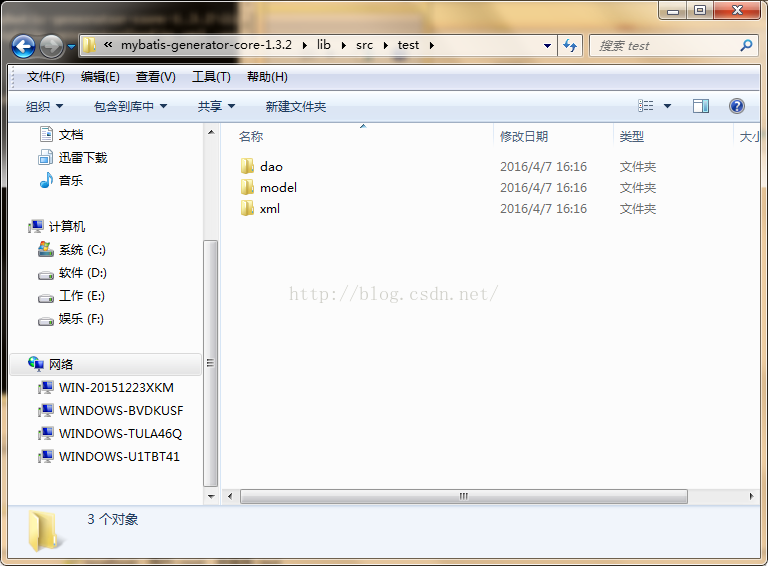
- <javaModelGenerator targetPackage="test.model" targetProject="src">
- <property name="enableSubPackages" value="true" />
- <property name="trimStrings" value="true" />
- </javaModelGenerator>
- <sqlMapGenerator targetPackage="test.xml" targetProject="src">
- <property name="enableSubPackages" value="true" />
- </sqlMapGenerator>
- <javaClientGenerator type="XMLMAPPER" targetPackage="test.dao" targetProject="src">
- <property name="enableSubPackages" value="true" />
- </javaClientGenerator>
- <table tableName="salary" enableCountByExample="false" enableUpdateByExample="false" enableDeleteByExample="false" enableSelectByExample="false" selectByExampleQueryId="false">
- </table>
- <table tableName="persons" enableCountByExample="false" enableUpdateByExample="false" enableDeleteByExample="false" enableSelectByExample="false" selectByExampleQueryId="false">
- </table>
- <table tableName="orders" enableCountByExample="false" enableUpdateByExample="false" enableDeleteByExample="false" enableSelectByExample="false" selectByExampleQueryId="false">
- </table>
- </context>
- </generatorConfiguration>
- <?xml version="1.0" encoding="UTF-8"?>
- <!DOCTYPE generatorConfiguration
- PUBLIC "-//mybatis.org//DTD MyBatis Generator Configuration 1.0//EN"
- "http://mybatis.org/dtd/mybatis-generator-config_1_0.dtd">
- <generatorConfiguration>
- <!--MySQL连接驱动-->
- <classPathEntry location="mysql-connector-java-5.1.9.jar" />
- <!--数据库链接URL,用户名、密码 -->
- <context id="MySQL" targetRuntime="MyBatis3">
- <commentGenerator>
- <property name="suppressDate" value="true"/>
- <!-- 是否去除自动生成的注释 true:是 : false:否 -->
- <property name="suppressAllComments" value="true"/>
- </commentGenerator>
- <jdbcConnection driverClass="com.mysql.jdbc.Driver"
- connectionURL="jdbc:mysql://127.0.0.1/test"
- userId="root"
- password="123456">
- </jdbcConnection>
- <!--是否启用java.math.BigDecimal-->
- <javaTypeResolver >
- <property name="forceBigDecimals" value="false" />
- </javaTypeResolver>
- <javaModelGenerator targetPackage="test.model" targetProject="src">
- <property name="enableSubPackages" value="true" />
- <property name="trimStrings" value="true" />
- </javaModelGenerator>
- <sqlMapGenerator targetPackage="test.xml" targetProject="src">
- <property name="enableSubPackages" value="true" />
- </sqlMapGenerator>
- <javaClientGenerator type="XMLMAPPER" targetPackage="test.dao" targetProject="src">
- <property name="enableSubPackages" value="true" />
- </javaClientGenerator>
- <table tableName="salary" enableCountByExample="false" enableUpdateByExample="false" enableDeleteByExample="false" enableSelectByExample="false" selectByExampleQueryId="false">
- </table>
- <table tableName="persons" enableCountByExample="false" enableUpdateByExample="false" enableDeleteByExample="false" enableSelectByExample="false" selectByExampleQueryId="false">
- </table>
- <table tableName="orders" enableCountByExample="false" enableUpdateByExample="false" enableDeleteByExample="false" enableSelectByExample="false" selectByExampleQueryId="false">
- </table>
- </context>
- </generatorConfiguration>
<?xml version="1.0" encoding="UTF-8"?>
<!DOCTYPE generatorConfiguration
PUBLIC "-//mybatis.org//DTD MyBatis Generator Configuration 1.0//EN"
"http://mybatis.org/dtd/mybatis-generator-config_1_0.dtd"> <generatorConfiguration> <!--MySQL连接驱动-->
<classPathEntry location="mysql-connector-java-5.1.9.jar" /> <!--数据库链接URL,用户名、密码 -->
<context id="MySQL" targetRuntime="MyBatis3">
<commentGenerator>
<property name="suppressDate" value="true"/>
<!-- 是否去除自动生成的注释 true:是 : false:否 -->
<property name="suppressAllComments" value="true"/>
</commentGenerator>
<jdbcConnection driverClass="com.mysql.jdbc.Driver"
connectionURL="jdbc:mysql://127.0.0.1/test"
userId="root"
password="123456">
</jdbcConnection><!--是否启用java.math.BigDecimal-->
<javaTypeResolver >
<property name="forceBigDecimals" value="false" />
</javaTypeResolver> <javaModelGenerator targetPackage="test.model" targetProject="src">
<property name="enableSubPackages" value="true" />
<property name="trimStrings" value="true" />
</javaModelGenerator> <sqlMapGenerator targetPackage="test.xml" targetProject="src">
<property name="enableSubPackages" value="true" />
</sqlMapGenerator> <javaClientGenerator type="XMLMAPPER" targetPackage="test.dao" targetProject="src">
<property name="enableSubPackages" value="true" />
</javaClientGenerator> <table tableName="salary" enableCountByExample="false" enableUpdateByExample="false" enableDeleteByExample="false" enableSelectByExample="false" selectByExampleQueryId="false">
</table>
<table tableName="persons" enableCountByExample="false" enableUpdateByExample="false" enableDeleteByExample="false" enableSelectByExample="false" selectByExampleQueryId="false">
</table>
<table tableName="orders" enableCountByExample="false" enableUpdateByExample="false" enableDeleteByExample="false" enableSelectByExample="false" selectByExampleQueryId="false">
</table>
</context>
</generatorConfiguration>
Running MyBatis Generator
mybatis-generator1.3.6的使用的更多相关文章
- eclipse 4.5 离线安装mybatis generator1.3.6卡在Install New Software的解决方法
转载:https://blog.csdn.net/ssshen14/article/details/80004459 离线插件 下载:https://github.com/mybatis/genera ...
- mybatis generator插件开发
mybatis现在普遍使用的每一个人DAO框架.mybatis generator它可以基于数据库中的表结构,生成自己主动mybatis代码和配置文件,方便使用,当然,实际的使用过程中.generat ...
- MyBatis generator配置 overwrite 文件覆盖失效
工具:IDEA.jdk1.8.mysql 底部有解决方法! pom.xml配置 <plugins> <!--Mybatis自动代码插入--> <plugin> &l ...
- MyBatis:Mybatis逆向工程问题记录
近日我在搭建springboot+mybatis+mysql 的整合项目(自己测试玩)的时候用到了mybatis的逆向工程,来这里记录一下我的菜鸟编码过程 首先我在maven中引入这些依赖 <d ...
- 【分享】标准springMVC+mybatis项目maven搭建最精简教程
文章由来:公司有个实习同学需要做毕业设计,不会搭建环境,我就代劳了,顺便分享给刚入门的小伙伴,我是自学的JAVA,所以我懂的.... (大图直接观看显示很模糊,请在图片上点击右键然后在新窗口打开看) ...
- Java MyBatis 插入数据库返回主键
最近在搞一个电商系统中由于业务需求,需要在插入一条产品信息后返回产品Id,刚开始遇到一些坑,这里做下笔记,以防今后忘记. 类似下面这段代码一样获取插入后的主键 User user = new User ...
- [原创]mybatis中整合ehcache缓存框架的使用
mybatis整合ehcache缓存框架的使用 mybaits的二级缓存是mapper范围级别,除了在SqlMapConfig.xml设置二级缓存的总开关,还要在具体的mapper.xml中开启二级缓 ...
- 【SSM框架】Spring + Springmvc + Mybatis 基本框架搭建集成教程
本文将讲解SSM框架的基本搭建集成,并有一个简单demo案例 说明:1.本文暂未使用maven集成,jar包需要手动导入. 2.本文为基础教程,大神切勿见笑. 3.如果对您学习有帮助,欢迎各种转载,注 ...
- mybatis plugins实现项目【全局】读写分离
在之前的文章中讲述过数据库主从同步和通过注解来为部分方法切换数据源实现读写分离 注解实现读写分离: http://www.cnblogs.com/xiaochangwei/p/4961807.html ...
- MyBatis基础入门--知识点总结
对原生态jdbc程序的问题总结 下面是一个传统的jdbc连接oracle数据库的标准代码: public static void main(String[] args) throws Exceptio ...
随机推荐
- Dockerfile Tomcat镜像制作
FROM centos MAINTAINER taohaijun "thjtao@126.com" WORKDIR /home #上传安装包 COPY jdk-8u131-linu ...
- 2019.10.22 csp-s模拟测试82 反思总结
重来重来,刚刚就当什么都没发生 今天的题属实有些迷惑,各种意义上…总之都很有难度吧.不满归不满,这套题的确不是什么没有意义的题目. 为了考验自己的学习能力记忆力,决定不写题解,扔个代码完事了 其实是懒 ...
- day18 15.自定义连接池
我们写的是连接池吗?Connection对象绝对不能关.现在写的玩意不是连接池.因为现在讲的是JDBC,连接池也是JDBC里面的,人家那是SUN公司定义的标准.标准,你那不是标准.既然是标准,你做连接 ...
- NKOJ1472 警卫安排
P1472警卫安排 时间限制 : 10000 MS 空间限制 : 65536 KB 问题描述 一个重要的基地被分为n个连通的区域.出于某种神秘的原因,这些区域以一个区域为核心,呈一颗树形分布. ...
- Hdu 4923(单调栈)
题目链接 Room and Moor Time Limit: 12000/6000 MS (Java/Others) Memory Limit: 262144/262144 K (Java/Ot ...
- 用Python的pandas框架操作Excel文件中的数据教程
用Python的pandas框架操作Excel文件中的数据教程 本文的目的,是向您展示如何使用pandas 来执行一些常见的Excel任务.有些例子比较琐碎,但我觉得展示这些简单的东西与那些你可以在其 ...
- go struct 工厂
- 会话技术之cookie(记录当前时间、浏览记录的记录和清除)
cookie 会话技术: 当用户打开浏览器的时候,访问不同的资源,直到用户将浏览器关闭,可以认为这是一次会话. 作用: 因为http协议是一个无状态的协议,它不会记录上一次访问的内容.用户在访问过程中 ...
- Leetcode700.Search in a Binary Search Tree二叉搜索树中的搜索
给定二叉搜索树(BST)的根节点和一个值. 你需要在BST中找到节点值等于给定值的节点. 返回以该节点为根的子树. 如果节点不存在,则返回 NULL. class Solution { public: ...
- MaxCompute技术人背后的故事:从ApacheORC到AliORC
2019大数据技术公开课第一季<技术人生专访>来袭,本季将带领开发者们探讨大数据技术,分享不同国家的工作体验.本文整理自阿里巴巴计算平台事业部高级技术专家吴刚的专访,将为大家介绍Apach ...