
css3基础-文本与字体+转换+过渡+动画+案例
Css3文本与字体
文本阴影
h1 {

    text-shadow: 5px 5px 5px red;

}
word-break换行:
h1:nth-child(1) { word-break: normal; } /*英文:一行放不下时整个单词换行*/

h1:nth-child(2) { word-break: break-all; } /*英文:一行放不下时把单词拆开换行*/

h1:nth-child(3) { word-break: keep-all; } /*英文:与normal类似*/

h1:nth-child(4) { word-break: normal; } /*中文:正常*/

h1:nth-child(5) { word-break: break-all; } /*中文:正常*/

h1:nth-child(6) { word-break: keep-all; } /*中文:标点符号之后换行*/
word-wrap换行(中文无效):
h1:nth-child(1) { word-wrap: normal; } /*英文:不换行*/

h1:nth-child(2) { word-wrap: break-word; } /*英文:换行*/
文本溢出时处理:
h1:nth-child(1) { text-overflow: clip; } /*隐藏*/

h1:nth-child(2) { text-overflow: ellipsis; }  /*省略号显示*/

h1:nth-child(3) { text-overflow: '>>'; } /*显示指定字符:只火狐有效*/
自定义字体
.ttf最常见字体,RAW格式,不做优化
.otf格式
.woff格式,web最佳格式,压缩版本
.eot格式,IE专用格式
.svg
@font-face {

    font-family: 'myfont';

    src: url('font/myFont.eot');

    src: url('font/myFont.eot?#iefix') format('embedded-opentype'),

         url('font/myFont.ttf') format('truetype'),

         url('font/myFont.woff') format('woff'),

         url('font/myFont.svg#myFont') format('svg');

}

h1 {

    font-family: 'myfont';

}
获取特殊字体格式文件的网址:
https://www.fontsquirrel.com/tools/webfont-generator
css3转换
2d旋转transform:rotate(deg)
.pic1 {

    -webkit-transform: rotate(7deg);

       -moz-transform: rotate(7deg);

        -ms-transform: rotate(7deg);

         -o-transform: rotate(7deg);

            transform: rotate(7deg);

}
2d平移transform: translate()
div > img {

    transform: translateX(200px);

}

div > img {

    transform: translateY(200px);

}

div > img {

    transform: translate(200px, 100px);

}
2d缩放transform: scale()
div > img {

    transform: scaleX(.5);

}

div > img {

    transform: scaleY(.5);

}

div > img {

    transform: scale(.5, .5);

}
2d斜切Skew()
div > img {

    transform: skew(15deg, 15deg); /*当只有一个参数的时候,第二个参数默认为0deg*/

}

div > img {

    transform: skewX(15deg); /*逆时针正,顺时针负*/

}

div > img {

    transform: skewY(15deg);

}
3D旋转
div > img {

    transform: rotateZ(45deg);

}

div > img {

    transform: rotate3d(1, 1, 1, 45deg); /*正:顺时针;负:逆时针*/

}
3D平移
div > img {

    transform: translateZ(200px);

}

div > img {

    transform: translate3d(200px, 200px, 200px);

}
3D缩放
div > img {

    transform: scaleZ(.5);

}

div > img {

    transform: scale3d(.5, .5, .5);

}
更改原点位置
div > img {

    transform: rotate3d(1, 1, 1, 45deg);

    transform-origin: left top 0;

}
Matrix_translate
transform: matrix(1, 0, 0, 1, x, y)等同于transform: translate(x, y)
div:nth-child(1) > img {

    transform: matrix(1, 0, 0, 1, 30, 30);

}

div:nth-child(2) > img {

    transform: translate(30px, 30px);

}
Matrix_ scale
transform: matrix(sx, 0, 0, sy, 0, 0)等同于transform: scale(sx, sy)
div:nth-child(1) > img {

    transform: matrix(.5, 0, 0, .5, 0, 0);

}

div:nth-child(2) > img {

    transform: scale(.5, .5);

}
Matrix_ skew
transform: matrix(1, tanθy, tanθx, 1, 0, 0)等同于transform: skew(θxdeg, θydeg)
div:nth-child(1) > img {

    transform: matrix(1, .5774, .5774, 1, 0, 0);

}

div:nth-child(2) > img {

    transform: skew(30deg, 30deg);

}
Matrix_ rotate
transform: matrix(cosθ, sinθ, -sinθ, cosθ, 0, 0)等同于transform: rotate(θdeg)
div:nth-child(1) > img {

    transform: matrix(.7071, .7071, -0.7071, .7071, 0, 0);

}

div:nth-child(2) > img {

    transform: rotate(45deg);

}
Matrix镜像对称:
matrix((1-k*k) / (1+k*k), 2k / (1 + k*k), 2k / (1 + k*k), (k*k - 1) / (1+k*k), 0, 0)
如果对称轴y=-x,即斜率k=-1,代入公式计算:
matrix((1- -1*-1) / (1+ -1*-1), 2*-1 / (1 + -1*-1),2*-1 / (1 + -1*-1),(-1*-1 - 1) / (1+-1*-1), 0, 0)即得到matrix((1- 1) / (1+ 1), -2 / (1 +1),-2 / (1 + 1),(1 - 1) / (1+1), 0, 0)=matrix(0,-1,-1,0, 0, 0)
有个可爱的小伙伴做的计算网址:
https://www.zhangxinxu.com/study/201206/css3-transform-matrix-mirror.html
div:nth-child(1) > img {

    transform: matrix3d(.5, 0, 0, 0, 0, .5, 0, 0, 0, 0, .5, 0, 0, 0, 0, 1);

}

div:nth-child(2) > img {

    transform: scale3d(.5, .5, .5);

}
transform-style: preserve-3d;
实现父元素对子元素的3D遮罩效果
Demo:
<!DOCTYPE html>

<html lang="en">

<head>

<meta charset="UTF-8">

<title>transform style</title>

<style type="text/css">

body { background: #abcdef; }

div { position: relative; width: 760px; height: 760px; margin: auto;

    -webkit-transform-style: preserve-3d;

       -moz-transform-style: preserve-3d;

        -ms-transform-style: preserve-3d;

         -o-transform-style: preserve-3d;

            transform-style: preserve-3d;

}

div > .inner { position: absolute; top: 0; right: 0; bottom: 0; left: 0; width: 100%; height: 100%; margin: auto; transform: rotateY(-45deg); background: url(images/circle_inner.png) no-repeat center center; }

div > .middle { position: absolute; top: 0; right: 0; bottom: 0; left: 0; width: 100%; height: 100%; margin: auto; transform: rotateX(-45deg); background: url(images/circle_middle.png) no-repeat center center; }

div > .outer { position: absolute; top: 0; right: 0; bottom: 0; left: 0; width: 100%; height: 100%; margin: auto; transform: rotateZ(-45deg); background: url(images/circle_outer.png) no-repeat center center; }

div > .imooc { position: absolute; top: 0; right: 0; bottom: 0; left: 0; width: 100%; height: 100%; margin: auto; background: url(images/imooc.png) no-repeat center center; }

</style>

</head>

<body>

<div>

    <div class="inner"></div>

    <div class="middle"></div>

    <div class="outer"></div>

    <div class="imooc"></div>

</div>

</body>

</html>

perspective: 500px;透视距离,perspective属性指定了观察者与z=0平面的距离,使具有三维位置变换的元素产生透视效果。z>0的三维元素比正常大,而z<0时则比正常小,大小程度由该属性的值决定
perspective-origin: bottom;透视点的位置,默认情况下,消失点位于元素的中心,但是可以通过设置perspective-origin属性来改变其位置
div { position: relative; width: 760px; height: 760px; margin: auto;

    -webkit-transform-style: preserve-3d;

       -moz-transform-style: preserve-3d;

        -ms-transform-style: preserve-3d;

         -o-transform-style: preserve-3d;

            transform-style: preserve-3d;

    -webkit-perspective: 500px;

       -moz-perspective: 500px;

        -ms-perspective: 500px;

         -o-perspective: 500px;

            perspective: 500px;

    -webkit-perspective-origin: bottom;

       -moz-perspective-origin: bottom;

        -ms-perspective-origin: bottom;

         -o-perspective-origin: bottom;

            perspective-origin: bottom;

}
元素背面是否可见
backface-visibility: hidden;

backface-visibility: visible;
css3过渡
transition: transform,如果不指定默认是all
div { width: 800px; height: 800px; margin: auto; transform: rotate(0deg); background: url(images/imooc.png) no-repeat center center, url(images/circle_outer.png) no-repeat center center;

    -webkit-transition: transform 2s ease-in-out 1s;

       -moz-transition: transform 2s ease-in-out 1s;

        -ms-transition: transform 2s ease-in-out 1s;

         -o-transition: transform 2s ease-in-out 1s;

            transition: transform 2s ease-in-out 1s;

}

div:hover { cursor: pointer; transform: rotate(180deg);

    -webkit-transition: transform 2s ease-in-out 1s;

       -moz-transition: transform 2s ease-in-out 1s;

        -ms-transition: transform 2s ease-in-out 1s;

         -o-transition: transform 2s ease-in-out 1s;

            transition: transform 2s ease-in-out 1s;

}
transition-timing-function:
#div1 {transition-timing-function: linear;} /*线性*/

#div2 {transition-timing-function: ease;} /*平滑*/

#div3 {transition-timing-function: ease-in;} /*慢入*/

#div4 {transition-timing-function: ease-out;} /*慢出*/

#div5 {transition-timing-function: ease-in-out;} /*慢入慢出*/
简写:属性+动画时间+运动函数+延迟时间
transition: transform 2s ease-in-out 1s;
当鼠标经过一个元素的时候,该元素翻转360°并且放大一倍显示
<!DOCTYPE html>

<html lang="en">

<head>

    <meta charset="UTF-8">

    <title>demo</title>

    <style>

        div {

            font-size: 14px;

            font-weight: bold;

            line-height: 50px;

            position: fixed;

            top: 0;

            right: 0;

            bottom: 0;

            left: 0;

            width: 200px;

            height: 50px;

            margin: auto;

            cursor: pointer;

            text-align: center;

            background: #abcdef;

            /*此处写代码*/

            -webkit-transform:rotate(0deg) scale(1);

            -webkit-transition:transform 1s;

        }

        /*此处写代码*/

       div:hover{

           -webkit-transform:rotate(360deg) scale(2);

           -webkit-transition:transform 1s;

       }

    </style>

</head>

<body>

    <div>www.test.com</div>

</html>

Css3动画
animation-delay 属性定义动画什么时候开始,单位可以是秒(s)或毫秒(ms),允许负值,-2s使动画马上开始,但会跳过2s进入动画
animation-iteration-count: infinite;无限循环/具体的数值
旋转太极:
<!DOCTYPE html>

<html lang="en">

<head>

    <meta charset="UTF-8">

    <title>demo</title>

    <style type="text/css">

        div {

            position: absolute;

            top: 0;

            right: 0;

            bottom: 0;

            left: 0;

            box-sizing: border-box;

            width: 400px;

            height: 400px;

            margin: auto;

            border: 1px solid red;

            border-bottom: 200px solid red;

            border-radius: 50%;

            transform-origin: 50% 50%;

            animation-name: rotate;

            animation-duration: 5s;

            animation-timing-function: linear;

            animation:rotate 5s linear infinite;

        }

        div::before{

            content:" ";

            width:60px;

            height:60px;

            border-radius:50%;

            position: absolute;

            top:100px;

            left:0;

            background-color: red;

            border: 70px solid white;

        }

        div::after{

            content:" ";

            width:60px;

            height:60px;

            border-radius:50%;

            position: absolute;

            top:100px;

            right:0;

            background-color: white;

            border: 70px solid red;

        }

        @keyframes rotate{

            from{transform:rotate(0deg);}

            to{transform:rotate(360deg);}

        }

    </style>

</head>

<body>

    <div></div>

</body>

</html>
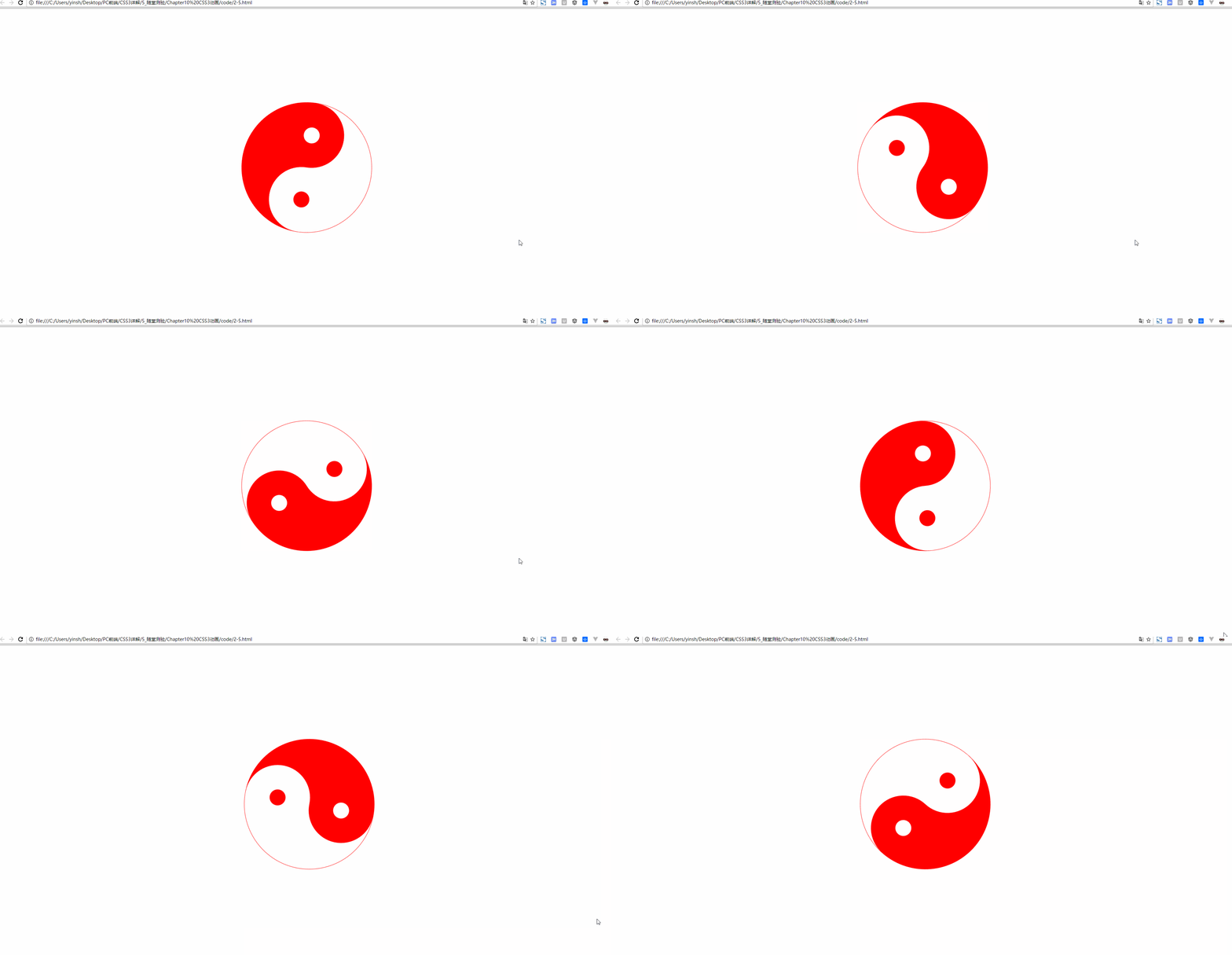
animation-direction与循环搭配,如果动画被设置为只播放一次,该属性将不起作用:
animation-direction: normal; /*正常*/

animation-direction: reverse; /*反向*/

animation-direction: alternate; /*先正向再反向*/

animation-direction: alternate-reverse; /*先反向再正向*/
动画暂停或未播放时的样式
animation-fill-mode: none; /*默认*/

animation-fill-mode: forwards; /*动画结束时的状态*/

animation-fill-mode: backwords; /*动画开始时的状态*/

animation-fill-mode: both; /*动画开始或结束的状态*/
animation-play-state: paused; /*动画暂停*/

animation-play-state: running; /*动画正在运行*/
鼠标悬停时暂停:
div {

    cursor: pointer;

    -webkit-animation-play-state: running;

            animation-play-state: running;

}

div:hover {

    cursor: pointer;

    -webkit-animation-play-state: paused;

            animation-play-state: paused;

}
Animation简写:
Animation:name duration timing-function delay iteration-count direction fill-mode play-state;
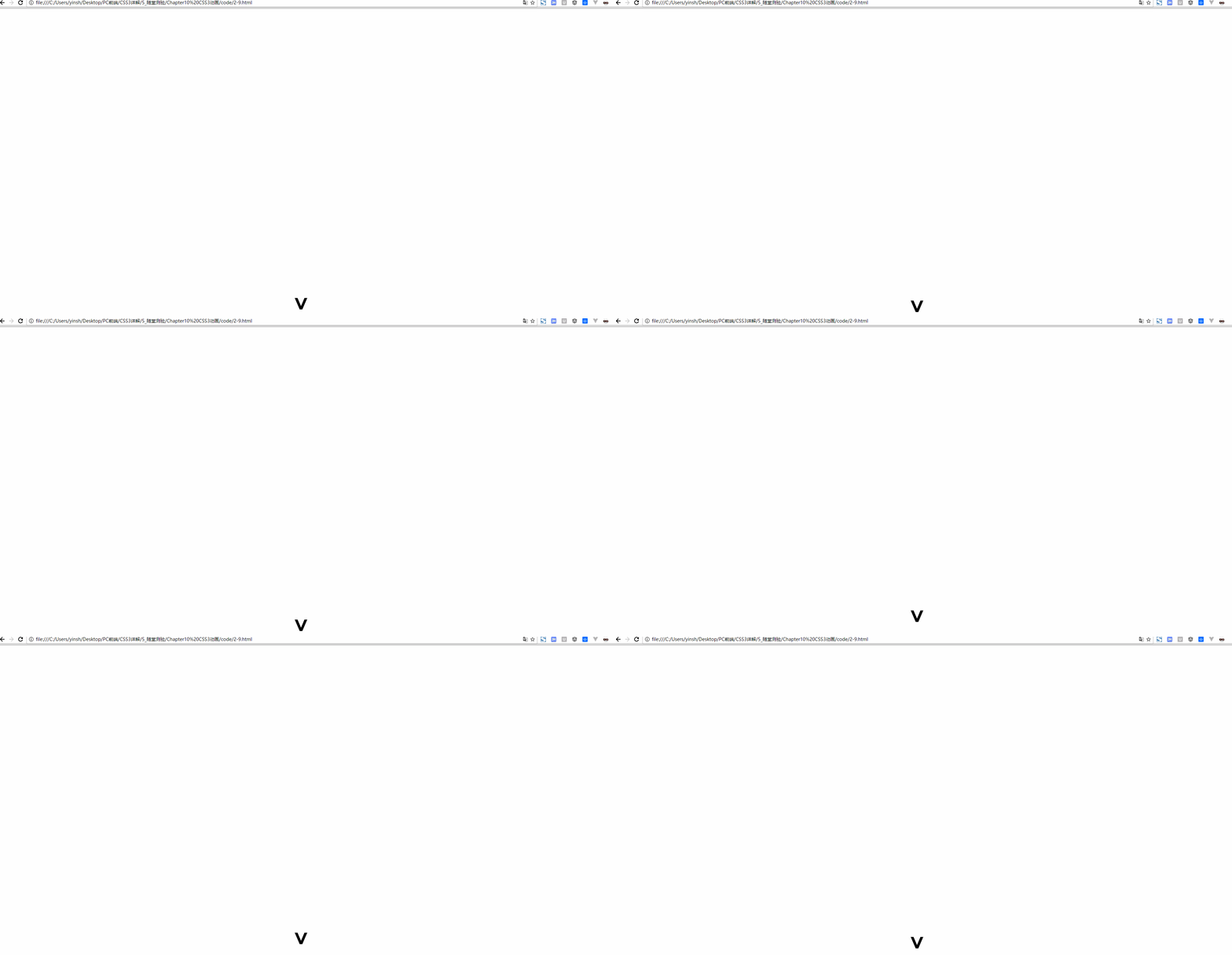
滚屏网页都有一个提示滚屏箭头动画效果
<!DOCTYPE html>
<html lang="en">
<head>
<meta charset="UTF-8">
<title>2-9</title>
<style type="text/css">
div {
font-family: Arial;
font-size: 72px;
font-weight: bold;
position: fixed;
right: 0;
left: 0;
width: 30px;
height: 30px;
margin: auto;
transform: rotate(90deg);
cursor:pointer;
animation:my_move .5s ease-in-out .5s infinite alternate ;
}
@keyframes my_move{
from{bottom:200px;}
to{bottom:100px;}
}
</style>
</head>
<body>
<div>></div>
</body>
</html>
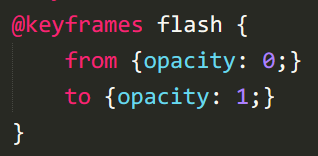
定义元素忽明忽暗的闪烁效果
css3基础-文本与字体+转换+过渡+动画+案例的更多相关文章
- css3基础教程十六变形与动画animation
前面我们讲过的变形与动画一般都是通过鼠标的单击.获得焦点,被点击或对元素进行一定改变后以后触发效果的,那么有没有像Flash一样自动播放的动画效果呢?答案当然是肯定的,这就是我们今天要讲到的anima ...
- CSS基础篇之背景、过渡动画
background-origin(背景原点) 设置元素背景图片的原始起始位置.必须保证背景是background-repeat为no-repeat属性才能生效. background-origin: ...
- CSS3—— 2D转换 3D转换 过渡 动画
2D转换 对元素进行移动.缩放.转动.拉长或拉伸 ————> ————> 移动 顺时针旋转 扩大/缩小 倾斜 2D变换合并 3D转换 绕x轴 绕y轴 过渡 从一种样式逐渐改变为另一 ...
- css3 转换 过渡 及动画
转换transform: 通过 CSS3 转换,我们能够对元素进行移动.缩放.转动.拉长或拉伸.您可以使用 2D 或 3D 转换来转换您的元素 2D转换属性: transform 向元素应用 2D 或 ...
- CSS3 基本属性 浅析(含选择器、背景阴影、3D转换、动画等)
1渐进增强原则 2私有前缀 不同浏览器在发布不同版本(一般测试版)时会加前缀,新增属性加上前缀进行支持测试: Chrome浏览器:-webkit-border-radius: 5px; ...
- CSS3文本与字体
一.CSS3 换行 1.word-break(规定自动换行的处理方法) word-break: normal / break-all / keep-all; /* normal:使用浏览器默认的换行规 ...
- CSS简介,基础选择器,字体属性,文本属性
欢迎大家去博客冰山一树Sankey,浏览效果更好.直接右上角搜索该标题即可 博客园主页:博客园主页-冰山一树Sankey CSDN主页:CSDN主页-冰山一树Sankey 前端学习:学习地址:黑马程序 ...
- CSS 基础:文本和字体(4)<思维导图>
这段时间利用一下间隙时间学习了CSS的基础知识,主要目的是加深对CSS的理解,虽然个人主要工作基本都是后台开发,但是个人觉得系统学习一下CSS的基础还是很有必要的.下面我学习CSS时做的思维导图(全屏 ...
- css3贝塞尔曲线过渡动画速率——transition-timing-function:cubic-bezier(n,n,n,n)
css3过渡动画速率用到的是三阶贝塞尔曲线,曲线有四个点,p0,p1,p2,p3 有几个属性: linear 规定以相同速度开始至结束的过渡效果(等于 cubic-bezier(0,0,1,1)). ...
随机推荐
- Shrio | java.io.IOException: Resource [classpath:shiro.ini] could not be found
案例 今天项目启动时一直报异常,看了错误日志发现是shrio文件找不到引起的,异常: java.io.IOException: Resource [classpath:shiro.ini] could ...
- 微信小程序如何创建云函数并安装wx-server-sdk依赖
时间:2020/01/23 步骤 1.在微信开发者工具中云函数所在的文件夹的图标与其他文件夹是不同的,如下(第一个是云函数): 如果需要使一个普通文件变为云函数文件夹,需要在project.confi ...
- 二、Linux系统硬链接和软链接详细介绍与实践
链接的概念 在linux系统中,链接可分为两种:一种被称为硬链接(Hard LinK),另一种被称为软链接或符号链接(Symbolic Link).在默认不带参数的情况下,执行ln命令创建的链接是硬链 ...
- Linux内核单链表
主要说明Linux内核中单链表操作的关键思想,需要注意的地方 1. 假设 为了说明关键思想,对数据结构进行了精简 2. 数据结构定义 struct ListNode { int val; ListNo ...
- Go操作MongoDB
mongoDB是目前比较流行的一个基于分布式文件存储的数据库,它是一个介于关系数据库和非关系数据库(NoSQL)之间的产品,是非关系数据库当中功能最丰富,最像关系数据库的. mongoDB介绍 mon ...
- java13人机猜拳
public class Demo01 { public static void main(String[] args) { /* * 你同桌和你要玩游戏. * 1 剪刀,2 石头,3 布 */ // ...
- java11类和对象
import java.util.Scanner; public class jh_01_如何认识事物 { public static void main(String[] args) { Scann ...
- NFA和DFA的区别
NFA DFA 初始状态 不唯一 唯一 弧上的标记 字(单字符字/ε) 字符(串) 转换关系 非确定 确定 对于每个NFA M都存在一个DFA M' 使得 L(M) = L(M')
- 踩坑ThinkPHP5之模型对象返回的数据集如何转为数组
各位小伙伴们大家好,冷月今天在做项目的过程中呢,遇到了一个坑就是用tp5的模型操作数据库时,返回的是数据集而不是直接的数组.于是冷月就想办法如何将数据集转为数组.写下这篇博文,防止大家遇到这个坑时可以 ...
- java方法参数传递方式只有----值传递!
在通常的说法中,方法参数的传递分为两种,值传递和引用传递,值传递是指将实际参数复制一份传递到方法中, 在方法中的改动将不会影响到实际参数本身,而引用传递则是指传递的是实际参数本身,在方法中的改动将会影 ...