
zabbix4.2配置监控nginx服务
1.监控原理
通过status模块监控(--with-http_stub_status_module)

2.修改nginx配置(/etc/nginx/conf.d/default.conf)
在被监控的主机上修改nginx配置文件,在配置文件中添加(一个location)下面的内容,修改后记得重启nginx服务:
 location /nginx_status {

                stub_status on;

                allow 192.168.10.100;    #表示允许该主机访问url:http://192.168.10.100/nginx_status

                allow 192.168.10.2;

                access_log off;

        }
3.添加监控脚本
在nginx服务器主机上添加监控nginx脚本(/etc/zabbix/zabbix_agent.d/nginx_status.sh,同时赋予该脚本可执行权限chmod a+x nginx_status.sh
#!/bin/bash

#Script to fetch nginx statuses for monitoring systems

    HOST="192.168.10.100"   #IP地址为装有nginx服务的主机地址

    PORT="80"

    function ping {

        /sbin/pidof nginx | wc -l

    }

    function active {

        /usr/bin/curl "http://$HOST:$PORT/nginx_status/" 2>/dev/null| grep 'Active' | awk '{print $NF}'

    }

    function reading {

        /usr/bin/curl "http://$HOST:$PORT/nginx_status/" 2>/dev/null| grep 'Reading' | awk '{print $2}'

    }

    function writing {

        /usr/bin/curl "http://$HOST:$PORT/nginx_status/" 2>/dev/null| grep 'Writing' | awk '{print $4}'

    }

    function waiting {

        /usr/bin/curl "http://$HOST:$PORT/nginx_status/" 2>/dev/null| grep 'Waiting' | awk '{print $6}'

    }

    function accepts {

        /usr/bin/curl "http://$HOST:$PORT/nginx_status/" 2>/dev/null| awk NR==3 | awk '{print $1}'

    }

    function handled {

        /usr/bin/curl "http://$HOST:$PORT/nginx_status/" 2>/dev/null| awk NR==3 | awk '{print $2}'

    }

    function requests {

        /usr/bin/curl "http://$HOST:$PORT/nginx_status/" 2>/dev/null| awk NR==3 | awk '{print $3}'

    }

    $1
4.进行访问测试检测
[root@zabbix-server-center alertscripts]# curl http://192.168.10.100/nginx_status   #IP地址为nginx服务器的主机地址

Active connections: 1

server accepts handled requests

 1 1 1

Reading: 0 Writing: 1 Waiting: 0
5.检测脚本测试
关于nginx状态的一些概念:
Active connections  Nginx正处理的活动链接数个数;重要

server              Nginx启动到现在共处理了多少个连接。

accepts             Nginx启动到现在共成功创建几次握手。

handled requests    Nginx总共处理了几次请求。

Reading             Nginx读取到客户端的 Header 信息数。

Writing             Nginx返回给客户端的 Header 信息数。

Waiting             Nginx已经处理完正在等候下一次请求指令的驻留链接,开启。

Keep-alive的情况下,Waiting这个值等于active-(reading + writing)。

请求丢失数=(握手数-连接数)可以看出,本次状态显示没有丢失请求。
[root@zabbix-server-center alertscripts]# sh nginx_status.sh active

1

[root@zabbix-server-center alertscripts]# sh nginx_status.sh reading

0

[root@zabbix-server-center alertscripts]# sh nginx_status.sh writing

1

[root@zabbix-server-center alertscripts]# sh nginx_status.sh accepts

20
6.在装有nginx服务的主机上修改zabbix_agentd.conf配置文件(/etc/zabbix/zabbix_agentd.conf)
修改:UnsafeUserParameters 等于 1 :UnsafeUserParameters=1
7.添加zabbix配置文件,放于 /etc/zabbix/zabbix_agentd.d/目录下(agent的配置文件 /etc/zabbix/zabbix_agentd.conf 中定义了其他key的包含目录)创建配置文件nginx_status.conf
添加:UserParameter=nginx[*], /etc/zabbix/zabbix_agentd.d/nginx_status.sh $1

                                                    #后面路径是监控脚本的位置

8.重启zabbix-agent服务
[root@ansible-control zabbix_agentd.d]# systemctl restart zabbix-agent.service
9.在zabbix server服务器上测试,是否能正常获取数据
[root@zabbix-server-center /]# zabbix_get -s 192.168.10.100 -p 10050 -k nginx.status[ping]

1

[root@zabbix-server-center /]# zabbix_get -s 192.168.10.100 -p 10050 -k nginx.status[requests]

2304

[root@zabbix-server-center /]# zabbix_get -s 192.168.10.100 -p 10050 -k nginx.status[accepts]

6285

[root@zabbix-server-center /]# zabbix_get -s 192.168.10.100 -p 10050 -k nginx.status[handled]

6286
7.进入zabbix界面配置监控模板
(1)创建模板:
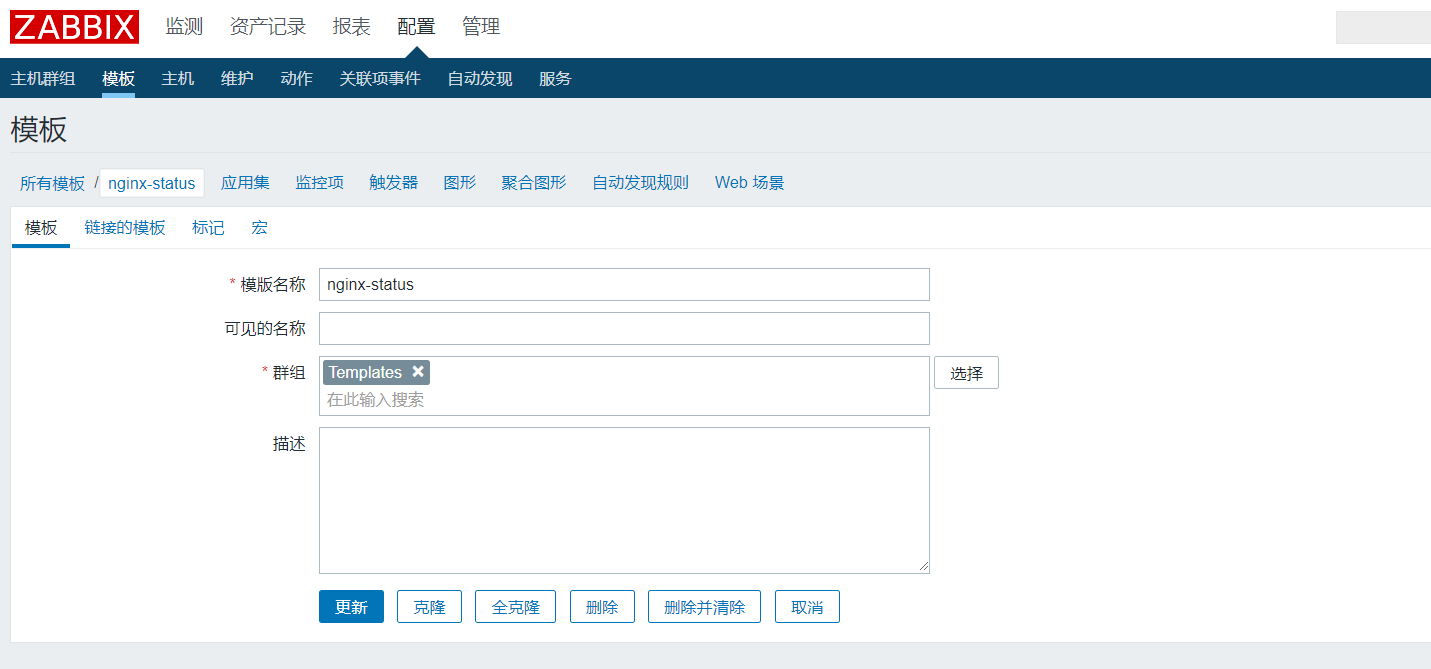
(2)添加应用集:
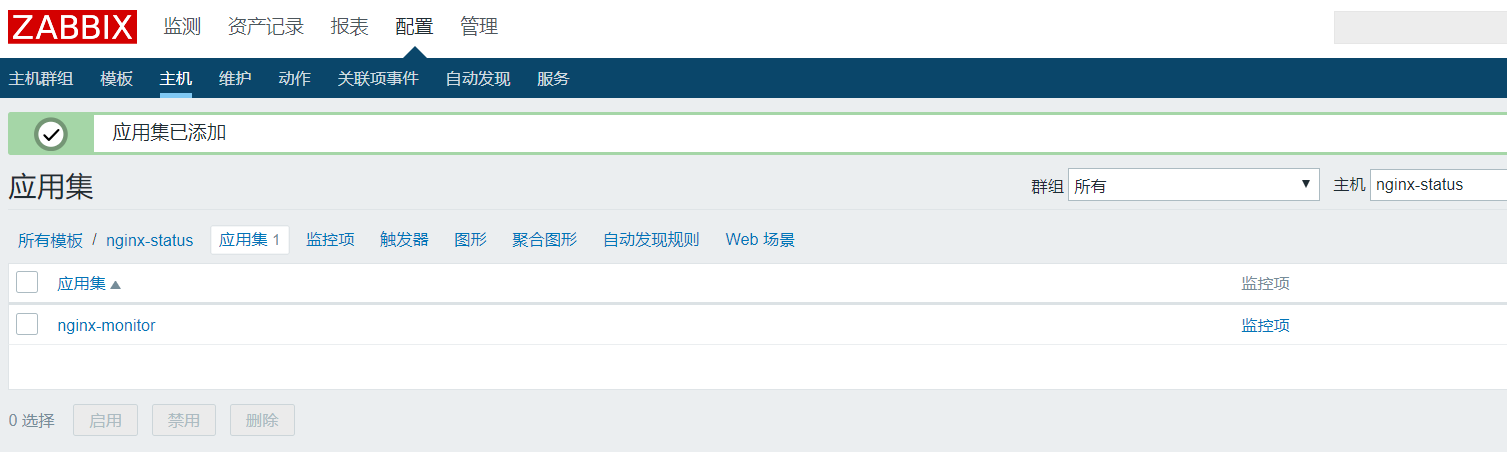
(3)创建监控项:

(4)创建多个监控项:
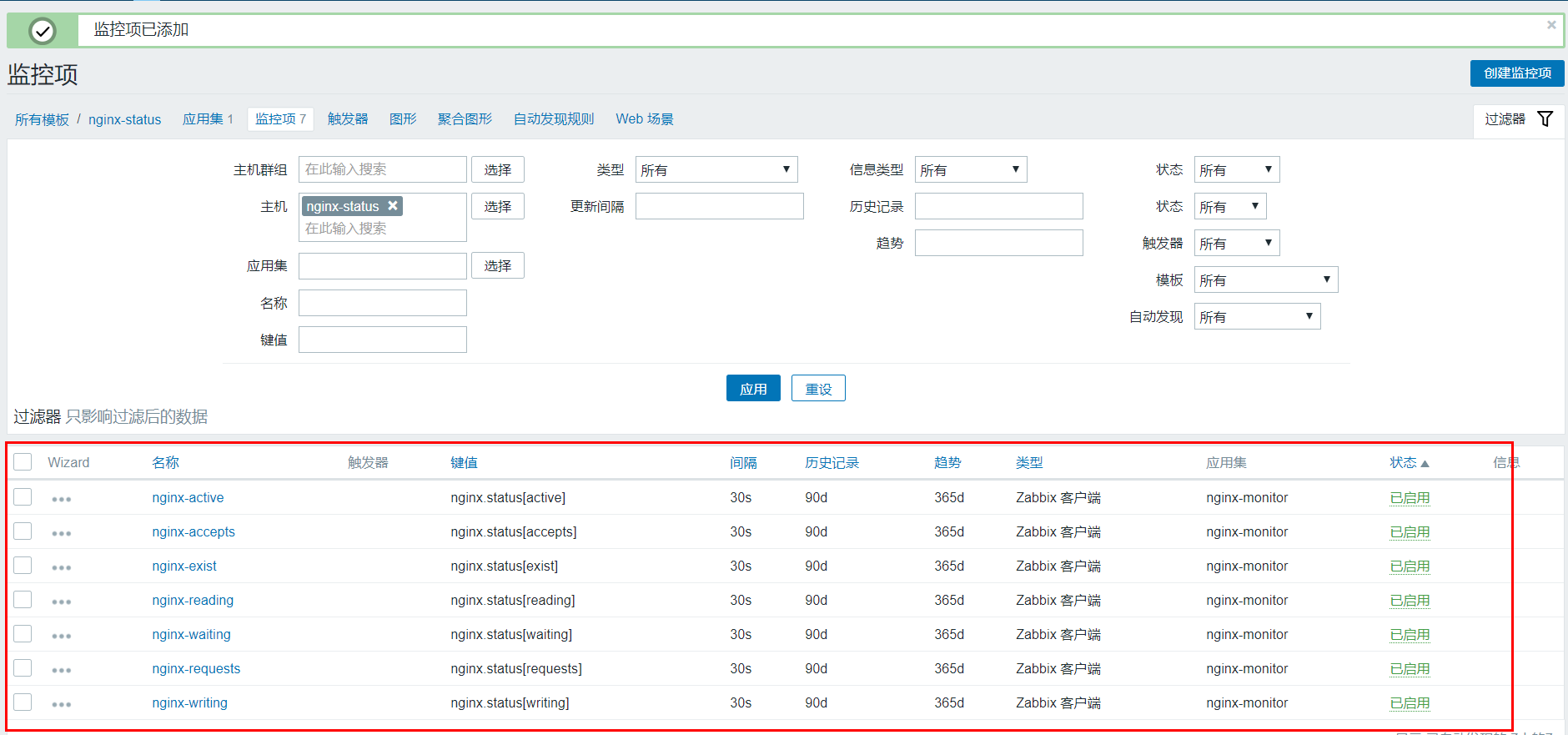
(5)创建触发器:触发器实时监控 Nginx 的存活状态,Nginx 一旦 Dump 机,就会发生报警。

(6)创建图形:
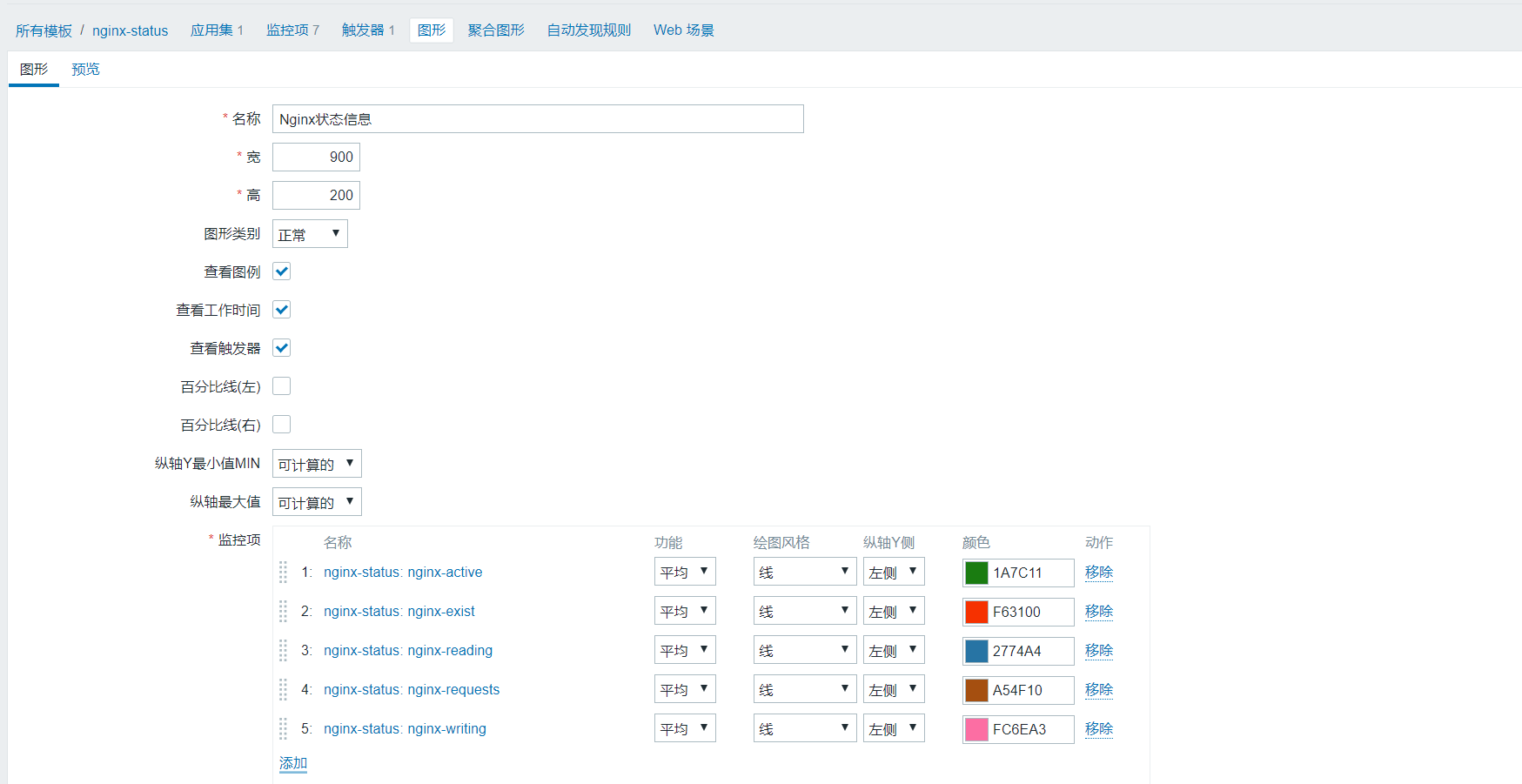
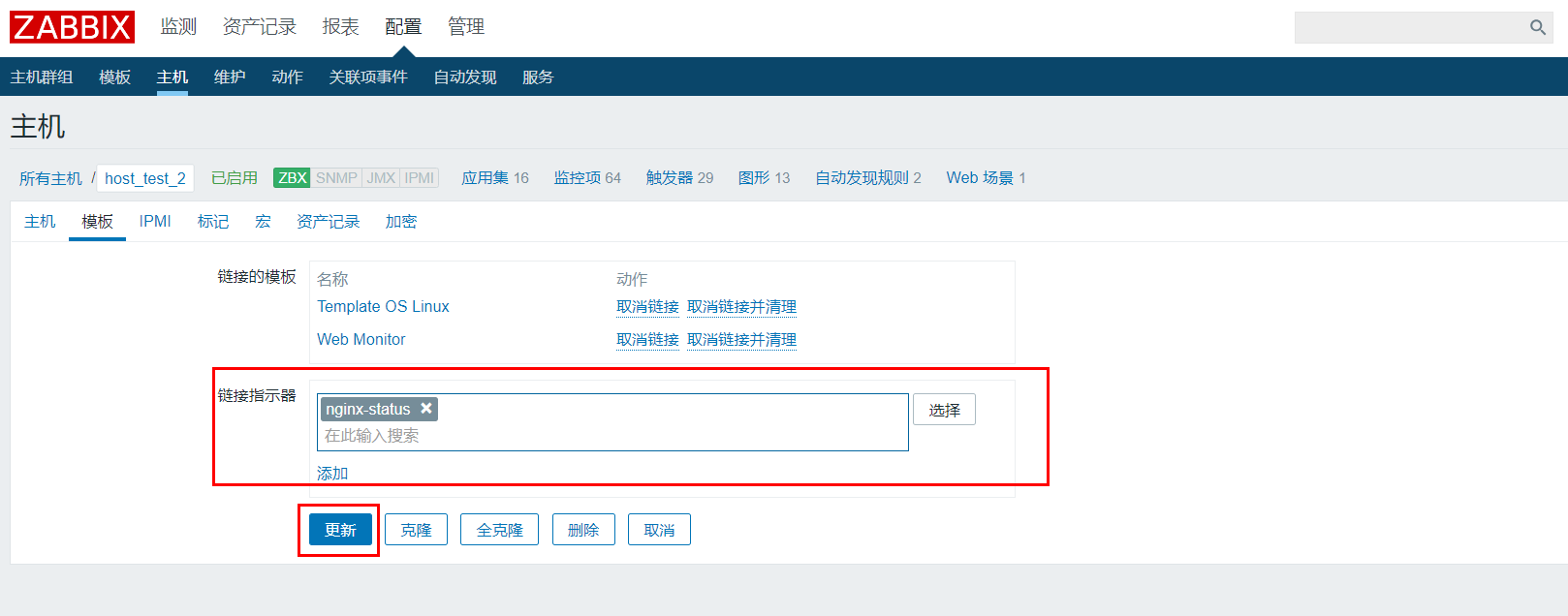
8.将模板应用在装有Nginx服务的主机
9.查看监控图形
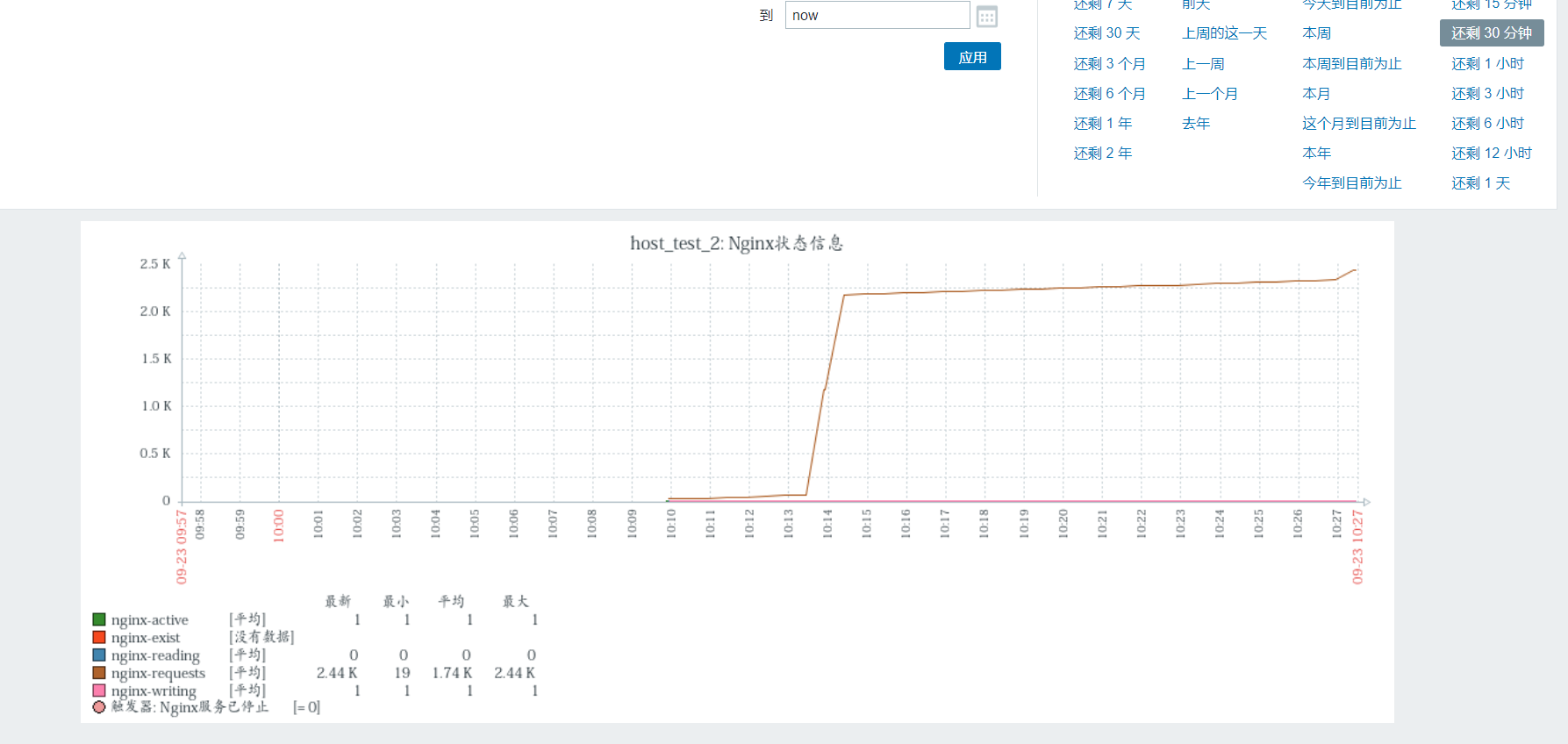
10.如果刚开始数值比较小,不利于查看图形,可以使用ab进行简单的压力测试(主要是requests),再查看数值变化
-n:在测试会话中所执行的请求个数。默认时,仅执行一个请求。
-c:一次产生的请求个数。默认是一次一个。
[root@zabbix-server-center /]# ab -n 1000 -c 1000 http://192.168.10.100:80/nginx_status
[root@zabbix-server-center /]# ab -n 1000 -c 1000 http://192.168.10.100:80/nginx_status

This is ApacheBench, Version 2.3 <$Revision: 1430300 $>

Copyright 1996 Adam Twiss, Zeus Technology Ltd, http://www.zeustech.net/

Licensed to The Apache Software Foundation, http://www.apache.org/

Benchmarking 192.168.10.100 (be patient)

Completed 100 requests

Completed 200 requests

Completed 300 requests

Completed 400 requests

Completed 500 requests

Completed 600 requests

Completed 700 requests

Completed 800 requests

Completed 900 requests

Completed 1000 requests

Finished 1000 requests

Server Software:        nginx/1.17.1

Server Hostname:        192.168.10.100

Server Port:            80

Document Path:          /nginx_status

Document Length:        106 bytes

Concurrency Level:      1000

Time taken for tests:   0.331 seconds

Complete requests:      1000

Failed requests:        819

   (Connect: 0, Receive: 0, Length: 819, Exceptions: 0)

Write errors:           0

Total transferred:      253092 bytes

HTML transferred:       109092 bytes

Requests per second:    3016.63 [#/sec] (mean)

Time per request:       331.496 [ms] (mean)

Time per request:       0.331 [ms] (mean, across all concurrent requests)

Transfer rate:          745.59 [Kbytes/sec] received

Connection Times (ms)

              min  mean[+/-sd] median   max

Connect:        3   31  15.1     26      69

Processing:    26   90  68.1     62     253

Waiting:        1   90  68.2     62     253

Total:         72  121  64.4     91     282

Percentage of the requests served within a certain time (ms)

  50%     91

  66%    103

  75%    109

  80%    113

  90%    239

  95%    280

  98%    282

  99%    282

 100%    282 (longest request)

值得参考的帖子:https://cloud.tencent.com/developer/article/1400917
11.关于Nginx的一个告警测试
进入模板选择nginx-status模板,添加触发器,表示requests大于500就发送邮件报警。
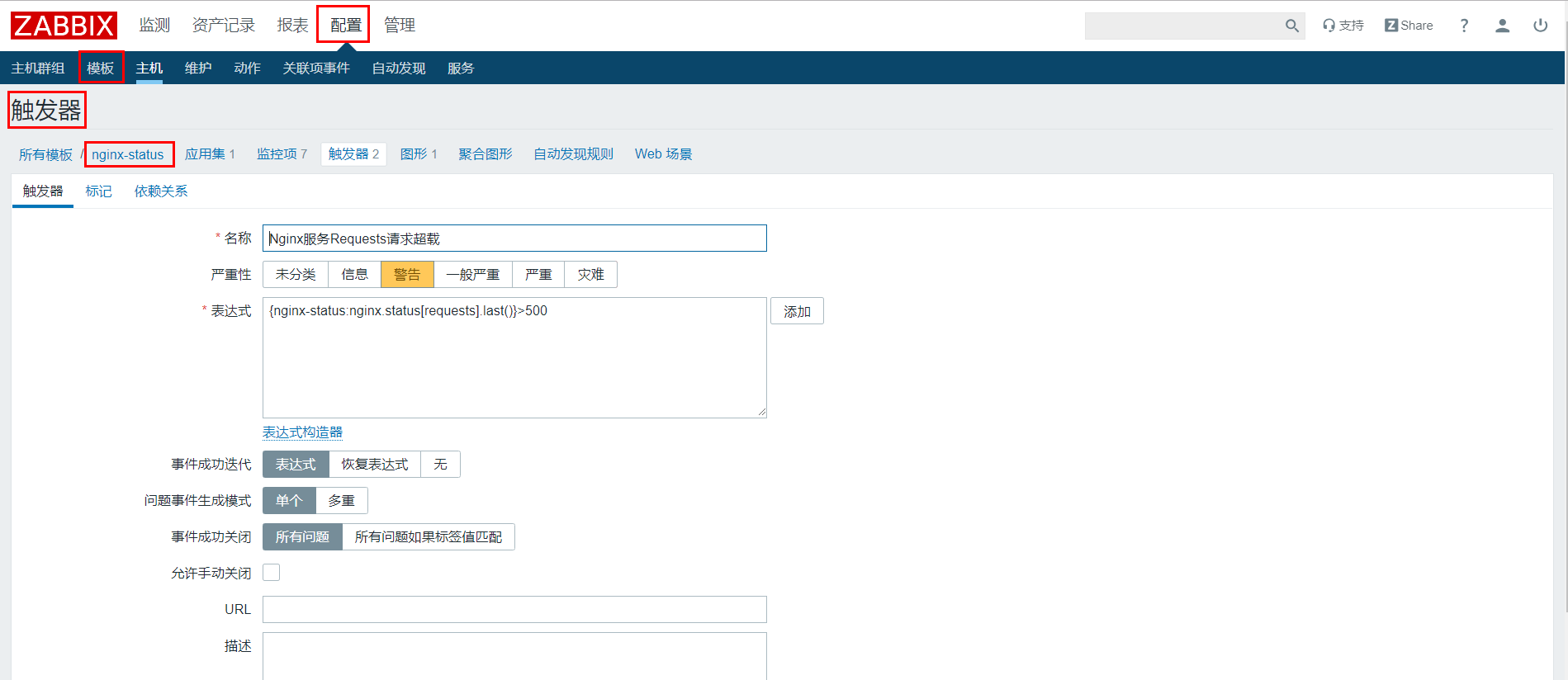
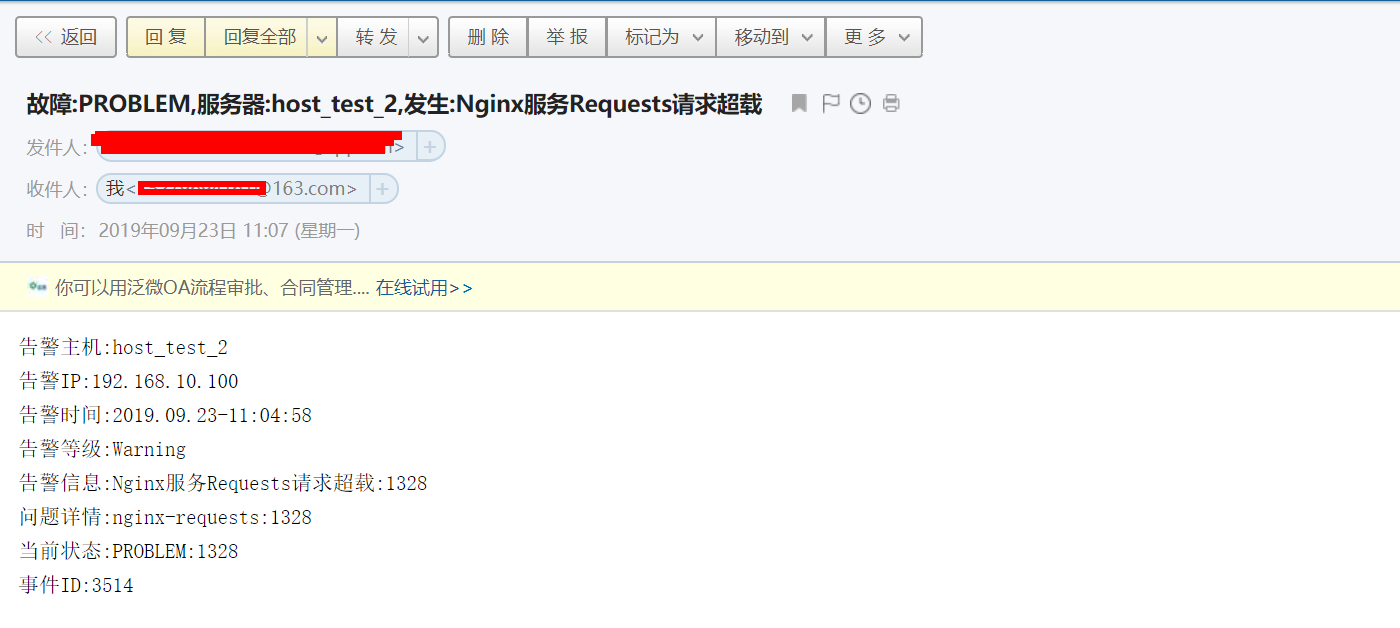
在zabbix服务器上使用ab命令进行疯狂压力测试(发送requests请求),不一会requests请求就超过500,随后就会收到报警邮件。
[root@zabbix-server-center /]# ab -n 1000 -c 1000 http://192.168.10.100:80/nginx_status
zabbix4.2配置监控nginx服务的更多相关文章
- 【zabbix告警监控】配置zabbix监控nginx服务
zabbix监控nginx,nginx需要添加--with-http_stub_status模块 使用zabbix监控nginx,首先nginx需要配置开启ngx_status.但是我这边nginx安 ...
- 使用Zabbix监控Nginx服务实战案例
使用Zabbix监控Nginx服务实战案例 作者:尹正杰 版权声明:原创作品,谢绝转载!否则将追究法律责任. 一.编译安装nginx步骤详解并开启状态页 博主推荐阅读: https://www.cn ...
- Nagios监控nginx服务具体过程
1在nginx 服务器上安装nrpe客户端: Nginx的服务须要监控起来.不然万一down了而不及时修复,会影响web应用.例如以下web应用上面启动的nginx后台进程[root@lb-net-2 ...
- Python 监控nginx服务是否正常
Python 监控nginx服务是否正常 #!/usr/bin/env python import os, sys, time from time import strftime while True ...
- 监控nginx服务
转自:http://www.cnblogs.com/silent2012/p/5310500.html 在Nginx的插件模块中有一个模块stub_status可以监控Nginx的一些状态信息,默认安 ...
- ZABBIX 3.0 配置监控NGINX性能【OK】
1.在agent端查看配置: nginx -V //查看编辑时是否加入状态监控模块:--with-http_stub_status_module --with-http_gzip_static_mod ...
- zabbix监控nginx服务状态
nginx需要安装--with-http_stub_status_module模块 $ nginx -V nginx version: nginx/1.12.2 built by gcc 4.8.5 ...
- 监控Nginx服务的Shell脚本
Nginx 虽然处理并发量比 apache 确实要强点,但它这种 php-cgi 模式不是太稳定,这点网上也有朋友总结了,我在实现项目中也感受到了. 我们一台支付机,偶尔会出现以下情况的:php-cg ...
- cacti系列(一)之cacti的安装及配置监控mysql服务
简介 Cacti是通过 snmpget来获取数据,使用 RRDtool绘画图形,而且你完全可以不需要了解RRDtool复杂的参数.它提供了非常强大的数据和用户管理功能,可以指定每一个用户能查看树状结构 ...
随机推荐
- minio gateway 代理s3 存储
以前有写过使用minio gataway 代理nas 的,实际上还可以代理s3 ,hdfs....,以下是一个gatway 带来nas 以及s3 集成的模式 环境准备 docker-compose文件 ...
- C++\CLI使用.net委托,*Callback注意"this"
今天在使用c++\cli的时候遇到了点关于委托,callback使用的问题,简单记录一下 首先贴段简单的C#中使用System.Threading.Timer的代码. Timer GameTim ...
- PAT甲级代码仓库
大道至简,知易行难.希望能够坚持刷题. PAT甲级真题题库,附上我的代码. Label Title Score Code Level 1001 A+B Format 20 1001 * 1002 A+ ...
- JS 弹出小窗口
弹出窗口函数 function openwindow(url,name,iWidth,iHeight){ var url; //转向网页的地址; var name; //网页名称,可为空; var i ...
- Ubuntu禁用root账号,开启Ubuntu密钥登录
新建普通用户 ## 新建普通用户 $ adduser ubuntu $ apt-get install sudo ## 将用户加入sudo组 $ usermod -a -G sudo ubuntu 为 ...
- Android9.0 Camera2 横屏问题修改记录
vendor\mediatek\proprietary\packages\apps 目录下有三份相机源码 分别是 Camera. Camera1. Camera2 通过查看 mk 发现通过 ifeq ...
- JS宣传页项目-综合实战
按照国际惯例先放图 index.html <!DOCTYPE html> <html lang="en"> <head> <meta ch ...
- Educational Codeforces Round 79 (Rated for Div. 2) Finished (A-D)
如果最大值比剩余两个加起来的总和+1还大,就是NO,否则是YES #include<bits/stdc++.h> using namespace std; int main(){ int ...
- ASP.NET Core SignalR 使用
SignalR: 实时 Web 功能使服务器端代码能够即时将内容推送到客户端(包括B/S,C/S,Andriod). SignalR最新版本为3.0(截止2020-02-28) SignalR ...
- navicat连接mysql出现2059错误的解决方法
安装navicat之后新建连接出现了2059的错误 网上查询过后,发现这个错误出现的原因是在mysql8之前的版本中加密规则为mysql_native_password,而在mysql8以后的加密规则 ...