
ElasticSearch 中文分词插件ik 的使用

下载
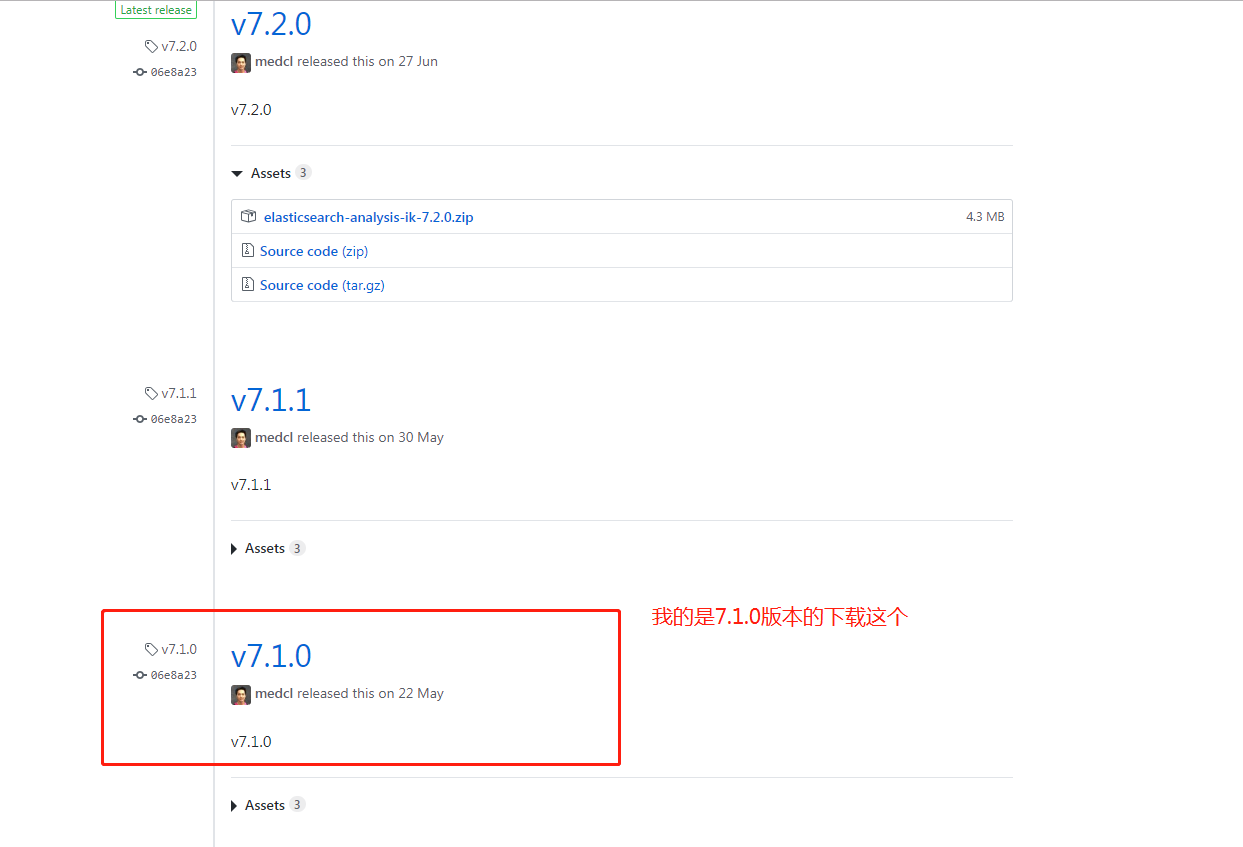
IK 的版本要与 Elasticsearch 的版本一致,因此下载 7.1.0 版本。
安装
1、中文分词插件下载地址:https://github.com/medcl/elasticsearch-analysis-ik
2、拼音分词插件下载地址:https://github.com/medcl/elasticsearch-analysis-pinyin
下载你对应的版本

将解压后的 IK 文件夹,放入 elasticsearch 文件夹下的 plugins/ik 目录下。
启动 Elasticsearch 后,看到下图,表示启动成功。

扩展本地词库
在 plugins\ik\config\custom 目录下新增文件 hotwords.dic。如添加 洪荒之力 。每一个词语一行。
在 plugins\ik\config 文件夹下的 IKAnalyzer.cfg.xml 文件配置本地词库。
<!--用户可以在这里配置自己的扩展字典,如果多个字典,则用分号分隔 custom/mydict.dic;custom/single_word_low_freq.dic-->

<entry key="ext_dict">custom/hotwords.dic</entry>
重新启动 Elasticsearch 显示如下图,表示启动成功。

文档的中文分词使用
IK分词器有两种分词模式:ik_max_word和ik_smart模式。
1、ik_max_word
会将文本做最细粒度的拆分,比如会将“中华人民共和国人民大会堂”拆分为“中华人民共和国、中华人民、中华、华人、人民共和国、人民、共和国、大会堂、大会、会堂等词语。
2、ik_smart
会做最粗粒度的拆分,比如会将“中华人民共和国人民大会堂”拆分为中华人民共和国、人民大会堂。
下面我们分别测试下。
先测试ik_max_word,输入命令如下:
POST http://localhost:9200/_analyze

{

    "analyzer": "ik_max_word",

    "text": "世界如此之大"

}
响应结果如下:
{

  "tokens": [

    {

      "token": "世界",

      "start_offset": ,

      "end_offset": ,

      "type": "CN_WORD",

      "position":

    },

    {

      "token": "如此之",

      "start_offset": ,

      "end_offset": ,

      "type": "CN_WORD",

      "position":

    },

    {

      "token": "如此",

      "start_offset": ,

      "end_offset": ,

      "type": "CN_WORD",

      "position":

    },

    {

      "token": "之大",

      "start_offset": ,

      "end_offset": ,

      "type": "CN_WORD",

      "position":

    }

  ]

}
再测试ik_smart,输入命令如下:
POST http://localhost:9200/_analyze

{

    "analyzer": "ik_smart",

    "text": "世界如此之大"

}
响应结果如下:
{

  "tokens": [

    {

      "token": "世界",

      "start_offset": ,

      "end_offset": ,

      "type": "CN_WORD",

      "position":

    },

    {

      "token": "如此",

      "start_offset": ,

      "end_offset": ,

      "type": "CN_WORD",

      "position":

    },

    {

      "token": "之大",

      "start_offset": ,

      "end_offset": ,

      "type": "CN_WORD",

      "position":

    }

  ]

}
通过Docker 安装elasticsearch-analysis-ik-6.4.5插件
FROM docker.elastic.co/elasticsearch/elasticsearch:6.4.5

ADD elasticsearch-analysis-ik-6.4.5 /usr/share/elasticsearch/plugins/elasticsearch-analysis-ik-6.4.5
ElasticSearch 中文分词插件ik 的使用的更多相关文章
- ElasticSearch(三) ElasticSearch中文分词插件IK的安装
正因为Elasticsearch 内置的分词器对中文不友好,会把中文分成单个字来进行全文检索,所以我们需要借助中文分词插件来解决这个问题. 一.安装maven管理工具 Elasticsearch 要使 ...
- ElasticSearch(四) ElasticSearch中文分词插件IK的简单测试
先来一个简单的测试 # curl -XPOST "http://192.168.9.155:9200/_analyze?analyzer=standard&pretty" ...
- Elasticsearch安装中文分词插件ik
Elasticsearch默认提供的分词器,会把每一个汉字分开,而不是我们想要的依据关键词来分词.比如: curl -XPOST "http://localhost:9200/userinf ...
- Elasticsearch如何安装中文分词插件ik
elasticsearch-analysis-ik 是一款中文的分词插件,支持自定义词库. 安装步骤: 1.到github网站下载源代码,网站地址为:https://github.com/medcl/ ...
- ElasticSearch中文分词(IK)
ElasticSearch常用的很受欢迎的是IK,这里稍微介绍下安装过程及测试过程. 1.ElasticSearch官方分词 自带的中文分词器很弱,可以体检下: [zsz@VS-zsz ~]$ c ...
- ElasticSearch-5.0.0安装中文分词插件IK
Install IK 源码地址:https://github.com/medcl/elasticsearch-analysis-ik,git clone下来. 1.compile mvn packag ...
- ElasticSearch中文分词器-IK分词器的使用
IK分词器的使用 首先我们通过Postman发送GET请求查询分词效果 GET http://localhost:9200/_analyze { "text":"农业银行 ...
- Elasticsearch 中文分词器IK
1.安装说明 https://github.com/medcl/elasticsearch-analysis-ik 2.release版本 https://github.com/medcl/elast ...
- ElasticSearch搜索引擎安装配置中文分词器IK插件
近几篇ElasticSearch系列: 1.阿里云服务器Linux系统安装配置ElasticSearch搜索引擎 2.Linux系统中ElasticSearch搜索引擎安装配置Head插件 3.Ela ...
随机推荐
- centos6.9实时查看tomcat运行日志
1.切换到tomcat的logs目录下 cd /usr/local/apache-tomcat-/logs 2.执行命令,查看日志 tail -f catalina.out 3.退出 Ctrl+c
- 经典案例复盘——运维专家讲述如何实现K8S落地(摘抄)
以下是运满满K8s容器化进程记录,摘抄一下,方便以后查阅. 背景介绍 运满满自开始微服务改造以来,线上线下已有数千个微服务的 Java 实例在运行中.这些 Java 实例部署在数百台云服务器或虚机上, ...
- 一文读懂Java GC原理和调优
概述 本文介绍GC基础原理和理论,GC调优方法思路和方法,基于Hotspot jdk1.8,学习之后将了解如何对生产系统出现的GC问题进行排查解决 阅读时长约30分钟,内容主要如下: GC基础原理,涉 ...
- Java 学习笔记之 线程isInterrupted方法
线程isInterrupted方法: isInterrupted()是Thread对象的方法,测试线程是否已经中断. public class ThreadRunMain { public stati ...
- Python 必备面试基础知识-3
今天继续分享 Python 相关的面试题,你准备好了嘛! 网络编程篇 1. 简述 OSI 七层协议 是网络传输协议,人为的把网络传输的不同阶段划分成不同的层次. 七层划分为:应用层.表示层.会话层.传 ...
- Solidity 编程实例--投票
Voting 投票 思路是为每张选票创建一个合约,每个投票选项提供一个短名称.合约创建者作为会长将会给每个投票参与人各自的地址投票权. 地址后面的人们可以选择自己投票或者委托信任的代表人替他们投票.在 ...
- 利用js种的正则删除html标签
public static string NoHTML(string Htmlstring) { //删除脚本 Htmlstring = Regex.Replace(Htmlstring, @&quo ...
- mac下安装jmeter
jmeter官网下载 双击解压 命令行进入/Users/yanguobin/apache-jmeter-5.1.1/bin目录下,输入sh jmeter即可启动 也可以 配置环境变量 vim ~/.b ...
- js时间查询补充
先来看下JS中的日期操作: var myDate = new Date(); myDate.getYear(); //获取当前年份(2位) myDate.getFullYear(); //获取完整的年 ...
- Node.js入门教程 第五篇 (Express框架)
Express框架 Express是适用于Node.js web的框架,提供了大量实用功能,例如路由功能及http功能. Express 框架核心特性: 可以设置中间件来响应 HTTP 请求. 定义了 ...