
Thread <number> cannot allocate new log, sequence <number>浅析
有时候,你会在ORACLE数据库的告警日志中发现“Thread <number> cannot allocate new log, sequence <number> Checkpoint not complete”这类告警。具体案例如下所示:
Thread 1 cannot allocate new log, sequence 279334
Checkpoint not complete
Current log# 4 seq# 279333 mem# 0: /u01/oradata/GSP/redo04.log
Current log# 4 seq# 279333 mem# 1: /u03/oradata/GSP/redo04.log
当然Thread或sequence的数值可能有所不同,基本上是类似下面这样的告警信息
Thread <number> cannot allocate new log, sequence <number>
Checkpoint not complete
也有可能是因为在等待重做日志的归档,出现的是下面这类告警信息
ORACLE Instance <name> - Can not allocate log, archival required
Thread <number> cannot allocate new log, sequence <number>
那么出现这类告警的具体原因是什么呢? 以及要如何去解决这个问题呢?
原因分析:
通常来说是因为重做日志(redo log)在写满后就会切换日志组,这个时候就会触发一次检查点事件(checkpoint),检查点(checkpoint)激活时会触发数据库写进程(DBWR),将数据缓冲区里的脏数据块写回到磁盘的数据文件中,只要这个脏数据写回磁盘事件没结束,那么数据库就不会释放这个日志组。在归档模式下,还会伴随着ARCH进程将重做日志进行归档的过程。如果重做日志(redo log)产生的过快,当CPK或归档还没完成,LGWR已经把其余的日志组写满,又要往当前的日志组里面写redo log的时候,这个时候就会发生冲突,数据库就会被挂起。并且一直会往alert.log中写类似上面的错误信息。
另外,重做日志在不同业务时段的切换频率不一样,所以出现这个错误,一般是业务繁忙或者出现大量DML操作的时候。
解决方法:
1:增大REDO LOG FILE的大小
增大redo log file的大小容易操作,但是redo log file设置为多大才是合理的呢?
1:参考V$INSTANCE_RECOVERY中OPTIMAL_LOGFILE_SIZE字段值,但是这个字段有可能为Null值,除非你调整FAST_START_MTTR_TARGET参数的值大于0
Redo log file size (in megabytes) that is considered optimal based on the current setting of FAST_START_MTTR_TARGET. It is recommended that the user configure all online redo logs to be at least this value.
官方文档的建议如下:
You can use the V$INSTANCE_RECOVERY view column OPTIMAL_LOGFILE_SIZE to determine the size of your online redo logs. This field shows the redo log file size in megabytes that is considered optimal based on the current setting of FAST_START_MTTR_TARGET. If this field consistently shows a value greater than the size of your smallest online log, then you should configure all your online logs to be at least this size.
Note, however, that the redo log file size affects the MTTR. In some cases, you may be able to refine your choice of the optimal FAST_START_MTTR_TARGET value by re-running the MTTR Advisor with your suggested optimal log file size.
SQL> SELECT OPTIMAL_LOGFILE_SIZE FROM V$INSTANCE_RECOVERY;
2:根据重做日志切换次数和重做日志生成的量来判断
可以用awr_redo_size_history脚本统计分析一下,每个小时、每天生成的归档日志的大小,然后可以某些时间段(切换频繁的时间段)的归档日志大小和15~ 20分钟(如果某个时间段切换非常频繁,几乎无法使用这个规则,因为重组日志会非常大)切换一次计算重做日志大小。当然这个不是放之四海而皆准的规则,需要根据实际业务判断,大部分情况下还是可以参考这个
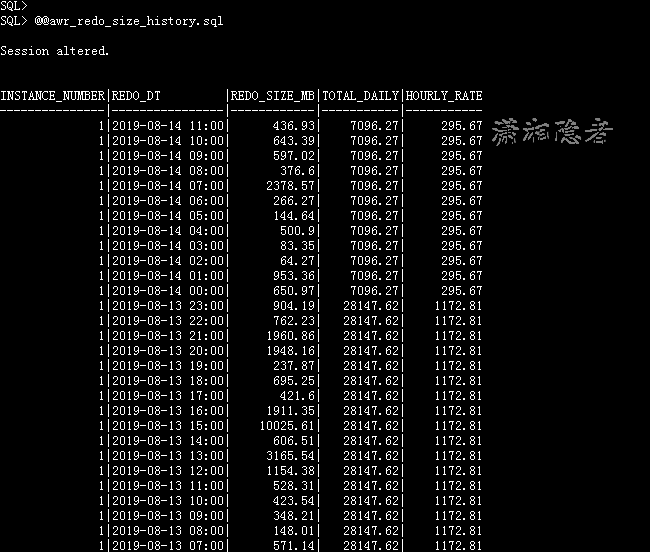
计算重做日志的一个脚本,仅供参考
SELECT
(SELECT ROUND(AVG(BYTES) / 1024 / 1024, 2) FROM V$LOG) AS "Redo size (MB)",
ROUND((20 / AVERAGE_PERIOD) * (SELECT AVG(BYTES)
FROM V$LOG) / 1024 / 1024, 2) AS "Recommended Size (MB)"
FROM (SELECT AVG((NEXT_TIME - FIRST_TIME) * 24 * 60) AS AVERAGE_PERIOD
FROM V$ARCHIVED_LOG
WHERE FIRST_TIME > SYSDATE - 3
AND TO_CHAR(FIRST_TIME, 'HH24:MI') BETWEEN
&START_OF_PEAK_HOURS AND &END_OF_PEAK_HOURS
);
2:增加REDO LOG Group的数量
增加日志组的数量,其实并不能解决“Thread <number> cannot allocate new log, sequence <number> Checkpoint not complete” 这个问题,但是他能解决下面这个问题:
ORACLE Instance <name> - Can not allocate log, archival required
Thread <number> cannot allocate new log, sequence <number>
这个是因为ARCH进程,尚未完成将重做日志文件复制到归档目标(需要存档),而此时由于重做日志切换太快或日志组过少,必须等待ARCR进程完成归档后,才能循环覆盖日志组。
3:Tune checkpoint
这个比较难,参考官方文档:Note 147468.1 Checkpoint Tuning and Troubleshooting Guide
4:Increase I/O speed for writing online REDO log/Archived REDO
This applies to Thread <number> cannot allocate new log, sequence <number>
Checkpoint not complete
- use ASYNC I/O if not already so
- use DBWR I/O slaves or multiple DBWR processes
Reference:
Oracle Database Performance Tuning Guide
Instance Tuning Using Performance Views
Consider Multiple Database Writer (DBWR) Processes or I/O Slaves
10.2 - http://docs.oracle.com/cd/B19306_01/server.102/b14211/instance_tune.htm#i42802
11.1 - http://docs.oracle.com/cd/B28359_01/server.111/b28274/instance_tune.htm#i42802
11.2 - http://docs.oracle.com/cd/E11882_01/server.112/e16638/instance_tune.htm#PFGRF94511
- consider the generic recommendations for REDO log files:
If the high I/O files are redo log files, then consider splitting the redo log files from the other files. Possible configurations can include the following:
1. Placing all redo logs on one disk without any other files. Also consider availability; members of the same group should be on different physical disks and controllers for recoverability purposes.
2. Placing each redo log group on a separate disk that does not store any other files.
3. Striping the redo log files across several disks, using an operating system striping tool. (Manual striping is not possible in this situation.)
4. Avoiding the use of RAID 5 for redo logs.
Reference:
Oracle Database Performance Tuning Guide
Redo Log Files
10.2 - http://docs.oracle.com/cd/B19306_01/server.102/b14211/iodesign.htm#sthref534
11.1 - http://docs.oracle.com/cd/B28359_01/server.111/b28274/iodesign.htm#CHDBCDHG
11.2 - http://docs.oracle.com/cd/E11882_01/server.112/e16638/iodesign.htm#PFGRF94396
For
ORACLE Instance <name> - Can not allocate log, archival required
Thread <number> cannot allocate new log, sequence <number>
In the above document you may check section "Archived Redo Logs"
5: 找到产生大量重做日志的SQL,如果这个SQL有业务或逻辑上不合理的地方,就要修改,或者将相关表设置为NOLOGGING,减少重做日志的产生
关于如何定位那些SQL产生了大量的重做日志,可以使用LogMiner工具,也可以参考我这篇博客“如何定位那些SQL产生了大量的redo日志”
参考资料:
https://asktom.oracle.com/pls/asktom/f?p=100:11:0::::P11_QUESTION_ID:69012348056
Manual Log Switching Causing "Thread 1 Cannot Allocate New Log" Message in the Alert Log (文档 ID 435887.1)
Can Not Allocate Log (文档 ID 1265962.1)
https://gokhanatil.com/2009/08/optimum-size-of-the-online-redo-log-files.html
Thread <number> cannot allocate new log, sequence <number>浅析的更多相关文章
- Thread 1 cannot allocate new log, sequence 187398
报错信息: Thread 1 cannot allocate new log, sequence 187398Checkpoint not complete 处理方法: 查看REDO日志组 selec ...
- Thread 1 cannot allocate new log的问题分析 (转载)
Thread 1 cannot allocate new log的问题分析 发生oracle宕机事故,alert文件中报告如下错误: Fri Jan 12 04:07:49 2007Thread 1 ...
- Thread 1 cannot allocate new log 的处理办法
ALTER SYSTEM ARCHIVE LOG Thread 1 cannot allocate new log, sequence 2594 Checkpoint not complete 这个实 ...
- InnoDB: The log sequence number in ibdata files does not match
InnoDB: The log sequence number in ibdata files does not matchInnoDB的:在ibdata文件的日志序列号不匹配 可能ibdata文件损 ...
- mysql oom之后的page 447 log sequence number 292344272 is in the future
mysql oom之后,重启时发生130517 16:00:10 InnoDB: Error: page 447 log sequence number 292344272InnoDB: is in ...
- Thread 1 cannot allocate new log的问题分析
http://blog.csdn.net/zonelan/article/details/7613519 http://leoguan.blog.51cto.com/816378/584494 htt ...
- The log scan number (620023:3702:1) passed to log scan in database 'xxxx' is not valid
昨天一台SQL Server 2008R2的数据库在凌晨5点多抛出下面告警信息: The log scan number (620023:3702:1) passed to log scan in d ...
- [crypto][ipsec] 简述ESP协议的sequence number机制
预备 首先提及一个概念叫重放攻击,对应的机制叫做:anti-replay https://en.wikipedia.org/wiki/Anti-replay IPsec协议的anti-replay特性 ...
- Sequence Number
1570: Sequence Number 时间限制: 1 Sec 内存限制: 1280 MB 题目描述 In Linear algebra, we have learned the definit ...
随机推荐
- CentOS7下部署java+tomcat+mysql项目及遇到的坑
CentOS 7 下安装部署java+tomcat+mysql 前置:CentOS7安装:https://jingyan.baidu.com/article/b7001fe1d1d8380e7382d ...
- ZKWeb网页框架2.2.1正式发布
2.2.1 更新的内容有 改进 EFCore 支持 支持自动 json 序列化字段 (通过 WithSerialization 选项) 支持懒加载 更新后 EFCore 可以使用所有默认插件 (ZKW ...
- 解决JRebel对myBatis Mapper 失效的问题
解决JRebel对myBatis Mapper 失效的问题 在之前的文章中介绍了JRebel这个插件的使用和优势,虽然它对配置文件的改动的热更新是生效的,但是mybatis的mapper文件的改动却无 ...
- fastjson又被发现漏洞,这次危害可能会导致服务瘫痪
0x00 漏洞背景 2019年9月5日,fastjson在commit 995845170527221ca0293cf290e33a7d6cb52bf7上提交了旨在修复当字符串中包含\\x转义字符时可 ...
- 拓展 centos 7
查看端口的占用情况 Centos6/contos7(ECS) 使用 netstat 查询系统上有多少TCP 多少UDP会话 netstat -tun -t: tcp -u: udp -a: all 表 ...
- Eureka+SpringBoot2.X版本实现优雅停服
在客户端添加如下配置 pom依赖 actuator.jar包 <dependency> <groupId>org.springframework.cloud</group ...
- node.js安装本地模块遇到的目录锁定问题【新手问题】
昨天发过文字版的,后来以为问题没解决就删除,今天偷个懒,直接上图. 被书中的介绍给误导了,虽然和书中不一样,但实际上自己练习写的模块已经是可用了.也犯了个常识性的错误:Warn一般不会有太大的影响.
- How to: Specify a Display Member (for a Lookup Editor, Detail Form Caption, etc.)如何:指定显示成员(用于查找编辑器、详细信息表单标题等)
Each business object used in an XAF application should have a default property. The default property ...
- [追热点]Rust学习资源整理
为什么选择Rust 在一次演讲中,谈到微软为解决相应内存问题所做的工作,微软研究人员 Matthew Parkinson 提到了微软正在开发的基于 Rust 的新编程语言 Verona. 摘自:[Ru ...
- 剑指offer笔记面试题5----替换空格
题目:请实现一个函数,把字符串中的每个空格替换成"20%".例如,输入"We are happy."则输出"We%20are%20happy.&quo ...