
excel2007VBA绘图2
 '--------------------------------------------------------Module1--------------------------------------------------------

 Sub Macro1()

     ActiveSheet.Range("B1:B40").Select

     ActiveSheet.Shapes.AddChart.Select

     ActiveChart.ChartType = xlXYScatter

     ActiveChart.SetSourceData Source:=Range("'Sheet1'!$A$1:$B$40")

     With ActiveChart

         .HasTitle = True                                    '为图表设置标题

         With .ChartTitle

             .Text = "交会图版"

             .Font.Name = "宋体"

             .Font.Size =

             .Font.ColorIndex =

             .Top =

             .Left =

         End With

         With .Axes(xlCategory)                             '为图表设置横坐标

             .HasTitle = True

             .AxisTitle.Text = "统计含量"

             .AxisTitle.Font.Name = "宋体"

             .AxisTitle.Font.Size =

             .AxisTitle.Font.Bold = False

             .AxisTitle.Font.ColorIndex =

             .MinimumScale = Cells(, ) - Cells(, ) * 0.2

             .MaximumScale = Cells(, ) + Cells(, ) * 0.2

         End With

         With .Axes(xlValue)                               '为图表设置纵坐标

             .HasTitle = True

             .AxisTitle.Text = "百分数"

             .AxisTitle.Font.Name = "宋体"

             .AxisTitle.Font.Size =

             .AxisTitle.Font.Bold = False

             .AxisTitle.Font.ColorIndex =

             ' i = Excel.Application.WorksheetFunction.Match("203", f, 0)

             .MinimumScale = Excel.Application.WorksheetFunction.Min(Range("B:B")) '**zbl**范围要加一个Range才不会出错,下面的不行

             .MaximumScale = Excel.Application.WorksheetFunction.Max(Range("B:B"))

 '            .MinimumScale = Excel.Application.WorksheetFunction.Min("B:B")

 '            .MaximumScale = Excel.Application.WorksheetFunction.Max("B:B")

 '            .MinimumScale = Application.WorksheetFunction.Min("b1:b40")

 '            .MaximumScale = Application.WorksheetFunction.Max("b4:b40")

 'Sub UseFunction()

 '    Dim myRange As Range

 '    Set myRange = Worksheets("Sheet1").Range("A1:C10")

 '    answer = Application.WorksheetFunction.Max搜索(myRange)

 '    MsgBox answer

 'End Sub

         End With

         .HasLegend = True                                      '为图表设置图例

         With .Legend

             .Position = xlLegendPositionRight

             .Font.ColorIndex =

             .Font.Bold = True

         End With

     End With

 End Sub
多个系列:

参考:http://club.excelhome.net/thread-1199400-1-1.html
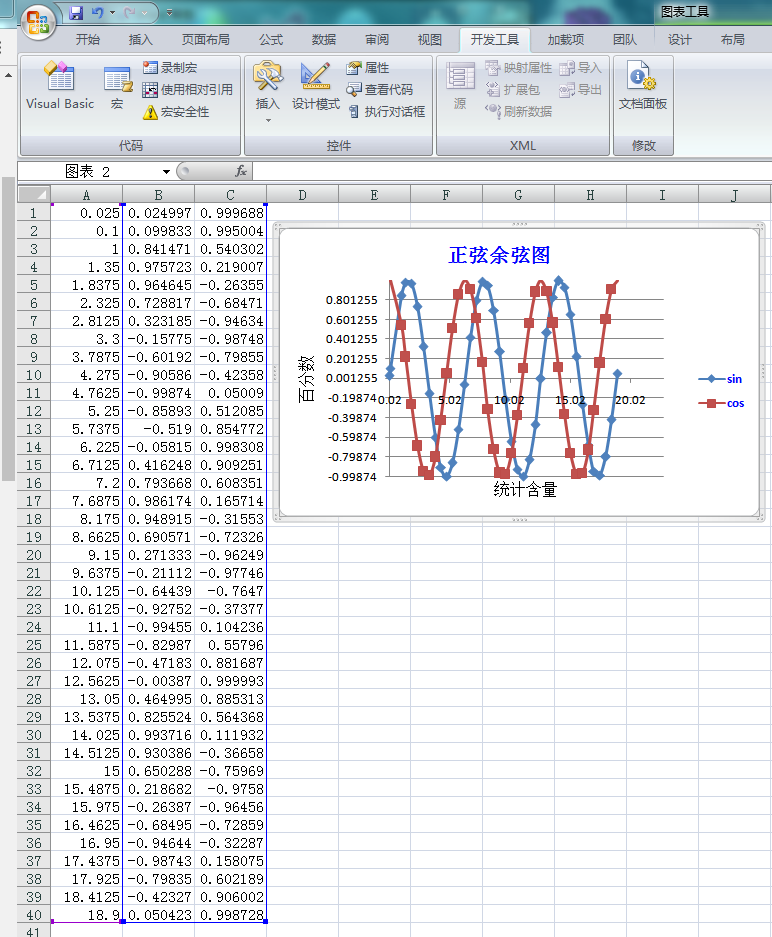
 '--------------------------------------------------------Module1--------------------------------------------------------

 Sub Macro1()

     ActiveSheet.Range("B1:C40").Select

     ActiveSheet.Shapes.AddChart.Select

     ActiveChart.ChartType = xlXYScatterSmooth '平滑线散点图

     ActiveChart.SetSourceData Source:=Range("'Sheet1'!$A$1:$C$40")

     With ActiveChart

         .HasTitle = True                                    '为图表设置标题

         .SeriesCollection().Name = "sin"                   '为图例设置名称

         .SeriesCollection().Name = "cos"                   '.SeriesCollection(i).Name=Worksheets("Sheet1").Range("A" & i)

         With .ChartTitle

             .Text = "正弦余弦图"

             .Font.Name = "宋体"

             .Font.Size =

             .Font.ColorIndex =

             .Top =

             .Left =

         End With

         With .Axes(xlCategory)                             '为图表设置横坐标

             .HasTitle = True

             .AxisTitle.Text = "统计含量"

             .AxisTitle.Font.Name = "宋体"

             .AxisTitle.Font.Size =

             .AxisTitle.Font.Bold = False

             .AxisTitle.Font.ColorIndex =

             .MinimumScale = Cells(, ) - Cells(, ) * 0.2

             .MaximumScale = Cells(, ) + Cells(, ) * 0.2

         End With

         With .Axes(xlValue)                               '为图表设置纵坐标

             .HasTitle = True

             .AxisTitle.Text = "百分数"

             .AxisTitle.Font.Name = "宋体"

             .AxisTitle.Font.Size =

             .AxisTitle.Font.Bold = False

             .AxisTitle.Font.ColorIndex =

             ' i = Excel.Application.WorksheetFunction.Match("203", f, 0)

             .MinimumScale = Excel.Application.WorksheetFunction.Min(Range("B:B")) '**zbl**范围要加一个Range才不会出错,下面的不行

             .MaximumScale = Excel.Application.WorksheetFunction.Max(Range("B:B"))

 '            .MinimumScale = Excel.Application.WorksheetFunction.Min("B:B")

 '            .MaximumScale = Excel.Application.WorksheetFunction.Max("B:B")

 '            .MinimumScale = Application.WorksheetFunction.Min("b1:b40")

 '            .MaximumScale = Application.WorksheetFunction.Max("b4:b40")

 'Sub UseFunction()

 '    Dim myRange As Range

 '    Set myRange = Worksheets("Sheet1").Range("A1:C10")

 '    answer = Application.WorksheetFunction.Max搜索(myRange)

 '    MsgBox answer

 'End Sub

         End With

         .HasLegend = True                                      '为图表设置图例

         With .Legend

             .Position = xlLegendPositionRight

             .Font.ColorIndex =

             .Font.Bold = True

         End With

     End With

 End Sub
设置网格线:

 '--------------------------------------------------------Module1--------------------------------------------------------

 Sub Macro1()

     ActiveSheet.Range("B1:C40").Select

     ActiveSheet.Shapes.AddChart.Select

     ActiveChart.ChartType = xlXYScatterSmooth '平滑线散点图

     ActiveChart.SetSourceData Source:=Range("'Sheet1'!$A$1:$C$40")

     ActiveWindow.GridlineColor = RGB(, , ) '窗体excel网格周围的线成红色了

     ActiveWindow.DisplayGridlines = False

     With ActiveChart

         .HasTitle = True                                    '为图表设置标题

         .SeriesCollection().Name = "sin"                   '为图例设置名称

         .SeriesCollection().Name = "cos"                   '.SeriesCollection(i).Name=Worksheets("Sheet1").Range("A" & i)

         With .ChartTitle

             .Text = "正弦余弦图"

             .Font.Name = "宋体"

             .Font.Size =

             .Font.ColorIndex =

             .Top =

             .Left =

         End With

         With .Axes(xlCategory)                             '为图表设置横坐标

             .HasTitle = True

             .AxisTitle.Text = "统计含量"

             .AxisTitle.Font.Name = "宋体"

             .AxisTitle.Font.Size =

             .AxisTitle.Font.Bold = False

             .AxisTitle.Font.ColorIndex =

             .MinimumScale = Cells(, ) - Cells(, ) * 0.2

             .MaximumScale = Cells(, ) + Cells(, ) * 0.2

         End With

         With .Axes(xlValue)                               '为图表设置纵坐标

             .HasTitle = True

             .AxisTitle.Text = "百分数"

             .AxisTitle.Font.Name = "宋体"

             .AxisTitle.Font.Size =

             .AxisTitle.Font.Bold = False

             .AxisTitle.Font.ColorIndex =

             ' i = Excel.Application.WorksheetFunction.Match("203", f, 0)

             .MinimumScale = Excel.Application.WorksheetFunction.Min(Range("B:B")) '**zbl**范围要加一个Range才不会出错,下面的不行

             .MaximumScale = Excel.Application.WorksheetFunction.Max(Range("B:B"))

 '            .MinimumScale = Excel.Application.WorksheetFunction.Min("B:B")

 '            .MaximumScale = Excel.Application.WorksheetFunction.Max("B:B")

 '            .MinimumScale = Application.WorksheetFunction.Min("b1:b40")

 '            .MaximumScale = Application.WorksheetFunction.Max("b4:b40")

 'Sub UseFunction()

 '    Dim myRange As Range

 '    Set myRange = Worksheets("Sheet1").Range("A1:C10")

 '    answer = Application.WorksheetFunction.Max搜索(myRange)

 '    MsgBox answer

 'End Sub

         End With

         .HasLegend = True                                      '为图表设置图例

         With .Legend

             .Position = xlLegendPositionRight

             .Font.ColorIndex =

             .Font.Bold = True

         End With

         Range("c1:d2").Borders.LineStyle = xlContinuous '区域全部设置线

         Range("c1:d2").Borders.LineStyle = xlNone          '取消单元格线’

         Range("d4").Borders(xlEdgeTop).LineStyle = xlContinuous '只设置单元格d3顶线 http://www.excelpx.com/thread-294531-1-1.html

         With Range("a1:b2").Borders

             .LineStyle = xlContinuous   '设置边框线

             .Weight = xlThick           '设置边框线为粗线

         End With

     End With

 End Sub
说明
每个 ChartObject 对象都代表一个嵌入图表。ChartObject 对象充当 Chart 对象的容器。ChartObject
对象的属性和方法控制工作表上嵌入图表的外观和大小。ChartObjects 集合
示例
使用 ChartObjects 方法返回 ChartObjects
集合。以下示例删除名为“Sheet1”的工作表上的所有嵌入图表。
| Visual Basic for Applications |
|---|
|
不能使用 ChartObjects 集合来调用以下属性和方法:
- RoundedCorners 属性
- Locked 属性
- Placement 属性
- PrintObject 属性
- Shadow属性
- SendToBack 方法
- BringToFront 方法
与早期版本不同,ChartObjects 集合现在可以读取有关高度、宽度、左对齐和顶对齐的属性。
使用 Add 方法可创建一个新的空嵌入图表并将它添加到集合中。使用 ChartWizard 方法可添加数据并设置新图表的格式。以下示例创建一个新嵌入图表,然后以折线图形式添加单元格 A1:A20 中的数据。
| Visual Basic for Applications |
|---|
|
使用 ChartObjects(index)(其中 index 是嵌入图表的索引号或名称)可以返回单个对象。以下示例设置名为“Sheet1”的工作表上嵌入图表 Chart 1 中的图表区图案。
| Visual Basic for Applications |
|---|
|
 Dim ch As ChartObject

 Set ch = Worksheets("sheet1").ChartObjects.Add(, , , )

 ch.Chart.ChartWizard source:=Worksheets("sheet1").Range("a1:a20"), _

     gallery:=xlLine, title:="New Chart"
excel2007VBA绘图2的更多相关文章
- excel2007vba绘图1
参考:http://club.excelhome.net/thread-480025-1-1.html '----------------------------------------------- ...
- Canvas绘图之平移translate、旋转rotate、缩放scale
画布操作介绍 画布绘图的环境通过translate(),scale(),rotate(), setTransform()和transform()来改变,它们会对画布的变换矩阵产生影响. 函数 方法 描 ...
- 用html5的canvas和JavaScript创建一个绘图程序
本文将引导你使用canvas和JavaScript创建一个简单的绘图程序. 创建canvas元素 首先准备容器Canvas元素,接下来所有的事情都会在JavaScript里面. <canvas ...
- echarts+php+mysql 绘图实例
最近在学习php+mysql,因为之前画图表都是直接在echart的实例demo中修改数据,便想着两相结合练习一下,通过ajax调用后台数据画图表. 我使用的是echart3,相比较第二版,echar ...
- html5 canvas常用api总结(二)--绘图API
canvas可以绘制出很多奇妙的样式和美丽的效果,通过几个简单的api就可以在画布上呈现出千变万化的效果,还可以制作网页游戏,接下来就总结一下和绘图有关的API. 绘画的时候canvas相当于画布,而 ...
- HTML5_04之SVG绘图
1.关于Canvas绘制图像: 问题:需要绘制多张图片时,必须等待所有图片加载完成才能开始绘制:而每张图片都是异步请求,彼此没有先后顺序,哪一张先加载完成完全无法预测: 方案: var progres ...
- HTML5 学习总结(四)——canvas绘图、WebGL、SVG
一.Canvas canvas是HTML5中新增一个HTML5标签与操作canvas的javascript API,它可以实现在网页中完成动态的2D与3D图像技术.<canvas> 标记和 ...
- AR创意分享:儿童涂鸦遇上程序绘图
第一节 临摹 小明经常临摹同桌小美的画作. 美术课上,老师表扬了小美的新作. 图1.1 小美的作品<蒙娜·毛虫的微笑> 临,是照着原作画:摹,是用薄纸张蒙在原作上面画. 第二节 借画 小明 ...
- C# 一段绘图代码 在form_load事件不能显示图
今天无意将一段绘图代码 写在form_load事件了,结果不能显示绘图.(代码:Graphics g = this.CreateGraphics();Pen pen = new Pen(Color.R ...
随机推荐
- Python: PySide(Qt)异步获取网页源码
学习PyQt UI编程笔记.相对PyQt来说,PySide资料为少. 此篇记录异步获取代码后,同步显示于界面窗体中,涉及线程网步,此为知识点. 直录代码: # encoding: utf-8 from ...
- SpringCloud 启动时报No active profile set, falling back to default profiles default
这在Spring程序启动时没有找到默认的配置文件所引发的错误,默认文件application.yml如下图: 一般在项目中都会有多个,如有正式环境.测试环境等.如下图: 根据上面这种多个配置的只需要 ...
- swift - xcode10 - 点击事件交互BUG - (手势和button的addTarget方法)
1. 现象button 点击闪退:没有任何原因 ,在听云检测上,显示 BUG2: 手势 没有任何作用,哪怕设置 isUserInteractionEnabled 和isEnabled 为true 都 ...
- SQL Merge 语法 单表查询
--项目中需要用到Merg语法,于是去网上查了资料,发现竟然都是多表查询,问题是我只有一张表,于是我纳闷了,后来我灵机一动,就搞定了!--表名:t_login(登录表)--字段:f_userName( ...
- python学习-名字管理
记录代码片段 print("="*50) print(" 名片管理系统 v0.01") print("1. 添加一个新的名片") print ...
- connot connect to mysql 10061
根据我自己运行的情况,解决方法如下: 按windows+R, 输入services.msc查找服务,在服务与应用中找到MYsql服务,查看是否已启动.
- 序列化_Transient
要实际的操作一下Serialize的代码Demo, 加深理解(某投行很喜欢问这个问题):transient关键字虽然目前还没有人面试过我,但是也是个考点
- go流程控制与函数
package main; import ( "fmt" ); func main() { isRun := true; //条件判断 if isRun { fmt.Printf( ...
- jQuery几个好用的插件
jQuery几个好用的插件: jQuery Validate:jQuery Validate 插件为表单提供了强大的验证功能,让客户端表单验证变得更简单,同时提供了大量的定制选项,满足应用程序各种需求 ...
- 使用JFinal实现使用MVC获取表单中的数据并将提示信息返回给另一jsp页面。
1.包结构 2.我们需要对web.xml进行配置: <?xml version="1.0" encoding="UTF-8"?> <web-a ...