
将Azure计算机视觉添加到Xamarin应用程序简单体验
微软Azure提供了大量的AI及机器学习功能,可以通过简单的RestAPI调用。
关于此文中提到的Azure计算机视觉,可查看此链接的详细介绍。
通过微软的服务,只需要几行代码即可使用计算机视觉中的 REST API 分析图像提取特征信息。
开发环境说明及初始准备。
开发工具:Visual Studio For Mac 2019 preview
创建Xamarin.Forms程序,PCL类库逐渐在过时,所以新项目的共享代码选择.NET Standard。

1.在共享项目中添加Xam.Plugin.Media的NuGet包引用,此包可以大大减少访问相册的代码量。
PS:Xamarin.Essentials还没有提供摄像头和相册的调用功能。
NuGet包安装完成后,会显示readme.txt,增加对应的访问权限设定,在此NuGet包的GitHub中同样有详细说明,
地址为:https://github.com/jamesmontemagno/MediaPlugin
2.添加对Microsoft.Azure.CognitiveServices.Vision.ComputerVision的Nuget包引用。
此包提供了Azure计算机视觉的API访问。
3.注册计算机视觉的API Key。
点击 链接

点击免费试用认知服务,登陆微软账号,
点击获取API Key,Azure会提供一个7天的免费试用Key

初始准备完成。
程序代码编写
<ContentPage xmlns="http://xamarin.com/schemas/2014/forms" xmlns:x="http://schemas.microsoft.com/winfx/2009/xaml"           xmlns:local="clr-namespace:RevealTest" x:Class="RevealTest.MainPage"           xmlns:ios="clr-namespace:Xamarin.Forms.PlatformConfiguration.iOSSpecific;assembly=Xamarin.Forms.Core"           ios:Page.UseSafeArea="true">
    <ContentPage.Content>
        <Grid>
            <Grid.RowDefinitions>
                <RowDefinition Height="2*" />
                <RowDefinition Height=".2*" />
                <RowDefinition Height="3*" />
            </Grid.RowDefinitions>
            <Grid.ColumnDefinitions>
                <ColumnDefinition Width="*" />
            </Grid.ColumnDefinitions>
            <Image Grid.Row="0" Grid.Column="0" x:Name="imgSelected" Aspect="AspectFit" />
            <Button x:Name="btnPick" Text="选择图片" Clicked="Handle_Clicked" Grid.Row="1" Grid.Column="0" />
            <TableView Grid.Row="2" Grid.Column="0" x:Name="TableView">
                <TableRoot>
                    <TableSection Title="图片信息" x:Name="TableSection">
                    </TableSection>
                </TableRoot>
            </TableView>
        </Grid>
    </ContentPage.Content>
</ContentPage>
PS:此行代码代表对刘海屏进行适配。
ios:Page.UseSafeArea="true"
public partial class MainPage : ContentPage
    {
        public string subscriptionKey = "申请的API Key";

        public MainPage()
        {
            InitializeComponent();

        }

        async void Handle_Clicked(object sender, System.EventArgs e)
        {
            TableView.Root.Clear();
            TableRoot root = new TableRoot();
            await CrossMedia.Current.Initialize();
            var status = await CrossPermissions.Current.CheckPermissionStatusAsync(Permission.Photos);
            if (status != PermissionStatus.Granted)
            {
                if (await CrossPermissions.Current.ShouldShowRequestPermissionRationaleAsync(Permission.Photos))
                {
                    await DisplayAlert("提示", "需要访问您的相册", "OK");
                }
                await DisplayAlert("提示", "需要访问您的相册", "OK");
                if (Device.RuntimePlatform == Device.iOS)
                {
                    Device.OpenUri(new Uri("app-settings:"));
                }

                return;
            }
            try
            {
                var file = await CrossMedia.Current.PickPhotoAsync(new Plugin.Media.Abstractions.PickMediaOptions
                {
                    PhotoSize = Plugin.Media.Abstractions.PhotoSize.Medium
                });
                if (file == null) return;
                imgSelected.Source = ImageSource.FromStream(() =>
                {
                    var stream = file.GetStream();
                    return stream;
                });
                var result = await MakeAnalysisRequest(file.Path);

                if (result == null)
                {
                    TableSection.Add(CreateTextCell("空", "空"));
                }
                if (result.Metadata != null)
                {
                    TableSection.Add(CreateTextCell("图片格式", result.Metadata.Format + " " + result.Metadata.Width.ToString() + "*" + result.Metadata.Height));
                }
                if (result.Description != null)
                {
                    foreach (var item in result.Description.Captions)
                    {
                        TableSection.Add(CreateTextCell("图片内容推测:" + item.Text, "可能性" + item.Confidence));
                    }
                    string tagdesc = "";
                    foreach (var item in result.Description.Tags)
                    {
                        tagdesc += item + ", ";
                    }
                    TableSection.Add(CreateTextCell("图片标签", tagdesc));
                }
                if (result.Tags != null)
                {
                    foreach (var item in result.Tags)
                    {
                        TableSection.Add(CreateTextCell(item.Name, "可能性" + item.Confidence));
                    }
                }
                TableView.Root.Add(TableSection);
            }

            catch (Exception ex)
            {
                string test = ex.Message;
            }
        }

        private TextCell CreateTextCell(string text, string detail)
        {
            return new TextCell
            {
                Text = text,
                Detail = detail,
                DetailColor = Color.Gray
            };
        }

        public async Task<ImageAnalysis> MakeAnalysisRequest(string imageFilePath)
        {

            using (var fileStream = new FileStream(imageFilePath, FileMode.Open, FileAccess.Read))
            {

                var apikey = new ApiKeyServiceClientCredentials(subscriptionKey);

                var visualFeatures = new List<VisualFeatureTypes>
                {
                    (VisualFeatureTypes)Enum.Parse(typeof(VisualFeatureTypes), "Categories"),
                    (VisualFeatureTypes)Enum.Parse(typeof(VisualFeatureTypes), "Tags"),
                    (VisualFeatureTypes)Enum.Parse(typeof(VisualFeatureTypes), "ImageType"),
                    (VisualFeatureTypes)Enum.Parse(typeof(VisualFeatureTypes), "Color"),
                    (VisualFeatureTypes)Enum.Parse(typeof(VisualFeatureTypes), "Faces"),
                    (VisualFeatureTypes)Enum.Parse(typeof(VisualFeatureTypes), "Adult"),
                    (VisualFeatureTypes)Enum.Parse(typeof(VisualFeatureTypes), "Description")
                };

                using (var client = new ComputerVisionClient(apikey) { Endpoint = "https://westcentralus.api.cognitive.microsoft.com" })
                {

                    ImageAnalysis analysisResult = await client.AnalyzeImageInStreamAsync(fileStream, visualFeatures.ToArray(), null, "zh");
                    return analysisResult;
                }
            }
        }
    }
由于只是体验性质,就没有使用MVVM模式,并且结果展示也没有使用特别恰当的方式。
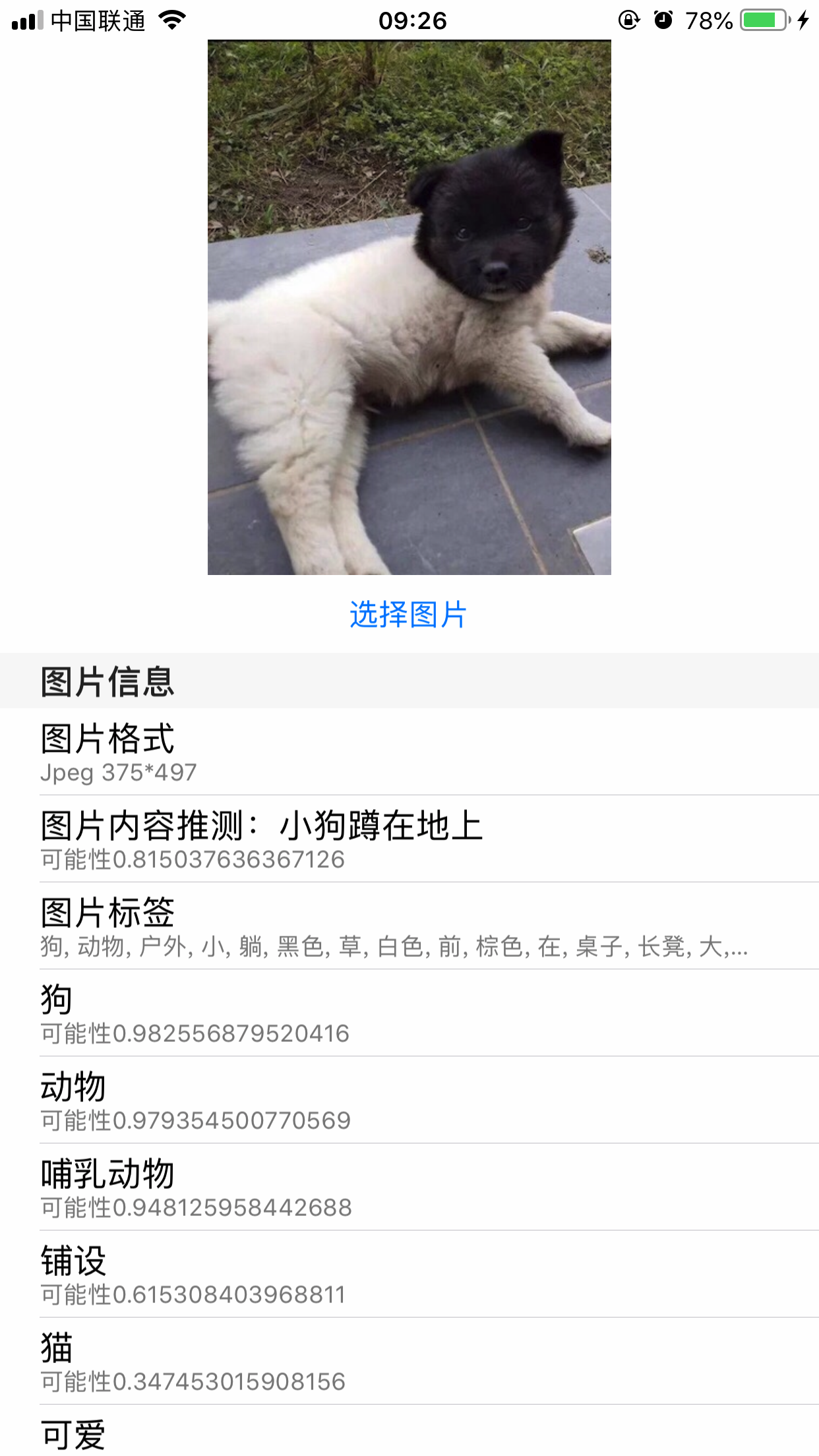
执行效果
将Azure计算机视觉添加到Xamarin应用程序简单体验的更多相关文章
- 在 Windows Azure 上设计多租户应用程序
作者:Suren Machiraju 和 Ralph Squillace 审校:Christian Martinez.James Podgorski.Valery Mizonov 和 Michael ...
- 使用Azure DevOps Pipeline实现.Net Core程序的CD
上一次我们讲了使用Azure DevOps Pipeline实现.Net Core程序的CI.这次我们来演示下如何使用Azure DevOps实现.Net Core程序的CD. 实现本次目标我们除了A ...
- Linux systemd 打开调试终端、添加开机自运行程序
/************************************************************************* * Linux systemd 打开调试终端.添加 ...
- 【Xamarin挖墙脚系列:如何从一个Apk程序转化为Xamarin的程序】
原文:[Xamarin挖墙脚系列:如何从一个Apk程序转化为Xamarin的程序] 工欲善其事必先利其器:工具下载:http://pan.baidu.com/s/1skxjwgH 接下来,我用个小的应 ...
- 从零开始学Xamarin.Forms(四) Android 准备步骤(添加第三方Xamarin.Forms.Labs库)
原文:从零开始学Xamarin.Forms(四) Android 准备步骤(添加第三方Xamarin.Forms.Labs库) 1.安装对应dll Update-Package Xama ...
- 故障排除:无法启动、访问或连接到 Azure 虚拟机上运行的应用程序
有多种原因可导致无法启用或连接到在 Azure 虚拟机 (VM) 上运行的应用程序.原因包括应用程序未在预期端口上运行或侦听.侦听端口受到阻止,或网络规则未将流量正确传递到应用程序.本文说明有条理地找 ...
- wxWidgets初学者导引(3)——wxWidgets应用程序初体验
wxWidgets初学者导引全目录 PDF版及附件下载 1 前言2 下载.安装wxWidgets3 wxWidgets应用程序初体验4 wxWidgets学习资料及利用方法指导5 用wxSmith ...
- 微信小程序简单封装图片上传组件
微信小程序简单封装图片上传组件 希望自己 "day day up" -----小陶 我从哪里来 在写小程序的时候需要上传图片,个人觉得官方提供的 Uploader 组件不是太好用, ...
- C#基础--.net平台的重要组成部分以及.net程序简单的编译原理
.net平台的组成只要有两部分 FCL:框架类库 CLR:公共语言运行时 .net程序简单的编译原理 1.0:使用C#编译器(csc.exe) 将C#源代码编译成程序集+{编译之前:会检查C ...
随机推荐
- 类名.class 与 类名.this 详解
类名.class 与 类名.this 详解 今天在看 PropertyPlaceholderConfigurer 源码时,突然看到一个 PropertyPlaceholderConfigurer.th ...
- Linux配置nodejs
http://my.oschina.net/blogshi/blog/260953 首先去官网下载代码,这里一定要注意安装分两种,一种是Source Code源码,一种是编译后的文件.我就是按照网上源 ...
- Linq去重 不用实现IEqualityComparer接口的方法超级简单
RskFactorRelation.Instance.GetCache<RskFactorRelation>(true).Where(x => !string.IsNullOrEmp ...
- jquery动态出操作select
var citys = {1:'北京',2:'上海',3:'广州',4:'深圳'}; $("#city option:gt(0)").remove(); for(var k in ...
- 【WebService】WebService基础知识(一)
WebService是什么? 1. 基于Web的服务:服务器端整出一些资源让客户端应用访问(获取数据) 2. 一个跨语言.跨平台的规范(抽象) 3. 多个跨平台.跨语言的应用间通信整合的方案(实际) ...
- Linux下进行程序设计时,关于库的使用:
一.gcc/g++命令中关于库的参数: -shared: 该选项指定生成动态连接库: -fPIC:表示编译为位置独立(地址无关)的代码,不用此选项的话,编译后的代码是位置相关的,所以动态载入时,是通过 ...
- Element ui 使用 Tree 树形控件
使用树形控件需要映入 jsx才能运行链接:https://github.com/vuejs/babel-plugin-transform-vue-jsx#usage npm install\ babe ...
- python对数据类型的相关操作
一.int的相关操作 int只有一个相关操作,bit_length() 用于计算一个数字的二进制长度 二.bool的相关操作 1.把数字转换成bool,除了0,返回的都是True a = 10 p ...
- 【转】Centos7下Yum安装PHP5.5,5.6,7.0
默认的版本太低了,手动安装有一些麻烦,想采用Yum安装的可以使用下面的方案: 1.检查当前安装的PHP包 yum list installed | grep php 如果有安装的PHP包,先删除他们 ...
- Eclipse使用Git管理项目
参考来源:https://www.cnblogs.com/wdh1995/p/7004384.html 常见问题: 1. 解决方案:http://www.360doc.com/content/18/0 ...