
Android-HttpClient-Get与Post请求登录功能
HttpClient 是org.apache.http.* 包中的;
第一种方式使用httpclient-*.jar (需要在网上去下载httpclient-*.jar包)

把httpclient-4.5.jar/httpclient-4.4.1.jar包放入到libs里,然后点击sync project ...才能使用httpclient-4.5.jar包

httpclient-4.5.jar不好用,建议使用httpclient-4.4.1.jar
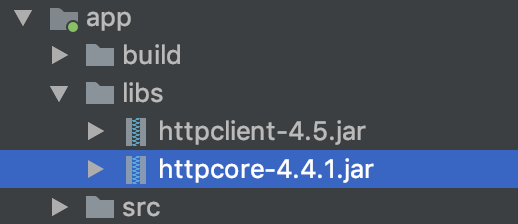
第二种方式:配置AndroidStudio 的方式获取 HttpClient
在相应的module下的build.gradle中加入:useLibrary 'org.apache.http.legacy'
这条语句一定要加在 android{ } 当中,然后rebulid
例如:

app/build.gradle android { useLibrary 'org.apache.http.legacy' }

apply plugin: 'com.android.application'

android {

    compileSdkVersion 28

    defaultConfig {

        applicationId "liudeli.async"

        minSdkVersion 21

        targetSdkVersion 28

        versionCode 1

        versionName "1.0"

        testInstrumentationRunner "android.support.test.runner.AndroidJUnitRunner"

    }

    buildTypes {

        release {

            minifyEnabled false

            proguardFiles getDefaultProguardFile('proguard-android.txt'), 'proguard-rules.pro'

        }

    }

    useLibrary 'org.apache.http.legacy'

}

dependencies {

    implementation fileTree(dir: 'libs', include: ['*.jar'])

    implementation 'com.android.support:appcompat-v7:28.0.0'

    implementation 'com.android.support.constraint:constraint-layout:1.1.3'

    testImplementation 'junit:junit:4.12'

    androidTestImplementation 'com.android.support.test:runner:1.0.2'

    androidTestImplementation 'com.android.support.test.espresso:espresso-core:3.0.2'

}
在AndroidManifest.xml加入权限:
  <!-- 访问网络是危险的行为 所以需要权限 -->

    <uses-permission android:name="android.permission.INTERNET" />

    <!-- 设置壁纸是危险的行为 所以需要权限 -->

    <uses-permission android:name="android.permission.SET_WALLPAPER" />
MainActivity6:
package liudeli.async;

import android.app.Activity;

import android.os.Bundle;

import android.view.View;

import android.widget.Button;

import android.widget.EditText;

import android.widget.Toast;

import org.apache.http.HttpEntity;

import org.apache.http.HttpResponse;

import org.apache.http.NameValuePair;

import org.apache.http.client.HttpClient;

import org.apache.http.client.entity.UrlEncodedFormEntity;

import org.apache.http.client.methods.HttpGet;

import org.apache.http.client.methods.HttpPost;

import org.apache.http.client.methods.HttpUriRequest;

import org.apache.http.impl.client.DefaultHttpClient;

import org.apache.http.message.BasicNameValuePair;

import java.io.ByteArrayOutputStream;

import java.io.InputStream;

import java.util.ArrayList;

import java.util.HashMap;

import java.util.List;

import java.util.Map;

public class MainActivity6 extends Activity implements View.OnClickListener {

    private EditText etName;

    private EditText etPwd;

    private Button btLogin;

    @Override

    protected void onCreate(Bundle savedInstanceState) {

        super.onCreate(savedInstanceState);

        setContentView(R.layout.activity_main6);

        etName = findViewById(R.id.et_name);

        etPwd = findViewById(R.id.et_pwd);

        btLogin = findViewById(R.id.bt_login);

        btLogin.setOnClickListener(this);

    }

    // 请求服务器的地址

    private final String PATH = "http://127.0.0.1:8080/LoginServlet";

    @Override

    public void onClick(View v) {

        // 拼装参数

        final Map<String, String> map = new HashMap<>();

        map.put("name", etName.getText().toString());

        map.put("pwd", etPwd.getText().toString());

        // 联网操作必须开启线程,执行异步任务

        new Thread(){

            @Override

            public void run() {

                super.run();

                try {

                    // Get请求方式,参数操作是拼接在链接

                    loginByGet(PATH, map);

                    // Post请求方式,参数操作是封装实体对象

                    loginByPost(PATH, map);

                } catch (Exception e) {

                    e.printStackTrace();

                    threadRunToToast("登录是程序发生异常");

                }

            }

        }.start();

    }

    /**

     * HttpClient Get 方式请求

     * @param path 请求的路径

     * @param map  请求的参数

     *                       拼接后的完整路径:http://127.0.0.1:8080/LoginServlet?name=zhangsan&pwd=123456

     */

    private void loginByGet(String path, Map<String, String> map) throws Exception{

        // 拼接路径 拼接后的完整路径:http://127.0.0.1:8080/LoginServlet?name=zhangsan&pwd=123456

        StringBuffer pathString = new StringBuffer(path);

        pathString.append("?");

        // 迭代遍历Map

        for (Map.Entry<String, String> mapItem : map.entrySet()) {

            String key = mapItem.getKey();

            String value = mapItem.getValue();

            // name=zhangsan&

            pathString.append(key).append("=").append(value).append("&");

        }

        // name=zhangsan&pwd=123456& 删除最后一个符号&  删除后:name=zhangsan&pwd=123456

        pathString.deleteCharAt(pathString.length() - 1);

        // 最后完整路径是:http://127.0.0.1:8080/LoginServlet?name=zhangsan&pwd=123456

        // 第一步 创建HttpClient

        HttpClient httpClient = new DefaultHttpClient();

        // 第三步 创建请求对象 Get

        HttpUriRequest getRequest = new HttpGet(pathString.toString());

        // 第二步 执行请求,获取响应对象

        HttpResponse response = httpClient.execute(getRequest);

        // 第四步 判断请求是否成功

        if (response.getStatusLine().getStatusCode() == 200) {

            // 第五步 获取响应的流

            InputStream inputStream = response.getEntity().getContent();

            byte[] bytes = new byte[1024];

            int len = 0;

            ByteArrayOutputStream bos = new ByteArrayOutputStream();

            while (-1 != (len = inputStream.read())) {

                // 把存取到bytes的数据,写入到>>ByteArrayOutputStream

                bos.write(bytes, 0, len);

            }

            // 第六步 判断是否请求成功, 注意:⚠️ success 是自定义服务器返回的  success代表登录成功

            String loginResult = bos.toString();

            if ("success".equals(loginResult)) {

                // 不能子在子线程中Toast

                // Toast.makeText(this, "登录成功", Toast.LENGTH_SHORT).show();

                threadRunToToast("登录成功");

            } else {

                // 不能子在子线程中Toast

                // Toast.makeText(this, "登录失败", Toast.LENGTH_SHORT).show();

                threadRunToToast("登录失败");

            }

            // 第七步 关闭流

            inputStream.close();

            bos.close();

        } else {

            // 不能子在子线程中Toast

            // Toast.makeText(this, "登录失败,请检查网络!", Toast.LENGTH_SHORT).show();

            threadRunToToast("登录失败,请检查网络!");

        }

    }

    /**

     * HttpClient Get 方式请求

     * @param path 请求的路径

     * @param map  请求的参数

     *                       路径:http://127.0.0.1:8080/LoginServlet

     *

     *                       参数:

     *                            name=zhangsan

     *                            pwd=123456

     */

    private void loginByPost(String path, Map<String, String> map) throws Exception {

        // 第一步 创建HttpClient

        HttpClient httpClient = new DefaultHttpClient();

        // 第三步 创建请求对象 Post

        HttpPost postRequest = new HttpPost(path);

        // 第六步 参数封装操作

        List<NameValuePair> nameValuePairs = new ArrayList<>();

        for (Map.Entry<String, String> mapItem : map.entrySet()) {

            // 遍历Map集合里面的 key value  >>>  name=zhangsan    pwd=123456

            String key = mapItem.getKey();

            String value = mapItem.getValue();

            // 创建参数对象

            NameValuePair nameValuePair = new BasicNameValuePair(key, value);

            // 把参数对象放入List<NameValuePair>集合

            nameValuePairs.add(nameValuePair);

        }

        // 第五步 创建实体对象 传入参数>>>List<? extends NameValuePair>

        HttpEntity entity = new UrlEncodedFormEntity(nameValuePairs, "UTF-8");

        // 第四步 把请求的参数 放入实体

        postRequest.setEntity(entity);

        // 第二步 执行请求,获取响应对象

        HttpResponse response = httpClient.execute(postRequest);

        // 第七步 判断请求是否成功

        if (response.getStatusLine().getStatusCode() == 200) {

            // 第八步 获取响应的流

            InputStream inputStream = response.getEntity().getContent();

            byte[] bytes = new byte[1024];

            int len = 0;

            ByteArrayOutputStream bos = new ByteArrayOutputStream();

            while (-1 != (len = inputStream.read())) {

                // 把存取到bytes的数据,写入到>>ByteArrayOutputStream

                bos.write(bytes, 0, len);

            }

            // 第九步 判断是否请求成功, 注意:⚠️ success 是自定义服务器返回的  success代表登录成功

            String loginResult = bos.toString();

            if ("success".equals(loginResult)) {

                // 不能子在子线程中Toast

                // Toast.makeText(this, "登录成功", Toast.LENGTH_SHORT).show();

                threadRunToToast("登录成功");

            } else {

                // 不能子在子线程中Toast

                // Toast.makeText(this, "登录失败", Toast.LENGTH_SHORT).show();

                threadRunToToast("登录失败");

            }

            // 第十步 关闭流

            inputStream.close();

            bos.close();

        } else {

            // 不能子在子线程中Toast

            // Toast.makeText(this, "登录失败,请检查网络!", Toast.LENGTH_SHORT).show();

            threadRunToToast("登录失败,请检查网络!");

        }

    }

    /**

     * 在 主线程 子线程 中提示,属于UI操作

     */

    private void threadRunToToast(final String text) {

        runOnUiThread(new Runnable() {

            @Override

            public void run() {

                Toast.makeText(getApplicationContext(), text, Toast.LENGTH_SHORT).show();

            }

        });

    }

}
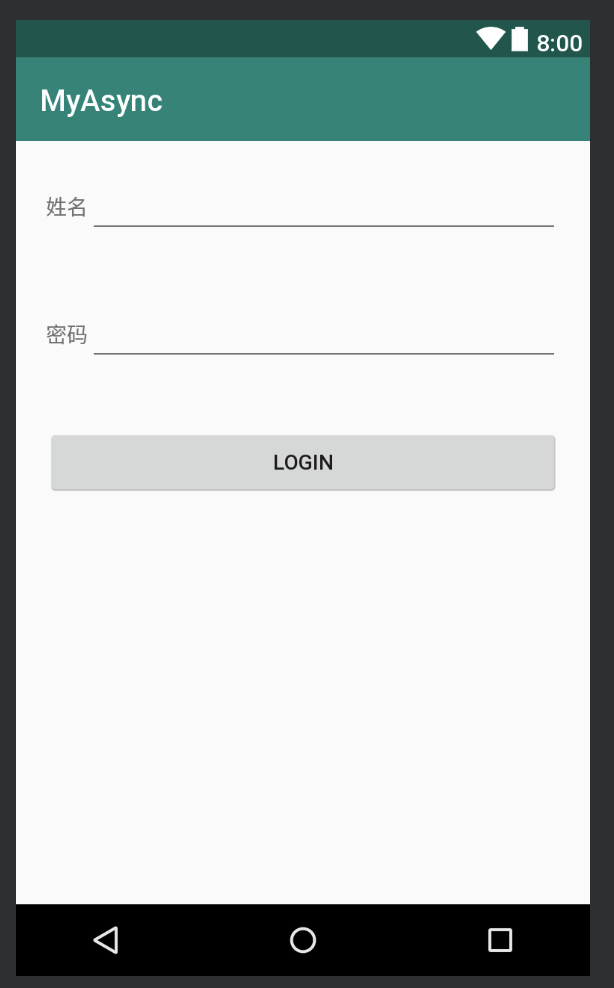
activity_main6.xml :
<?xml version="1.0" encoding="utf-8"?>

<LinearLayout

    xmlns:android="http://schemas.android.com/apk/res/android"

    android:layout_width="match_parent"

    android:layout_height="match_parent"

    android:orientation="vertical">

    <LinearLayout

        android:layout_width="match_parent"

        android:layout_height="wrap_content"

        android:padding="20dp">

        <TextView

            android:layout_width="wrap_content"

            android:layout_height="wrap_content"

            android:text="姓名"

            />

        <EditText

            android:id="@+id/et_name"

            android:layout_width="0dp"

            android:layout_height="wrap_content"

            android:layout_weight="1"

            />

    </LinearLayout>

    <LinearLayout

        android:layout_width="match_parent"

        android:layout_height="wrap_content"

        android:padding="20dp">

        <TextView

            android:layout_width="wrap_content"

            android:layout_height="wrap_content"

            android:text="密码"

            />

        <EditText

            android:id="@+id/et_pwd"

            android:layout_width="0dp"

            android:layout_height="wrap_content"

            android:layout_weight="1"

            />

    </LinearLayout>

    <Button

        android:id="@+id/bt_login"

        android:layout_width="match_parent"

        android:layout_height="wrap_content"

        android:layout_marginLeft="20dp"

        android:layout_marginRight="20dp"

        android:layout_marginTop="20dp"

        android:text="login"

        />

</LinearLayout>
Android-HttpClient-Get与Post请求登录功能的更多相关文章
- Android HttpClient GET或者POST请求基本使用方法(转)
在Android开发中我们经常会用到网络连接功能与服务器进行数据的交互,为此Android的SDK提供了Apache的HttpClient来方便我们使用各种Http服务.这里只介绍如何使用HttpCl ...
- Android+struts2+json方式模拟手机登录功能
涉及到的知识点: 1.Struts2框架的搭建(包括Struts2的jSON插件) 2.Android前台访问Web采用HttpClient方式. 3.Android采用JSON的解析. 服务端主要包 ...
- Android-HttpURLConnection-Get与Post请求登录功能
HttpURLConnection 在这请求方式是Java包中的: AndroidManifest.xml配置权限: <!-- 访问网络是危险的行为 所以需要权限 --> <uses ...
- Android学习笔记_65_登录功能本身没有任何特别
对于登录功能本身没有任何特别,使用httpclient向服务器post用户名密码即可.但是为了保持登录的状态(在各个Activity之间切换时要让网站知道用户一直是处于登录的状态)就需要进行cooki ...
- 为Android游戏接入第三方登录功能
1. “游戏客户端”调用“SDK客户端”的登录功能向“SDK服务端”进行身份认证 2. 验证通过后,“游戏客户端”可得到用户信息,根据游戏逻辑可将用户信息传给“游戏服务器”进行验证 3. “游戏服务器 ...
- android使用smack实现简单登录功能
android端采用xmpp协议实现即时通讯,在最开始的登录功能就遇到了不少障碍.首先在官网(https://www.igniterealtime.org/projects/openfire/)下载o ...
- Android Studio 通过一个登录功能介绍SQLite数据库的使用
前言: SQLite简介:是一款轻型的数据库,是遵守ACID的关系型数据库管理系统,它包含在一个相对小的C库中.它是D.RichardHipp建立的公有领域项目.它的设计目标是嵌入式的,而且目前已经在 ...
- (22)Ajax的基本使用(实现登录功能和局部刷新以及防止跨站请求伪造攻击)
Ajax的作用 前后端分离的项目,需要交互,就要通过Ajax来完成交互 AJAX(Asynchronous Javascript And XML)翻译成中文就是“异步Javascript和XML”.即 ...
- 实现Web请求后端Api的Demo,实现是通过JQuery的AJAX实现后端请求,以及对请求到的数据的解析处理,实现登录功能
本篇实现Web请求后端Api的Demo,实现是通过JQuery的AJAX实现后端请求,以及对请求到的数据的解析处理,实现登录功能需求描述:1. 请求后端Api接口地址2. 根据返回信息进行判断处理前端 ...
随机推荐
- Virtual Machine Kernel Panic : Not Syncing : VFS : Unable To Mount Root FS On Unknown-Block (0,0)
Virtual Machine Kernel Panic : Not Syncing : VFS : Unable To Mount Root FS On Unknown-Block (0,0) 33 ...
- Properties of a scheduled job in Laravel
Every entry you add is converted into an instance of Illuminate\Console\Scheduling\Event and stored ...
- About the Cron Expression
About the Cron Expression Cron is use in Linux for the time schedule Format Seconds Minutes Hours Da ...
- H.264, MPEG4之间的关系
百度百科搜索 H.264 H.264是国际标准化组织(ISO)和国际电信联盟(ITU)共同提出的继MPEG4之后的新一代数字视频压缩格式.H.264是ITU-T以H.26x系列为名称命名的视频编解码技 ...
- [C#.Net]C#连接Oracle数据库的方法
首先介绍下开发环境:WIn10 64bit+Visual Studio 2015+Oracle10ClientWin32(只是客户端,如果安装整个数据库也是可以的) 目前了解C#中连接Oracle数据 ...
- ubunut下安装ibus_pinyin中文输入法
ubuntu安装中文输入法,,此处一ibus-pinyin为例为其安装中文输入法,,, 1. 设置(setting)---语言支持(language support)---汉语(chinese),,, ...
- 2018.10.25 bzoj4565: [Haoi2016]字符合并(区间dp+状压)
传送门 当看到那个k≤8k\le 8k≤8的时候就知道需要状压了. 状态定义:f[i][j][k]f[i][j][k]f[i][j][k]表示区间[i,j][i,j][i,j]处理完之后的状态为kkk ...
- springboot深入学习(一)-----springboot核心、配置文件加载、日志配置
一.@SpringBootApplication @SpringBootApplication是spring boot的核心注解,源码如下: 相当于:@Configuration+@EnableAut ...
- boost--signal
1.signals2库 signals2库实现了线程安全的观察者模式,在signals2中观察者模式被称为信号/插槽(signals/slots),它是一种函数回调机制.一个信号可以关联一个或多个插槽 ...
- C++STL 容器比较
Vector的使用场景:比如软件历史操作记录的存储,我们经常要查看历史记录,比如上一次的记录,上上次的记录,但却不会去删除记录,因为记录是事实的描述. deque的使用场景:比如排队购票系统,对排队者 ...