
spring-boot 速成(7) 集成dubbo
github上有一个开源项目spring-boot-starter-dubbo 提供了spring-boot与dubbo的集成功能,直接拿来用即可。(记得给作者点赞,以示感谢!)
下面是使用步骤,先看下工程的大致结构:
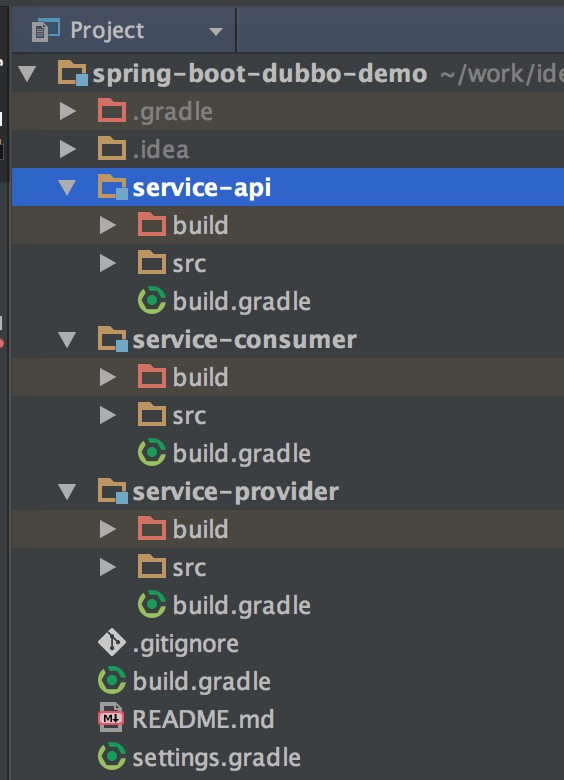
一、引入相关的依赖项
 subprojects {

     buildscript {

         ext {

             springBootVersion = '1.5.3.RELEASE'

         }

         repositories {

             mavenLocal()

             maven {

                 url "http://maven.aliyun.com/nexus/content/groups/public/"

             }

             mavenCentral()

         }

         dependencies {

             classpath("org.springframework.boot:spring-boot-gradle-plugin:${springBootVersion}")

         }

     }

     apply plugin: "java"

     apply plugin: "maven"

     apply plugin: 'idea'

     targetCompatibility = 1.8

     sourceCompatibility = 1.8

     repositories {

         mavenLocal()

         maven {

             url "http://maven.aliyun.com/nexus/content/groups/public/"

         }

         mavenCentral()

     }

     configurations.all {

         resolutionStrategy.cacheChangingModulesFor 1, "minutes"

     }

     dependencies {

         compile('io.dubbo.springboot:spring-boot-starter-dubbo:1.0.0')

         compile('org.springframework.boot:spring-boot-starter-web:1.5.3.RELEASE')

     }

 }
这是最外层根目录下的build.gradle,关键地方就是最后dependencies引入的2个依赖项
二、service-api中定义接口
 package com.cnblogs.yjmyzz.service.api;

 /**

  * Created by 菩提树下的杨过(http:/yjmyzz.cnblogs.com) on 2017/5/21.

  */

 public interface DemoService {

     String hello(String nickName);

 }
这一步平淡无奇,没什么好说的
三、service-provider
3.1 提供接口实现
 package com.cnblogs.yjmyzz.service.impl;

 import com.alibaba.dubbo.config.annotation.Service;

 import com.cnblogs.yjmyzz.service.api.DemoService;

 import org.slf4j.Logger;

 import org.slf4j.LoggerFactory;

 /**

  * Created by 菩提树下的杨过(http:/yjmyzz.cnblogs.com) on 2017/5/21.

  */

 @Service(version = "1.0.0")

 public class DemoServiceImpl implements DemoService {

     Logger logger = LoggerFactory.getLogger(DemoServiceImpl.class);

     public String hello(String nickName) {

         logger.info(nickName + " call me!");

         return String.format("hi , %s!", nickName);

     }

 }
常规套路,不用多说
3.2 编写ServiceProvider主类
 package com.cnblogs.yjmyzz.service;

 import org.springframework.boot.SpringApplication;

 import org.springframework.boot.autoconfigure.SpringBootApplication;

 /**

  * Created by yangjunming on 2017/5/21.

  */

 @SpringBootApplication

 public class ServiceProvider {

     public static void main(String[] args) {

         SpringApplication.run(ServiceProvider.class, args);

     }

 }
仍然是spring-boot的经典套路,跟dubbo也没任何关系
3.3 application.yml配置
 server:

   port: 8001

 spring:

   dubbo:

     scan: com.cnblogs.yjmyzz.service

     application:

       name: provider

     registry:

       address: zookeeper://127.0.0.1:2181

     protocol:

       name: dubbo

       port: 20880
这里是重点,指定了dubbo服务提供方启动所需的zk注册地址,协议类型及端口,包括扫描的包。
四、service-consumer
4.1 定义一个辅助用的Proxy
 package com.cnblogs.yjmyzz.service.proxy;

 import com.alibaba.dubbo.config.annotation.Reference;

 import com.cnblogs.yjmyzz.service.api.DemoService;

 import org.springframework.stereotype.Component;

 /**

  * Created by yangjunming on 2017/5/21.

  */

 @Component

 public class ServiceProxy {

     @Reference(version = "1.0.0")

     public DemoService demoService;

 }
就是一个标准的spring组件(不管是叫proxy还是叫container都无所谓,随个人喜好),在该组件中持有对Service的引用实例,注意:如果指定了version,则该版本号要与service-provider中的版本号一致
4.2 调用服务
 package com.cnblogs.yjmyzz.service;

 import com.cnblogs.yjmyzz.service.proxy.ServiceProxy;

 import org.springframework.boot.SpringApplication;

 import org.springframework.boot.autoconfigure.SpringBootApplication;

 import org.springframework.context.ConfigurableApplicationContext;

 /**

  * Created by 菩提树下的杨过(http:/yjmyzz.cnblogs.com) on 2017/5/21.

  */

 @SpringBootApplication

 public class ServiceConsumer {

     public static void main(String[] args) {

         ConfigurableApplicationContext ctx = SpringApplication.run(ServiceConsumer.class, args);

         ServiceProxy proxy = ctx.getBean(ServiceProxy.class);

         System.out.println(proxy.demoService.hello("菩提树下的杨过"));//调用服务

     }

 }
一看即明,不多解释。
4.3 application.yml配置
 server:

   port: 8002

 spring:

   dubbo:

     scan: com.cnblogs.yjmyzz.service

     application:

       name: consumer

     registry:

       address: zookeeper://127.0.0.1:2181
ok,搞定!
上述示例源代码,已托管至github,有需要的朋友自行下载:https://github.com/yjmyzz/spring-boot-dubbo-demo
spring-boot 速成(7) 集成dubbo的更多相关文章
- Java框架Spring Boot & 服务治理框架Dubbo & 应用容器引擎Docker 实现微服务发布
微服务系统架构实践 开发语言Java 8 框架使用Spring boot 服务治理框架Dubbo 容器部署Docker 持续集成Gitlab CI 持续部署Piplin 注册中心Zookeeper 服 ...
- spring boot / cloud (三) 集成springfox-swagger2构建在线API文档
spring boot / cloud (三) 集成springfox-swagger2构建在线API文档 前言 不能同步更新API文档会有什么问题? 理想情况下,为所开发的服务编写接口文档,能提高与 ...
- Spring Boot HikariCP 一 ——集成多数据源
其实这里介绍的东西主要是参考的另外一篇文章,数据库读写分离的. 参考文章就把链接贴出来,里面有那位的代码,简单明了https://gitee.com/comven/dynamic-datasource ...
- Spring Boot系列——如何集成Log4j2
上篇<Spring Boot系列--日志配置>介绍了Spring Boot如何进行日志配置,日志系统用的是Spring Boot默认的LogBack. 事实上,除了使用默认的LogBack ...
- 【ELK】4.spring boot 2.X集成ES spring-data-ES 进行CRUD操作 完整版+kibana管理ES的index操作
spring boot 2.X集成ES 进行CRUD操作 完整版 内容包括: ============================================================ ...
- 15、Spring Boot 2.x 集成 Swagger UI
1.15.Spring Boot 2.x 集成 Swagger UI 完整源码: Spring-Boot-Demos 1.15.1 pom文件添加swagger包 <swagger2.versi ...
- 14、Spring Boot 2.x 集成 Druid 数据源
14.Spring Boot 2.x 集成 Druid 数据源 完整源码: Spring-Boot-Demos
- 12、Spring Boot 2.x 集成 MongoDB
1.12 Spring Boot 2.x 集成 MongoDB 完整源码: Spring-Boot-Demos
- 11、Spring Boot 2.x 集成 HBase
1.11 Spring Boot 2.x 集成 HBase 完整源码: Spring-Boot-Demos
- 10、Spring Boot 2.x 集成 Log4j2
1.10 Spring Boot 2.x 集成 Log4j2 完整源码: Spring-Boot-Demos
随机推荐
- angularJs入门篇-hello world 开头
AngularJS 采用了完全不同的解决方案,它创建实时视图模板代替视图,而不是将数据合并进模板之后更新DOM. 任何一个独立视图组件中的值都是 动态替换的.这个功能可以说是AngularJS中最重要 ...
- 【转】2019年3月 最新win10激活密匙 win10各版本永久激活序列号 win10正式版激活码分享
现在市面上大致有两种主流激活方法,一种是通过激活码来激活,另外一种是通过激活工具来激活.但是激活工具有个弊端就是激活时间只有180天,很多网友都想要永久激活,现在已经过了win10系统免费推广期了,所 ...
- nested exception is com.svorx.core.dao.PersistenceException
在quartz定时执行任务的时候,hibernate报错,在只读事务中进行了update语句: [ERROR] 2018/08/03 10:35:00,827 org.quartz.core.JobR ...
- tensorboard遇到的坑
<ul><li>No graph definition files were found.</li></ul> <p>启动命令 tensor ...
- LTE:eMBMS架构
一个MBSFN区域是由一个或多个传输相同内容的小区组成的特殊区域.如图1所示,小区8和9都属于MBSFN区域C.一个MBSFN区域可由多个小区组成,一个小区也可以属于多个(至多8个,从36.331中的 ...
- 10 Go 1.10 Release Notes
Go 1.10 Release Notes Introduction to Go 1.10 Changes to the language Ports Tools Default GOROOT &am ...
- [转]solver优化方法
原文地址:http://www.cnblogs.com/denny402/p/5074212.html 到目前为止,caffe总共提供了六种优化方法: Stochastic Gradient Desc ...
- C++ Primer读书笔记(2)
getline(cin,string s)可以读取一整行,包括空白符.使用ctrl+Z结束 字符串字面值与string是不同的类型.两个字符串字面值不能直接相加. 处理string对象中的字符时,C+ ...
- FormData介绍
FormData XMLHttpRequest Level 2添加了一个新的接口FormData.利用FormData对象,我们可以通过JavaScript用一些键值对来模拟一系列表单控件,我们还可以 ...
- TcxGrid 内容 行高度