
MapReduce源码刨析
MapReduce编程刨析:
Map
map函数是对一些独立元素组成的概念列表(如单词计数中每行数据形成的列表)的每一个元素进行指定的操作(如把每行数据拆分成不同单词,并把每个单词计数为1),用户可以自定义一个把数据拆分成不同单词并把单词计数为1的映射map函数),事实上每个元素都是被独立操作的,而原始列表没有被修改,因为这里创建了一个新的列表来保存新的答案。
public class Mapper<KEYIN, VALUEIN, KEYOUT, VALUEOUT> {

  //设定Context传递给 {@link Mapper} 实现

  public abstract class Context

    implements MapContext<KEYIN,VALUEIN,KEYOUT,VALUEOUT> {

  }

  //在任务开始的时候调用一次 为map方法提供预处理一些内容

  protected void setup(Context context

                       ) throws IOException, InterruptedException {

  }

 // 对输入分片里的key/value对调用一次,进行处理。

  @SuppressWarnings("unchecked")

  protected void map(KEYIN key, VALUEIN value,

                     Context context) throws IOException, InterruptedException {

    context.write((KEYOUT) key, (VALUEOUT) value);

  }

  //任务结尾调用一次,进行扫尾工作。

  protected void cleanup(Context context

                         ) throws IOException, InterruptedException {

  }

  public void run(Context context) throws IOException, InterruptedException {

    setup(context);

    try {

      while (context.nextKeyValue()) {

        map(context.getCurrentKey(), context.getCurrentValue(), context); //对key/value进行处理。

      }

    } finally {

      cleanup(context);

    }

  }

}
编写MapReduce程序时,Map都要继承Mapper类,Mapper有4种泛型:KEYIN,VALUEIN,KEYOUT,VALUEOUT。KEYIN,VALUEIN是输入数据(key,value)的值,KEYOUT,VALUEOUT是输出数据(key,value)的值。因为它们经常在节点间进行网络传输,所以继承Writable接口被封闭类的驱动。
首先run()方法执行Map作业中的setup方法,它只在作业开始的时候调用一次处理Map作业需要的一些初始化作业。
然后,通过while循环遍历context里的(key,value)对 ,对每一组需要重写map方法以满足业务需求,在map中有3个参数。分别是key,value,context。key作为输入的关键字,value为输入的值。他们是MapReduce过程用于传值的(key,value),数据的输入是一批(key,value),从源码 context.write((KEYOUT) key, (VALUEOUT) value);可以看出生成结果也是一对(key,value),然后将其写入context。
因为MapReduce 是基于集群运算的框架,因此key和value的值为了满足集群之间的网络传输的规则,需要支持序列化和反序列化,而且整个MapRedcue过程会按照key进行排序分组,因此key必须实现WritableComparable接口,保证MapReduce对数据输出的结果执行进行相应的排序操作。
最后调用cleanup方法做最后的处理。它只在MapReduce进行结束的时候执行一次进行作业的扫尾工作。
代码
public class WordCountMapper extends Mapper<LongWritable, Text, Text, IntWritable> {

    @Override

    protected void map(LongWritable key, Text value, Context context) throws IOException, InterruptedException {

        //key记录的是数据的偏移位置,value是每次分片提供给我们的读取一行数据。

        //Map读数据时按分片给的内容一行一行来读取的。

        String[] words = value.toString().split(" "); //每一行数据拆按照“ ”拆分放入字符数组words

        for (String word : words) {

            context.write(new Text(word), new IntWritable(1));  //每个单词当key,并赋值1

        }

    }
- 第1个参数类型LongWritable:输入key类型,记录数据分片的偏移量。
- 第2个参数类型Text:输入value,对应分片中的文本数据。
- 第3个参数Text:输出key,对应map方法计算的key值。
- 第4个参数IntWritable:输出value,对应map计算的value值。
Mapper从分片后传出的上下文接收数据以LongWritable, Text为(key,value)接收,然后重写map方法,默认设置一行一行读取数据并以(key,value)的形式进行便利.最后经过context.write方法按照Mapper类中定义的输出格式(Text, IntWritable)写入上下文。给Mapper Redcuer 等支持Context传输程序使用。
Reduce
Reducer获取Mapper任务输出的已经完成的地址信息后,系统会启用复制程序,将需要的数据复制到本地存储空间,如果Mapper输出很小,会复制到Reducer的内存区域。否则会复制到磁盘上,随着复制内容的增加,Reduce作业批量地启动合并任务,执行合并操作,启动Reducer类后接收上下文地数据进行Reduce任务。
public class Reducer<KEYIN,VALUEIN,KEYOUT,VALUEOUT> {

  // 设定Context传递给{@link Reducer}实现,即获得Context的内容

  public abstract class Context

    implements ReduceContext<KEYIN,VALUEIN,KEYOUT,VALUEOUT> {

  }

   //任务开始调用一次,为reduce方法提供预处理的一些内容

  protected void setup(Context context

                       ) throws IOException, InterruptedException {

  }

   //对key/value进行处理

  @SuppressWarnings("unchecked")

  protected void reduce(KEYIN key, Iterable<VALUEIN> values, Context context

                        ) throws IOException, InterruptedException {

    for(VALUEIN value: values) {//迭代获取context的数据

      context.write((KEYOUT) key, (VALUEOUT) value); //将计算结果写入context

    }

  }

	//在任务结尾调用一次进行一次扫尾工作

  protected void cleanup(Context context

                         ) throws IOException, InterruptedException {

  }

//Reducer类的驱动方法

  public void run(Context context) throws IOException, InterruptedException {

    setup(context);

    try {

      while (context.nextKey()) {

        reduce(context.getCurrentKey(), context.getValues(), context);

        //如果使用备份存储,请将其重置

        Iterator<VALUEIN> iter = context.getValues().iterator();

        if(iter instanceof ReduceContext.ValueIterator) {

          ((ReduceContext.ValueIterator<VALUEIN>)iter).resetBackupStore();

        }

      }

    } finally {

      cleanup(context);  //扫尾

    }

  }

}
任何一个Reduce任务都会继承Reducer类,有4个值分别是:KEYIN,VALUEIN,KEYOUT,VALUEOUT。
KEYIN,VALUEIN是Reducer接收来自Mapper的输出,故Writable类型要和Mapper类中的KEYOUT、VALUEIN指定输出的key/value数据类型是一 一对应的。每个Reducer类接收的数据并不是Mapper传出的数据量,而是shuffle过程分区决定的,一般一个分区对应一个Reducer类,当只有一个Reducer类时,可以接收所有分区的数据。
Reducer的结构和Mapper源码结构十分相似,run方法的驱动Reducer的任务,执行顺序时setup→while→cleanup,其中setup与clean方法分别提供了对预执行和扫尾的操作和支持。分别在Reducer任务执行前执行一次,在Reducer任务后结尾执行一次。 while (context.nextKey())判断所在的Reducer类中(一般一个Reducer类对应一个,一个分区接收一组或多组由Map任务输出的key/value对的值)相同的key及相应的值一定在一个分区。)是否有下一个分区,如果有则会把相同key对应的值放到一块传给reduce方法进行处理。reducer有KEYIN key, Iterable <.VALUEIN./> values, Context context 共3个形式参数,其中 key时whiel条件判定的key,values就是与该vaues和key相同的key的所有值,然后会根据for循环把他们写入到上下文中。
reduce方法将传过来的数据按照key进行排序。Reduce任务接收的数据来自Map任务的输出,中间经过shuffle分区、排序、分组,正式给reduce方法处理。
代码
public class WordCountReducer extends Reducer<Text, IntWritable, Text, IntWritable> {

	//reduce方法重写

    @Override

    protected void reduce(Text key, Iterable<IntWritable> values, Context context) throws IOException, InterruptedException {

        int total = 0;  //初始化变量为0

        for (IntWritable value : values) {

            total += value.get();//将相同的单词对应的值加一起

        }

        context.write(key, new IntWritable(total));//结果写入上下文

    }

}
Driver
public class WordCountDriver {

    public static void main(String[] args) throws Exception {

        Job job = Job.getInstance(new Configuration()); //获取环境变量

        job.setJarByClass(WordCountDriver.class);  //指定驱动类

        job.setMapperClass(WordCountMapper.class); //指定Map类

        job.setMapOutputKeyClass(Text.class);	//map K

        job.setMapOutputValueClass(IntWritable.class);	//map v

        job.setReducerClass(WordCountReducer.class); //指定reducer类

        job.setOutputKeyClass(Text.class);	//reduce k

        job.setOutputValueClass(IntWritable.class); //reduce v

        FileInputFormat.setInputPaths(job, new Path(args[0])); //任务输如路径

        FileOutputFormat.setOutputPath(job, new Path(args[1]));	//任务输出路径

        job.waitForCompletion(true);

    }

}
首先获取Job的实例,并创建环境变量的实例conf赋值于Job的构造方法,在job作业中set方法只有作业被提交之后才起作用,之后他们将抛出一个IllegalStateException异常。通常,用户创建应用程序,通过Job描述作业各个方面,然后提交作业监视其进度。7-13行指定map和reduce的输入输出文件类型。FileInputFormat继承InputFormat类,主要完成输入路径的设置。FileOutputFormat继承OutputFormat类通过setOutputPath方法指定Job作业执行完成结果的输出路径,对于Shuffle过程默认的分区、分组、排序、如果不能满足任务要求,也可以自定义指定。
过程
检查作业提交输入输出样式的细节。
为作业计算InputSplit值。
如果需要的话,为作业的DistributedCahe建立统计信息。
复制作业的jar包和配置文件到FileSystem上的MapReduce系统目录下。
提交作业到ResourceManager并且监控它的状态。
作业Job输入
检查作业的有效性。
检查作业输入的有效性。
提供RecordReader的实现,这个RecordReadr从逻辑InputSplit中输入记录,这些记录将由Mapper处理。
作业Job输出
- 检查作业的输出,检查路径是否已经存在
- 提供一个RecordWriter的实现,用来输出作业加过,TextOutputFormat是默认的OutputFormat,输出文件被保存在FileSystem上。
Mapper输入
Mapper的输入本质上来讲是源自于HDFS上存储的数据,这些数据进入Mapper计算之前有个分片的过程,它主要将HDFS上的Block在进行map之前重新划分,生成一组记录分片长度和一个记录数据位置的数组,进而内部形成记录数组位置的值key vakye扩及然后传给Mapper计算,这里 key和value的类型由一套默认的类型机制,同时也是向用户开放的。
setInputFormatClass
public void setInputFormatClass(Class<? extends InputFormat> cls

                                ) throws IllegalStateException {

  ensureState(JobState.DEFINE);

  conf.setClass(INPUT_FORMAT_CLASS_ATTR, cls,

                InputFormat.class);

}
这里有一个很重要的类InputFormat,它位于“package org.apache.hadoop.mapreduce”中,一共包含两种方法getSplits和createRecorecordReader
@InterfaceAudience.Public

@InterfaceStability.Stable

public abstract class InputFormat<K, V> {

   //对输入的数据进行分片

  public abstract  List<InputSplit> getSplits(JobContext context ) throws IOException, InterruptedException;

  //获取分片中的数据

  public abstract RecordReader<K,V> createRecordReader(InputSplit split,TaskAttemptContext context   ) throws IOException, InterruptedException;

}
getSplits对输入数据进行切片,最终获取一个InputSplit的返回列表。
@InterfaceAudience.Public

@InterfaceStability.Stable

public abstract class InputSplit {

	//获取分片split的大小,以便分片按其排序,并返回分片的字节数据

  public abstract long getLength() throws IOException, InterruptedException;

	//获取分片所在本地的命名列表(本地不需要序列化),并返回一个新的节点数组

  public abstract  String[] getLocations() throws IOException, InterruptedException;

  //返回分片数据存储每一个位置的拆分信息列表,如果是空值表示所有的位置都有数组存储在磁盘上

  @Evolving

  public SplitLocationInfo[] getLocationInfo() throws IOException {

    return null;

  }

}
createRecorder方法获得一个RecordReader的返回值源码信息如下
@InterfaceAudience.Public

@InterfaceStability.Stable

public abstract class RecordReader<KEYIN, VALUEIN> implements Closeable {

 //初始化调用一次.

  public abstract void initialize(InputSplit split, TaskAttemptContext context ) throws IOException, InterruptedException;

//判断下一个key/value是否存在,如果存在则返回true

  public abstract  boolean nextKeyValue() throws IOException, InterruptedException;

  //获取当前的key。如果存在,则返回true

  public abstract KEYIN getCurrentKey() throws IOException, InterruptedException;

  //获取当前的值,返回读取的对象

  public abstract  VALUEIN getCurrentValue() throws IOException, InterruptedException;

  //记录 record reader通过数据的当前处理进度,返回0.0~1.0之间的数字。用于标记当前的进度。

  public abstract float getProgress() throws IOException, InterruptedException;

  //关闭recorde reader

  public abstract void close() throws IOException;

}
Recorder主要的功能是将数据拆分成KV对,然后传递给Map任务。
TextInputFormat
输入采用的默认格式,如果Job对象不指定,系统默认会运行它,如果指定的话:
job.setInputFormatClass(TextInputFormat.class);
TextInputFormat包含RecordReader和isSplitable两种方法位于package org.apache.hadoop.mapreduce.lib.input;
@InterfaceAudience.Public

@InterfaceStability.Stable

public class TextInputFormat extends FileInputFormat<LongWritable, Text> {

//定义文本的读取方式,是通过RecordReader返回的RecordReader<LongWritable, Text> 类实现的

  @Override

  public RecordReader<LongWritable, Text> createRecordReader(InputSplit split,TaskAttemptContext context) {

    String delimiter = context.getConfiguration().get(

        "textinputformat.record.delimiter");

    byte[] recordDelimiterBytes = null;

    if (null != delimiter)

      recordDelimiterBytes = delimiter.getBytes(Charsets.UTF_8);//采用UTF_8编码

    return new LineRecordReader(recordDelimiterBytes); //返回LineRecordReader实例

  }

//判断是否分片吗,如果分片返回true

  @Override

  protected boolean isSplitable(JobContext context, Path file) {

  //根据文件后缀名来查找文件file的相关压缩编码器

    final CompressionCodec codec =

      new CompressionCodecFactory(context.getConfiguration()).getCodec(file);

    if (null == codec) {

      return true;// 没有压缩,返回true

    }

    //返回SplittableCompressionCodec的编码器实例。

    return codec instanceof SplittableCompressionCodec;

  }

}
TextInputFormat以(longWrite,Text)形式继承了FileinputFormat类的逻辑,重写了isSplittable方法():
protected boolean isSplitable(JobContext context, Path filename) {

  return true;

}
代码设定了默认分片的格式,在TextInputFormat类的isSplittable()方法,代码加入了压缩的判定,如果没有压缩,则设定为可分片,如果有压缩,返回的是分片压缩的解码器的实例。
createRecorderReader()是定义文本文件读取方式,实际文件读取时通过它返回的RecordReader(LongWritable,Text)的字类LineRecordReader的实例位于(package org.apache.hadoop.mapreduce.lib.input;)在源码的207行-215行
@Override

 public LongWritable getCurrentKey() { //指定获取key类型 Mapper获取输入key的类型

   return key;

 }

 @Override

 public Text getCurrentValue() {  //指定获取value的类型也就是Mapper要获取输入value的类型

   return value;

 }
如果该条数据存在两个Block中
public void initialize(InputSplit genericSplit, TaskAttemptContext context) throws IOException {

   FileSplit split = (FileSplit) genericSplit;

   Configuration job = context.getConfiguration();

   this.maxLineLength = job.getInt(MAX_LINE_LENGTH, Integer.MAX_VALUE);

   start = split.getStart();

   end = start + split.getLength();

   final Path file = split.getPath();

   final FileSystem fs = file.getFileSystem(job);

   fileIn = fs.open(file);

   CompressionCodec codec = new CompressionCodecFactory(job).getCodec(file);

   if (null!=codec) {

     isCompressedInput = true;

     decompressor = CodecPool.getDecompressor(codec);

     if (codec instanceof SplittableCompressionCodec) {

       final SplitCompressionInputStream cIn =

         ((SplittableCompressionCodec)codec).createInputStream(

           fileIn, decompressor, start, end,

           SplittableCompressionCodec.READ_MODE.BYBLOCK);

       in = new CompressedSplitLineReader(cIn, job,

           this.recordDelimiterBytes);

       start = cIn.getAdjustedStart();

       end = cIn.getAdjustedEnd();

       filePosition = cIn;

     } else {

       in = new SplitLineReader(codec.createInputStream(fileIn,

           decompressor), job, this.recordDelimiterBytes);

       filePosition = fileIn;

     }

   } else {

     fileIn.seek(start);

     in = new UncompressedSplitLineReader(

         fileIn, job, this.recordDelimiterBytes, split.getLength());

     filePosition = fileIn;

   }

  //if的判断条件是start != 0,即从第二行开始读取数据,那么第一行数据去哪里么呢

   if (start != 0) {

     start += in.readLine(new Text(), 0, maxBytesToConsume(start));

   }

   this.pos = start;

 }
为了保证数据的第一行被切断的时候正确读取,并没有判断数据是否被切断,而是一视同仁地除了第一个split,其他所有split都经过if的判定,全部从第二行开始读数据,当然到达split结尾时总是再多读一行,这样就避开了数据被切断的烦恼。如果最后一个split的结尾没有下一行了呢:
public boolean nextKeyValue() throws IOException {

   if (key == null) {

     key = new LongWritable();

   }

   key.set(pos);

   if (value == null) {

     value = new Text();

   }

   int newSize = 0;

   // 使用的判定条件计算当前位置小于或等于split的结尾位置,即当前已处于split的结尾位置时,while依然会再执行一次,那么结束,这样就解决了InputSplit读取的跨界问题。

   // split limit i.e. (end - 1)

   while (getFilePosition() <= end || in.needAdditionalRecordAfterSplit()) {

     if (pos == 0) {

       newSize = skipUtfByteOrderMark();

     } else {

       newSize = in.readLine(value, maxLineLength, maxBytesToConsume(pos));

       pos += newSize;

     }

     if ((newSize == 0) || (newSize < maxLineLength)) {

       break;

     }

     // line too long. try again

     LOG.info("Skipped line of size " + newSize + " at pos " +

              (pos - newSize));

   }

   if (newSize == 0) {

     key = null;

     value = null;

     return false;

   } else {

     return true;

   }

 }
优化策略
作为Mapper输入,分片是一个很重要的环节,它主要将HDFS上的Block再进行Map计算之前进行逻辑划分,通常情况下分片大小和HDFS的Block块大小一样,也可以自定义。
/**

   *isSplitable方法确定文件是否分片

   *如果文件可以拆分,此处设定分片为真

   *否则如压缩文件不持支拆分的,则不进行拆分

   */

protected boolean isSplitable(JobContext context, Path filename) {

    return true;

  }

  public static void setInputPathFilter(Job job, Class<? extends PathFilter> filter) {

    job.getConfiguration().setClass(PATHFILTER_CLASS, filter, PathFilter.class);

  }

  public static void setMinInputSplitSize(Job job,long size) {

    job.getConfiguration().setLong(SPLIT_MINSIZE, size);

  }

  /**

  *获取由格式强加的分片大小的下限,默认值是1。

  */

  public static long getMinSplitSize(JobContext job) {

    return job.getConfiguration().getLong(SPLIT_MINSIZE, 1L);

  }

  public static void setMaxInputSplitSize(Job job, long size) {

    job.getConfiguration().setLong(SPLIT_MAXSIZE, size);

  }

  //返回一个分片中最大的有效字符数

  public static long getMaxSplitSize(JobContext context) {

    return context.getConfiguration().getLong(SPLIT_MAXSIZE, Long.MAX_VALUE);

  }

  public static PathFilter getInputPathFilter(JobContext context) {

    Configuration conf = context.getConfiguration();

    Class<?> filterClass = conf.getClass(PATHFILTER_CLASS, null,

        PathFilter.class);

    return (filterClass != null) ?

        (PathFilter) ReflectionUtils.newInstance(filterClass, conf) : null;

  }

  protected List<FileStatus> listStatus(JobContext job

                                        ) throws IOException {

    Path[] dirs = getInputPaths(job);

    if (dirs.length == 0) {

      throw new IOException("No input paths specified in job");

    }

//用getSplits方法生成文件列表并将其制作成FileSplits

  public List<InputSplit> getSplits(JobContext job) throws IOException {

//返回getFormatMinSplitSize,getMinSplitSize的较大值。

    StopWatch sw = new StopWatch().start();

    long minSize = Math.max(getFormatMinSplitSize(), getMinSplitSize(job));

    long maxSize = getMaxSplitSize(job);

_ _ _ _ _ _ _ _ _ _ _ _ _ _ _ _ _ _ _ _ _ _ _ _ _ _ _ _

 for (FileStatus file: files) {

 	//文件分片为真的话进行分片大小的计算

      Path path = file.getPath();

      long length = file.getLen();

      if (length != 0) {

        BlockLocation[] blkLocations;

        if (file instanceof LocatedFileStatus) {

          blkLocations = ((LocatedFileStatus) file).getBlockLocations();

        } else {

          FileSystem fs = path.getFileSystem(job.getConfiguration());

          blkLocations = fs.getFileBlockLocations(file, 0, length);

        }

        //文件分片为真的话,进行分片大小的计算。

        if (isSplitable(job, path)) {

          long blockSize = file.getBlockSize();

          long splitSize = computeSplitSize(blockSize, minSize, maxSize);

          long bytesRemaining = length;

          while (((double) bytesRemaining)/splitSize > SPLIT_SLOP) {

            int blkIndex = getBlockIndex(blkLocations, length-bytesRemaining);

            splits.add(makeSplit(path, length-bytesRemaining, splitSize,

                        blkLocations[blkIndex].getHosts(),

                        blkLocations[blkIndex].getCachedHosts()));

            bytesRemaining -= splitSize;

          }

_ _ _ _ _ _ _ _ _ _ _ _ _ _ _ _ _ _ _ _ _ _ _ _ _ _ _ _

//分片大小的计算

 protected long computeSplitSize(long blockSize, long minSize,long maxSize) {

    return Math.max(minSize, Math.min(maxSize, blockSize));

  }
最小分片大小通常是1个字节,最大分片大小默认是由Java的long类型表示的最大值(Long.MAX_VALUE),只有把它的值设置成小于HDFS Block才有效果。computeSplitSize(blockSize, minSize, maxSize)计算分片的的大小。再默认情况下minSize<blockSize<maxSize。因此分片通常情况下就是HDFS的Block块的大小。
这些值可以通过mapred.min.split.size、mapred.min.split.size、mapred.max.split.size和dfs.block.size,进行设定。
默认情况下 TextInputformat 对任务的切片机制是按文件规划切片,不管文件多小,都会是一个单独的切片,都会交给一个 maptask,这样如果有大量小文件,就会产生大量的maptask,处理效率极其低下。
(1)最好的办法,在数据处理系统的最前端(预处理/采集),将小文件先合并成大文件,再上传到 HDFS 做后续分析。
(2)补救措施:如果已经是大量小文件在 HDFS 中了,可以使用另一种
InputFormat来做切片。(CombineTextInputFormat),它的切片逻辑跟 TextFileInputFormat
不同:它可以将多个小文件从逻辑上规划到一个切片中,这样,多个小文件就可以交给一个 maptask。
(3)优先满足最小切片大小,不超过最大切片大小 。
CombineTextInputFormat.setMaxInputSplitSize(job, 4194304);// 4m   CombineTextInputFormat.setMinInputSplitSize(job, 2097152);// 2m

// 举例:0.5m+1m+0.3m+5m=2m + 4.8m=2m + 4m + 0.8m
//  如果不设置 InputFormat,它默认用的是 TextInputFormat.class

job.setInputFormatClass(CombineTextInputFormat.class) CombineTextInputFormat.setMaxInputSplitSize(job, 4194304);// 4m

CombineTextInputFormat.setMinInputSplitSize(job, 2097152);// 2m
分区
分区是划分键值空间,Partitioner负责控制Map输出结果key的分隔,key(或者key子集)被用于产生分区,通常使用Hash函数。分区的数目与一个作业的Reduce任务的数目时一样的,因此,Partitioner控制将中间过程key(也就是这条记录)发送给m个Reduce任务中的哪一个来进行Reduce操作,它位于“org.apche.hadoop.mapreduce”中:
public abstract class Partitioner<KEY, VALUE> {

  public abstract int getPartition(KEY key, VALUE value, int numPartitions);

}

HashPartitioner
它位于“org.apache.hadoop.mapreduce.lib.partition”中式是默认的Partition。
public class HashPartitioner<K, V> extends Partitioner<K, V> {

  public int getPartition(K key, V value, int numReduceTasks) {

    return (key.hashCode() & Integer.MAX_VALUE) % numReduceTasks;

  }

}
其中key和value式Map的输出的(K,V)numReduceTasks式Reduce的任务数。Job的Reduce任务数可以指定:
job.setNumberTask(3);//设定Reduce任务数量
此时getPartition的numReduceTasks值为3.
用key.hashCode() 和 Integer.MAX_VALUE) 进行与操作,保证了数据的整数表达,再和numReduceTasks进行取余操作,保证了key值被大致分配给相应的Reduce任务,保证任务分配的均衡性。
job.setPartitionerClass(HashPartitioner.class);
此代码不写,默认是HashPartitioner。
TotalOrderPartitioner
分区过程通过从外部生成的源文件中读取分割点来影响总体顺序。这个类可以实现输出的全排序。这个类不是基于Hash的。他的getPartitione方法如下:
public int getPartition(K key, V value, int numPartitions) {

  return partitions.findPartition(key);

}
KeyFieldBasedPartitioner
KeyFieldBasedPartitioner是基于Hash的Partitioner,它提供了多个区间计算Hash,当区间数为0时,KeyFieldBasedPartitioner退化成HashPartitioner:
public int getPartition(K2 key, V2 value, int numReduceTasks) {

    byte[] keyBytes;

    List <KeyDescription> allKeySpecs = keyFieldHelper.keySpecs();

    if (allKeySpecs.size() == 0) {

      return getPartition(key.toString().hashCode(), numReduceTasks);

    }

    try {

      keyBytes = key.toString().getBytes("UTF-8");

    } catch (UnsupportedEncodingException e) {

      throw new RuntimeException("The current system does not " +

          "support UTF-8 encoding!", e);

    }

    // return 0 if the key is empty

    if (keyBytes.length == 0) {

      return 0;

    }

    int []lengthIndicesFirst = keyFieldHelper.getWordLengths(keyBytes, 0,

        keyBytes.length);

    int currentHash = 0;

    for (KeyDescription keySpec : allKeySpecs) {

      int startChar = keyFieldHelper.getStartOffset(keyBytes, 0,

        keyBytes.length, lengthIndicesFirst, keySpec);

       // no key found! continue

      if (startChar < 0) {

        continue;

      }

      int endChar = keyFieldHelper.getEndOffset(keyBytes, 0, keyBytes.length,

          lengthIndicesFirst, keySpec);

      currentHash = hashCode(keyBytes, startChar, endChar,

          currentHash);

    }

    return getPartition(currentHash, numReduceTasks);

  }
BinaryPartitioner
BinaryPartitioner继承Partitioner 是Partitioner的偏特化子类该类提供两个偏移量:
mapreduce.partition.binarypartitioner.left.offset  //数组左偏移量(默认为0)

mapreduce.partition.binarypartitioner.right.offset //数组右偏移量(默认为0)

leftOffset = conf.getInt(LEFT_OFFSET_PROPERTY_NAME, 0);

rightOffset = conf.getInt(RIGHT_OFFSET_PROPERTY_NAME, -1);
在计算任何一个Reduce任务是仅仅对键值K的[rightOffset,leftOffset]这个区间区Hash。分区BinaryComparable键使用BinaryComparable键使用BinaryComparable.getBytes()返回的bytes数组的可配置部分。它的部分源码如下:
  public int getPartition(BinaryComparable key, V value, int numPartitions) {

    int length = key.getLength();

    int leftIndex = (leftOffset + length) % length;

    int rightIndex = (rightOffset + length) % length;

    int hash = WritableComparator.hashBytes(key.getBytes(),

      leftIndex, rightIndex - leftIndex + 1);

    return (hash & Integer.MAX_VALUE) % numPartitions;

  }

}
自定义Partition
public class MyPartitioner extends Partitioner<Text, Text> { //定义分区名

    @Override

    public int getPartition(Text key, Text value, int numReduceTasks) {//重写分区防火阀

        return (Integer.parseInt(key.toString()) & Integer.MAX_VALUE) % numReduceTasks;

    }

}
job中引用自定义分区
job.setPartitionerClass(MyPartitioner.class);
排序
排序Sort式MapReduce计算中的核心部分,默认按照字典排序,优势按照业务需求,就需要自定义排序,自定义排序编写排序时候要继承WritableComparator类,重写compare计算方法,对于接收key类型可以通过当前的构造方法super来指定。
public class MySort extends WritableComparator {				//自定义排序名称

    public MySort() {

        super(IntWritable.class, true); //因为Shuffle过程是以key进行排序,这里指定keytWritablel类型

    }

    @Override

    public int compare(WritableComparable a, WritableComparable b) { //重写compare方法

        IntWritable v1 = (IntWritable) a;

        IntWritable v2 = (IntWritable) b;

        return v2.compareTo(v1);

    }

}
job中引用自定义排序
job.setSortComparatorClass(MySort.class);
分组
默认情况下,reduce方法每次接收的是一组相同key的value值,所以每个reduce方法每次只能通过相同key所对应的值进行计算。但有时用户会期望不同的key所对应的value值能再一次reduce方法调用时进行操作。这样的期望与默认的行为不符合,此时需要用户进行自定义分组的操作。
public class MyGroupSort extends WritableComparator {	//定义分组名称

    public MyGroupSort() {

        super(IntWritable.class, true); //指定key的writable类型

    }

    @Override   //重写compare方法

    public int compare(WritableComparable a, WritableComparable b) {

        IntWritable v1 = (IntWritable) a;

        IntWritable v2 = (IntWritable) b;

        if (v1.get() > 10) {

            return 0;   //表示同一数组

        } else {

            return -1; //代表不是同一数组

        }

    }

}
job中引用自定义分组
job.setGroupingComparatorClass(MyGroupSort.class);
Combiner
Shuffle运行原理可以知道,启用Combiner可以减少磁盘和网络的IO,Combiner时相当于本地的Reduce进行计算,把相同 的key累加在一起,如果再RPC传输之前把相同的key进行规约。即不应先给最终的结果,又可以减轻网络传输压力。
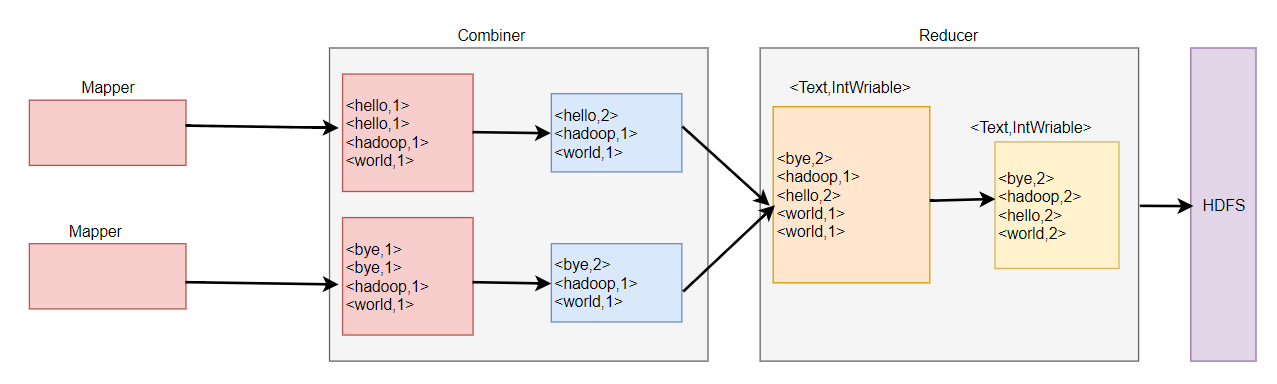
Combiner实现了在RPC传输之前对相同key的值进行了一次类似Reduce的计算操作,累加了值。然后把key和累加后的值作为k v通过RPC传输给Reduce。
public class WordCount_combiner_job {

    public static class WordCountMap extends Mapper<LongWritable, Text, Text, IntWritable> {

        @Override

        protected void map(LongWritable key, Text value, Context context) throws IOException, InterruptedException {

            System.out.println("split:<" + key + ":  " + value + ">");

            String[] words = value.toString().split(" ");

            for (String word : words) {

                System.out.println("split:<" + key + ":  " + word + ">");

                context.write(new Text(word), new IntWritable(1));

            }

        }

    }

    public static class WordCountReducer extends Reducer<Text, IntWritable, Text, IntWritable> {

        @Override

        protected void reduce(Text key, Iterable<IntWritable> values, Context context) throws IOException, InterruptedException {

            int total = 0;

            for (IntWritable value : values) {

                total += value.get();

            }

            context.write(key, new IntWritable(total));

        }

    }

    public static void main(String[] args) throws IOException, ClassNotFoundException, InterruptedException {

        Configuration conf = new Configuration();

        Job job = Job.getInstance(conf); //获取环境变量

        job.setJarByClass(WordCount_combiner_job.class); //设置jar包

        job.setJobName("WordCount");

        job.setMapperClass(WordCountMap.class); //map作业

        job.setMapOutputKeyClass(Text.class);

        job.setMapOutputValueClass(IntWritable.class);

        job.setCombinerClass(WordCountReducer.class);//在此处设置ombinerClass

        job.setReducerClass(WordCountReducer.class); //reduce作业

        job.setOutputKeyClass(Text.class); // k

        job.setOutputValueClass(IntWritable.class); //v

        FileInputFormat.setInputPaths(job, new Path(args[0]));

        FileOutputFormat.setOutputPath(job, new Path(args[1]));

        job.waitForCompletion(true);

    }

}
SVG业务
有些业务在应用Combiner时必须仔细考虑一些问题,否则就会出错:
avg1.txt                       avg2.txt

20							 25

10							 17

3
错误代码
import org.apache.hadoop.conf.Configuration;

import org.apache.hadoop.fs.Path;

import org.apache.hadoop.io.IntWritable;

import org.apache.hadoop.io.LongWritable;

import org.apache.hadoop.io.Text;

import org.apache.hadoop.mapreduce.Job;

import org.apache.hadoop.mapreduce.Mapper;

import org.apache.hadoop.mapreduce.Reducer;

import org.apache.hadoop.mapreduce.lib.input.FileInputFormat;

import org.apache.hadoop.mapreduce.lib.output.FileOutputFormat;

import java.io.IOException;

public class TxSVG_Erro_job {

    public static class TxSVGMapper extends Mapper<LongWritable, Text, IntWritable, IntWritable> {

        @Override

        protected void map(LongWritable key, Text value, Context context) throws IOException, InterruptedException {

            context.write(new IntWritable(1), new IntWritable(Integer.parseInt(value.toString())));

        }

    }

    public static class TxSVGReducer extends Reducer<IntWritable, IntWritable, IntWritable, IntWritable> {

        @Override

        protected void reduce(IntWritable key, Iterable<IntWritable> values, Context context) throws IOException, InterruptedException {

            int totoal = 0;

            int count = 0;

            for (IntWritable value : values) {

                totoal += value.get();

                count++;

            }

            context.write(new IntWritable(1), new IntWritable(totoal / count));

        }

    }

    public static void main(String[] args) throws IOException, ClassNotFoundException, InterruptedException {

        Configuration conf = new Configuration(); //获取环境变量

        Job job = Job.getInstance(conf);    //实例化任务

        job.setJobName("AVG_ERRO");  //设置任务名

        job.setJarByClass(TxSVG_Erro_job.class); //设置指定jar

        job.setOutputKeyClass(IntWritable.class);  //设置输出k

        job.setOutputValueClass(IntWritable.class); //设置输出v

        job.setMapperClass(TxSVGMapper.class); //设置map类

        job.setCombinerClass(TxSVGReducer.class);

        job.setReducerClass(TxSVGReducer.class);

        FileInputFormat.setInputPaths(job, new Path(args[0]));

        FileOutputFormat.setOutputPath(job, new Path(args[1]));

        job.waitForCompletion(true);

    }
计算如图:

正确的结果应该是(20+10+3+25+17)/5=15,
但是WordCOunt应用Combiner的求法求SVG会出现错误,如果代码不变的情况下去掉 job.setCombinerClass(TxSVGReducer.class);可以提获得正确的结果,但是如果去掉COmbiner,整个数据都会全给一个Reduce计算,如果数据量大会导致Reduce任务所在的节点资源会出现宕机。
思路
- 定义一个Writable用于存储数据量的值的平均值
- 计算总和,用Writable中的数据乘以品滚之来反推回总值。
- 计算平均值,平均值=综合/总共数据量。
TxtSVG_Writable
import org.apache.hadoop.io.Writable;

import java.io.DataInput;

import java.io.DataOutput;

import java.io.IOException;

public class TxtSVG_Writable implements Writable {

    private int count = 0;

    private int average = 0;

    public int getCount() {

        return count;

    }

    public void setCount(int count) {

        this.count = count;

    }

    public int getAverage() {

        return average;

    }

    public void setAverage(int average) {

        this.average = average;

    }

    @Override

    public String toString() {

        return count + "\t" + average;

    }

    public void readFields(DataInput in) throws IOException {

        count = in.readInt();

        average = in.readInt();

    }

    public void write(DataOutput out) throws IOException {

        out.writeInt(count);

        out.writeInt(average);

    }

}
TxtSVG_TRUE_job
public class TxtSVG_TRUE_job {

    public static class SVGMapper extends Mapper<LongWritable, Text, IntWritable, TxtSVG_Writable> {

        private TxtSVG_Writable w = new TxtSVG_Writable();

        @Override

        protected void map(LongWritable key, Text value, Context context) throws IOException, InterruptedException {

            w.setCount(1);

            w.setAverage(Integer.parseInt(value.toString()));

            context.write(new IntWritable(1), w);

        }

    }

    public static class SVGReduce extends Reducer<IntWritable, TxtSVG_Writable, IntWritable, TxtSVG_Writable> {

        private TxtSVG_Writable result = new TxtSVG_Writable();

        @Override

        protected void reduce(IntWritable key, Iterable<TxtSVG_Writable> values, Context context) throws IOException, InterruptedException {

            int sum = 0;

            int count = 0;

            for (TxtSVG_Writable value : values) {

                sum += value.getCount() * value.getAverage();

                count += value.getCount();

            }

            result.setCount(count);

            result.setAverage(sum / count);

            context.write(key, result);

        }

    }

    public static void main(String[] args) throws Exception {

        Configuration configuration = new Configuration(); //获取环境变量

        Job job = Job.getInstance(configuration); //实例化任务

       job.setJobName("TRUE_AVG");//设置任务名称

        job.setJarByClass(TxtSVG_TRUE_job.class);  //设置运行Jar类型

        job.setOutputKeyClass(IntWritable.class); //输出Key格式

        job.setOutputValueClass(TxtSVG_Writable.class);//设置Value格式

        job.setMapperClass(SVGMapper.class);//设置mapper

        job.setCombinerClass(SVGReduce.class);//Combiner在本地运行

        job.setReducerClass(SVGReduce.class);//设置Reducer

        FileInputFormat.setInputPaths(job, new Path(args[0])); //设置输入路径

        FileOutputFormat.setOutputPath(job, new Path(args[1]));//设置输出路径

        job.waitForCompletion(true);

    }

}
平均值最麻烦的情况就是分子和计算的时候,一定用总和除以数据总量,因为错误的代码Combiner运行在本地,总体把 分子和分母的关系处理错了,导致结果出错,总之就是无论什么时候都要保证总和和总数量不能错。

OutPutFormat
源码包位于包“package org.apache.hadoop.mapreduce;”中,是一个抽象类,能够设置文件的输出格式,完成输出规范检查,并未文件输出格式提供作业结果数据输出的功能。

NullOutputFormat
继承OutputFormat的类的一个抽象类,位于org.apache.hadoop.mapreduce.lib.output;
/**

 * Consume all outputs and put them in /dev/null.

 */

@InterfaceAudience.Public

@InterfaceStability.Stable

public class NullOutputFormat<K, V> extends OutputFormat<K, V>
消耗所有的输出,并把键值对写入/dev/null。相当于舍弃他们。
FileOutputFormat
位于org.apache.hadoop.mapreduce.lib.output;是一个从FileSystem读取数据的基类。有子类MapFileOutputFormat,SequenceFileOutputFormat、TextOutputFormat。
FileOutputFormat
提供了若干静态方法,用户可以用他们进行设置输入路径设置、分块大小设置等全局设置。
MapFileOutputFormat
把MapFile作为输出。需要确保Reducer输出的key已经排好序。
SequenceFileOutputFormat
SequenceFileOutputFormat将他的输出写进一个二进制顺序文件。容易压缩,如果为后续MapReduce任务的输出,是很好的输出格式。
TextOutputFormat
在FileOutputFormat所有的子类中,TextOutputFormat类是默认的输出格式,将每条记录记录写成文本行。由于TextOutputFormat调用toString()方法把键和值转换成任意类型。
FilterOutputFormat
对OutputFormat的再一次封装,类似于Java的流的Filter方式
对OutputFormat的输出可以自定义编写他的格式,自定义InputFormat类似首先要继承FileOutputFormat然后重写getRecordWrite方法,返回值类型是RecordeWriter。OutputFormat输出可以指定多路径。和Reduce任务数联系密切,当Reduce任务书为1时,分区数多于1也能运行,也就是说Reduce任务数大于1时,它于分区数必须时保持一致的。
DBOutputFormat
继承OutputFormat接收 K V 对,其中key的继承类DBWritable接口,OutputFormat将Reduce输出发送到SQL表。DBOutPutFormat返回的RecordWriter值使用批量SQL查询写入数据库。
实例分区
import org.apache.hadoop.io.IntWritable;

import org.apache.hadoop.io.Text;

import org.apache.hadoop.mapreduce.Partitioner;

public class MyPartitioner extends Partitioner<Text, IntWritable> {

    public int getPartition(Text key, IntWritable value, int numPartitions) {

        if (key.toString().equals("bye")) { //key 为bye 进度第0分区

            return 0;

        } else if (key.toString().equals("hello")) {  //key为hello进度第1分区

            return 1;

        } else if (key.toString().equals("hadoop")) { //key为hadoop 进度第2分区

            return 2;

        } else {

            return 3; //其他的进入第3分区

        }

    }

}
import org.apache.hadoop.conf.Configuration;

import org.apache.hadoop.fs.Path;

import org.apache.hadoop.io.IntWritable;

import org.apache.hadoop.io.LongWritable;

import org.apache.hadoop.io.Text;

import org.apache.hadoop.mapreduce.Job;

import org.apache.hadoop.mapreduce.Mapper;

import org.apache.hadoop.mapreduce.Reducer;

import org.apache.hadoop.mapreduce.lib.input.FileInputFormat;

import org.apache.hadoop.mapreduce.lib.output.FileOutputFormat;

import java.io.IOException;

public class TxtCounter_job {

    public static class wordCountMap extends Mapper<LongWritable, Text, Text, IntWritable> {

        @Override

        protected void map(LongWritable key, Text value, Context context) throws IOException, InterruptedException {

            String[] words = value.toString().split(" ");

            for (String word : words) {

                context.write(new Text(word), new IntWritable(1));

            }

        }

    }

        public static class WordCountReduce extends Reducer<Text, IntWritable, Text, IntWritable> {

            @Override

            protected void reduce(Text key, Iterable<IntWritable> values, Context context) throws IOException, InterruptedException {

                int sum = 0;

                for (IntWritable value : values) {

                    System.out.println("<" + key + ":  " + value + ">");

                    sum += value.get();

                }

                context.write(key, new IntWritable(sum));

            }

        }

    public static void main(String[] args) throws Exception {

        Configuration conf = new Configuration();  //获取环境变量

        Job job = Job.getInstance(conf); //实例化任务

        job.setJarByClass(TxtCounter_job.class); //设定jar类型

        job.setOutputKeyClass(Text.class); //设置输出key格式

        job.setOutputValueClass(IntWritable.class); //设置value格式

        job.setMapperClass(wordCountMap.class); //设置Mapper类

        job.setReducerClass(WordCountReduce.class); //设置reduce类

        job.setPartitionerClass(MyPartitioner.class); //自定义分区

        job.setNumReduceTasks(4); //设置reduce任务数量

        FileInputFormat.setInputPaths(job, new Path(args[0])); //添加输入路径

        FileOutputFormat.setOutputPath(job, new Path(args[1])); // 添加输出路径

        job.waitForCompletion(true);

    }

}
MapReduce源码刨析的更多相关文章
- 30s源码刨析系列之函数篇
前言 由浅入深.逐个击破 30SecondsOfCode 中函数系列所有源码片段,带你领略源码之美. 本系列是对名库 30SecondsOfCode 的深入刨析. 本篇是其中的函数篇,可以在极短的时间 ...
- Flask上下文管理及源码刨析
基本流程概述 - 与django相比是两种不同的实现方式. - django/tornado是通过传参数形式实现 - 而flask是通过上下文管理, 两种都可以实现,只不实现的方式不一样罢了. - 上 ...
- ConcurrentHashMap源码刨析(基于jdk1.7)
看源码前我们必须先知道一下ConcurrentHashMap的基本结构.ConcurrentHashMap是采用分段锁来进行并发控制的. 其中有一个内部类为Segment类用来表示锁.而Segment ...
- HashMap源码刨析(面试必看)
目录 1.Hash的计算规则? 2.HashMap是怎么形成环形链表的(即为什么不是线程安全)?(1.7中的问题) 3.JDK1.7和1.8的HashMap不同点? 4.HashMap和HashTab ...
- Java 源码刨析 - String
[String 是如何实现的?它有哪些重要的方法?] String 内部实际存储结构为 char 数组,源码如下: public final class String implements java. ...
- Java 源码刨析 - HashMap 底层实现原理是什么?JDK8 做了哪些优化?
[基本结构] 在 JDK 1.7 中 HashMap 是以数组加链表的形式组成的: JDK 1.8 之后新增了红黑树的组成结构,当链表大于 8 并且容量大于 64 时,链表结构会转换成红黑树结构,它的 ...
- Java 源码刨析 - 线程的状态有哪些?它是如何工作的?
线程(Thread)是并发编程的基础,也是程序执行的最小单元,它依托进程而存在. 一个进程中可以包含多个线程,多线程可以共享一块内存空间和一组系统资源,因此线程之间的切换更加节省资源.更加轻量化,也因 ...
- SSM-SpringMVC-04:SpringMVC深入浅出理解HandleMapping(源码刨析)
------------吾亦无他,唯手熟尔,谦卑若愚,好学若饥------------- 先从概念理解,从中央调度器,携带参数request,调度到HandleMapping处理器映射器,处理器映射器 ...
- form 源码刨析
def clean_name(self) value = self.cleaned_data.get('name') if "金-瓶-梅" not in value: raise ...
随机推荐
- 深入详解美团点评CAT跨语言服务监控(一) CAT简介与部署
前言: CAT是一个实时和接近全量的监控系统,它侧重于对Java应用的监控,除了与点评RPC组件融合的很好之外,他将会能与Spring.MyBatis.Dubbo 等框架以及Log4j 等结合,支持P ...
- 比较两个ranges(equal,mismatch,lexicographical_compare)
euqal 比较两个序列是否相等,相等返回true,不相等返回false //版本一:调用重载operator==比较元素 template <class InputIterator1,clas ...
- 在HTML中导入外部的css
1,标签:<link type="text/css" rel="stylesheet" href="CSS样式文件的绝对地址"> ...
- activiti 委派和转办的区别
委派 委派:是将任务节点分给其他人处理,等其他人处理好之后,委派任务会自动回到委派人的任务中 将hr的任务进行委派: taskService.delegateTask(taskId, userId); ...
- HttpServletResponse和HttpServletRequest
1.相关的接口 HttpServletRequest HttpServletRequest接口最常用的方法就是获得请求中的参数,这些参数一般是客户端表单中的数据.同时,HttpServletReq ...
- cocos 3.16 生成预编译库模板
打开模板功能 不知道什么原因,cocos 3.16关闭了模板功能,因此使用cocos -h命令时,无法显示gen-templates参数. 打开的方式也挺简单,打开tools/cocos2d-cons ...
- mac里安装Mycrypt扩展
https://jingyan.baidu.com/article/e3c78d644cf1ed3c4c85f5a8.html 先用homebrew安装mycrpt 再下载php5.6版本源码 然后进 ...
- springboot学习心得
1.mvn package --加载运行一个含有pom.xml的目录并生成target目录2.mvn dependency:tree 显示项目所有依赖的树状结构3.业务委托给了Spring Boot的 ...
- overflow标签
有时父标签设置了固定的宽高,但子标签把父标签给撑开了,就要在父标签里加一个overflow标签,等于hidden超出的地方隐藏,等于auto超出的地方隐藏,并且多个滚动条 <div style= ...
- Spring cloud和Dubbo
dubbo由于是二进制的传输,占用带宽会更少springCloud是http协议传输,带宽会比较多,同时使用http协议一般会使用JSON报文,消耗会更大 dubbo的开发难度较大,原因是dubbo的 ...