
PostgreSQL 之 yum安装 postgis 插件
版本说明:
CentOS7.5 + PostgreSQL 10.5
参考资源:
https://www.postgresql.org/download/linux/redhat/
http://download.osgeo.org/postgis/source/ postgis下载ftp网站
https://trac.osgeo.org/geos/ geos官方网站
https://blog.csdn.net/xzwspy/article/details/80082082?utm_source=blogxgwz3 源码安装postgis,注意各个版本的兼容性
https://www.cnblogs.com/ilifeilong/p/6979288.html 源码安装postgis,注意各个版本的兼容性
https://blog.csdn.net/learn_tech/article/details/80195566 源码安装gdal
http://2057.iteye.com/blog/1616620
安装postgresql
#Install the repository RPM

yum install https://download.postgresql.org/pub/repos/yum/10/redhat/rhel-7-x86_64/pgdg-centos10-10-2.noarch.rpm

#Install the client packages

yum install postgresql10

#Optionally install the server packages

yum install postgresql10-server

#Optionally initialize the database and enable automatic start

/usr/pgsql-10/bin/postgresql-10-setup initdb

systemctl enable postgresql-10

systemctl start postgresql-10
Platform support
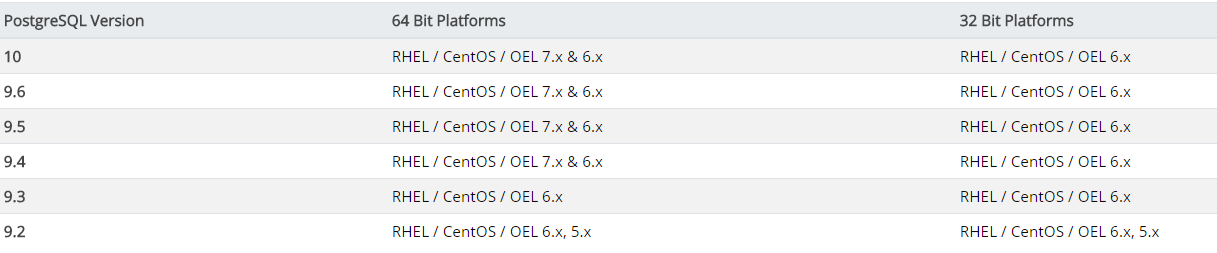
安装PostGIS
1.先安装几个工具包
yum install wget net-tools epel-release -y
然后安装postgis
yum install postgis24_10 postgis24_10-client -y
安装拓展工具
yum install ogr_fdw10 -y

yum install pgrouting_10 -y
2.创建数据库postgis
CREATE DATABASE postgis OWNER postgres;
切换新创建的database
\c postgis
安装PostGis扩展
postgis=# CREATE EXTENSION postgis;

postgis=# CREATE EXTENSION postgis_topology;

postgis=# CREATE EXTENSION ogr_fdw;
然后可以验证是否安装成功
SELECT postgis_full_version();

另外,下面是官方网站点列的一份扩展:
-- Enable PostGIS (includes raster)

CREATE EXTENSION postgis;

-- Enable Topology

CREATE EXTENSION postgis_topology;

-- Enable PostGIS Advanced 3D

-- and other geoprocessing algorithms

-- sfcgal not available with all distributions

CREATE EXTENSION postgis_sfcgal;

-- fuzzy matching needed for Tiger

CREATE EXTENSION fuzzystrmatch;

-- rule based standardizer

CREATE EXTENSION address_standardizer;

-- example rule data set

CREATE EXTENSION address_standardizer_data_us;

-- Enable US Tiger Geocoder

CREATE EXTENSION postgis_tiger_geocoder;
PostgreSQL 之 yum安装 postgis 插件的更多相关文章
- PostgreSQL 12 YUM安装
目录 1.创建postgres用户 2.查看操作系统版本 3.配置yum源(对应CentOS 6) 4.安装客户端包 5.安装服务器端包 6.初始化数据库和设置自启动服务 7.postgres用户的b ...
- CentOS 6.9/7通过yum安装指定版本的PostgreSQL扩展PostGIS
一.安装PostGIS扩展插件(24_10) // 安装EPEL源 # rpm -ivh http://dl.fedoraproject.org/pub/epel/6/x86_64/epel-rele ...
- CentOS7使用yum安装PostgreSQL和PostGIS
更新yum源 CentOS7默认yum源的PostgreSQL版本过低,不适合在本版本上使用.在https://yum.postgresql.org/repopackages.php上找到适合Cent ...
- 与你相遇好幸运,CentOS 7 x86_64使用Yum安装PostgreSQL
访问http://yum.pgrpms.org/reporpms/repoview/letter_p.group.html,下载并安装和当前系统对应的rpm文件. wget https://downl ...
- postgresql数据库的yum安装方法
实验环境>>>>>>>>>>>>>>>>>>操作系统:CentOS release 6.3 ...
- CentOS7 yum安装、配置PostgreSQL 9.5
PostgreSQL 9.5安装 1.添加RPM yum install https://download.postgresql.org/pub/repos/yum/9.5/redhat/rhel-7 ...
- PostgreSQL数据库的安装与PostGIS的安装(转)
原文:http://lovewinner.iteye.com/blog/1490915 安装postgresql sudo apt-get install postgresql-9.1 postgre ...
- yum安装PostgreSQL 在6和7
一.安装PostgreSQL 复制代码// 安装EPEL源# wget http://dl.fedoraproject.org/pub/epel/6/x86_64/epel-release-6-8.n ...
- CentOS下yum安装PostgreSQL
关键词:centos install PostgreSQL Configure YUM repository vim /etc/yum.repos.d/CentOS-Base.repo [base] ...
随机推荐
- linux后台运行之&和nohup区别,模拟后台守护进程
先来看一下&的使用 root@BP:~# cat test.sh #!/bin/bash while true do echo "linux">/dev/null d ...
- Scala方法定义,方法和函数的区别,将方法转换成函数
1. 定义方法和函数 1.1. 定义方法 方法的返回值类型可以不写,编译器可以自动推断出来,但是对于递归函数,必须指定返回类型 1.2. 定义函数 1.3.方法和函数的区别 在函数式编程语言中,函数是 ...
- 简单的user-based协同过滤算法示例代码
#构造一份打分数据集1 users = {"小明": {"中国合伙人": 5.0, "太平轮": 3.0, "荒野猎人" ...
- 八、springboot(五)配置定时器
1.修改启动类 @SpringBootApplication @EnableScheduling public class DemoApplication { public static void m ...
- ElasticSearch(六)底层索引控制
相似度算法 涉及到了ES的底层,首先讲一下ES的底层核心,相似度模型,ES的查询和传统的数据库查询最大的差别就在相似度查询(之前讲过,索引存储的最大差别就是讲非结构化数据转化为结构化),ES里面会给文 ...
- 洛谷 2234 [HNOI2002]营业额统计——treap(入门)
题目:https://www.luogu.org/problemnew/show/P2234 学习了一下 treap 的写法. 学习材料:https://blog.csdn.net/litble/ar ...
- file命令详解
Linux file命令 Linux file命令用于辨识文件类型. 通过file指令,我们得以辨识该文件的类型 用法: file [-bchikLNnprsvz0] [--apple] [--mim ...
- flume-ng-sql-source实现oracle增量数据读取
一.下载编译flume-ng-sql-source 下载地址:https://github.com/keedio/flume-ng-sql-source.git ,安装说明文档编译和拷贝jar包 嫌麻 ...
- spring boot编译项目打jar包
<build> <plugins> <!--jar包打包--> <plugin> <groupId>org.springframework. ...
- Python 简说 list,tuple,dict,set
python 是按缩进来识别代码块的 . 缩进请严格按照Python的习惯写法:4个空格,不要使用Tab,更不要混合Tab和空格,否则很容易造成因为缩进引起的语法错误. list 有序集合 访问不 ...