
spring学习 十 schema-based 前置后后置通知
spring 提供了 2 种 AOP 实现方式:(1)Schema-based ,(2)AspectJ
Schema-based:每个通知都需要实现接口或类,配置 spring 配置文件时在<aop:config>配置
AspectJ:每个通知不需要实现接口或类,配置 spring 配置文件是在<aop:config>的子标签<aop:aspect>中配置
基于Schema-based实现的入门程序
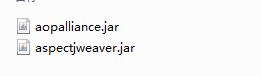
(1)第一步:导入jar包,除了spring中必须的包,下面两个包
(2)第二步:新建通知类
如果要实现前置通知,后置通知,在Schema-based方式中需要实现 MethodBeforeAdvice与 AfterReturningAdvice两个接口,代码如下;
前置通知代码,before方法的参数:
arg0: 切点方法对象 Method 对象
arg1: 切点方法参数
arg2:切点在哪个对象中
import java.lang.reflect.Method;

import org.springframework.aop.BeforeAdvice;

import org.springframework.aop.MethodBeforeAdvice;

public class MyBeforeAdvice implements MethodBeforeAdvice{

    @Override

    public void before(Method arg0, Object[] arg1, Object arg2) throws Throwable {

        System.out.println("前置通知");

    }

}
后置通知代码:
afterReturning方法的参数:
arg0: 切点方法返回值
arg1:切点方法对象
arg2:切点方法参数
arg3:切点方法所在类的对象
package com.airplan.pojo;

import java.lang.reflect.Method;

import org.springframework.aop.AfterReturningAdvice;

public class MyAfterAdvice implements AfterReturningAdvice{

    @Override

    public void afterReturning(Object arg0, Method arg1, Object[] arg2, Object arg3) throws Throwable {

        System.out.println("后置通知");

    }

}
第三步:aop配置
3.1 引入 aop 命名空间
3.2 配置通知类的<bean>
3.3 配置切面
3.4 * 通配符,匹配任意方法名,任意类名,任意一级包名
3.5 如果希望匹配任意方法参数 (..)
代表把返回值为任意类型,
且在PointCutClass类下面的,参数为任意的方法声明为切点
expression="* execution(void com.airplan.pojo.PointCutClass.*(..))"

下面的配置代表把通知和切入点进行对应
<aop:advisor advice-ref="beforeAdvice" pointcut-ref="mypoint"/>

<aop:advisor advice-ref="afterAdvice" pointcut-ref="mypoint"/>
<?xml version="1.0" encoding="UTF-8"?>

<beans xmlns="http://www.springframework.org/schema/beans"

 xmlns:xsi="http://www.w3.org/2001/XMLSchema-instance"

 xmlns:aop="http://www.springframework.org/schema/aop"

 xsi:schemaLocation="http://www.springframework.org/schema/beans

 http://www.springframework.org/schema/beans/spring-beans.xsd

 http://www.springframework.org/schema/aop

 http://www.springframework.org/schema/aop/spring-aop-4.1.xsd ">

    <!-- 配置通知所在的类 -->

    <bean id="beforeAdvice" class="com.airplan.pojo.MyBeforeAdvice"></bean>

    <bean id="afterAdvice" class="com.airplan.pojo.MyAfterAdvice"></bean>

    <!-- 配置切面 -->

    <aop:config>

        <!-- 配置切点 -->

        <aop:pointcut expression="execution(void com.airplan.pojo.PointCutClass.testFun())" id="mypoint"/>

        <!-- 配置通知 -->

        <aop:advisor advice-ref="beforeAdvice" pointcut-ref="mypoint"/>

        <aop:advisor advice-ref="afterAdvice" pointcut-ref="mypoint"/>

    </aop:config>

    <!-- 配置切点所在的类 -->

    <bean id="pointCutClass" class="com.airplan.pojo.PointCutClass"></bean>

</beans>
第四步:测试代码
package com.airplan.test;

import org.springframework.context.ApplicationContext;

import org.springframework.context.support.ClassPathXmlApplicationContext;

import com.airplan.pojo.PointCutClass;

public class AopDemo {

    public static void main(String[] args) {

        ApplicationContext ac=new ClassPathXmlApplicationContext("applicationContext.xml");

        PointCutClass pointCutClass = ac.getBean("pointCutClass",PointCutClass.class);

        pointCutClass.testFun();

    }

}
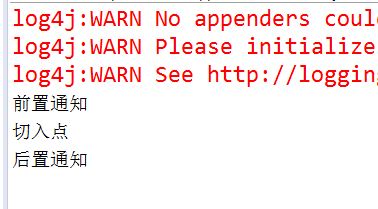
运行结果;
spring学习 十 schema-based 前置后后置通知的更多相关文章
- Spring学习十五----------Spring AOP API的Pointcut、advice及 ProxyFactoryBean相关内容
© 版权声明:本文为博主原创文章,转载请注明出处 实例: 1.项目结构 2.pom.xml <project xmlns="http://maven.apache.org/POM/4. ...
- spring学习十九 常用注解
1. @Component 创建类对象,相当于配置<bean/>2. @Service 与@Component 功能相同. 2.1 写在 ServiceImpl 类上.3. @Reposi ...
- spring学习 十二 AspectJ-based的通知入门 带参数的通知
第一步:编写通知类 package com.airplan.pojo; import org.aspectj.lang.ProceedingJoinPoint; public class Advice ...
- Spring学习十四----------Spring AOP实例
© 版权声明:本文为博主原创文章,转载请注明出处 实例 1.项目结构 2.pom.xml <project xmlns="http://maven.apache.org/POM/4.0 ...
- spring学习 十 schema-based 异常通知,和环绕通知
一 schema-based异常通知 第一步:创建通知类 :新建一个类实现 throwsAdvice 接口,throwsAdvice接口只是标记接口里面并没有任何方法,必须自己写方法,且必须叫 aft ...
- Spring学习(十八)----- Spring AOP+AspectJ注解实例
我们将向你展示如何将AspectJ注解集成到Spring AOP框架.在这个Spring AOP+ AspectJ 示例中,让您轻松实现拦截方法. 常见AspectJ的注解: @Before – 方法 ...
- Spring学习(十六)----- Spring AOP实例(Pointcut(切点),Advisor)
在上一个Spring AOP通知的例子,一个类的整个方法被自动拦截.但在大多数情况下,可能只需要一种方式来拦截一个或两个方法,这就是为什么引入'切入点'的原因.它允许你通过它的方法名来拦截方法.另外, ...
- Spring学习(十五)----- Spring AOP通知实例 – Advice
Spring AOP(面向方面编程)框架,用于在模块化方面的横切关注点.简单得说,它只是一个拦截器拦截一些过程,例如,当一个方法执行,Spring AOP 可以劫持一个执行的方法,在方法执行之前或之后 ...
- Spring学习(十二)-----Spring @PostConstruct和@PreDestroy实例
实现 初始化方法和销毁方法3种方式: 实现标识接口 InitializingBean,DisposableBean(不推荐使用,耦合性太高) 设置bean属性 Init-method destroy- ...
随机推荐
- WDlinux 修改后台默认8080端口的方法
修改8080端口正确方法 新版本: 方法一: apache sed -i 's/8080/8088/' /www/wdlinux/wdapache/conf/httpd.conf 然后记得修改防火墙i ...
- Win7下VB6.0不能加载mscomctl.ocx的解决办法
下载这个:http://pan.baidu.com/s/1sjJgrbJ 然后在命令框下注册这个组件: regsvr32 mscomctl.ocx 即可
- 设置https以及http转https的问题
公司用的是阿里云服务器win2008server r2 ,环境是phpwamp,出现许多问题.2018-11-12 一 设置https 1.设置httpd.ini 取消以下三个配置的# LoadMod ...
- CentOS 下环境变量
1. 显示环境变量HOME(不要把一个#号输进去了,#代表用户名) # echo #HOME /home/redbooks 2. 设置一个新的环境变量hello # export HELLO=&quo ...
- String int 相互转换
String->int: int i = Integer.parseInt(s) int->String: String s = Integer.toString(i)
- Codeforces Beta Round #16 (Div. 2 Only)
Codeforces Beta Round #16 (Div. 2 Only) http://codeforces.com/contest/16 A 水题 #include<bits/stdc+ ...
- unittest 单元测试
unittest 单元测试: 1,单元测试是指对软件中最小可测试单元进行检查和验证.对于单元测试中单元的含义,一般来讲,要根据实际情况去判定其具体含义. 2,unitest=TestCase + Te ...
- 干净的ssm框架项目
其中数据库只有如下表与字段 访问效果: 项目下载: 干净的ssm框架项目.rar
- ABAP开发需要养成的习惯—变量定义
变量定义 Global variables are BAD 定义内表先在程序开头定义types,如 types: begin of ty_structure, id type i, ...
- union和union all区别
如果我们需要将两个select语句的结果作为一个整体显示出来,我们就需要用到union或者union all关键字.union(或称为联合)的作用是将多个结果合并在一起显示出来. union和unio ...