
修改window本地hosts文件,修改域名指向
如何修改hosts文件
# Copyright (c) 1993-2009 Microsoft Corp.

#

# This is a sample HOSTS file used by Microsoft TCP/IP for Windows.

#

# This file contains the mappings of IP addresses to host names. Each

# entry should be kept on an individual line. The IP address should

# be placed in the first column followed by the corresponding host name.

# The IP address and the host name should be separated by at least one

# space.

#

# Additionally, comments (such as these) may be inserted on individual

# lines or following the machine name denoted by a '#' symbol.

#

# For example:

#

#      102.54.94.97     rhino.acme.com          # source server

#       38.25.63.10     x.acme.com              # x client host

# localhost name resolution is handled within DNS itself.

#    127.0.0.1       localhost

#    ::1             localhost
在最后新增如下内容:
127.0.0.1 www.163.com
表示域名“www.163.com”指向的ip为127.0.0.1,即本地。修改后文件内容如下:
# Copyright (c) 1993-2009 Microsoft Corp.

#

# This is a sample HOSTS file used by Microsoft TCP/IP for Windows.

#

# This file contains the mappings of IP addresses to host names. Each

# entry should be kept on an individual line. The IP address should

# be placed in the first column followed by the corresponding host name.

# The IP address and the host name should be separated by at least one

# space.

#

# Additionally, comments (such as these) may be inserted on individual

# lines or following the machine name denoted by a '#' symbol.

#

# For example:

#

#      102.54.94.97     rhino.acme.com          # source server

#       38.25.63.10     x.acme.com              # x client host

# localhost name resolution is handled within DNS itself.

#    127.0.0.1       localhost

#    ::1             localhost

127.0.0.1    www.163.com
修改后用浏览器访问“www.163.com”会被解析到127.0.0.1,导致无法显示该网页。
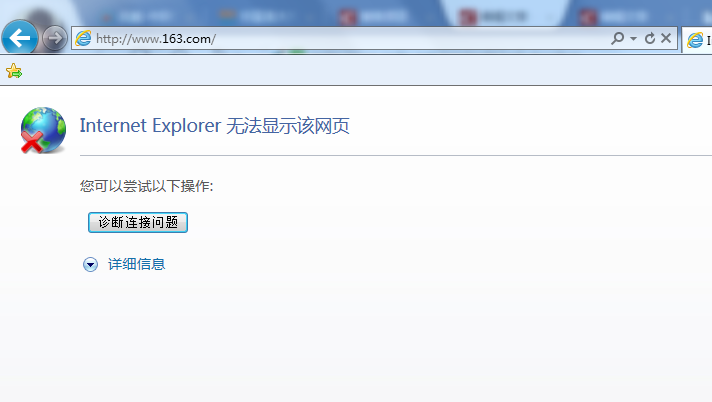
为了进一步验证,使用tomcat在本地启动一个Web服务。tomcat版本为:apache-tomcat-8.5.4,其他版本应该操作类似。
下载解压tomcat后,运行apache-tomcat-8.5.4\bin\startup.bat,待tomcat启动成功,本地就有了一个Web服务了。
这时再访问"www.163.com:8080",就可以看到有页面内容了:
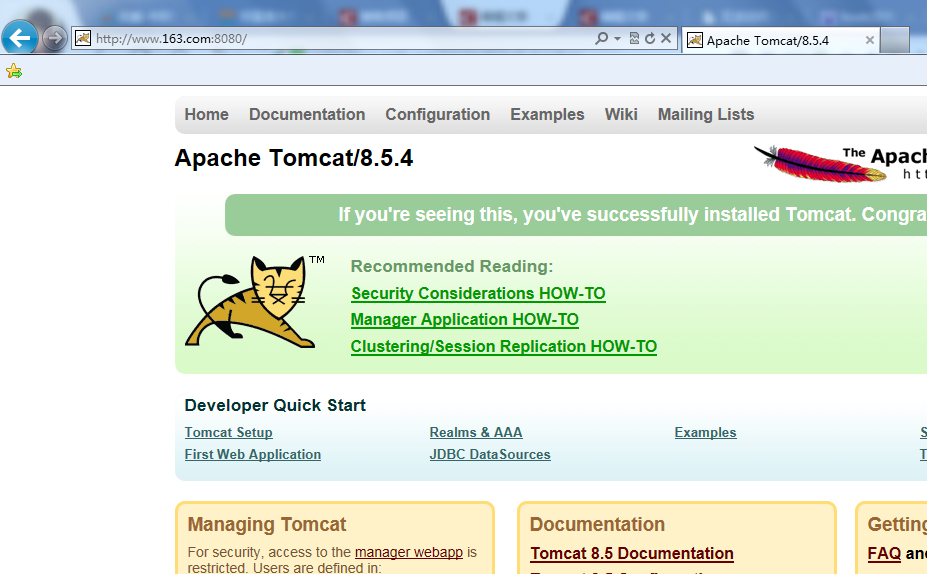
为什么要加上8080呢,因为这是端口号,tomcat开启的Web服务默认使用8080端口,而浏览器中默认的是80端口,所以必需要显示指明。也可以修改tomcat安装目录下的config/server.xml中的8080为80,这样就不用在访问时显式指定端口了。
这就是通过修改hosts文件来使域名指向某个IP的方式了,如果需要添加多条配置,直接再新增一行内容就行了。
修改window本地hosts文件,修改域名指向的更多相关文章
- 修改Window的hosts文件提示“该文件被其他程序占用”解决方案
1.打开C:\Windows\System32\drivers\etc中的hosts 2.右键——>属性——>安全 3.在修改保存就可以了
- 【计算机网络】windows修改本机hosts文件
hosts 文件所在的位置 C:/windows/system32/drivers/etc/hosts 修改后不必重启立即生效的方法 命令行下运行: ipconfig /displaydns 显示所有 ...
- 如何修改本地hosts文件?
1.window7修改本地hosts文件 # window7系统hosts文件位置 C:\Windows\System32\drivers\etc 2.linux # linux系统hosts文件位置 ...
- 修改容器的hosts文件
修改容器的hosts文件 1.介绍 docker容器中的hosts文件虽然在宿主机磁盘上/var/lib/docker/containers/xxx/hosts中,但是修改该文件是无效的,需要通过其他 ...
- k8s修改pod的hosts文件
1.在1.7版本后使用HostAliases修改pod的hosts文件.该文件由kubelet管理 在deployment的yaml文件中添加在pod template 的spec里面即可: apiV ...
- SUSE系列---修改IP和hosts文件
有些时候我们需要修改linux系统的IP,此时我们要注意,修改IP之后,如果我们如果不修改hosts文件,那么可能我们一些服务会无法使用:下面分别记录修改IP和hosts文件的方法: 修改IP: 打开 ...
- svn 从文件上次修改以来没有任何文件修改或加入。
现象:代码已经被修改过了,但是再往svn上提交代码时仍然提示: 从文件上次修改以来没有任何文件修改或加入. 解决办法: 1.找打存放代码的文件夹,右键——TortoiseSVN——clean up(清 ...
- Ubuntu16.04/windows7修改本地hosts文件
1. 从github上下载最新的hosts文件:https://serve.netsh.org/pub/ipv4-hosts/ ubuntu16.04: 第二步:Ctrl+Alt+T 打开ubuntu ...
- hosts文件修改之后立刻刷新
最近因为项目的需要,总是修改hosts文件,每次修改之后都要重启浏览器,总结下刷新的方式 window下,hosts文件位置:C:\windows\system32\drivers\etc\hosts ...
随机推荐
- Android ImageView点击效果
ImageView设置点击效果需要注意两点,第一个设置android:clickable="true",第二个 <item android:drawable="@d ...
- echarts折现图配置
js引用和div容器 <div id="container" style="height: 100%"></div> <scrip ...
- crm SDK 设置用户的上级
/// <summary> /// 设置用户的上级 /// </summary> /// <param name="service">服务< ...
- js第四天学习小结:
(1)函数的四种形式小结: 无参无返回值 function tellstory(){ console.log("从前有座山"); console.log(" ...
- Unable to find the wrapper ”https” - did youforget to enable it when you configured PHP?
Unable to find the wrapper ”https” - did youforget to enable it when you configured PHP? 这是在Windows的 ...
- Django实现瀑布流,组合搜索
Django中组合搜索功能 需求分析 很多电商网站中有组合搜索的功能,所谓组合搜索就是网页中组合多个条件,对数据库中进行查询,并且将结果显示在页面中,看个例子吧: 注意红框中的标识,我们可以根据URL ...
- linux:ubuntu安装mysql(二)--推荐
1)下载mysql安装包mysql-5.7.24-linux-glibc2.12-x86_64.tar.gz,下载地址:https://dev.mysql.com/downloads/mysql/ 2 ...
- postgresql copy的使用方式
方法一: 将数据库表复制到磁盘文件: copy "Test" to 'G:/Test.csv' delimiter ',' csv header encoding 'GBK'; 从 ...
- GNU C语言开发环境
1. GNU C 编译器 2. GNU make 项目管理工具 3. 创建和使用函数库 4. GNU C 函数库(glibc) 1.GNU C 编译器 使用 c语言 编写的代码,运行前必须经过编译和链 ...
- C#找出第n到m个素数之间所有之和
static void Main(string[] args) { int n = int.Parse(Console.ReadLine()); //开始的数 int m = int.Parse(Co ...