
修改window本地hosts文件,修改域名指向
如何修改hosts文件
# Copyright (c) 1993-2009 Microsoft Corp.

#

# This is a sample HOSTS file used by Microsoft TCP/IP for Windows.

#

# This file contains the mappings of IP addresses to host names. Each

# entry should be kept on an individual line. The IP address should

# be placed in the first column followed by the corresponding host name.

# The IP address and the host name should be separated by at least one

# space.

#

# Additionally, comments (such as these) may be inserted on individual

# lines or following the machine name denoted by a '#' symbol.

#

# For example:

#

#      102.54.94.97     rhino.acme.com          # source server

#       38.25.63.10     x.acme.com              # x client host

# localhost name resolution is handled within DNS itself.

#    127.0.0.1       localhost

#    ::1             localhost
在最后新增如下内容:
127.0.0.1 www.163.com
表示域名“www.163.com”指向的ip为127.0.0.1,即本地。修改后文件内容如下:
# Copyright (c) 1993-2009 Microsoft Corp.

#

# This is a sample HOSTS file used by Microsoft TCP/IP for Windows.

#

# This file contains the mappings of IP addresses to host names. Each

# entry should be kept on an individual line. The IP address should

# be placed in the first column followed by the corresponding host name.

# The IP address and the host name should be separated by at least one

# space.

#

# Additionally, comments (such as these) may be inserted on individual

# lines or following the machine name denoted by a '#' symbol.

#

# For example:

#

#      102.54.94.97     rhino.acme.com          # source server

#       38.25.63.10     x.acme.com              # x client host

# localhost name resolution is handled within DNS itself.

#    127.0.0.1       localhost

#    ::1             localhost

127.0.0.1    www.163.com
修改后用浏览器访问“www.163.com”会被解析到127.0.0.1,导致无法显示该网页。
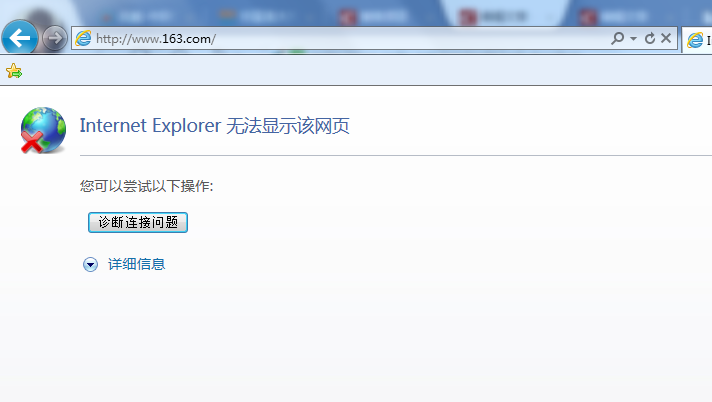
为了进一步验证,使用tomcat在本地启动一个Web服务。tomcat版本为:apache-tomcat-8.5.4,其他版本应该操作类似。
下载解压tomcat后,运行apache-tomcat-8.5.4\bin\startup.bat,待tomcat启动成功,本地就有了一个Web服务了。
这时再访问"www.163.com:8080",就可以看到有页面内容了:
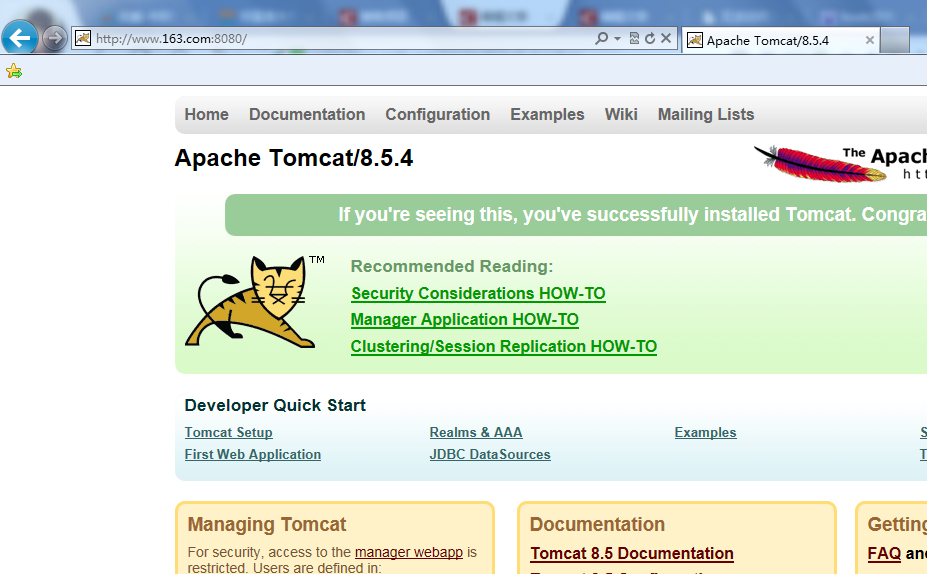
为什么要加上8080呢,因为这是端口号,tomcat开启的Web服务默认使用8080端口,而浏览器中默认的是80端口,所以必需要显示指明。也可以修改tomcat安装目录下的config/server.xml中的8080为80,这样就不用在访问时显式指定端口了。
这就是通过修改hosts文件来使域名指向某个IP的方式了,如果需要添加多条配置,直接再新增一行内容就行了。
修改window本地hosts文件,修改域名指向的更多相关文章
- 修改Window的hosts文件提示“该文件被其他程序占用”解决方案
1.打开C:\Windows\System32\drivers\etc中的hosts 2.右键——>属性——>安全 3.在修改保存就可以了
- 【计算机网络】windows修改本机hosts文件
hosts 文件所在的位置 C:/windows/system32/drivers/etc/hosts 修改后不必重启立即生效的方法 命令行下运行: ipconfig /displaydns 显示所有 ...
- 如何修改本地hosts文件?
1.window7修改本地hosts文件 # window7系统hosts文件位置 C:\Windows\System32\drivers\etc 2.linux # linux系统hosts文件位置 ...
- 修改容器的hosts文件
修改容器的hosts文件 1.介绍 docker容器中的hosts文件虽然在宿主机磁盘上/var/lib/docker/containers/xxx/hosts中,但是修改该文件是无效的,需要通过其他 ...
- k8s修改pod的hosts文件
1.在1.7版本后使用HostAliases修改pod的hosts文件.该文件由kubelet管理 在deployment的yaml文件中添加在pod template 的spec里面即可: apiV ...
- SUSE系列---修改IP和hosts文件
有些时候我们需要修改linux系统的IP,此时我们要注意,修改IP之后,如果我们如果不修改hosts文件,那么可能我们一些服务会无法使用:下面分别记录修改IP和hosts文件的方法: 修改IP: 打开 ...
- svn 从文件上次修改以来没有任何文件修改或加入。
现象:代码已经被修改过了,但是再往svn上提交代码时仍然提示: 从文件上次修改以来没有任何文件修改或加入. 解决办法: 1.找打存放代码的文件夹,右键——TortoiseSVN——clean up(清 ...
- Ubuntu16.04/windows7修改本地hosts文件
1. 从github上下载最新的hosts文件:https://serve.netsh.org/pub/ipv4-hosts/ ubuntu16.04: 第二步:Ctrl+Alt+T 打开ubuntu ...
- hosts文件修改之后立刻刷新
最近因为项目的需要,总是修改hosts文件,每次修改之后都要重启浏览器,总结下刷新的方式 window下,hosts文件位置:C:\windows\system32\drivers\etc\hosts ...
随机推荐
- echart力导向图
<!DOCTYPE html> <html lang="en"> <head> <meta charset="GBK" ...
- tips:可变参数列表
tips:可变参数列表! 先来看看以往我们要传递许多参数时是怎么做的: java: public static void main(String []args){} c: int main(int a ...
- CS229 6.12 Neurons Networks from self-taught learning to deep network
self-taught learning 在特征提取方面完全是用的无监督的方法,对于有标记的数据,可以结合有监督学习来对上述方法得到的参数进行微调,从而得到一个更加准确的参数a. 在self-taug ...
- echarts.js应用之map
最近项目中用到了echarts.js中的map,我画了一个简版的案例,如下所示: 效果图: 主要代码如下: <!DOCTYPE html> <html lang="en&q ...
- BZOJ4195 luoguP1955 NOI2015D1T1 程序自动分析
题意:给定n个(xi = xj) 或 (xi != xj) 的条件,问是否可能成立 BZOJ链接:http://www.lydsy.com/JudgeOnline/problem.php?id=419 ...
- failed to open stream: Permission denied in警告错误
问题是文件所在目录的权限问题导致的.只需要将警告文件所在的目录权限更改为777(至少是006)即可 例如 (...a.log)failed to open stream: Permission den ...
- spring揭密学习笔记(1) --spring的由来
1.spring起源于在EJB暴露出各种严重问题的情况应运而生. Spring是于2003年兴起的一个轻量级的Java开发框架, Spring倡导一切从实际出发,以实用的态度来选择适合当前开发场景的解 ...
- 【每日一学】pandas_透视表函数&交叉表函数
每日一悟 [分开工作内外8小时] 前一个月,我经常把工作内的问题带到路上.地铁上.睡觉前,甚至是周末. 然而很快发现,我工作外的成就几乎没有,而工作内的进展也并不理想. 仔细想想,工作外是需要学新东西 ...
- scala-class
object Scala { def main( args : Array[ String ] ) : Unit = { val p = , ); println( p ); p.move( , ); ...
- <转载> MySQL 架构 http://www.cnblogs.com/winner-0715/p/6863802.html
1.MySQL整体逻辑架构 我们先下图看看MySQL整体逻辑架构(MySQL’s Logical Architecture) 图1 第一层,即最上一层,所包含的服务并不是MySQL所独有的技术.它们都 ...