
git merge 详细操作,看完就懂
[root@hostname git_test]# git init

hint: Using 'master' as the name for the initial branch. This default branch name

hint: is subject to change. To configure the initial branch name to use in all

hint: of your new repositories, which will suppress this warning, call:

hint:

hint: git config --global init.defaultBranch <name>

hint:

hint: Names commonly chosen instead of 'master' are 'main', 'trunk' and

hint: 'development'. The just-created branch can be renamed via this command:

hint:

hint: git branch -m <name>

Initialized empty Git repository in /root/git_test/.git/

[root@hostname git_test]# git log

fatal: your current branch 'master' does not have any commits yet

[root@hostname git_test]# vi test.txt

[root@hostname git_test]# git add .

[root@hostname git_test]# git commit "in main, 1st change"

error: pathspec 'in main, 1st change' did not match any file(s) known to git

[root@hostname git_test]# git commit -m "in main, 1st change"

[master (root-commit) 5c0420f] in main, 1st change

1 file changed, 1 insertion(+)

create mode 100644 test.txt

[root@hostname git_test]# git commit "in main, 1st change"^C

[root@hostname git_test]# vi test.txt

[root@hostname git_test]# git add .

[root@hostname git_test]# git commit -m "in main, 2nd change"

[master 16e9a53] in main, 2nd change

1 file changed, 1 insertion(+)

[root@hostname git_test]# gi tlog

bash: gi: command not found...

Similar command is: 'go'

[root@hostname git_test]# git log

commit 16e9a53302c804d3a0ad7924c45e00209c86c72f (HEAD -> master)

Author: Shuai Ma <shuai.ma@hei-ya.com>

Date: Fri Apr 21 22:41:49 2023 -0400

in main, 2nd change

commit 5c0420f6c5efb9c8b98c89b9d4595f15c3fbed9c

Author: Shuai Ma <shuai.ma@hei-ya.com>

Date: Fri Apr 21 22:41:23 2023 -0400

in main, 1st change

[root@hostname git_test]# git checkout -b feature_1

Switched to a new branch 'feature_1'

[root@hostname git_test]# vi test.txt

[root@hostname git_test]# git add .

[root@hostname git_test]# git commit -m "after branching, in feature_1, 1st change"

[feature_1 11981bf] after branching, in feature_1, 1st change

1 file changed, 1 insertion(+)

[root@hostname git_test]# git checkout master

Switched to branch 'master'

[root@hostname git_test]# vi test.txt

[root@hostname git_test]# git add .

[root@hostname git_test]# git commit -m "after branching, in main, 1st change"

[master 129c297] after branching, in main, 1st change

1 file changed, 1 insertion(+)

[root@hostname git_test]# vi test.txt

[root@hostname git_test]# git add .

[root@hostname git_test]# git commit -m "after branching, in main, 2nd change"

[master 87d7da3] after branching, in main, 2nd change

1 file changed, 1 insertion(+)

[root@hostname git_test]# git checkout feature_1

Switched to branch 'feature_1'

[root@hostname git_test]# vi test.txt

[root@hostname git_test]# git add .

[root@hostname git_test]# git commit -m "after branching, in feature_1, 2nd change"

[feature_1 c170207] after branching, in feature_1, 2nd change

1 file changed, 1 insertion(+)

[root@hostname git_test]# git log

commit c170207b0567946eff71880ee90326ad64822b0b (HEAD -> feature_1)

Author: Shuai Ma <shuai.ma@hei-ya.com>

Date: Fri Apr 21 22:46:46 2023 -0400

after branching, in feature_1, 2nd change

commit 11981bffedb873679d73bdca89716f1b6cbc9f4d

Author: Shuai Ma <shuai.ma@hei-ya.com>

Date: Fri Apr 21 22:42:58 2023 -0400

after branching, in feature_1, 1st change

commit 16e9a53302c804d3a0ad7924c45e00209c86c72f

Author: Shuai Ma <shuai.ma@hei-ya.com>

Date: Fri Apr 21 22:41:49 2023 -0400

in main, 2nd change

commit 5c0420f6c5efb9c8b98c89b9d4595f15c3fbed9c

Author: Shuai Ma <shuai.ma@hei-ya.com>

Date: Fri Apr 21 22:41:23 2023 -0400

in main, 1st change

[root@hostname git_test]# git checkout master

Switched to branch 'master'

[root@hostname git_test]# vi test.txt

[root@hostname git_test]# git add .

[root@hostname git_test]# git commit -m "after branching, in main, 3rd change"

[master 687068c] after branching, in main, 3rd change

1 file changed, 1 insertion(+)

[root@hostname git_test]# git log

commit 687068ce78e7f72326ecaec4c4d062139cd4d2c3 (HEAD -> master)

Author: Shuai Ma <shuai.ma@hei-ya.com>

Date: Fri Apr 21 22:48:29 2023 -0400

after branching, in main, 3rd change

commit 87d7da3f4a51f811a846451bb75f7f8ccbd7cca0

Author: Shuai Ma <shuai.ma@hei-ya.com>

Date: Fri Apr 21 22:44:23 2023 -0400

after branching, in main, 2nd change

commit 129c297f2ac32868f60a6cee4fc76970090648ab

Author: Shuai Ma <shuai.ma@hei-ya.com>

Date: Fri Apr 21 22:43:46 2023 -0400

after branching, in main, 1st change

commit 16e9a53302c804d3a0ad7924c45e00209c86c72f

Author: Shuai Ma <shuai.ma@hei-ya.com>

Date: Fri Apr 21 22:41:49 2023 -0400

in main, 2nd change

commit 5c0420f6c5efb9c8b98c89b9d4595f15c3fbed9c

Author: Shuai Ma <shuai.ma@hei-ya.com>

Date: Fri Apr 21 22:41:23 2023 -0400

in main, 1st change

[root@hostname git_test]# git checkout feature_1

Switched to branch 'feature_1'

[root@hostname git_test]# git log

commit c170207b0567946eff71880ee90326ad64822b0b (HEAD -> feature_1)

Author: Shuai Ma <shuai.ma@hei-ya.com>

Date: Fri Apr 21 22:46:46 2023 -0400

after branching, in feature_1, 2nd change

commit 11981bffedb873679d73bdca89716f1b6cbc9f4d

Author: Shuai Ma <shuai.ma@hei-ya.com>

Date: Fri Apr 21 22:42:58 2023 -0400

after branching, in feature_1, 1st change

commit 16e9a53302c804d3a0ad7924c45e00209c86c72f

Author: Shuai Ma <shuai.ma@hei-ya.com>

Date: Fri Apr 21 22:41:49 2023 -0400

in main, 2nd change

commit 5c0420f6c5efb9c8b98c89b9d4595f15c3fbed9c

Author: Shuai Ma <shuai.ma@hei-ya.com>

Date: Fri Apr 21 22:41:23 2023 -0400

in main, 1st change

[root@hostname git_test]# git merge master

Auto-merging test.txt

CONFLICT (content): Merge conflict in test.txt

Automatic merge failed; fix conflicts and then commit the result.

[root@hostname git_test]# vi test.txt

[root@hostname git_test]# git status

On branch feature_1

You have unmerged paths.

(fix conflicts and run "git commit")

(use "git merge --abort" to abort the merge)

Unmerged paths:

(use "git add <file>..." to mark resolution)

both modified: test.txt

no changes added to commit (use "git add" and/or "git commit -a")

[root@hostname git_test]# git add .

[root@hostname git_test]# git commit -m "merge main, fix conflict"

[feature_1 ed8959d] merge main, fix conflict

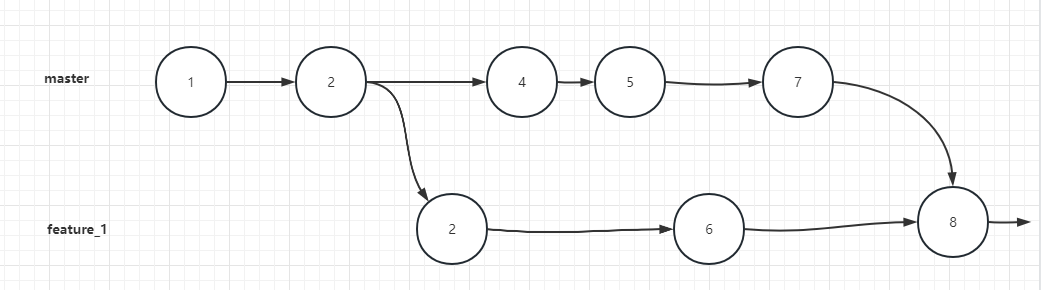
git log shows all the commits from master branch and feature_1 branch are included

[root@hostname git_test]# git log

commit ed8959dd5f7c200c9e45e69a1804ecb83b3cf89e (HEAD -> feature_1)

Merge: c170207 687068c

Author: Shuai Ma <shuai.ma@hei-ya.com>

Date: Fri Apr 21 22:54:42 2023 -0400

merge main, fix conflict

commit 687068ce78e7f72326ecaec4c4d062139cd4d2c3 (master)

Author: Shuai Ma <shuai.ma@hei-ya.com>

Date: Fri Apr 21 22:48:29 2023 -0400

after branching, in main, 3rd change

commit c170207b0567946eff71880ee90326ad64822b0b

Author: Shuai Ma <shuai.ma@hei-ya.com>

Date: Fri Apr 21 22:46:46 2023 -0400

after branching, in feature_1, 2nd change

commit 87d7da3f4a51f811a846451bb75f7f8ccbd7cca0

Author: Shuai Ma <shuai.ma@hei-ya.com>

Date: Fri Apr 21 22:44:23 2023 -0400

after branching, in main, 2nd change

commit 129c297f2ac32868f60a6cee4fc76970090648ab

Author: Shuai Ma <shuai.ma@hei-ya.com>

Date: Fri Apr 21 22:43:46 2023 -0400

after branching, in main, 1st change

commit 11981bffedb873679d73bdca89716f1b6cbc9f4d

Author: Shuai Ma <shuai.ma@hei-ya.com>

Date: Fri Apr 21 22:42:58 2023 -0400

after branching, in feature_1, 1st change

commit 16e9a53302c804d3a0ad7924c45e00209c86c72f

Author: Shuai Ma <shuai.ma@hei-ya.com>

Date: Fri Apr 21 22:41:49 2023 -0400

in main, 2nd change

commit 5c0420f6c5efb9c8b98c89b9d4595f15c3fbed9c

Author: Shuai Ma <shuai.ma@hei-ya.com>

Date: Fri Apr 21 22:41:23 2023 -0400

in main, 1st change

[root@hostname git_test]# git diff 11981bffedb873679d73bdca89716f1b6cbc9f4d 129c297f2ac32868f60a6cee4fc76970090648ab

diff --git a/test.txt b/test.txt

index 0681d7f..4e4c571 100644

--- a/test.txt

+++ b/test.txt

@@ -1,3 +1,3 @@

in main, 1st change

in main, 2nd change

-after branching, in feature_1, 1st change

+after branching, in main, 1st change

[root@hostname git_test]# git diff 11981bffedb873679d73bdca89716f1b6cbc9f4d 129c297f2ac32868f60a6cee4fc76970090648ab

diff --git a/test.txt b/test.txt

index 0681d7f..4e4c571 100644

--- a/test.txt

+++ b/test.txt

@@ -1,3 +1,3 @@

in main, 1st change

in main, 2nd change

-after branching, in feature_1, 1st change

+after branching, in main, 1st change

[root@hostname git_test]# git rebase -i 16e9a53302c804d3a0ad7924c45e00209c86c72f

[detached HEAD d2b1d01] after branching, in feature_1, 1st change

Date: Fri Apr 21 22:42:58 2023 -0400

1 file changed, 2 insertions(+)

Auto-merging test.txt

CONFLICT (content): Merge conflict in test.txt

error: could not apply 129c297... after branching, in main, 1st change

Resolve all conflicts manually, mark them as resolved with

"git add/rm <conflicted_files>", then run "git rebase --continue".

You can instead skip this commit: run "git rebase --skip".

To abort and get back to the state before "git rebase", run "git rebase --abort".

Could not apply 129c297... after branching, in main, 1st change

in the pop up file:

pick 11981bf after branching, in feature_1, 1st change

s c170207 after branching, in feature_1, 2nd change

pick 129c297 after branching, in main, 1st change

pick 87d7da3 after branching, in main, 2nd change

pick 687068c after branching, in main, 3rd change

# Rebase 16e9a53..ed8959d onto 16e9a53 (5 commands)

#

# Commands:

# p, pick <commit> = use commit

# r, reword <commit> = use commit, but edit the commit message

# e, edit <commit> = use commit, but stop for amending

# s, squash <commit> = use commit, but meld into previous commit

# f, fixup <commit> = like "squash", but discard this commit's log message

# x, exec <command> = run command (the rest of the line) using shell

# b, break = stop here (continue rebase later with 'git rebase --continue')

# d, drop <commit> = remove commit

# l, label <label> = label current HEAD with a name

# t, reset <label> = reset HEAD to a label

# m, merge [-C <commit> | -c <commit>] <label> [# <oneline>]

# . create a merge commit using the original merge commit's

# . message (or the oneline, if no original merge commit was

# . specified). Use -c <commit> to reword the commit message.

#

# These lines can be re-ordered; they are executed from top to bottom.

#

# If you remove a line here THAT COMMIT WILL BE LOST.

#

# However, if you remove everything, the rebase will be aborted.

Conflict:

[root@hostname git_test]# vi test.txt

in main, 1st change

in main, 2nd change

<<<<<<< HEAD

after branching, in feature_1, 1st change

after branching, in feature_1, 2nd change

=======

after branching, in main, 1st change

>>>>>>> 129c297 (after branching, in main, 1st change)

[root@hostname git_test]# git add .

[root@hostname git_test]# git rebase --continue

[detached HEAD d1ac649] after branching, in main, 1st change

1 file changed, 1 insertion(+)

Successfully rebased and updated refs/heads/feature_1.

再次git log, 发现merge 那次记录没有了?

[root@hostname git_test]# git log

commit 4c6b9d68e4312a61e36f4bb95cad64f080d11d13 (HEAD -> feature_1)

Author: Shuai Ma <shuai.ma@hei-ya.com>

Date: Fri Apr 21 22:48:29 2023 -0400

after branching, in main, 3rd change

commit fb2d8d2de1a02a1c3d930ec68f20ea6955cd6f8a

Author: Shuai Ma <shuai.ma@hei-ya.com>

Date: Fri Apr 21 22:44:23 2023 -0400

after branching, in main, 2nd change

commit d1ac6493ba37454002009bf92a83363220a68e09

Author: Shuai Ma <shuai.ma@hei-ya.com>

Date: Fri Apr 21 22:43:46 2023 -0400

after branching, in main, 1st change

commit d2b1d01d56705e26cc23a819c23e7a3d48c38104

Author: Shuai Ma <shuai.ma@hei-ya.com>

Date: Fri Apr 21 22:42:58 2023 -0400

after branching, in feature_1, 1st change

after branching, in feature_1, 2nd change

commit 16e9a53302c804d3a0ad7924c45e00209c86c72f

Author: Shuai Ma <shuai.ma@hei-ya.com>

Date: Fri Apr 21 22:41:49 2023 -0400

in main, 2nd change

commit 5c0420f6c5efb9c8b98c89b9d4595f15c3fbed9c

Author: Shuai Ma <shuai.ma@hei-ya.com>

Date: Fri Apr 21 22:41:23 2023 -0400

in main, 1st change

[root@hostname git_test]# git diff 16e9a53302c804d3a0ad7924c45e00209c86c72f d2b1d01d56705e26cc23a819c23e7a3d48c38104

diff --git a/test.txt b/test.txt

index ff7d9a6..0a69e58 100644

--- a/test.txt

+++ b/test.txt

@@ -1,2 +1,4 @@

in main, 1st change

in main, 2nd change

+after branching, in feature_1, 1st change

+after branching, in feature_1, 2nd change

[root@hostname git_test]# git diff d2b1d01d56705e26cc23a819c23e7a3d48c38104 d1ac6493ba37454002009bf92a83363220a68e09

diff --git a/test.txt b/test.txt

index 0a69e58..3469806 100644

--- a/test.txt

+++ b/test.txt

@@ -2,3 +2,4 @@ in main, 1st change

in main, 2nd change

after branching, in feature_1, 1st change

after branching, in feature_1, 2nd change

+after branching, in main, 1st change

[root@hostname git_test]#
git merge 详细操作,看完就懂的更多相关文章
- 深度剖析HashMap的数据存储实现原理(看完必懂篇)
深度剖析HashMap的数据存储实现原理(看完必懂篇) 具体的原理分析可以参考一下两篇文章,有透彻的分析! 参考资料: 1. https://www.jianshu.com/p/17177c12f84 ...
- [转帖]Linux shell中2>&1的含义解释 (全网最全,看完就懂)
Linux shell中2>&1的含义解释 (全网最全,看完就懂) https://blog.csdn.net/zhaominpro/article/details/82630528 ...
- 2018前端面试总结,看完弄懂,工资少说加3K | 掘金技术征文
2018前端面试总结,看完弄懂,工资少说加3K | 掘金技术征文:https://juejin.im/post/5b94d8965188255c5a0cdc02
- git版本控制-详细操作
- git,软件帮助使用者进行版本的管理 阶段一git 命令: git init 初始化 git config --global user.email "you@example.com&qu ...
- 最全的前端Git基础命令,看完保证你会!
常见信息 master: 默认开发分支 origin:默认远程版本库 Head: 默认开发分支 Head^:Head 的父提交 创建新仓库 git init git init [project-nam ...
- java回调函数,看完就懂
java回调函数在网上了看了些例子,比较绕,不够清晰,自己写的一个例子比较通俗,java回调其实很简单. 举个例子我是类B,我有个方法叫b(),现在我要调用类A中的方法a(),写个代码就是: publ ...
- 看完肯定懂的 Java 字符串常量池指南
字符串问题可谓是 Java 中经久不衰的问题,尤其是字符串常量池经常作为面试题出现.可即便是看似简单而又经常被提起的问题,还是有好多同学一知半解,看上去懂了,仔细分析起来却又发现不太明白. 背景说明 ...
- 如何利用tox打造自动自动化测试框架,看完就懂
什么是toxtox官方文档的第一句话 standardize testing in Python,意思就是说标准化python中的测试,那是不是很适合测试人员来使用呢,我们来看看他究竟是什么? 根据官 ...
- 看完就懂--CSS选择器优先级的计算
CSS选择器优先级的计算 什么是选择器的优先级 优先级的计算与比较(一) - 优先级具有可加性 - 选择器优先级不会超过自身最大数量级 - 同等优先级情况下,后写的覆盖前写的 - 并集选择器之间的优先 ...
- NB-IoT的DRX、eDRX、PSM三个模式怎么用?通俗解释,看完就懂!
面我们讲了不少NB-IOT的应用.软件和硬件设计的变动. (链接在文章末尾). 今天讲讲NB-IoT的三大模式,在各种物联网和智能硬件场景中的使用方法 DRX.eDRx.PSM是什么? DRX虽然叫做 ...
随机推荐
- MFC基于对画框工程笔记->更改窗口图标以及生成的.exe图标
一.前言 继前一篇生成MFC基于对话框工程->新建MFC对话框后,开始改动对话框图标以及生成的.exe图标. 原对话框图标以及.exe图标: 在菜单栏中选择生成目录为Release 打开Rele ...
- java将list中某个元素放在首位
java将list中某个元素放在首位 1 List<Example> example = exampleRepository.list(); 2 3 //将list里的某个字符串默认排列在 ...
- C#多窗口切换的实现
本文关键字: 多窗口切换 label splitContainer 窗口背景颜色设置 字体设置 窗口布局 按钮事件 按钮 新建项目: 开发MainForm: MainForm先添加1个splitCon ...
- 解决方案 | MiKTex SSL connect error code 35
可能是:你的网络屏蔽了需要连接的网站,更换手机流量热点即可解决
- 内部网关协议OSPF
开放最短路径优先OSPF,开放表明OSPF不受某一厂商控制,最短路径优先是因为使用了最短路径算法SPF. OSPF最主要的特征是使用链路状态协议,而不是RIP的距离向量路由协议.其余特点: ⑴使用洪泛 ...
- 完美卸载Docker
1,删除docker所在目录 rm -rf /etc/docker rm -rf /run/docker rm -rf /var/lib/dockershim rm -rf /var/lib/dock ...
- 经典面试题函数柯里化: add(1)(2)(3) = 6
function currying() { const args = Array.prototype.slice.call(arguments); const inner = function () ...
- leetcode中等(字符串):[3, 6, 8, 49, 179, 299, 524, 539, 609, 648]
目录 3. 无重复字符的最长子串 6. Z 字形变换 8. 字符串转换整数 (atoi) 49. 字母异位词分组 179. 最大数 299. 猜数字游戏 524. 通过删除字母匹配到字典里最长单词 5 ...
- webpack4.15.1 学习笔记(一) — 基本概念
目录 入口(entry) 出口(output) 加载器 Loaders 插件 Plugins 模式 webpack.config.js 配置 终终终终于下定决心,对你下手了,系统的学习一下. webp ...
- 整数-笔记C
实际情况也确实如此,C语言并没有严格规定 short.int.long 的长度,只做了宽泛的限制: short 至少占用 2 个字节. int 建议为一个机器字长.32 位环境下机器字长为 4 字节, ...