
svg动画 - 波浪动画
波浪
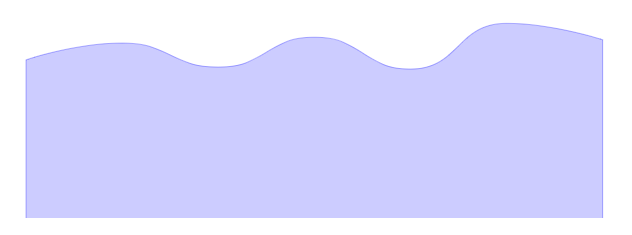
<path d="M 96.1271 806.2501

        C 96.1271 806.2501 241.441 755.7685 384.5859 755.7685

        C 529.8998 755.7685 529.9529 827.65 673.0447 827.65

        C 818.4117 827.65 817.7127 738.2097 961.5035 738.2097

        C 1106.1715 738.2097 1109.3353 833.6858 1249.9624 833.6858

        C 1397.7941 833.6858 1387.886 696.5074 1538.4211 696.5074

        C 1676.3448 696.5074 1826.88 745.8917 1826.88 745.8917

        L 1826.88 1283.07

        L 96.1271 1283.07Z" stroke="blue" stroke-width="3" stroke-opacity="0.3" fill="blue" fill-opacity="0.2"/>
path c 的用法
C x1 y1, x2 y2, x y

c dx1 dy1, dx2 dy2, dx dy

(x,y)表示的是曲线的终点,(x1,y1)是起点的控制点,(x2,y2)是终点的控制点。
曲线数据分析

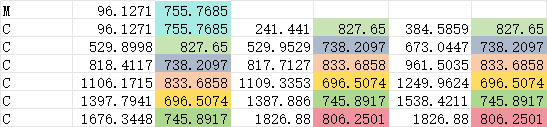
控制点的y值的大小决定了波峰是由高到低还是由低到高
第一条曲线起点低(806.2501),结点高(755.7685),就是一条向上的曲线(svg使用的是坐标系的第四象限,y值越大,越往下)

对应这一部分

第二条曲线起点高(755.7685),结点低(827.65),就是一条向下的曲线

对应这一部分

把所有的y值对应前移一个位置,可以得到波峰相反的曲线
见下图绿色曲线
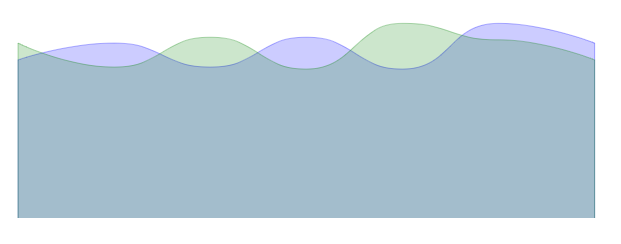
<g xmlns="http://www.w3.org/2000/svg" transform="translate(0 -350)">

    <path d="M 96.1271 806.2501       C 96.1271 806.2501 241.441 755.7685 384.5859 755.7685   C 529.8998 755.7685 529.9529 827.65 673.0447 827.65   C 818.4117 827.65 817.7127 738.2097 961.5035 738.2097   C 1106.1715 738.2097 1109.3353 833.6858 1249.9624 833.6858   C 1397.7941 833.6858 1387.886 696.5074 1538.4211 696.5074   C 1676.3448 696.5074 1826.88 755.7685 1826.88 755.7685   L 1826.88 1283.07   L 96.1271 1283.07Z" stroke="blue" stroke-width="3" stroke-opacity="0.3" fill="blue" fill-opacity="0.2">

    </path>

    <path d="M 96.1271 755.7685       C 96.1271 755.7685 241.441 827.65 384.5859 827.65   C 529.8998 827.65 529.9529 738.2097 673.0447 738.2097   C 818.4117 738.2097 817.7127 833.6858 961.5035 833.6858   C 1106.1715 833.6858 1109.3353 696.5074 1249.9624 696.5074   C 1397.7941 696.5074 1387.886 745.8917 1538.4211 745.8917   C 1676.3448 745.8917 1826.88 806.2501 1826.88 806.2501   L 1826.88 1283.07   L 96.1271 1283.07Z" stroke="green" stroke-width="3" stroke-opacity="0.3" fill="green" fill-opacity="0.2">

    </path>

</g>
制作无线循环动画
为了让两个波形可以首尾相连,把第一个曲线的最后一个y值,改为第二个曲线的第一个y值

移动第二条曲线到第一条曲线的结尾处

<g xmlns="http://www.w3.org/2000/svg" transform="translate(0 -350)">

    <path d="M 96.1271 806.2501       C 96.1271 806.2501 241.441 755.7685 384.5859 755.7685   C 529.8998 755.7685 529.9529 827.65 673.0447 827.65   C 818.4117 827.65 817.7127 738.2097 961.5035 738.2097   C 1106.1715 738.2097 1109.3353 833.6858 1249.9624 833.6858   C 1397.7941 833.6858 1387.886 696.5074 1538.4211 696.5074   C 1676.3448 696.5074 1826.88 755.7685 1826.88 755.7685   L 1826.88 1283.07   L 96.1271 1283.07Z" stroke="blue" stroke-width="3" stroke-opacity="0.3" fill="blue" fill-opacity="0.2">

    </path>

    <path d="M 96.1271 755.7685       C 96.1271 755.7685 241.441 827.65 384.5859 827.65   C 529.8998 827.65 529.9529 738.2097 673.0447 738.2097   C 818.4117 738.2097 817.7127 833.6858 961.5035 833.6858   C 1106.1715 833.6858 1109.3353 696.5074 1249.9624 696.5074   C 1397.7941 696.5074 1387.886 745.8917 1538.4211 745.8917   C 1676.3448 745.8917 1826.88 806.2501 1826.88 806.2501   L 1826.88 1283.07   L 96.1271 1283.07Z" stroke="green" stroke-width="3" stroke-opacity="0.3" fill="green" fill-opacity="0.2" transform="translate(1730.75 0)">

    </path>

</g>
利用三条曲线加上动画,可以制作无线循环的动画
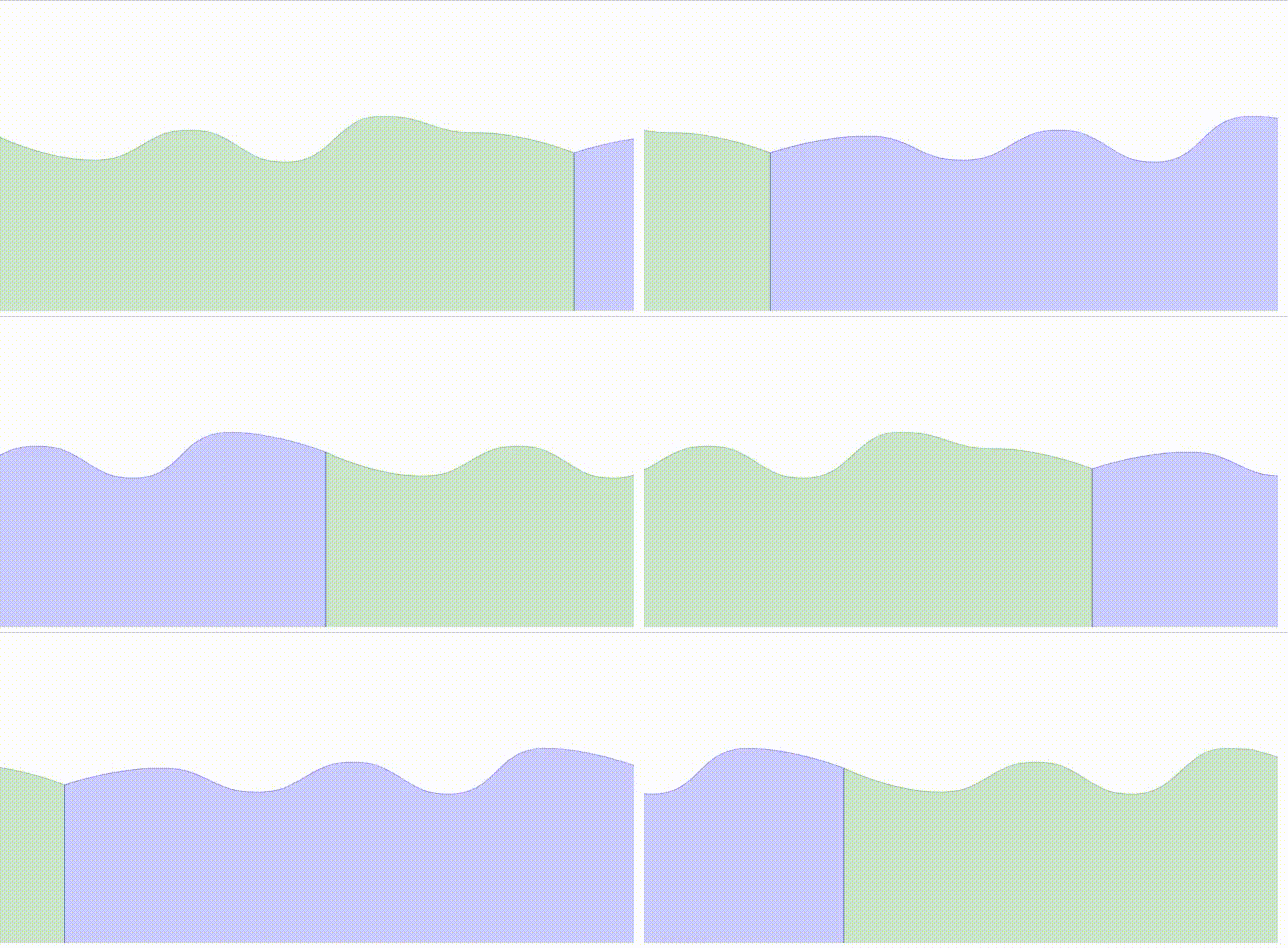
<svg xmlns="http://www.w3.org/2000/svg" xmlns:xlink="http://www.w3.org/1999/xlink" version="1.1" baseProfile="full" width="1903" height="931" style="position:absolute;left:0;top:0;user-select:none">

<g transform="translate(0 -350)">

    <path d="M 96.1271 806.2501       C 96.1271 806.2501 241.441 755.7685 384.5859 755.7685   C 529.8998 755.7685 529.9529 827.65 673.0447 827.65   C 818.4117 827.65 817.7127 738.2097 961.5035 738.2097   C 1106.1715 738.2097 1109.3353 833.6858 1249.9624 833.6858   C 1397.7941 833.6858 1387.886 696.5074 1538.4211 696.5074   C 1676.3448 696.5074 1826.88 755.7685 1826.88 755.7685   L 1826.88 1283.07   L 96.1271 1283.07Z" stroke="blue" stroke-width="3" stroke-opacity="0.3" fill="blue" fill-opacity="0.2">

        <animateTransform attributeName="transform" begin="0s" dur="3s" type="translate" values="0 0; 1730.75 0; 3461.5 0" repeatCount="indefinite"/>

    </path>

    <path d="M 96.1271 755.7685       C 96.1271 755.7685 241.441 827.65 384.5859 827.65   C 529.8998 827.65 529.9529 738.2097 673.0447 738.2097   C 818.4117 738.2097 817.7127 833.6858 961.5035 833.6858   C 1106.1715 833.6858 1109.3353 696.5074 1249.9624 696.5074   C 1397.7941 696.5074 1387.886 745.8917 1538.4211 745.8917   C 1676.3448 745.8917 1826.88 806.2501 1826.88 806.2501   L 1826.88 1283.07   L 96.1271 1283.07Z" stroke="green" stroke-width="3" stroke-opacity="0.3" fill="green" fill-opacity="0.2">

        <animateTransform attributeName="transform" begin="0s" dur="3s" type="translate" values="-1730.75 0; 0 0; 1730.75 0" repeatCount="indefinite"/>

    </path>

    <path d="M 96.1271 806.2501       C 96.1271 806.2501 241.441 755.7685 384.5859 755.7685   C 529.8998 755.7685 529.9529 827.65 673.0447 827.65   C 818.4117 827.65 817.7127 738.2097 961.5035 738.2097   C 1106.1715 738.2097 1109.3353 833.6858 1249.9624 833.6858   C 1397.7941 833.6858 1387.886 696.5074 1538.4211 696.5074   C 1676.3448 696.5074 1826.88 755.7685 1826.88 755.7685   L 1826.88 1283.07   L 96.1271 1283.07Z" stroke="blue" stroke-width="3" stroke-opacity="0.3" fill="blue" fill-opacity="0.2">

        <animateTransform attributeName="transform" begin="0s" dur="3s" type="translate" values="-3461.5 0; -1730.75 0; 0 0" repeatCount="indefinite"/>

    </path>

</g>

</svg>
波浪动画
用两条曲线的路径值,不断切换,可以制作波浪形变的动画

<svg xmlns="http://www.w3.org/2000/svg" xmlns:xlink="http://www.w3.org/1999/xlink" version="1.1" baseProfile="full" width="1903" height="931" style="position:absolute;left:0;top:0;user-select:none">

<g clip-path="url(#rectClip)">

    <g transform="translate(0 -350)" >

        <path fill="url(#zr0-g1)" fill-opacity="0.8">

            <animate attributeName="d" dur="3s" repeatCount="indefinite" values="M 96.1271 806.2501

                C 96.1271 806.2501 241.441 755.7685 384.5859 755.7685

                C 529.8998 755.7685 529.9529 827.65 673.0447 827.65

                C 818.4117 827.65 817.7127 738.2097 961.5035 738.2097

                C 1106.1715 738.2097 1109.3353 833.6858 1249.9624 833.6858

                C 1397.7941 833.6858 1387.886 696.5074 1538.4211 696.5074

                C 1676.3448 696.5074 1826.88 745.8917 1826.88 745.8917

                L 1826.88 1283.07

                L 96.1271 1283.07Z;

                M    96.1271    755.7685

                C    96.1271    755.7685    241.441    827.65    384.5859    827.65

                C    529.8998    827.65    529.9529    755.7685    673.0447    755.7685

                C    818.4117    755.7685    817.7127    827.65    961.5035    827.65

                C    1106.1715    827.65    1109.3353    738.2097    1249.9624    738.2097

                C    1397.7941    738.2097    1387.886    833.6858    1538.4211    833.6858

                C    1676.3448    833.6858    1826.88    696.5074    1826.88    696.5074

                L 1826.88 1283.07

                L 96.1271 1283.07Z;

                M 96.1271 806.2501

                C 96.1271 806.2501 241.441 755.7685 384.5859 755.7685

                C 529.8998 755.7685 529.9529 827.65 673.0447 827.65

                C 818.4117 827.65 817.7127 738.2097 961.5035 738.2097

                C 1106.1715 738.2097 1109.3353 833.6858 1249.9624 833.6858

                C 1397.7941 833.6858 1387.886 696.5074 1538.4211 696.5074

                C 1676.3448 696.5074 1826.88 745.8917 1826.88 745.8917

                L 1826.88 1283.07

                L 96.1271 1283.07Z"></animate>

                <animateTransform attributeName="transform" begin="0s" dur="3s" type="translate"

                    values="-100 0; 100 0; -100 0" repeatCount="indefinite" />

        </path>

    </g>

</g>

<circle cx="700" cy="500" r="400" stroke-width="5" stroke="green" fill="transparent" stroke-opacity="0.5" stroke-dasharray="5"/>

<defs>

    <clipPath id="rectClip">

        <circle cx="700" cy="500" r="400" stroke-width="10" stroke="red" fill="transparent"></circle>

    </clipPath>

    <linearGradient gradientUnits="objectBoundingBox" x1="0" y1="0" x2="0" y2="1" id="zr0-g1">

        <stop offset="0%" stop-color="rgb(0,221,255)"></stop>

        <stop offset="100%" stop-color="rgb(77,119,255)"></stop>

    </linearGradient>

</defs>

</svg>
svg动画 - 波浪动画的更多相关文章
- SVG波浪动画
今天来试试用svg+css3制作波浪动画 下图是我制作出的效果 还不错吧 在制作波浪前,首先我们要画波浪啊,至于画波浪,如果你想直接通过计算贝塞尔曲线绘制出波浪... 好吧,那我也不拦着你 我就直接用 ...
- 纯CSS实现帅气的SVG路径描边动画效果(转载)
本文转载自: 纯CSS实现帅气的SVG路径描边动画效果
- Android 自定义波浪动画 --"让进度浪起来~"
原文链接:http://www.jianshu.com/p/0e25a10cb9f5 一款效果不错的动画,实现也挺简单的,推荐阅读学习~ -- 由 傻小孩b 分享 waveview <Andro ...
- SVG的路径动画效果
使用SVG animateMotion实现的一个动画路径效果,相关代码如下. 在线调试唯一地址:http://www.gbtags.com/gb/debug/c88f4099-5056-4ad7-af ...
- 超级强大的SVG SMIL animation动画详解
本文花费精力惊人,具有先驱前瞻性,转载规则以及申明见文末,当心予以追究.本文地址:http://www.zhangxinxu.com/wordpress/?p=4333 //zxx: 本文的SVG在有 ...
- iOS CAShapeLayer、CADisplayLink 实现波浪动画效果
iOS CAShapeLayer.CADisplayLink 实现波浪动画效果 效果图 代码已上传 GitHub:https://github.com/Silence-GitHub/CoreAnima ...
- [转]超级强大的SVG SMIL animation动画详解
超级强大的SVG SMIL animation动画详解 本文花费精力惊人,具有先驱前瞻性,转载规则以及申明见文末,当心予以追究.本文地址:http://www.zhangxinxu.com/wordp ...
- svg路径蒙版动画
svg路径蒙版动画,是比较实用的一种动画效果,能够绘制如下图所示的动画. 接下来细说这样的动画是如何做成的: 1.准备工作 2.SVG路径动画 3.SVG路径蒙版动画 4.复杂图形的编辑技巧 1.准备 ...
- css3 svg路径蒙版动画
css3 svg路径蒙版动画 具体看https://www.cnblogs.com/oubenruing/p/9568954.html 还有个更好控制的写法<pre><!DOCTYP ...
- svg描边路径动画
svg描边路径动画<pre><!DOCTYPE html><html> <head> <meta charset="UTF-8" ...
随机推荐
- 2021-11-11:打乱数组。给你一个整数数组 nums ,设计算法来打乱一个没有重复元素的数组。实现 Solution class:Solutio(int[] nums) 使用整数数组 nums
2021-11-11:打乱数组.给你一个整数数组 nums ,设计算法来打乱一个没有重复元素的数组.实现 Solution class:Solutio(int[] nums) 使用整数数组 nums ...
- Vue 全局避免按钮重复点击
这里用到的 Vue.directive 自定义指令 自定义指令是对普通DOM元素进行的底层操作,它是一种有效的的补充和扩展,不仅可以用于定义任何的dom操作,并且是可以复用的 在 main.js 中写 ...
- 【GiraKoo】Git工具使用指南
Git工具使用指南 Git是一个分布式版本控制工具,可以用于管理代码.本文介绍了如何使用git工具. 1. SVN和Git的区别 1.1 SVN SVN是集中式版本控制工具,所有的代码都存储在一个中央 ...
- C# EFCore 根据Oracle/SqlServer数据库表生成实体类和DbContext
官方文档: https://docs.microsoft.com/zh-cn/ef/core/managing-schemas/scaffolding?tabs=dotnet-core-cli 本文以 ...
- Java并发(九)----线程join、interrupt
1.join 方法详解 1.1 为什么需要 join? 下面的代码执行,打印 r 是什么? static int r = 0; public static void main(String[] arg ...
- 发现了阿里云 APP 的一个小 BUG
由于微信不允许外部链接,你需要点击文章尾部左下角的 "阅读原文",才能访问文中链接. 前几天在华为手机上使用阿里云 APP,从 oss bucket 中下载了一张图片,想要通过微信 ...
- 用声明式宏解析 Rust 语法
在上一篇 Rust 声明式宏中的 Metavariables 有哪些 的基础上, 今天尝试解析一下 Rust 中的几种 item.我们知道一个 crate 是由 item 组成的,每一个 fn str ...
- 前端学习C语言 - 函数和关键字
函数和关键字 本篇主要介绍:自定义函数.宏函数.字符串处理函数和关键字. 自定义函数 基本用法 实现一个 add() 函数.请看示例: #include <stdio.h> // 自定义函 ...
- 开发中MongoDB遇到的各种问题
目录 一.安装6版本以下 二.安装6版本及以上 三.安装6版本以下(解压版) 四.配置本地 Windows MongoGB 服务 五.navicat 连接远程mongodb数据库 六.ip不一致问题 ...
- 特性介绍 | MySQL测试框架 MTR 系列教程(四):语法篇
作者:卢文双 资深数据库内核研发 序言: 以前对 MySQL 测试框架 MTR 的使用,主要集中于 SQL 正确性验证.近期由于工作需要,深入了解了 MTR 的方方面面,发现 MTR 的能力不仅限于此 ...