
Python之初级RPG小游戏
在国外网站上找到一个练习Python的小游戏感觉不错,自己实现了一下。
通过该练习你能学到:
- 元组
- 字典
- 简单定义函数和封装
- 条件控制语句
游戏说明
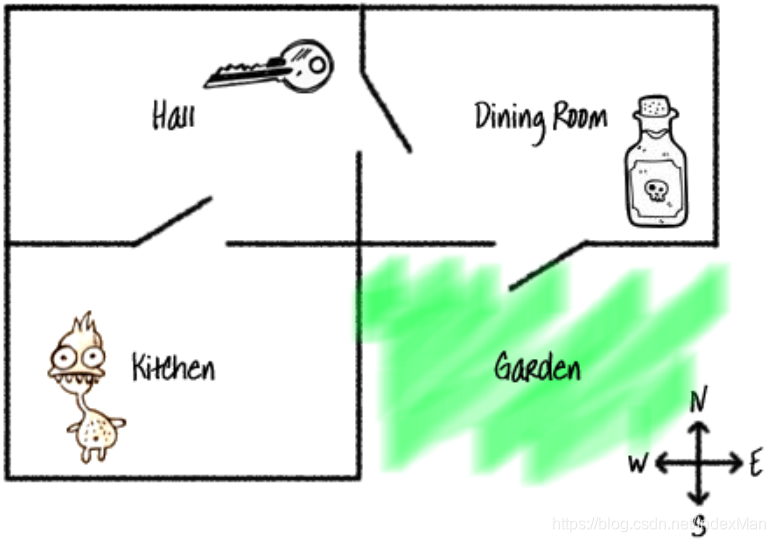
以下是3个房间和1个花园:
Hall 客厅 有一把钥匙,Kitchen 厨房 有一只怪物,Dinning Room 餐厅 有一瓶药水,Garden 花园
完成游戏条件:拿到钥匙和药水到达花园并躲避怪物。
游戏操作指令:
go [direction]
get [item]
[direction] 包含:east, west, south, north
[item] 包含:key, potion
游戏源码
#! python3

"""

author: laoxu

"""

# 游戏说明

def showInstructions():

    print('''

    RPG Game

    ========

    完成游戏条件:拿到钥匙和药水到达花园并躲避怪物。

    命令:

      go [direction]

      get [item]

    '''

          )

# 打印当前房间和背包信息

def showCurrentRoom(room, bag):

    print('You are in the %s' % room)

    print('Inventory: ', bag)

rooms = {

    'Hall': {

        'south': 'Kitchen',

        'east': 'Dinning Room',

        'item': 'key'

    },

    'Kitchen': {

        'north': 'Hall',

        'item': 'monster'

    },

    'Dinning Room': {

        'west': 'Hall',

        'south': 'Garden',

        'item': 'potion'

    },

    'Garden': {

        'north': 'Dinning Room'

    }

}

# 初始化房间

currentRoom = 'Hall'

# 初始化物品栏

inventory = []

# 打印游戏帮助

showInstructions()

print('You are in the %s' % currentRoom)

print('Inventory: ', inventory)

print('You see a key')

while True:

    # 玩家进入厨房,游戏结束

    if 'item' in rooms[currentRoom] and 'monster' in rooms[currentRoom]['item']:

        print('你被怪物抓住了...游戏结束!')

        break

    # 玩家拿到钥匙和药水进入花园,游戏结束

    if currentRoom == 'Garden' and 'key' in inventory and 'potion' in inventory:

        print('你逃脱了房子!你赢了!')

        break

    # 接收操作步骤

    step = input()

    # 客厅->厨房

    if currentRoom == 'Hall' and step == 'go south':

        currentRoom = 'Kitchen'

        continue

    # 客厅->餐厅

    elif currentRoom == 'Hall' and step == 'go east':

        currentRoom = 'Dinning Room'

    # 厨房->客厅

    elif currentRoom == 'Kitchen' and step == 'go north':

        currentRoom = 'Hall'

    # 餐厅->客厅

    elif currentRoom == 'Dinning Room' and step == 'go west':

        currentRoom = 'Hall'

    # 餐厅->花园

    elif currentRoom == 'Dinning Room' and step == 'go south':

        currentRoom = 'Garden'

    # 花园->餐厅

    elif currentRoom == 'Garden' and step == 'go north':

        currentRoom = 'Dinning Room'

    # 拿到钥匙

    elif currentRoom == 'Hall' and 'key' not in inventory and step == 'get key':

        inventory.append('key')

        print('key got!')

    # 拿到药水

    elif currentRoom == 'Dinning Room' and 'potion' not in inventory and step == 'get potion':

        inventory.append('potion')

        print('potion got!')

    # 打印房间和物品栏

    showCurrentRoom(currentRoom, inventory)

    if currentRoom == 'Hall' and 'key' not in inventory:

        print('You see a key')

    if currentRoom == 'Dinning Room' and 'potion' not in inventory:

        print('You see a potion')

    continue
运行效果

Python之初级RPG小游戏的更多相关文章
- 用Python设计一个经典小游戏
这是关于Python的第9篇文章,介绍如何用Python设计一个经典小游戏:猜大小. 在这个游戏中,将用到前面我介绍过的所有内容:变量的使用.参数传递.函数设计.条件控制和循环等,做个整体的总结和复习 ...
- Python开发接水果小游戏
我研发的Python游戏引擎Pylash已经更新到1.4了.如今我们就来使用它完毕一个极其简单的小游戏:接水果. 下面是游戏截图: 游戏操作说明:点击屏幕左右两边或者使用键盘方向键控制人物移动.使人物 ...
- python【控制台】小游戏--贪吃蛇
传统贪吃蛇相信大家都玩过,也是一款很老很经典的游戏,今天我们用python控制台实现 项目有很多bug没有解决,因为本人一时兴起写的一个小游戏,所以只是实现可玩部分功能,并没有花较多的时间和精力去维护 ...
- python成语接龙小游戏
上一篇讲了小游戏的坑现在把源码放出来 #coding:utf-8 import string import pypinyin import sys import random print(" ...
- 【Python】猜数小游戏(文件操作)
人生苦短,我用Python 关键词 1.多用户 2.字典记录所有成绩 3.每次游戏轮数&总游戏次数&平均每次游戏需要多少轮 字典Dictionary.列表List.元组Tuple差异化 ...
- python做一个数独小游戏
最近看了下python的一些知识,在这里记载一下. 1.首先是安装,在官网下载最新的版本3.6,安装的时候要注意在下面勾选上ADD TO PATH,安装的时候会自动写入到环境变量里面,如果没有勾选,可 ...
- 【Python】猜数小游戏
有点沙雕 temp=input("猜猜我心里想的是哪个数字?") guess=int (temp) if guess==8: print("你是我肚里的蛔虫么?" ...
- Python制作塔防小游戏
开发工具 Python版本:3.6.4 相关模块: pygame模块: 以及一些Python自带的模块.
- python——成语接龙小游戏
小试牛刀的简易成语接龙. 思路—— 1.网上下载成语字典的txt版本 2.通过python进行处理得到格式化的成语,并整理成字典(python字典查找速度快) 3.python程序,查找 用户输入的最 ...
- python学习-6 猜拳小游戏
import random # 调用随机数模块 pc = random.randint(1,3) # 产生1-3的随机数 print("来玩个猜拳游戏吧!") a = '石头' b ...
随机推荐
- CoreDNS -- DNS服务与服务发现
CoreDNS -- DNS服务与服务发现 DNS服务器 手册:https://coredns.io/manual/toc/ Github:https://github.com/coredns/cor ...
- [转帖]DevOps & CI/CD 常见面试题汇总
https://www.cnblogs.com/Dev0ps/p/15123168.html 什么是 DevOps答:用最简单的术语来说,DevOps 是产品开发过程中开发(Dev)和运营(Ops) ...
- [转帖]使用 TiUP 部署 TiDB 集群
https://docs.pingcap.com/zh/tidb/stable/production-deployment-using-tiup TiUP 是 TiDB 4.0 版本引入的集群运维工具 ...
- [转帖]使用 TiUP bench 组件压测 TiDB
https://docs.pingcap.com/zh/tidb/stable/tiup-bench 在测试数据库性能时,经常需要对数据库进行压测,为了满足这一需求,TiUP 集成了 bench 组件 ...
- [转帖]人脸特征计算速度优化-SIMD技术Neon介绍
人脸特征计算速度优化-SIMD技术Neon介绍 JasonZhu 游走于秃头和研究的边缘 关注 15 人赞同了该文章 目录 收起 1. baseline计算 2. simd和数据重排加速 数 ...
- Linux部分参数的学习
Linux部分参数的学习 简介 之前总结过很多Nginx或者是部署软件时的一些注意事项. 但是感觉对linux系统参数部分掌握的不是很好. 今天周末想着整理一下,作为备忘. limits.conf i ...
- Concat、Push、Spread syntax性能差异对比
今天在力扣上做了一道数组扁平化的题,按理来说,应该熟能生巧了,但是在使用concat时候超出了时间限制,使用push可以通过,代码如下: /** * @describe 使用concat,超出时间限制 ...
- Element-UI中Drawer抽屉去除标题自带黑色边框
当点击事件drawer==true时,抽匣回打开 这时抽匣的标题会出现一个难看的蓝色边框,一会就会消失,但是好丑,所以要去掉它 解决方法 /deep/ :focus { outline: 0; } v ...
- 【小测试】golang中数组边界检查的开销大约是1.87%~3.12%
作者:张富春(ahfuzhang),转载时请注明作者和引用链接,谢谢! cnblogs博客 zhihu Github 公众号:一本正经的瞎扯 对比C/C++, golang等类型安全的语言会在数组访问 ...
- tortoisegit 还原远程分支到某个版本
v2还原到v1 1.强制还原(git reset) 如果使用这种方式还原到v1,将丢失还原到v1到v2之间的所有提交及日志. 1.1显示日志 有save1.save2两条提交记录. 1.2 重置版本( ...