
CS231N Assignment3 笔记(更新中)
在这项作业中,将实现语言网络,并将其应用于 COCO 数据集上的图像标题。然后将训练生成对抗网络,生成与训练数据集相似的图像。最后,您将学习自我监督学习,自动学习无标签数据集的视觉表示。
本作业的目标如下:
1.理解并实现 RNN 和 Transformer 网络。将它们与 CNN 网络相结合,为图像添加标题。
2.了解如何训练和实现生成对抗网络(GAN),以生成与数据集中的样本相似的图像。
3.了解如何利用自我监督学习技术来帮助完成图像分类任务。
Q1: Network Visualization: Saliency Maps, Class Visualization, and Fooling Images
The notebook Network_Visualization.ipynb will introduce the pretrained SqueezeNet model, compute gradients with respect to images, and use them to produce saliency maps and fooling images.
我们将探索使用image gradients来生成新图像。
在训练模型时,我们定义了一个损失函数来衡量我们目前对模型表现的不满。然后我们使用反向传播来计算损耗相对于模型参数的梯度,并对模型参数进行梯度下降以使损耗最小化。
在这里,我们将做一些略有不同的事情。我们将从一个CNN模型开始,该模型已经过预训练,可以在ImageNet数据集上执行图像分类。我们将使用这个模型来定义一个损失函数,它量化了我们当前对自己图像的不满。然后,我们将使用反向传播来计算这种损失相对于图像像素的梯度。然后,我们将保持模型不变,并对图像执行梯度下降,以合成一幅最大限度减少损失的新图像。
我们将探索三种图像生成技术:
显著图Saliency Maps:可以使用显著图来判断图像的哪一部分影响了网络做出的分类决策。需要完成cs231n/net_visualization_pytorch.py当中的compute_saliency_maps函数
 1 def compute_saliency_maps(X, y, model):

 2     """

 3     Compute a class saliency map using the model for images X and labels y.

 4

 5     Input:

 6     - X: Input images; Tensor of shape (N, 3, H, W)

 7     - y: Labels for X; LongTensor of shape (N,)

 8     - model: A pretrained CNN that will be used to compute the saliency map.

 9

10     Returns:

11     - saliency: A Tensor of shape (N, H, W) giving the saliency maps for the input

12     images.

13     """

14     # Make sure the model is in "test" mode

15     # "test" mode下,模型通常会关闭一些训练中使用的特定层(如 dropout 或 batch normalization)

16     model.eval()

17

18     # Make input tensor require gradient

19     # 告诉 PyTorch 在计算模型的前向传播时跟踪输入图像 X 的梯度。

20     X.requires_grad_()

21

22     saliency = None

23     ##############################################################################

24     # TODO: Implement this function. Perform a forward and backward pass through #

25     # the model to compute the gradient of the correct class score with respect  #

26     # to each input image. You first want to compute the loss over the correct   #

27     # scores (we'll combine losses across a batch by summing), and then compute  #

28     # the gradients with a backward pass.                                        #

29     ##############################################################################

30     # *****START OF YOUR CODE (DO NOT DELETE/MODIFY THIS LINE)*****

31

32     # 执行Forward pass

33     scores = model(X)

34     # y.view(-1, 1) 将标签 y 变形为列向量

35     # 使用 gather(1,) 从 scores 中选择正确类别的分数

36     correct_scores = scores.gather(1, y.view(-1, 1))

37     # Compute loss

38     # 使用负的正确类别分数的和作为损失,因为我们想要最大化这个分数。

39     loss = -correct_scores.sum()

40

41     # 执行Backward pass

42     loss.backward()

43     # Compute the saliency map

44     # 梯度.绝对值.三通道当中的最大值,dim=1即对应(N, 3, H, W)的3

45     # 注意若没有[0],则第一个张量是最大值的张量,第二个张量是对应最大值的索引。

46     saliency = X.grad.abs().max(dim=1)[0]

47

48     # Clear gradients for next iteration

49     # 清零输入图像的梯度,以确保下一次迭代时梯度不会累积。

50     X.grad.data.zero_()

51

52     # *****END OF YOUR CODE (DO NOT DELETE/MODIFY THIS LINE)*****

53     ##############################################################################

54     #                             END OF YOUR CODE                               #

55     ##############################################################################

56     return saliency
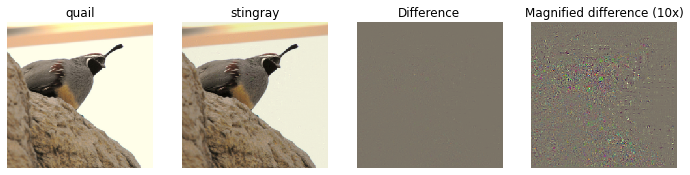
Fooling Images:可以干扰输入图像,使其在人类看来是相同的,但会被预先训练的网络错误分类。需要完成cs231n/net_visualization_pytorch.py当中的make_fooling_image函数
 1 def make_fooling_image(X, target_y, model):

 2     """

 3     Generate a fooling image that is close to X, but that the model classifies

 4     as target_y.

 5

 6     Inputs:

 7     - X: Input image; Tensor of shape (1, 3, 224, 224)

 8     - target_y: An integer in the range [0, 1000)

 9     - model: A pretrained CNN

10

11     Returns:

12     - X_fooling: An image that is close to X, but that is classifed as target_y

13     by the model.

14     """

15     # Initialize our fooling image to the input image, and make it require gradient

16     X_fooling = X.clone()

17     X_fooling = X_fooling.requires_grad_()

18

19     learning_rate = 1

20     ##############################################################################

21     # TODO: Generate a fooling image X_fooling that the model will classify as   #

22     # the class target_y. You should perform gradient ascent on the score of the #

23     # target class, stopping when the model is fooled.                           #

24     # When computing an update step, first normalize the gradient:               #

25     #   dX = learning_rate * g / ||g||_2                                         #

26     #                                                                            #

27     # You should write a training loop.                                          #

28     #                                                                            #

29     # HINT: For most examples, you should be able to generate a fooling image    #

30     # in fewer than 100 iterations of gradient ascent.                           #

31     # You can print your progress over iterations to check your algorithm.       #

32     ##############################################################################

33     # *****START OF YOUR CODE (DO NOT DELETE/MODIFY THIS LINE)*****

34

35     # Set the model to evaluation mode

36     model.eval()

37

38     # Define a criterion (loss function) to maximize the target class score

39     # criterion = torch.nn.CrossEntropyLoss()

40

41     #初始分类

42     scores = model(X_fooling)

43

44     _, y_predit = scores.max(dim = 1)

45

46     iter = 0

47

48     while(y_predit != target_y):

49         iter += 1

50

51         target_score = scores[0, target_y]

52         target_score.backward()

53         grad = X_fooling.grad / X_fooling.grad.norm()

54         X_fooling.data += learning_rate * grad

55

56         X_fooling.grad.zero_()

57

58         model.zero_rgrad()

59

60         scores = model(X_fooling)

61         _,y_predit=scores.max(dim = 1)

62

63     print("Iteration Count: %d"% iter)

64

65

66     # *****END OF YOUR CODE (DO NOT DELETE/MODIFY THIS LINE)*****

67     ##############################################################################

68     #                             END OF YOUR CODE                               #

69     ##############################################################################

70     return X_fooling
例如idx = 1,target_y = 6,输出为
类别可视化Class Visualization:可以合成图像以最大化特定类别的分类分数;这可以让我们对网络在对该类别的图像进行分类时寻找什么有所了解。
 1 def class_visualization_update_step(img, model, target_y, l2_reg, learning_rate):

 2     ########################################################################

 3     # TODO: Use the model to compute the gradient of the score for the     #

 4     # class target_y with respect to the pixels of the image, and make a   #

 5     # gradient step on the image using the learning rate. Don't forget the #

 6     # L2 regularization term!                                              #

 7     # Be very careful about the signs of elements in your code.            #

 8     ########################################################################

 9     # *****START OF YOUR CODE (DO NOT DELETE/MODIFY THIS LINE)*****

10

11     score = model(img)

12     target_score = score[0,target_y]

13     target_score.backward()

14

15     im_grad = img.grad - l2_reg * img

16     grad = im_grad / im_grad.norm()

17     img.data += learning_rate * grad

18     img.grad.zero_()

19     model.zero_grad()

20

21     # *****END OF YOUR CODE (DO NOT DELETE/MODIFY THIS LINE)*****

22     ########################################################################

23     #                             END OF YOUR CODE                         #

24     ########################################################################

25

26 def create_class_visualization(target_y, model, dtype, **kwargs):

27     """

28     Generate an image to maximize the score of target_y under a pretrained model.

29

30     Inputs:

31     - target_y: Integer in the range [0, 1000) giving the index of the class

32     - model: A pretrained CNN that will be used to generate the image

33     - dtype: Torch datatype to use for computations

34

35     Keyword arguments:

36     - l2_reg: Strength of L2 regularization on the image

37     - learning_rate: How big of a step to take

38     - num_iterations: How many iterations to use

39     - blur_every: How often to blur the image as an implicit regularizer

40     - max_jitter: How much to gjitter the image as an implicit regularizer

41     - show_every: How often to show the intermediate result

42     """

43     model.type(dtype)

44

45     l2_reg = kwargs.pop('l2_reg', 1e-3)

46     learning_rate = kwargs.pop('learning_rate', 25)

47     num_iterations = kwargs.pop('num_iterations', 100)

48     blur_every = kwargs.pop('blur_every', 10)

49     max_jitter = kwargs.pop('max_jitter', 16)

50     show_every = kwargs.pop('show_every', 25)

51

52     # 随机初始化生成图像,其数据类型为 dtype,并标记为需要梯度计算

53     img = torch.randn(1, 3, 224, 224).mul_(1.0).type(dtype).requires_grad_()

54

55     for t in range(num_iterations):

56         # 在每次迭代中,随机对图像进行轻微的抖动,这是为了得到稍微更好的结果。

57         ox, oy = random.randint(0, max_jitter), random.randint(0, max_jitter)

58         img.data.copy_(jitter(img.data, ox, oy))

59         class_visualization_update_step(img, model, target_y, l2_reg, learning_rate)

60         # 恢复图像,撤销之前的抖动。

61         img.data.copy_(jitter(img.data, -ox, -oy))

62

63         # As regularizer, clamp and periodically blur the image

64         for c in range(3):

65             lo = float(-SQUEEZENET_MEAN[c] / SQUEEZENET_STD[c])

66             hi = float((1.0 - SQUEEZENET_MEAN[c]) / SQUEEZENET_STD[c])

67             img.data[:, c].clamp_(min=lo, max=hi)

68         # 每隔一定的迭代次数对图像进行模糊处理

69         if t % blur_every == 0:

70             blur_image(img.data, sigma=0.5)

71

72         # Periodically show the image

73         if t == 0 or (t + 1) % show_every == 0 or t == num_iterations - 1:

74             plt.imshow(deprocess(img.data.clone().cpu()))

75             class_name = class_names[target_y]

76             plt.title('%s\nIteration %d / %d' % (class_name, t + 1, num_iterations))

77             plt.gcf().set_size_inches(4, 4)

78             plt.axis('off')

79             plt.show()

80

81     return deprocess(img.data.cpu())
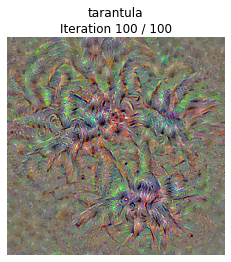
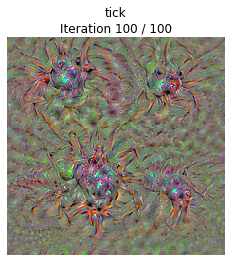
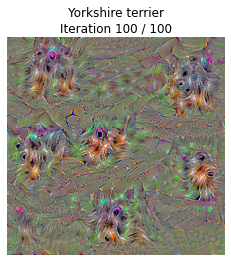

net_visualizaiton_pytorch.py还附上了抖动之类的函数
 1 def jitter(X, ox, oy):

 2     """

 3     Helper function to randomly jitter an image.

 4

 5     Inputs

 6     - X: PyTorch Tensor of shape (N, C, H, W)

 7     - ox, oy: Integers giving number of pixels to jitter along W and H axes

 8

 9     Returns: A new PyTorch Tensor of shape (N, C, H, W)

10     """

11     # 如果 ox 不等于零,表示需要在图像的水平方向进行抖动,

12     # 将图像沿着水平方向切分成两部分,然后将右侧的部分移动到左侧。

13     if ox != 0:

14         left = X[:, :, :, :-ox]

15         right = X[:, :, :, -ox:]

16         X = torch.cat([right, left], dim=3)

17     # 如果 oy 不等于零,表示需要在图像的垂直方向进行抖动,

18     # 将图像沿着垂直方向切分成两部分,然后将上侧的部分移动到下侧。

19     if oy != 0:

20         top = X[:, :, :-oy]

21         bottom = X[:, :, -oy:]

22         X = torch.cat([bottom, top], dim=2)

23     return X
高斯模糊
1 def blur_image(X, sigma=1):

2     X_np = X.cpu().clone().numpy() # 转换成numpy数组

3     X_np = gaussian_filter1d(X_np, sigma, axis=2) # 水平方向

4     X_np = gaussian_filter1d(X_np, sigma, axis=3) # 垂直方向

5     X.copy_(torch.Tensor(X_np).type_as(X)) # 转换为pytorch张量

6     return X
Q2: Image Captioning with Vanilla RNNs
The notebook RNN_Captioning.ipynb will walk you through the implementation of vanilla recurrent neural networks and apply them to image captioning on COCO.
Network_Visualization.ipynb 笔记本将引入预训练的 SqueezeNet 模型,计算与图像相关的梯度,并利用这些梯度生成显著性地图和傻瓜图像。
Q3: Image Captioning with Transformers
The notebook Transformer_Captioning.ipynb will walk you through the implementation of a Transformer model and apply it to image captioning on COCO.
Q4: Generative Adversarial Networks
In the notebook Generative_Adversarial_Networks.ipynb you will learn how to generate images that match a training dataset and use these models to improve classifier performance when training on a large amount of unlabeled data and a small amount of labeled data. When first opening the notebook, go to Runtime > Change runtime type and set Hardware accelerator to GPU.
Q5: Self-Supervised Learning for Image Classification
In the notebook Self_Supervised_Learning.ipynb, you will learn how to leverage self-supervised pretraining to obtain better performance on image classification tasks. When first opening the notebook, go to Runtime > Change runtime type and set Hardware accelerator to GPU.
Extra Credit: Image Captioning with LSTMs
The notebook LSTM_Captioning.ipynb will walk you through the implementation of Long-Short Term Memory (LSTM) RNNs and apply them to image captioning on COCO.
参考:https://github.com/hanlulu1998/CS231n/tree/master/assignment3
CS231N Assignment3 笔记(更新中)的更多相关文章
- SQL手工注入入门级笔记(更新中)
一.字符型注入 针对如下php代码进行注入: $sql="select user_name from users where name='$_GET['name']'"; 正常访问 ...
- Java编程思想—读书笔记(更新中)
第1章 对象导论 1.4 被隐藏的具体实现 访问控制的原因: 让客户端程序员无法触及他们不应该触及的部分(不是用户解决特定问题所需的接口的一部分) 允许库设计者可以改变类内容的工作方式而不用担心会影响 ...
- Python3学习笔记-更新中
1.Python概况 2.Anaconda安装及使用 3.Pycharm安装及使用 4.Hello World!!! 5.数据类型及类型转换 6.分支结构 7.循环语句 8.异常
- 微信小程序练习笔记(更新中。。。)
微信小程序练习笔记 微信小程序的练习笔记,用来整理思路的,文档持续更新中... 案例一:实现行的删除和增加操作 test.js // 当我们在特定方法中创建对象或者定义变量给与初始值的时候,它是局部 ...
- 笔记:认识 head 标签 待 更新中……
文档的头部描述了文档的各种属性和信息,包括文档的标题等.绝大多数文档头部包含的数据都不会真正作为内容显示给读者. 下面这些标签可用在 head 部分: <head> <title&g ...
- CS231n课程笔记翻译9:卷积神经网络笔记
译者注:本文翻译自斯坦福CS231n课程笔记ConvNet notes,由课程教师Andrej Karpathy授权进行翻译.本篇教程由杜客和猴子翻译完成,堃堃和李艺颖进行校对修改. 原文如下 内容列 ...
- CS231n课程笔记翻译8:神经网络笔记 part3
译者注:本文智能单元首发,译自斯坦福CS231n课程笔记Neural Nets notes 3,课程教师Andrej Karpathy授权翻译.本篇教程由杜客翻译完成,堃堃和巩子嘉进行校对修改.译文含 ...
- CS231n课程笔记翻译7:神经网络笔记 part2
译者注:本文智能单元首发,译自斯坦福CS231n课程笔记Neural Nets notes 2,课程教师Andrej Karpathy授权翻译.本篇教程由杜客翻译完成,堃堃进行校对修改.译文含公式和代 ...
- CS231n课程笔记翻译6:神经网络笔记 part1
译者注:本文智能单元首发,译自斯坦福CS231n课程笔记Neural Nets notes 1,课程教师Andrej Karpathy授权翻译.本篇教程由杜客翻译完成,巩子嘉和堃堃进行校对修改.译文含 ...
- CS231n课程笔记翻译5:反向传播笔记
译者注:本文智能单元首发,译自斯坦福CS231n课程笔记Backprop Note,课程教师Andrej Karpathy授权翻译.本篇教程由杜客翻译完成,堃堃和巩子嘉进行校对修改.译文含公式和代码, ...
随机推荐
- 云小课|DSC帮您管数据,保障您的云上数据安全
摘要:华为数据安全中心,积累华为云多年数据经验,整合云上各类数据源,搭载数据安全黑科技,通过深度行为识别引擎,助您轻松管理云上数据. 本文分享自华为云社区<云小课 | DSC帮您管数据,保障您的 ...
- 华为云AOM 2.0版本发布
摘要:AOM作为华为云面向租户的统一运维门户,将在7月1日重磅发布2.0版本. 本文分享自华为云社区<华为云AOM发布2.0版本,3大特性亮相>,作者:华为云PaaS小助手. 6月16日华 ...
- 列举GaussDB(DWS)常见的查询时索引失效场景
摘要:使用GaussDB(DWS)时,有时为了加快查询速度,需要对表建立索引.有时我们会遇到明明建立了索引,查询计划中却发现索引没有被使用的情况.本文将列举几种常见的场景和优化方法. 本文分享自华为云 ...
- 实用教程|手把手带你离线部署Walrus
Walrus 0.4 已于近日发布,新版本中采用的应用模型可以让运维团队仅需配置1次,即可在多模态的基础设施及环境中运行包括应用服务及周边依赖资源在内的全套应用系统.这极大减少了运维人员的工作量,同时 ...
- 字节跳动基于 Apache Hudi 的多流拼接实践方案
字节跳动数据湖团队在实时数仓构建宽表的业务场景中,探索实践出的一种基于 Hudi Payload 的合并机制提出的全新解决方案. 字节跳动数据湖团队在实时数仓构建宽表的业务场景中,探索实践出的一种基于 ...
- 获取标准报表CJI3的ALV数据
1.CJI3 运行标准程序CJI3,获取对象和业务货币值,在其他程序中展示 2.代码展示 CJI3对应程序名rkpep003,最终展示的ALV结构可以再程序中找到. 因为本实例只获取其中两个字段的值, ...
- 网传的Spring大漏洞
昨天凌晨发了篇关于Spring大漏洞的推文,白天就有不少小伙伴问文章怎么删了. 主要是因为收到朋友提醒说可能发这个会违规(原因可参考:阿里云因发现Log4j2核弹级漏洞但未及时上报,被工信部处罚),所 ...
- Educational Codeforces Round 104 (Rated for Div. 2) A-E 个人题解
比赛链接 1487A. Arena n 个 Hero,分别有 \(a_i\) 的初始等级.每次两个 Hero 战斗时:等级相同无影响,否则等级高的英雄等级+1.直到某个英雄等级到了 \(100^{50 ...
- 清洁低碳环保新能源,3D 光伏与光热发电站可视化
前言 碳达峰.碳中和成为今年两会"热词",在国家政府工作报告中指出,扎实做好碳达峰.碳中和各项工作,制定 2030 年前碳排放达峰行动方案,优化产业结构和能源结构,实现低碳环保节能 ...
- excel常用函数整理(可检索)
目录: 一.数字函数 1.1 sum 1.2 sumif 1.3 sumifs 1.4 sumproduct 1.5 abs二.统计函数 2.1 count 2.2 counta 2.3 counti ...